
Here’s a quick and easy script to simply move a control on the panel, it takes the control name and new positions as the arguments.
Determining the name of a control is pretty simple, right click on the field -> Advanced -> Show Field Information
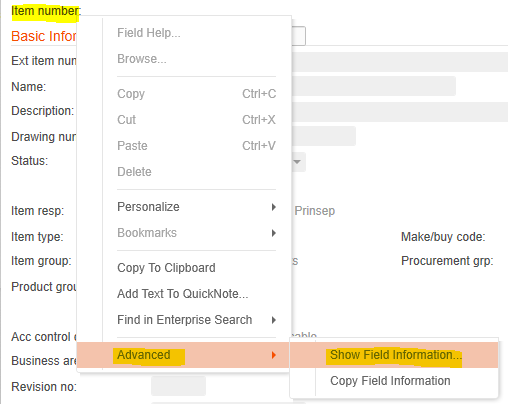
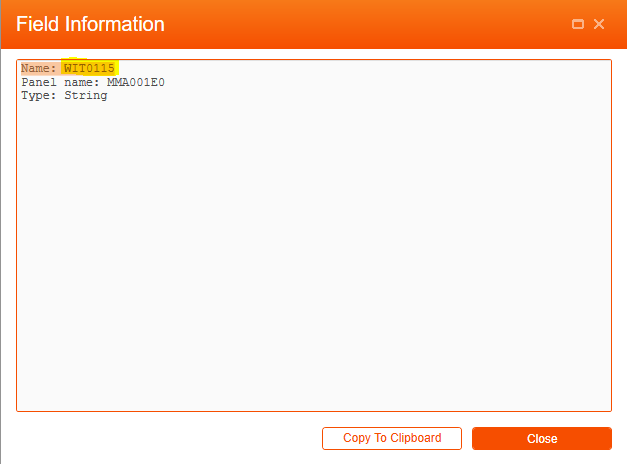
WIT0115 is the field name for the Item Label
And the script itself
/*
**	Name:	MoveControl.js
**
**	Description:
**	 Change the position of a control
**
**	Arguments:
**
**	<Control Name>,<column>,<row>
**
**	Eg.
**		WEITNO,15,2
**	 will move the control WEITNO to column 15, row 2
**
**	Written By:	scott.campbell@potatoit.kiwi
**
**
*/

import System;
import System.Windows;
import System.Windows.Controls;
import MForms;

package MForms.JScript
{
	class MoveControl
	{
		var gDebug = null;

		public function Init(element: Object, args: Object, controller : Object, debug : Object)
		{
			var content : Object = controller.RenderEngine.Content;
			gDebug = debug;
			try
			{
				if(null != args)
				{
					var argumentArray = args.split(",");

					if(null != argumentArray)
					{
						if(argumentArray.length > 2)
						{
							var control = ScriptUtil.FindChild(content, argumentArray[0]);
							if(null != control)
							{
								var column = int.Parse(argumentArray[1]);
								var row = int.Parse(argumentArray[2]);
								setPosition(control, column, row);
							}
						}
					}

				}
			}
			catch(ex)
			{
				debug.Error(ex);
			}
		}

		private function setPosition(aControl, aColumn, aRow)
		{
			if(null != aControl)
			{
				gDebug.Debug("Set Controls Position");
				gDebug.Debug(" +-- Control: " + aControl.Name);
				gDebug.Debug(" +---- Column: " + aColumn);
				gDebug.Debug(" +---- Row: " + aRow);
				Grid.SetColumn(aControl, aColumn);
				Grid.SetRow(aControl, aRow);
			}
		}
	}
}
 Potato IT
Thank you for this information and your help.
in addition how can we recover for a zone if it is editable or not (enabled or disable)?
Thank you
best regards
Hi Yvon,
sorry, but I don’t think I understand your question.
UI controls have an .IsEnabled property which determine if they are enabled/disabled. TextBoxes have been/are a little different – in older versions I would normally check the Style to see if it was StyleTextBoxDisabled
Cheers,
Scott