Mashups: Orders for a Customer – Sorting on the Order Number

As per usual, lots of excuses for not posting in a while.

I’ve recently managed to free up some time to start thinking about M3, JScripts and some of the new shinys that we purchased last year, namely Mashups, LES and DAF.

So what I have recently been tinkering with is Mashups and though a few things have been a little disappointing, others are very kewl.

Let me say, if you delving in to the world of Mashups, take some time to learn a little about WPF and XAML. You can download Microsoft Visual Studio 2010 or higher and create WPF projects and see how XAML works when dealing with controls and layouts.

Using XAML is fantastic – there is a lot of power you can tap in to and there is a vast amount of resources available on the web about doing innovative things with WPF and XAML and by extension Mashups.

I’ve been tinkering with two different ideas, getting data in to a Mashup from a WebService (more on that in another post) and creating a nice easy way for a user to select a customer, then an order and see the order lines of that order.

So, in order to ease the leg-work a little I used the List and Edit template from Lawson, this gave me a list of the customers which you could select and it will provide some key details for you to edit.

Using that as a basic, it was pretty easy to create a new MIListPanel calling the M3API OIS100MI::LstHead and link the CUNO together. Then it was pretty easy to create another MIListPanel and populate that by calling OIS100MI::LstLine and linking on the ORNO.

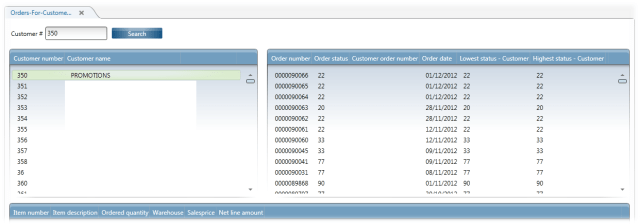
This yields something like this:

Which is pretty nifty – something useful created in a very short period of time.

However, having been a user there are a few things which would annoy me.

1). Order Date is eating more real-estate than it should for no good reason.
2). The Order Numbers aren’t in order.

Formatting the Order Date

So we don’t like seeing the time added on to the order date, it’s not really relevant and we’ll the time component isn’t populated anyway. So what I’d like to do is set it up so it removes the time component AND lines up the dates.

It’s been a while since I played around with XAML directly, but my googlefu was working. We need to set the StringFormat in our DisplayMemberBinding to something a little more friendly.

Checking our XAML the Mashup created we have the following entry:
<GridViewColumn Header=”Order date” DisplayMemberBinding=”{Binding [ORDT]}” />

A quick change to:
<GridViewColumn Header=”Order date” DisplayMemberBinding=”{Binding [ORDT], StringFormat=dd/MM/yyyy}” />

Now means that we get rid of the time component and the string format is going to always be 10 characters – so it will line up nicely in the column. Some of you may wonder why I didn’t just do
<GridViewColumn Header=”Order date” DisplayMemberBinding=”{Binding [ORDT], StringFormat=d }” />

That would be because on days < 10 the date string will only be 9 characters in length – which means the date won’t line up.

Changing the Sorting Order

Normally this would be pretty straight forward, we’d have a little XAML and a little bit of code in the background – however mortals like me don’t have the tools to add the code 😦

So this requires a little bit of thinking and some extensive googling I came across this post
http://www.galasoft.ch/mydotnet/articles/article-2007081301.aspx

Which talks about creating CollectionViewSource as a resource and illustrates just how powerful XAML is.

After a little bit of adaption I got it working.
 

And finally the XAML.

<Grid xmlns="http://schemas.microsoft.com/winfx/2006/xaml/presentation" xmlns:x="http://schemas.microsoft.com/winfx/2006/xaml" xmlns:ui="clr-namespace:Mango.UI.Controls;assembly=Mango.UI" xmlns:mashup="clr-namespace:Mango.UI.Services.Mashup;assembly=Mango.UI" xmlns:m3="clr-namespace:MForms.Mashup;assembly=MForms" xmlns:scm="clr-namespace:System.ComponentModel;assembly=WindowsBase">
	<Grid.Resources>
	</Grid.Resources>

	<Grid.ColumnDefinitions>
		<ColumnDefinition Width="500" />
		<ColumnDefinition Width="*" />
	</Grid.ColumnDefinitions>
	<Grid.RowDefinitions>
	   <RowDefinition Height="Auto" />
		<RowDefinition Height="300" />
		<RowDefinition Height="*" />
		<RowDefinition Height="Auto" />
	</Grid.RowDefinitions>
	<StackPanel Orientation="Horizontal" Margin="8,16,8,8">
		<Label>Customer #</Label>
		<TextBox Name="SearchCustomerTextBox" Width="100" Margin="0" />
		<Button Content="{mashup:Constant Key=Search,File=Mango.UI}" Width="100" VerticalAlignment="Center" Margin="8,0,5,0">
			<Button.CommandParameter>
				<mashup:Events>
					<mashup:Event SourceEventName="Click" TargetName="CustomerList" TargetEventName="List">
						<mashup:Parameter TargetKey="CUNO" Value="{Binding ElementName=SearchCustomerTextBox, Path=Text}" />
					</mashup:Event>
				</mashup:Events>
			</Button.CommandParameter>
		</Button>

	</StackPanel>
	
	<m3:MIListPanel Name="CustomerList" Margin="8" Grid.Row="1">
		<m3:MIListPanel.Events>
			<mashup:Events>
				<mashup:Event SourceEventName="Startup" TargetEventName="List" />
				<mashup:Event TargetName="milpOrderHeaders" SourceEventName="CurrentItemChanged" TargetEventName="Clear" />
				<mashup:Event TargetName="milpOrderHeaders" SourceEventName="CurrentItemChanged" TargetEventName="List">
					<mashup:Parameter SourceKey="CUNO" TargetKey="CUNO" />
				</mashup:Event>
				<mashup:Event TargetName="milpOrderLines" SourceEventName="CurrentItemChanged" TargetEventName="Clear" />
			</mashup:Events>
		</m3:MIListPanel.Events>
		<m3:MIListPanel.DataSource>
			<m3:MIDataSource Program="CRS610MI" Transaction="LstByNumber" Type="List" InputFields="CUNO" OutputFields="CUNO,CUNM,CUA1,CUA2" MaxReturnedRecords="9999" />
		</m3:MIListPanel.DataSource>
		<ListView ItemsSource="{Binding Items}" Style="{DynamicResource styleListView}" ItemContainerStyle="{DynamicResource styleListViewItem}">
			<ListView.View>
				<GridView ColumnHeaderContainerStyle="{DynamicResource styleGridViewColumnHeader}">
					<GridView.Columns>
						<GridViewColumn Header="Customer number" DisplayMemberBinding="{Binding [CUNO]}" />
						<GridViewColumn Header="Customer name" DisplayMemberBinding="{Binding [CUNM]}" />
					</GridView.Columns>
				</GridView>
			</ListView.View>
		</ListView>
	</m3:MIListPanel>
	<m3:MIListPanel Name="milpOrderHeaders" Grid.Row="1" Grid.Column="1" Margin="8">
		<m3:MIListPanel.Events>
			<mashup:Events>
				<mashup:Event TargetName="milpOrderLines" SourceEventName="CurrentItemChanged" TargetEventName="Clear" />
				<mashup:Event TargetName="milpOrderLines" SourceEventName="CurrentItemChanged" TargetEventName="List">
					<mashup:Parameter SourceKey="ORNO" TargetKey="ORNO" />
				</mashup:Event>
			</mashup:Events>
		</m3:MIListPanel.Events>
		<m3:MIListPanel.Resources>
			<scm:SortDescription x:Key="sortOrder" PropertyName="[ORNO]" Direction="Descending" />
			<CollectionViewSource x:Key="sortedItems" Source="{Binding Items}">
				<CollectionViewSource.SortDescriptions>
					<scm:SortDescription PropertyName="[ORNO]" Direction="Descending" />
				</CollectionViewSource.SortDescriptions>
			</CollectionViewSource>
		</m3:MIListPanel.Resources>
		<m3:MIListPanel.DataSource>
			<m3:MIDataSource Program="OIS100MI" Transaction="LstHead" Type="Get" InputFields="ORNO,CUNO" OutputFields="ORNO,ORDT,STAT,CUOR,CUCD,ORSL,ORST,NTAM" MaxReturnedRecords="9999" />
		</m3:MIListPanel.DataSource>
		<ListView ItemsSource="{Binding Source={StaticResource sortedItems}}" Style="{DynamicResource styleListView}" ItemContainerStyle="{DynamicResource styleListViewItem}">
			<ListView.View>
				<GridView ColumnHeaderContainerStyle="{DynamicResource styleGridViewColumnHeader}">
					<GridView.Columns>
						<GridViewColumn Header="Order number" DisplayMemberBinding="{Binding [ORNO]}" />
						<GridViewColumn Header="Order status" DisplayMemberBinding="{Binding [STAT]}" />
						<GridViewColumn Header="Customer order number" DisplayMemberBinding="{Binding [CUOR]}" />
						<GridViewColumn Header="Order date" DisplayMemberBinding="{Binding [ORDT], StringFormat=dd/MM/yyyy}" />
						<!-- <GridViewColumn Header="Order date" DisplayMemberBinding="{Binding [ORDT]}" /> -->
						<GridViewColumn Header="Lowest status - Customer" DisplayMemberBinding="{Binding [ORSL]}" />
						<GridViewColumn Header="Highest status - Customer" DisplayMemberBinding="{Binding [ORST]}" />
					</GridView.Columns>
				</GridView>
			</ListView.View>
		</ListView>
	</m3:MIListPanel>
	<m3:MIListPanel Name="milpOrderLines" Margin="8" Grid.Row="2" Grid.ColumnSpan="2">
		<m3:MIListPanel.DataSource>
			<m3:MIDataSource Program="OIS100MI" Transaction="LstLine" Type="List" InputFields="ORNO" OutputFields="ITNO,ITDS,ORQT,WHLO,NLAM,SAPR" />
		</m3:MIListPanel.DataSource>
		<ListView ItemsSource="{Binding Items}" Style="{DynamicResource styleListView}" ItemContainerStyle="{DynamicResource styleListViewItem}">
			<ListView.View>
				<GridView ColumnHeaderContainerStyle="{DynamicResource styleGridViewColumnHeader}">
					<GridView.Columns>
						<GridViewColumn Header="Item number" DisplayMemberBinding="{Binding [ITNO]}" />
						<GridViewColumn Header="Item description" DisplayMemberBinding="{Binding [ITDS]}" />
						<GridViewColumn Header="Ordered quantity" DisplayMemberBinding="{Binding [ORQT]}" />
						<GridViewColumn Header="Warehouse" DisplayMemberBinding="{Binding [WHLO]}" />
						<GridViewColumn Header="Salesprice" DisplayMemberBinding="{Binding [SAPR]}" />
						<GridViewColumn Header="Net line amount" DisplayMemberBinding="{Binding [NLAM]}" />
					</GridView.Columns>
				</GridView>
			</ListView.View>
		</ListView>
	</m3:MIListPanel>
	
	<ui:StatusBar Name="StatusBar" Grid.Row="3" Grid.Column="0" Grid.ColumnSpan="2" />
</Grid>
Posted in M3 / MoveX, Mashups | 9 Comments

LSO & API/MI – a guest post

A couple of weeks ago I got an email from Jonas to share discussing using the APIs from LSO 10 – which is fantastic timing as we have recently upgraded. As I am sure most of you are aware, version 10 of LSO allows you to call APIs directly. So here it goes – enjoy:


Useful info perhaps, hope it will give you some nice ideas – API:s are good to both get and in some cases create data..

API/MI in scripts in short (using LSO 10) – probably left out some variable declarations but you will probably get the concept.

Don’t forget MNS185 and CRS990MI/GetBrowse if there are no API:s for data that you wish to get, you can create your own selection and even with filters, quite powerful imho..

Example to call API from LSO..

import Lawson.M3.MI;

public function ApiExample()
                   {
                             var api = "MMS200MI"; 
                             var transaction = "GetItmBasic"; 
                             var record = new MIRecord(); 
                             record["CONO"] = UserContext.CurrentCompany;
                             record["ITNO"] = itemNumber; 
 
                             MIWorker.Run(api, transaction, record, NextStepFunctionHere); 
                   }

private function NextStepFunctionHere (response:MIResponse) 
                   { 
                             itemDescription=response.Item.GetString("ITDS");
                             itemDescription2=response.Item.GetString("FUDS");

                             doSomethingWithThis();
                   }


Alternative when create data or execute multiple api calls in same function and handle a possible returnError and display to user or log.

var api = "MMS200MI"; 
var transaction = "GetItmBasic"; 
var record = new MIRecord(); 

record["CONO"] = UserContext.CurrentCompany;
record["ITNO"] = itemNumber; 

response = MIAccess.Execute(program, transaction, record); 
                             if(response.HasError) {
                                      returnError="Error in API transaction:" + response.ErrorMessage;
                                       return;
                             }
 

itemDescription = response.Item.GetString("ITDS");


…and another nice feature:

How to write to the LSO log with script debug data:

// Declare before init:
var logger: log4net.ILog = Mango.Core.LogManager.GetLogger(System.Reflection.MethodBase.GetCurrentMethod().DeclaringType);

// Call to the function:
WriteLog("This is an example of debug logging to lso log”);
 

private function WriteLog(logText: String){
      if(message!=null){
           logger.Debug(logText);
           if(debug){
           debug.WriteLine(logText);
         }
       }
      }
Posted in Uncategorized | 2 Comments

SessionCache and InstanceCache

Today is one of the days when I thought it would be a good idea to look in to some research on cleaning up some scripts.

In particular scripts that don’t clean up properly after themselves. I am sure that there are Lawson staff that look at some of the scripts here and shake their heads – in particular ones where they are automating the entry of multiple lines of data.

The instances where I tend to do this have been on programs where people will tend to close the program once the script has run and the script itself won’t recurse too many times – so the negative effects are fairly minor. But there comes a time when you really need to sit down and have a good look at how you should handle these situations.

As I have previously posted, whenever we do just about any operation in LSO, the Init() method gets called as the script is re-attached to the window. In theory after each operation you should be cleaning up your script – removing any event handlers etc. This of-course creates problems if you are interating through a list or trying to enter multiple lines of data.

The clever developers at Lawson – err…Infor recognised this fact and provided SessionCache and InstanceCache.

Sadly the documentation on what they actually do is pretty, well…poor is an understatement…
The SessionCache is a helper class for scripts that can be used to cache items in the MForms session.

The InstanceCache is a helper class for scripts that can be used to cache items for a specific MForms instance.

Ok, what are we defining as an instance and a session?

So, how do we find out? Write a script 🙂

In short, Session Cache survives the closing of the window that the script is associated with. InstanceCache does not. This is the Window being closed, so if you have a script associated with OIS300 and you right click on an entry and it takes you in to the Order Lines (OIS101) the window is NOT closed, so the InstanceCache won’t be reset.

So now that we have that cleared up, I guess that we should start cleaning up those broken scripts eh? 😉

To prove this I have created a script to test the behaviours of the Session Cache and the Instance Cache and attached it to OIS300 (it is a deployed script).

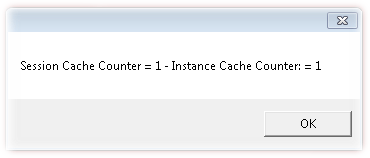
I run OIS300 and get this – at this point because my script does all the work in the Init() method the OIS300 window won’t open until after I click on OK.

Now I close OIS300. Then I run OIS300 and get the following message

We can see that the SessionCache is at 2 now. But the Instance Cache is 1.

We will click Ok to allow OIS300 to display.

Next we will press F5 to refresh OIS300 – this will cause the Init() method to be called again and we get another messagebox.

Now we can see the SessionCache has incremented AND the InstanceCache has incremented.

If we do an open related to open the order lines (which goes to OIS101), and then hit the previous button we will get the messagebox pop up again

So we can see that both cache objects have incremented.

Anyway, here’s the script, commented as per usual and you can test to your hearts content 🙂

import System;
import System.Windows;
import System.Windows.Controls;
import MForms;

package MForms.JScript
{
	class sessionCacheTest
	{
		public function Init(element: Object, args: Object, controller : Object, debug : Object)
		{
			// these are the variables where we will
			// store our counters
			var counterSessionCache = 0;
			var counterInstanceCache = 0;
			
			var key = "TestCounterSessionCache";
			var key = "TestCounterInstanceCache";
			
			// do we already have a SessionCache saved?
			if(SessionCache.ContainsKey(key))
			{
				// yes; we should retrieve that value in to our counterSessionCache
				// variable.  We will add one to it shortly and save it again
   				counterSessionCache = SessionCache.Get(key);
			}
			// do we already have an InstanceCache saved?
			if(InstanceCache.ContainsKey(controller, key))
			{
				// yes; we should retrieve that value in to our counterInstanceCache
				// variable.  We will add one to it shortly and save it again
				counterInstanceCache  = InstanceCache.Get(controller, key);
			}

			// add 1 to the session cache counter
			counterSessionCache++;
			// add 1 to the instance cache counter
			counterInstanceCache++;
			
			// save these values
			SessionCache.Add(key, counterSessionCache);
			InstanceCache.Add(controller, key, counterInstanceCache);

			MessageBox.Show("Session Cache Counter = " + counterSessionCache + " - Instance Cache Counter: = " + counterInstanceCache);
		}
	}
}


(Script is heavily based on the examples from the Infor developer documentation)

Posted in Development, M3 / MoveX | 3 Comments

LSO10, APIs & WebServices, things have changed

We recently upgraded to LSO10 (yay!), got Mashups (yay!), DAF (yay!) and LES (yay!) and we went as far as we could with the Grid. So M3 is now in the Grid so we lose Server View and instead get a lot of very interesting and fancy stuff in LifeCycle Manager.

We have Gridified the M3 Business Engine, which in turn effects means we have access to Grid WebServices. In the world of Grid WebServices there are a few surprises.

The Grid is all handled through LifeCycle Manager.

Authentication Changes

Grid Services use LDAP for authentication. Previously WebServices and Smart Office used LDAP and the APIs used our AS400 authentication.

SQL Connection Changes

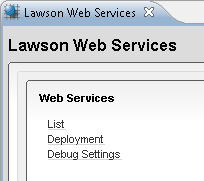
It is this that prompted the posting. Setting up WebServices to use SQL pre-grid was pretty straight forward. You would go to the Lawson Web Services page and click on the create a SQL link and you’ll get something similar to this

The Driver and the JDBC Url you could actually get from the M3 properties.

Under the Grid it gets arcane to those of us who don’t live and breath AS400 and DB2.

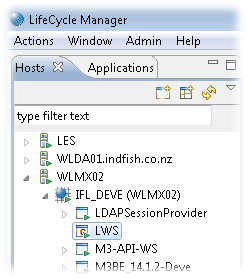
  1. Log in to LifeCycle Manager
  2. Find your WebService Environment
  3. Right Click Lawson Grid -> Application -> Manage Application
  4. Click Configurations
  5. Add a Database Configuration
  6. Fill in the Connection details
    1. Name – a friendly name for you to reference
    2. Driver – this is the part that wasn’t obvious, and the documentation cryptically referred to “Lawson WebServices Administration Guide” which is no-where to be found for the Grid version of WebServices. Prevously it had been “com.ibm.as400.access.AS400JDBCDriver”. But as we were DB2, I choose DB2
    3. JDBC Url – again, I tried using the old config, no dice. In a fit of intellectual prowess I tried changing the jdbc:as400:// to jdbc:db2:// and it worked!
    4. Username and password, well…
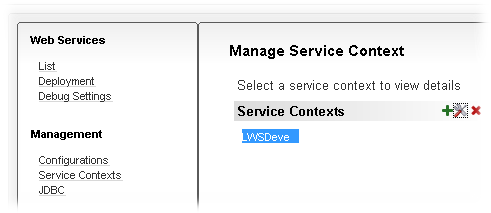
  7. Click on Service Contexts
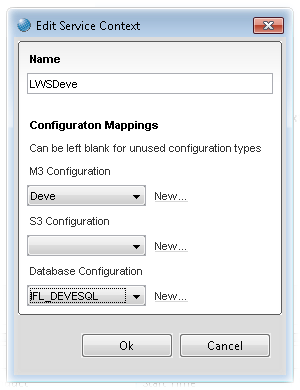
  8. Click on the Edit Selected Service Context
  9. Select your Database that you created.

Pre-Grid this would be sufficient for you to submit a string like this:
<soapenv:Envelope xmlns:soapenv=”http://schemas.xmlsoap.org/soap/envelope/&#8221; xmlns:mws2=”http://mws.intentia.net/mws2&#8243; xmlns:get=”http://www.indfish.co.nz/FreeCapsSQL/GetFreeCaps”><soapenv:Header><mws2:mws><mws2:user>potato</mws2:user><mws2:password>potatoit</mws2:password><mws2:company>100</mws2:company><mws2:division>IFL</mws2:division></mws2:mws></soapenv:Header><soapenv:Body><get:GetFreeCaps><get:OrderNumber>00000001</get:OrderNumber></get:GetFreeCaps></soapenv:Body></soapenv:Envelope&gt;

using a HttpWebRequest.

Post-Grid you will get authentication errors. It is actually through this that I discovered the Debug options in LifeCycle Manager for the Web Services which proved to give me the clues to solve this issue.

Now we need to use the HttpWebRequest.Credentials to provide the authentication information (refer to my previous postings for a more complete example in to which to insert the code below)

var credCache = new CredentialCache();
credCache.Add(new Uri(http://WLMX02.indfish.co.nz:21005&#8221;),“Basic”new NetworkCredential(“potato”“potatoit”));
hwrRequest.Credentials = credCache;

The http://WLMX02.indfish.co.nz:21005&#8221; is the endpoint of your webservice.
The “Basic” is to identify that we are using Basic authentication.
The new NetworkCredential(“potato”“potatoit”) is the username and password that we will use in the authentication header.

Interestingly I no longer needed to put the username and password in the SOAP envelope.

Identifying Endpoints and Getting the wdsl

You can find the location of the WDSL in LifeCycle Manager

  1. Log in to LifeCycle Manager
  2. Find your WebService Environment
  3. Right Click Lawson Grid -> Application -> Manage Application
  4. Select List
  5. Select your Service Context
  6. Select your WebService
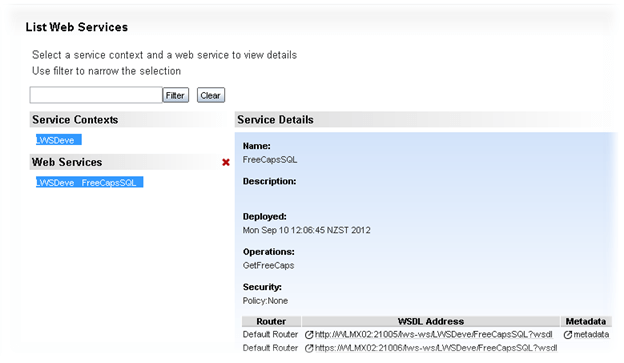
  7. And now you have a path to the wsdl

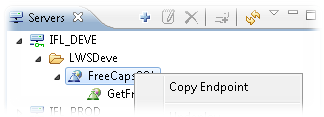
To get the EndPoint is very easy. In Lawson Web Service Designer simply expand the server that you want to connect to, and locate the class you created, right click and select “Copy Endpoint”

And you’ll get something like
http://WLMX02.indfish.co.nz:21005/lws-ws/LWSDeve/FreeCapsSQL

Configuring the Servers for Lawson Web Service Designer

Finding where you need to point LWS Designer to wasn’t the most trivial of exercises, so here is a step by step.

  1. Log in to LifeCycle Manager
  2. Go to the Application Tab
  3. Find your Web Service
  4. Right Click and select Configure Application
  5. Click Manage Application
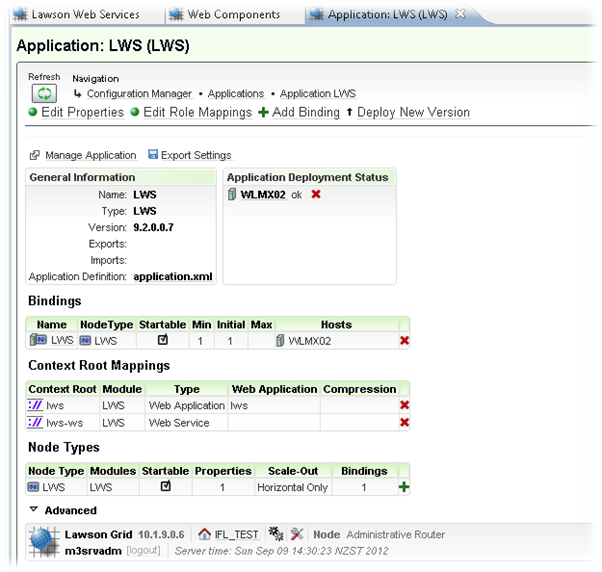
  6. Click Web Components
  7. Expand the entrypoints
  8. And the Entry Points are what you add to LWS Designer

Debugging – the Kewl Stuff!

One of the really nice things about Gridification is we have some debug settings.

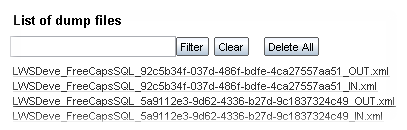
If we turn on the “Create dump files for SOAP messages (files are stored in <Grid>/application/LWS/dumps)” we get a in and an out with the envelopes

Call your webservice

And now you’ll have files which show exactly what was submitted and returned.

Posted in M3 / MoveX, Webservices | 5 Comments

Controlling an Internet Explorer Session from a JScript

Let us say that you have some product specifications stored on your intranet, and your paranoid network administrator requires authentication – the PNA was kind enough to provide a generic read only login.

You want to make life easy for your users, from MMS001 you want to press a button which will launch IE so you can see the product specifications seamlessly – automatically logging in. In this example, I am purely going to provide the authentication information, but you could potentially have the site choose a specific product or whatever you want.

One of the nice things about Internet Explorer is that it is just like MS Office, it’s COM enabled, so we can launch and control it through scripts or external programs.

In order to provide the log in information we need to determine the input box names for the Username and Passwords. You would also want to retrieve the Login button aswell in a real world example.

So below is what the login page looks like

Taking a look at the markup for this page, we see that the Username has an id of Login1_UserName. Password is Login1_Password.

And the script itself

import System;
import System.Windows;
import System.Windows.Controls;
import MForms;

package MForms.JScript
{
	class ieTest
	{
		public function Init(element: Object, args: Object, controller : Object, debug : Object)
		{
			 var content : Object = controller.RenderEngine.Content;
			 
			 // create the com object
			 var IEApp = new ActiveXObject("InternetExplorer.Application");
			 // make sure it is visible
			 IEApp.Visible = true;
			 
			 // navigate to the website (be aware, it may take time to load!)
			IEApp.Navigate("https://go.potatoit.com/potatoit/view/DocumentView.aspx?libraryProcessGroupId=-1&tagId=-1&specialCase=AllTag");
			
			// retrieve the document with all of the controls and content
			var doc = IEApp.Document;
			// find and populate the password field which we determined was called "Login1_Password"
			doc.getElementByID("Login1_Password").value = "potatoit" 
			// find and populate the user field which we determined was called "Login1_Username"
			doc.getElementByID("Login1_Username").value = "potatoit" 
		}
	}
}

Be aware that if you transition through different IE security zones and you have Protected Mode on, you won’t have access to the markup document in IE, so you won’t be able to submit your information.

Posted in Uncategorized | 2 Comments

GLS100 – Journal Import Part III

Well, 3 posts in one day!  Breaking all the rules here (some good advice that I read a while ago was someone that prepared several posts and would drip feed them out so their blog would have at least one entry a month rather than fits and starts).

But advice is something that you give, not take – and I am waiting on desktop computers to finish patching!

So, GLS100 – Journal Import.  This is the third posting of this (https://potatoit.wordpress.com/2011/02/12/journal-importing-from-excel-jscript-handling-of-error-messages-part-ii/).

Recently I was made aware that there is an issue with this script under LSO10, it appears that this was caused by my code search through the VisualTree looking for the control that displayed any error messages – this control has been renamed – actually, it sounds like it is a different type of control now but we have the same effect.

For the regular readers, you’ll know that I discovered another method of retrieving the error information (https://potatoit.wordpress.com/2012/01/16/extracting-the-error-message/), so I have taken the opportunity to rip out all the superflous code – reducing the footprint quite considerably and providing what I believe a more robust method of error detection (which will work even if the user has the errors displayed in a dialog box)

I also took the opportunity to address an issue that a reader commented on about internationalisation – there is an issue where if you run an English version of Excel on a version of Windows that isn’t set to English, and you don’t have the appropriate language packs installed you get this pretty vague error.  Helpfully Microsoft had the code that I needed to fix the issue and it was pretty trivial to translate in to Javascript.

Then there was also a user reported issue which has since been addressed.

Anyways, to see the layout of the spreadsheet, please refer to my earlier posts.  Oh, it’s worth noting that I don’t have LSO10 installed, so I am trusting that the code as it stands now will work.  If you are on LSO10 and are still having an issue, feel free to drop me a comment with the details and I’ll see what I can do.

Enjoy…

// V004 20110207    * completed
// V005 20110207    * maximum row is now set to 10000
//                  * we will look for the word End to end our line processing
// V006 20110212    * don't submit lines that have a 0 value
//                  * truncate the decimals to two decimals
// V007 20120512    * updated error checking to something a tad more sensible
//                      so it will work with LSO 10
//      20120513    * addressed an issue with "Old format or invalid type library"
//                      http://support.microsoft.com/kb/320369
//                      issue raised by Hendrik
//                      https://potatoit.wordpress.com/2011/01/23/journal-importing-jscript-handling-of-error-messages/#comment-45
// V008 20120516    * if a forumla is used in the debit column and it is zero, 
//                      then we incorrectly don't process the credit column
// V009 20120516    * we stopped on blank lines when we should continue processing


import System;
import System.Text;
import System.Windows;
import System.Windows.Controls;
import System.Windows.Media;
import System.Windows.Media.Media3D;

import MForms;
import Mango.UI.Core;
import Mango.UI.Core.Util;
import Mango.UI.Services;
import Mango.Services;

import Excel;
import System.Reflection;

package MForms.JScript
{
	class GLS100_JournalImport_V09
	{
		var giicInstanceController : IInstanceController = null;    // this is where we will store the IInstanceController to make it available to the rest of the class
		var ggrdContentGrid : Grid = null;                          // this is the Grid that we get passed by the Init()
		var gexaApplication = null;                                 // Excel.Application object
		
		var gbtnImportFromExcel : Button = null;                    // this is the button that we will put on to the panel that will kick off the whole import
		var glvListView : ListView = null;                          // this is the ListView on the panel
		
		var gwbWorkbook = null;                                     // here we will store the Workbook object
		
		var giStartRow : int = 15;                                  // the starting row in the Spreadsheet
		var giMaxRow : int = 10000;                                    // the end row in the Spreadsheet
		var giCurrentRow : int = 15;                                // the current row in the Spreadsheet
		
		var gbLookForResponse = false;                              // should we be looking for a response?

		var gobjStatusJ1 = null;                                      // the statusbar
		var gobjStatusE = null;

		var gbRequest : boolean = false;                            // the request event 


		var gstrVoucherType : String = null;                        // the voucher type

		public function Init(element: Object, args: Object, controller : Object, debug : Object)
		{
			// lets make some of the controls and other
			// bits pieces available to other sections of our code
			ggrdContentGrid = controller.RenderEngine.Content;
			giicInstanceController = controller;
			glvListView = controller.RenderEngine.ListControl.ListView;
			
			try
			{
				// create the button for importing
				gbtnImportFromExcel = new Button();
				gbtnImportFromExcel.Content = "Import";

				Grid.SetColumnSpan(gbtnImportFromExcel, 10);
				Grid.SetColumn(gbtnImportFromExcel, 1);
				Grid.SetRow(gbtnImportFromExcel, 22);
				
				// finally add the control to the grid
				ggrdContentGrid.Children.Add(gbtnImportFromExcel);
				
				// ----- Events -----
				gbtnImportFromExcel.add_Click(OnImportFromExcelClicked);
				gbtnImportFromExcel.add_Unloaded(OnImportFromExcelUnloaded);

			}
			catch(exException)
			{
				MessageBox.Show("Error: " + exException.Message + Environment.NewLine + exException.StackTrace);
			}
		
		}
		
		// check for errors, we need to check
		// for errors on BOTH the E panel
		// and J1 panel
		// We will go out and look for the status control if we 
		// don't have it
		private function checkForError()
		{
			var strResult : String = null;
            // var objRuntime = MForms.Runtime.Runtime(giicInstanceController.Runtime).Result;
			var strStatusMessage : String = MForms.Runtime.Runtime(giicInstanceController.Runtime).Result;  // objRuntime.Result;

			try
			{
				var iStartPosition : int = 0;

				iStartPosition = strStatusMessage.IndexOf("<Msg>");

				// if Msg doesn't exist, then we didn't have an error
				if(-1 == iStartPosition)
				{
					// we are all good!
				}
				else
				{
					var iEndPosition : int = strStatusMessage.IndexOf("</Msg>");
					if((-1 == iEndPosition) && (0 != iEndPosition))
					{
						iEndPosition = strStatusMessage.length-1;
					}
					strResult = strStatusMessage.substring(iStartPosition+5, iEndPosition);
				}
			}
			catch(ex)
			{
				MessageBox.Show("checkForError() exception: " + ex.message);
			}

			return(strResult);
		}

		// display an OpenFileDialog box
		// and extract the result
		private function retrieveImportFile()
		{
			var result : String = null;
			var ofdFile = new System.Windows.Forms.OpenFileDialog();    // we have to use the forms OpenFileDialog unfortunately
			if(null != ofdFile)
			{
				ofdFile.Multiselect = false;
				ofdFile.Filter = "Excel Files (*.xls;*.xlsx)|*.xls;*.xlsx|All Files (*.*)|*.*"; // filter on xls or xlsx files only
				
				if(true == ofdFile.ShowDialog())
				{
					result = ofdFile.FileName;
				}
			}
			return(result);
		}
		
		// this is where we actually do the import
		private function OnImportFromExcelClicked(sender : Object, e : RoutedEventArgs)
		{
			gstrVoucherType = null;
			try
			{
				// here we do some initialisation of Excel
				InitialiseExcel();

				var strFilename : String = retrieveImportFile();            // retrieve the filename of the Excel spreadsheet to open
				if((null != strFilename) && (null != gexaApplication))      // ensure that not only do we have a filename, but we also managed to initialise Excel
				{
					gwbWorkbook = gexaApplication.Workbooks.Open(strFilename);  // open the spreadsheet
					if(null != gwbWorkbook)
					{
						giicInstanceController.add_RequestCompleted(OnRequestCompleted);
						giicInstanceController.add_RequestCompleted(OnRequested);
						gbRequest = true;

						gwbWorkbook.Saved = true;                               // get rid of those annoying save messages
						var strVoucherType : String = retrieveVoucherType();    // we want to get the voucher type from the spreadsheet (the GLS100 voucher)
						
						if(!String.IsNullOrEmpty(strVoucherType))               // we need to ensure that we have a voucher type
						{
							giicInstanceController.RenderEngine.SetFocusOnList();
							selectFAMFunction(strVoucherType);              // now we need to go out and select the function
							
							// from where on out, we start using the events
						}
					}
					else MessageBox.Show("Failed to Open Workbook");
				}
				else MessageBox.Show("Filename or Excel doesn't exist: " + strFilename);
			}
			catch(exException)
			{
				MessageBox.Show("Error: " + exException.description);
			}
		}

		// set the VoucherText within GLS100/E
		private function setM3VoucherText(astrVoucherText : String)
		{
			var tbVoucherText : TextBox = ScriptUtil.FindChild(ggrdContentGrid, "WWGVTX");
			if(null != tbVoucherText)
			{
				tbVoucherText.Text = astrVoucherText;
			}
			else MessageBox.Show("setM3VoucherText() - Child not found");
		}

		// set the Year within GLS100/E
		private function setM3YEA4(astrYEA4Text : String)
		{
			var tbYEA4Text : TextBox = ScriptUtil.FindChild(ggrdContentGrid, "WWYEA4");
			if(null != tbYEA4Text)
			{
				tbYEA4Text.Text = astrYEA4Text;
			}
			else MessageBox.Show("setM3VoucherText() - Child not found");
		}

		// we need to set the reversal date
		private function setM3ReversalDate(astrReversalText : String)
		{
			var tbReversalText = ScriptUtil.FindChild(ggrdContentGrid, "WWSHDT");
			if(null != tbReversalText)
			{
				try
				{
					var dtValue : DateTime = DateTime.FromOADate(Convert.ToDouble(astrReversalText));
					tbReversalText.Value = dtValue;
				}
				catch(ex)
				{
					MessageBox.Show(ex.description);
				}
			}
			else MessageBox.Show("setM3ReversalDate() - Child not found");
		}

		// set the accounting date within GLS100/E
		private function setM3AccountingDate(astrAccountingDate : String)
		{
			var tbITNO = ScriptUtil.FindChild(ggrdContentGrid, "WWACDT");
			if(null != tbITNO)
			{
				try
				{
					var dtValue : DateTime = DateTime.FromOADate(Convert.ToDouble(astrAccountingDate));
					tbITNO.Value = dtValue;
				}
				catch(ex)
				{
					MessageBox.Show(ex.description);
				}
			}
			else MessageBox.Show("Accounting Date not found");
		}

		// retrieve the voucher text from the spreadsheet
		private function retrieveVoucherText()
		{
			return(gwbWorkbook.ActiveSheet.Range("E7").Value);
		}
		
		// retrieve the accounting date from the spreadsheet
		// we need to use Value2 in this instance to get
		// a value that we can actually use
		private function retrieveAccountingDate()
		{
			try
			{
				return(gwbWorkbook.ActiveSheet.Range("R5").Value2);
			}
			catch(ex)
			{
				MessageBox.Show("Exception: " + ex.message);
			}
			
		}

		// retrieve the voucher type from the Spreadsheet
		private function retrieveVoucherType()
		{
			gstrVoucherType = gwbWorkbook.ActiveSheet.Range("K5").Value;
			return(gstrVoucherType);
		}		

		// retrieve the reversing date
		private function retrieveReversingDate()
		{
			try
			{
				return(gwbWorkbook.ActiveSheet.Range("R7").Value2);
			}
			catch(ex)
			{
			}
		}		


		// GLS100/B set the FAM Function
		private function selectFAMFunction(astrFAMFunction : String)
		{
			var bFound : boolean = false;
			
			if(!String.IsNullOrEmpty(astrFAMFunction))
			{
				// search through the ListView for the FAM function
				for(var iCount : int = 0; iCount < glvListView.Items.Count; iCount++)
				{
					var itmCurrentItem = glvListView.Items[iCount];
					if(null != itmCurrentItem)
					{
						if(!String.IsNullOrEmpty(itmCurrentItem[0]))
						{
							var strCurrentString = itmCurrentItem[0].ToString();
							if(0 == String.Compare(strCurrentString, astrFAMFunction))
							{
								glvListView.SelectedItem = itmCurrentItem;
								bFound = true;
								break;
							}
						}
					}
				}
			}
			if(true == bFound)
			{
				// ok, we've found the FAM Function on the ListView
				// now we need to SELECT it
				giicInstanceController.ListOption("1");	// SELECT
			}
			
		}
		
		// our Import button is being unloaded, now's a good time to clean
		// everything up
		private function OnImportFromExcelUnloaded(sender : Object, e : RoutedEventArgs)
		{
			if(null != gbtnImportFromExcel)
			{
				gbtnImportFromExcel.remove_Click(OnImportFromExcelClicked);
				gbtnImportFromExcel.remove_Unloaded(OnImportFromExcelUnloaded);
			}
		}
		
		public function OnRequested(sender: Object, e: RequestEventArgs)
		{
			// we don't really use this at all at the moment
		}

		// set the error line against the spreadsheet
		private function setLineStatus(astrError : String)
		{
			if(null != gwbWorkbook)
			{
				gwbWorkbook.ActiveSheet.Range("S" + (giCurrentRow-1).ToString()).Value = astrError;
			}
		}
	
		public function OnRequestCompleted(sender: Object, e: RequestEventArgs)
		{
			var strError : String = null;
			try
			{
				if(e.CommandType == MNEProtocol.CommandTypeKey)     // we're looking for a key event
				{
					if(e.CommandValue == MNEProtocol.KeyEnter)      // specifically we're looking the enter key event
					{
						strError = checkForError();

						if(true == String.IsNullOrEmpty(strError))
						{
							if(true == giicInstanceController.RenderEngine.PanelHeader.EndsWith("E"))   // are we on panel E?
							{
								handleEPanel();     // handle panel E
								strError = checkForError();
							}
							else if(true == giicInstanceController.RenderEngine.PanelHeader.EndsWith("J1")) // are we on panel G1 (this should be GLS120/G1)
							{
								strError = checkForError();

								if(true != String.IsNullOrEmpty(strError))
								{
									giCurrentRow = giMaxRow + 1;
								}
								else
								{
									handleJ1Panel();    // handle panel j
								}
							}
						}
						else
						{
							setLineStatus(strError);
						}
					}
				}
				else if(e.CommandType == MNEProtocol.CommandTypeListOption)
				{
					if(e.CommandValue == MNEProtocol.OptionSelect)
					{
						if(true == String.IsNullOrEmpty(strError))
						{
							handleEPanel();
						}
					}
				}
				if(null != giicInstanceController.Response)
				{
					if(0 == String.Compare(giicInstanceController.Response.Request.RequestType.ToString(), "Panel"))
					{
						if((MNEProtocol.CommandTypeKey == giicInstanceController.Response.Request.CommandType) && (MNEProtocol.KeyF03 == giicInstanceController.Response.Request.CommandValue))
						{
							CleanUp();
						}
					}
				}
			}
			catch(ex)
			{
				MessageBox.Show(ex.message);
			}
			if(null != strError)
			{
				CleanUp();
			}
		}
		
		// this is where we do the actual handling of the J1 Panel
		private function handleJ1Panel()
		{
			if(giCurrentRow <= giMaxRow)    // the spreadsheet has a limited number of rows...
			{
				// extract the lines from the spreadsheet
				var strWWADIV : String = retrieveFromActiveSheet("H" + giCurrentRow);       // division
				var strWXAIT1 : String = retrieveFromActiveSheet("B" + giCurrentRow);
				var strWXAIT2 : String = retrieveFromActiveSheet("C" + giCurrentRow);
				var strWXAIT3 : String = retrieveFromActiveSheet("D" + giCurrentRow);
				var strWXAIT4 : String = retrieveFromActiveSheet("E" + giCurrentRow);
				var strWXAIT5 : String = retrieveFromActiveSheet("F" + giCurrentRow);
				var strWXAIT6 : String = retrieveFromActiveSheet("G" + giCurrentRow);
				var strWWCUAMDebit : String = retrieveFromActiveSheet("I" + giCurrentRow);
				var strWWCUAMCredit : String = retrieveFromActiveSheet("L" + giCurrentRow);
				var strWWVTXT : String = retrieveFromActiveSheet("O" + giCurrentRow);
				var strWWVTCD : String = retrieveFromActiveSheet("N" + giCurrentRow);

				// this is the current row
				giCurrentRow = giCurrentRow + 1;
				if(!String.IsNullOrEmpty(strWXAIT1))
				{
					if(0 != String.Compare(strWXAIT1,"undefined"))  // verify that we actually have content
					{
						if(0 != String.Compare(strWXAIT1,"End", true))
						{
							var bDoWeHaveAValue : boolean = false;
							
							if(!String.IsNullOrEmpty(strWWCUAMDebit))
							{
								var dblDebit : double = strWWCUAMDebit;
								var strDebit : String = dblDebit.ToString("#.##");  // make sure that we are formatted to only 2 decimal places
								if(!String.IsNullOrEmpty(strDebit))                 // ensure we actually have a value now that we have converted it
								{
									if(0 != String.Compare(strDebit, "0.00"))       // ensure that the value isn't 0!
									{
										bDoWeHaveAValue = true;
										setM3TextField("WWCUAM", strDebit);	// Value
									}
								}
							}
							if((!String.IsNullOrEmpty(strWWCUAMCredit)) && (false == bDoWeHaveAValue))  // 20120516 - if a forumla is used in the debit column and it is zero, then we incorrectly don't process the credit column
							{
								var dblCredit : double = strWWCUAMCredit;
								var strCredit : String = dblCredit.ToString("#.##");    // make sure that we are formatted to only 2 decimal places
								if(!String.IsNullOrEmpty(strCredit))                    // ensure we actually have a value now that we have converted it
								{
									if(0 != String.Compare(strCredit, "0.00"))          // ensure that the value isn't 0!
									{
										bDoWeHaveAValue = true;
										setM3TextField("WWCUAM", "-" + strCredit);	// Value
									}
								}
							}
							if(true == bDoWeHaveAValue)     // if the value is 0, then we shouldn't submit it
							{
								// strWWADIV
								if(!String.IsNullOrEmpty(strWWADIV))
								{
									setM3TextField("WWADIV", strWWADIV);	// division
								}

								setM3TextField("WXAIT1", strWXAIT1);	// account
	
								setM3TextField("WXAIT2", strWXAIT2);	// Dept
								setM3TextField("WXAIT3", strWXAIT3);	// Dim3
								setM3TextField("WXAIT4", strWXAIT4);	// Dim4
								setM3TextField("WXAIT5", strWXAIT5);	// Dim5
								setM3TextField("WXAIT6", strWXAIT6);	// Dim6
								//setM3TextField("", retrieveFromActiveSheet("H" + giCurrentRow));	// Division

						
								setM3TextField("WWVTXT", strWWVTXT);	// Voucher Text
								setM3TextField("WWVTCD", strWWVTCD);    // VAT type

								giicInstanceController.PressKey("ENTER");   // press the enter key
							}
							else
							{
								// we need to go to the next line to process
								handleJ1Panel();
							}
						}
						else
						{
							giCurrentRow = giMaxRow + 1;    // 20110207 - end this loop
							CleanUp();                      // and do our cleanup
						}

					}
                    else handleJ1Panel();   //MessageBox.Show("2. No content in column B");
				}
                else handleJ1Panel();   //MessageBox.Show("1. No content in column B");
			}
			else
			{
				//MessageBox.Show("handleJ1Panel(): " + giCurrentRow + " - " + giMaxRow);
				CleanUp();
			}
		}
		
		// a little wee helper function that will search for a TextBox name
		// and set the TextBox value
		private function setM3TextField(astrName : String, astrValue : String)
		{
			var tbTextBox : TextBox = ScriptUtil.FindChild(ggrdContentGrid, astrName);
			if(null != tbTextBox)
			{
				tbTextBox.Text = astrValue;
			}
			else MessageBox.Show("Can't find: " + tbTextBox.Text);
		}

		// retrieve some data from the active spreadsheet
		// at a specific location
		private function retrieveFromActiveSheet(astrPosition : String)
		{
			var strValue : String = gwbWorkbook.ActiveSheet.Range(astrPosition).Value;
			if(true == String.IsNullOrEmpty(strValue))
			{
				strValue = "";
			}
			else if(0 == String.Compare(strValue, "undefined"))
			{
				strValue = "";
			}

			return(strValue);
		}
		
		// retrieveVoucherType
		// gstrVoucherType
		// handle the E Panel
		private function handleEPanel()
		{
			var strAccountingDate : String = retrieveAccountingDate();  // retrieve the accounting date from the Spreadsheet
			var strVoucherText : String = retrieveVoucherText();        // retroeve the voucher text from the Spreadsheet

			var strReversalDate : String = retrieveReversingDate();     // retrieve the reversal date
			var bHaveAllTheFields : Boolean = false;                    // do we have all the fields that we require?


			if( (0 == String.Compare(gstrVoucherType,"100")) || (0 == String.Compare(gstrVoucherType,"200")) || (0 == String.Compare(gstrVoucherType,"900")))
			{
				if((!String.IsNullOrEmpty(strAccountingDate)) && (!String.IsNullOrEmpty(strVoucherText)))
				{
					if(0 == String.Compare(gstrVoucherType,"900"))
					{
						setM3YEA4(strAccountingDate);
					}
					else
					{
						setM3AccountingDate(strAccountingDate);     // now we actually set the accounting date in the TextBox
					}
					
					setM3VoucherText(strVoucherText);           // and the Voucher TextBox
					bHaveAllTheFields = true;
				}
			}
			else if(0 == String.Compare(gstrVoucherType,"300"))
			{
				if((!String.IsNullOrEmpty(strReversalDate)) && (!String.IsNullOrEmpty(strAccountingDate)) && (!String.IsNullOrEmpty(strVoucherText)))
				{
					setM3AccountingDate(strAccountingDate);     // now we actually set the accounting date in the TextBox
					setM3VoucherText(strVoucherText);           // and the Voucher TextBox
					setM3ReversalDate(strReversalDate);         // now set the reversal date

					bHaveAllTheFields = true;
				}
			}
			else
			{
				MessageBox.Show("Sorry, but we can't handle the voucher type: " + gstrVoucherType);
			}
			// if((!String.IsNullOrEmpty(strAccountingDate)) && (!String.IsNullOrEmpty(strVoucherText)))
			if(true == bHaveAllTheFields)
			{
				giicInstanceController.PressKey("ENTER");   // now we press enter - this will fire off a Request event and should take us to GLS120/G1
			}
			else MessageBox.Show("We require an Account Date and Voucher Text");
		}
		
		private function CleanUp()
		{
			if(true == gbRequest)
			{
				giicInstanceController.remove_RequestCompleted(OnRequestCompleted);
				giicInstanceController.remove_RequestCompleted(OnRequested);
			}
			gbRequest = false;
			CleanUpExcel();
			//MessageBox.Show("Cleaned up");
		}

		private function CleanUpExcel()
		{
				// check to ensure we have a Workbook object
				// before we attempt to close the workbook
				if(null != gwbWorkbook)
				{
					gwbWorkbook.Close();
					gwbWorkbook = null;
				}
				// make sure we have actually created
				// the Excel Application object before
				// we Quit
				if(null != gexaApplication)
				{
					gexaApplication.Quit();
					gexaApplication = null;
				}
		}

		private function InitialiseExcel()
		{
			var result = null;
			try
			{
				gexaApplication = new ActiveXObject("Excel.Application");
				gexaApplication.Visible = true;
				
                // Address a 'bug' "Old format or invalid type library" where
                // you run an english version of Excel but the regional settings of the
                // computer is configured for a non-English language (and the language pack
                // isn't installed)
                //  http://support.microsoft.com/kb/320369
                // 
                System.Threading.Thread.CurrentThread.CurrentCulture = new System.Globalization.CultureInfo("en-US");

				result = gexaApplication;
			}
			catch(exException)
			{
				MessageBox.Show("Error: " + exException.Message + Environment.NewLine + exException.StackTrace);
			}
			return(result);
		}
		
		//
	}
}


Posted in How Far is Too Far?, M3 / MoveX | 2 Comments

Controller.RenderEngine.Content – what does it give us access to?

After a dry spell, there’s now a couple of posts at once… 🙂

I have alluded to this in the past, but I thought I’d take the opportunity to provide a specific post on this topic.

The name itself is a little misleading, but…

To answer the question, it gives us access to the VisualTree, a tree that we can iterate up and down to our hearts content. How do I know this? A number of years ago I was working on a coolstorage program where I needed to explore the visual tree to provide some nifty effects. It was there that I learnt about WPF and how the interface objects were stored as a hierarchy and I gained a newfound respect for Microsoft and WPF!

Why am I going on about this – well, ScriptUtil.FindChild() will only go down the visual tree, not up it, so it is very helpful for us to know where in the scheme of things Smart Office grants us an entry point – then we will take that entry point and exploit the .Net framework 🙂

Probably the easiest way to demonstrate where the Controller.RenderEngine.Content sits in the visualtree is with a script:

import System;
import System.Windows;
import System.Windows.Controls;
import MForms;

package MForms.JScript
{
	class testContent
	{
		public function Init(element: Object, args: Object, controller : Object, debug : Object)
		{
			 var content : Object = controller.RenderEngine.Content;
			 
			 content.Background = new System.Windows.Media.SolidColorBrush(System.Windows.Media.Colors.Black);
		}
	}
}


This script will simply set the background to black for the area that the .Content grid occupies. Nice, quick and easy.

As we can see the Sorting order isn’t within the black area, so passing controller.RenderEngine.Content to ScriptUtil.FindChild() will just return null. We have to walk up the tree to get to the sorting order.

This can be done with some code like so – this will take you all the way up the visual tree (I usually look for a standard control and iterate up the list until I hit that control).

var parent : Object = content
var lastParent : Object = content;

while(null != (parent = VisualTreeHelper.GetParent(parent)))
{
	lastParent = parent;
}


Posted in Uncategorized | 2 Comments

Timing – and knowing / determing which events cause the Init() to be called

It’s been a while since my last post; pretty shocking I know!

In fairness, some of the things that I have been mucking around with have been related to what I was going to present at Inforum, and well, I didn’t want to spoil the uh…surprise… (that’s my excuse and I’ll stick to it).

Inforum btw was quite interesting, I got a general positive vibe from the Lawson…err…Infor staff that I spoke to. And it looks like some exciting technologies are being developed.

But that isn’t what I am really here to type about today. Timing…

If you’ve ever gone down the route of working with multiple panels or read all my posts then you’ll no doubt have encountered some frustration around scripts not working quite how you’d expect, I usually tend to notice these differences when deploying a script vs running them in the mforms jscript editor.

Each time I have encountered odd behaviour, I have thought to myself, wouldn’t it be nice to know the sequence of events – when events fire and all that other good stuff. And I will think to myself…I should write a script which will just log the entry and exit of some functions – subscribe to some events and see how they work which may make things a little clearer in my mind. Of-course, being in IT, my life is about promoting laziness – making life easier so people have to do less work 😉

So with Inforum coming up and some people bull…err…encouraging me to do a presentation I thought to myself…well, time to write that script. I of-course procrastinated further…

I have considered writing a summary with conclusions… The main reason I haven’t is I am wary of changes in behaviour as versions change, so I’d far rather providing a very basic framework that people can use to observe what happens with their version and in their environment and hopefully provide some guidance based upon that which I have seen.

What I did was I created a script which uses the System.IO.File.AppendAllText() function to write data to a text file. I write a line to this file on the entry of the Init() method and immediately before the exit of the Init() method.

        public function Init(element: Object, args: Object, controller : Object, debug : Object)
        {
            System.IO.File.AppendAllText(gstrOutputPath, DateTime.Now.ToString(gstrDateTimeFormat) + " Init() entry - element = " + element + " Args = " + args + Environment.NewLine);
            var content : Object = controller.RenderEngine.Content;

            gController = controller;

            // TODO Add your code here
            glvListView = controller.RenderEngine.ListControl.ListView;
            // glvListView.Tag.IsPooled = false;

            gController.add_RequestCompleted(OnRequestCompleted);
            gController.add_Requested(OnRequested);            

            
            glvListView.add_Unloaded(OnLVUnloaded);

            System.IO.File.AppendAllText(gstrOutputPath, DateTime.Now.ToString(gstrDateTimeFormat) + " Init() exiting" + Environment.NewLine);
        }


I also subscribe to a Listview and subscribe to its unload event. Likewise, I will write a line to my output file when I enter the unload event and just before I exit. I put this in so I could see when the ListView itself was being destroyed in the context of the various actions that we can do in Smart Office. I believe that this behaviour can be influenced using the <listview>.Tag.IsPooled property (beyond the scope of this post at the moment).

        public function OnLVUnloaded(sender: Object, e: RoutedEventArgs)
        {
            System.IO.File.AppendAllText(gstrOutputPath, DateTime.Now.ToString(gstrDateTimeFormat) + " OnLVUnloaded() entry" + Environment.NewLine);
            
            glvListView.remove_Unloaded(OnLVUnloaded);

            gController.remove_Requested(OnRequested);            
            // gController.remove_RequestCompleted(OnRequestCompleted);

            System.IO.File.AppendAllText(gstrOutputPath, DateTime.Now.ToString(gstrDateTimeFormat) + " OnLVUnloaded() exit" + Environment.NewLine);
        }


Then probably the most important parts…I subscribe to the RequestCompleted and the Requested events, and will write out some bits of information which I felt might be helpful.

        public function OnRequestCompleted(sender: Object, e: RequestEventArgs)
        {
            System.IO.File.AppendAllText(gstrOutputPath, DateTime.Now.ToString(gstrDateTimeFormat) + " OnRequestCompleted() entry" + Environment.NewLine);
            System.IO.File.AppendAllText(gstrOutputPath, DateTime.Now.ToString(gstrDateTimeFormat) + " OnRequestCompleted() - Event Type: " + e.CommandType + Environment.NewLine);
            System.IO.File.AppendAllText(gstrOutputPath, DateTime.Now.ToString(gstrDateTimeFormat) + " OnRequestCompleted() - Event Value: " + e.CommandValue + Environment.NewLine);
            System.IO.File.AppendAllText(gstrOutputPath, DateTime.Now.ToString(gstrDateTimeFormat) + " OnRequestCompleted() exit" + Environment.NewLine);
        }

        public function OnRequested(sender: Object, e: RequestEventArgs)
        {
            System.IO.File.AppendAllText(gstrOutputPath, DateTime.Now.ToString(gstrDateTimeFormat) + " OnRequested() entry" + Environment.NewLine);
            System.IO.File.AppendAllText(gstrOutputPath, DateTime.Now.ToString(gstrDateTimeFormat) + " OnRequested() - Event Type: " + e.CommandType + Environment.NewLine);
            System.IO.File.AppendAllText(gstrOutputPath, DateTime.Now.ToString(gstrDateTimeFormat) + " OnRequested() - Event Value: " + e.CommandValue + Environment.NewLine);
            System.IO.File.AppendAllText(gstrOutputPath, DateTime.Now.ToString(gstrDateTimeFormat) + " OnRequested() exit" + Environment.NewLine);
            gController.remove_Requested(OnRequested);        
            // gController.remove_RequestCompleted(OnRequestCompleted);            
        }

I want to see what happens when

  • We initially start a program
  • Press F5
  • Scroll down
  • Open Related
  • Previous from an Open Related
  • Display an entry
  • Previous from display an entry
  • Close a panel

I also wanted to illustrate what happens when we are bad and don’t follow the instructions in the LSO Developers Guide and we neglect to clean up and unsubscribe from events when the Requested() event is called – it is by doing this that I get a get a feel for why Lawson want you to unsubscribe and also just what I can expect if I do dodgy scripting. Actually – I think it is quite important if only so you can assess the risk of not following a recommendation precisely, but I’ll pontificate this point another day.

I’m running this script against LSO9, and the comments that I make are purely from observation, full script will be at the bottom of this post for you to test and should run in any panel that has a ListView.

Opening a Panel

So, the Initial opening of a panel

20120329 12:49:25:595 Init() entry – element = undefined Args =

20120329 12:49:25:607 Init() exiting

20120329 12:49:25:610 OnRequestCompleted() entry

20120329 12:49:25:610 OnRequestCompleted() – Event Type: RUN

20120329 12:49:25:611 OnRequestCompleted() – Event Value: mms001

20120329 12:49:25:611 OnRequestCompleted() exit

We can see from the information in the file that the InitI() gets called, and once it exits it looks like the RequestCompleted() event is fired. Quite helpfully we can see that this was a event type of RUN and had a value of MMS001. There is no Requested() event trapped by us because our script and the event subscription in the Init() method doesn’t get bound to the panel until after the Requested() event has exited!

Pressing F5 on a Panel

This is something that caught me out on a couple of occasions, pressing F5 on a panel causes the Init() to be called again. So in effect your script should (if you have cleaned up properly) be unloaded and disassociated, and then reassociated.

20120329 12:50:37:521 OnRequested() entry

20120329 12:50:37:522 OnRequested() – Event Type: KEY

20120329 12:50:37:523 OnRequested() – Event Value: F5

20120329 12:50:37:523 OnRequested() exit

20120329 12:50:37:887 Init() entry – element = undefined Args =

20120329 12:50:37:888 Init() exiting

20120329 12:50:37:888 OnRequestCompleted() entry

20120329 12:50:37:888 OnRequestCompleted() – Event Type: KEY

20120329 12:50:37:889 OnRequestCompleted() – Event Value: F5

20120329 12:50:37:889 OnRequestCompleted() exit

20120329 12:50:38:001 OnLVUnloaded() entry

20120329 12:50:38:003 OnLVUnloaded() exit

This is a lot more interesting than the panel opening – we can see the Requested() event occur, We can see the type of value of the event, and then the exit.

THEN Init() gets called, then the RequestCompleted…all makes sense – but then we see that the ListViews Unloaded() event is fired! So the general takeaway from this is that an F5 is effectively going to be treated as a complete destroy and recreation of at least the GUI elements.

Scrolling Down the ListView

As mentioned in the past, Smart Office retrieves a number of records at once and as you scroll down further it will request some more records from the BE. But I was curious about what other things may be happening…

20120329 12:52:00:137 OnRequested() entry

20120329 12:52:00:137 OnRequested() – Event Type: PAGE

20120329 12:52:00:138 OnRequested() – Event Value: DOWN

20120329 12:52:00:138 OnRequested() exit

It doesn’t really look very exciting at all. But hold on, no RequestCompleted()…

So lets not clean up our events.

20120329 14:18:06:547 OnRequested() entry

20120329 14:18:06:548 OnRequested() – Event Type: PAGE

20120329 14:18:06:548 OnRequested() – Event Value: DOWN

20120329 14:18:06:548 OnRequested() exit

20120329 14:18:06:560 OnRequestCompleted() entry

20120329 14:18:06:560 OnRequestCompleted() – Event Type: PAGE

20120329 14:18:06:561 OnRequestCompleted() – Event Value: DOWN

20120329 14:18:06:561 OnRequestCompleted() exit

This looks a little more interesting.

Open Related

The action of taking us to a completely new layout on our panel – we can make some good guesses about what will happen…

20120329 14:34:16:858 OnRequestCompleted() entry

20120329 14:34:16:858 OnRequestCompleted() – Event Type: LSTOPT

20120329 14:34:16:858 OnRequestCompleted() – Event Value: 11

20120329 14:34:16:859 OnRequestCompleted() exit

20120329 14:34:16:958 OnLVUnloaded() entry

20120329 14:34:16:958 OnLVUnloaded() exit

Previous after Open Related

20120329 14:35:55:490 Init() entry – element = undefined Args =

20120329 14:35:55:491 Init() exiting

20120329 14:35:55:492 OnRequestCompleted() entry

20120329 14:35:55:492 OnRequestCompleted() – Event Type: KEY

20120329 14:35:55:492 OnRequestCompleted() – Event Value: F12

20120329 14:35:55:493 OnRequestCompleted() exit

Closing a Panel

And we can’t forget about the closing of a panel.

20120329 14:36:51:143 OnRequested() entry

20120329 14:36:51:144 OnRequested() – Event Type: KEY

20120329 14:36:51:145 OnRequested() – Event Value: F03

20120329 14:36:51:145 OnRequested() exit

20120329 14:36:51:535 OnRequestCompleted() entry

20120329 14:36:51:535 OnRequestCompleted() – Event Type: KEY

20120329 14:36:51:536 OnRequestCompleted() – Event Value: F03

20120329 14:36:51:536 OnRequestCompleted() exit

20120329 14:36:51:538 OnLVUnloaded() entry

20120329 14:36:51:538 OnLVUnloaded() exit

So hopefully this gives you an idea, or at least a framework to muck around to provide clues on what may be going wrong with a script.

And the full code…enjoy…

import System;
import System.Windows;
import System.Windows.Controls;
import MForms;

package MForms.JScript
{
    class HowItWorks_V002
    {
        var gstrOutputPath : String = "C:\\Temp\\HowItWorks.txt";
        var gstrDateTimeFormat : String = "yyyyMMdd HH:mm:ss:fff";

        var gController;
        var glvListView;

        public function Init(element: Object, args: Object, controller : Object, debug : Object)
        {
            System.IO.File.AppendAllText(gstrOutputPath, DateTime.Now.ToString(gstrDateTimeFormat) + " Init() entry - element = " + element + " Args = " + args + Environment.NewLine);
            var content : Object = controller.RenderEngine.Content;

            gController = controller;

            // TODO Add your code here
            glvListView = controller.RenderEngine.ListControl.ListView;
            // glvListView.Tag.IsPooled = false;

            gController.add_RequestCompleted(OnRequestCompleted);
            gController.add_Requested(OnRequested);            

            
            glvListView.add_Unloaded(OnLVUnloaded);

            System.IO.File.AppendAllText(gstrOutputPath, DateTime.Now.ToString(gstrDateTimeFormat) + " Init() exiting" + Environment.NewLine);
        }

        public function OnLVUnloaded(sender: Object, e: RoutedEventArgs)
        {
            System.IO.File.AppendAllText(gstrOutputPath, DateTime.Now.ToString(gstrDateTimeFormat) + " OnLVUnloaded() entry" + Environment.NewLine);
            
            glvListView.remove_Unloaded(OnLVUnloaded);

            gController.remove_Requested(OnRequested);            
            // gController.remove_RequestCompleted(OnRequestCompleted);

            System.IO.File.AppendAllText(gstrOutputPath, DateTime.Now.ToString(gstrDateTimeFormat) + " OnLVUnloaded() exit" + Environment.NewLine);
        }

        public function OnRequestCompleted(sender: Object, e: RequestEventArgs)
        {
            System.IO.File.AppendAllText(gstrOutputPath, DateTime.Now.ToString(gstrDateTimeFormat) + " OnRequestCompleted() entry" + Environment.NewLine);
            System.IO.File.AppendAllText(gstrOutputPath, DateTime.Now.ToString(gstrDateTimeFormat) + " OnRequestCompleted() - Event Type: " + e.CommandType + Environment.NewLine);
            System.IO.File.AppendAllText(gstrOutputPath, DateTime.Now.ToString(gstrDateTimeFormat) + " OnRequestCompleted() - Event Value: " + e.CommandValue + Environment.NewLine);
            System.IO.File.AppendAllText(gstrOutputPath, DateTime.Now.ToString(gstrDateTimeFormat) + " OnRequestCompleted() exit" + Environment.NewLine);
        }

        public function OnRequested(sender: Object, e: RequestEventArgs)
        {
            System.IO.File.AppendAllText(gstrOutputPath, DateTime.Now.ToString(gstrDateTimeFormat) + " OnRequested() entry" + Environment.NewLine);
            System.IO.File.AppendAllText(gstrOutputPath, DateTime.Now.ToString(gstrDateTimeFormat) + " OnRequested() - Event Type: " + e.CommandType + Environment.NewLine);
            System.IO.File.AppendAllText(gstrOutputPath, DateTime.Now.ToString(gstrDateTimeFormat) + " OnRequested() - Event Value: " + e.CommandValue + Environment.NewLine);
            System.IO.File.AppendAllText(gstrOutputPath, DateTime.Now.ToString(gstrDateTimeFormat) + " OnRequested() exit" + Environment.NewLine);
            gController.remove_Requested(OnRequested);        
            // gController.remove_RequestCompleted(OnRequestCompleted);            
        }

    }
}

Posted in Development, M3 / MoveX | 1 Comment

Modification Removal – MMS100 – Barcoding

This is another post around the removal of modifications.

This post really discusses the changes to a panel to streamline it for some very specific uses, includes error monitoring, supressing the F4 browse, hiding, moving, and adding fields.

The Problem

Let us go back to the 2003/2004 timeframe…as part of our ERP project, we wanted to streamline our stock in and out processes. At that point in time our freezer staff would have sheets of paper which they would use to determine the product going on to an order and they would manually write where they retrieved the product from and the quantity. Then that sheet of paper would go to another person who would key in the stock movement.

We wanted to put computers on to our forklifts and have the forklift staff scan locations and scan pallets – reducing the paper and potential keying errors.

So, each location in our freezers has a barcode label with the freezer location. And each pallet gets a label which has four pieces of information on them separated by a horizontal tab. So a pallet barcode will go <Item Code>HT<Manufacturing Order Number>HT<Lot Number>HT<Quantity> on the single barcode.

This required us to have any screen that they go in to have four fields in that specific tab order. Not to mention we needed to make it easy for our forklift staff to navigate MoveX Explorer on 800×400 screens.

The Solution with MoveX Explorer

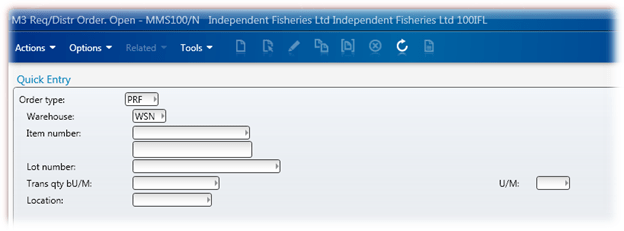
Due to time constraints and a lack of information available on the MoveX APIs, we got forced down the route of modify quite around a dozen panels. Not very kewl, but it largely worked. In this instance we modified MMS100 to look like this:

The Solution with Lawson Smart Office

As mentioned in the past, you can move controls around, resize them, hide them and add them.

Now we uplifted our mods as is in our upgrade to save time and retain staff focus – so even though there was opportunity to change, we err’ed on the side of minimal change.

So mods get uplifted and recently we had a problem with some Distribution Orders (MMS100/MMS101) – problems that could be fixed with fixes we could retrieve through Life Cycle Manager. We put the fix in, we break the mod, we don’t put the fix in we have a broken process, uplifting the mod, well – expensive.

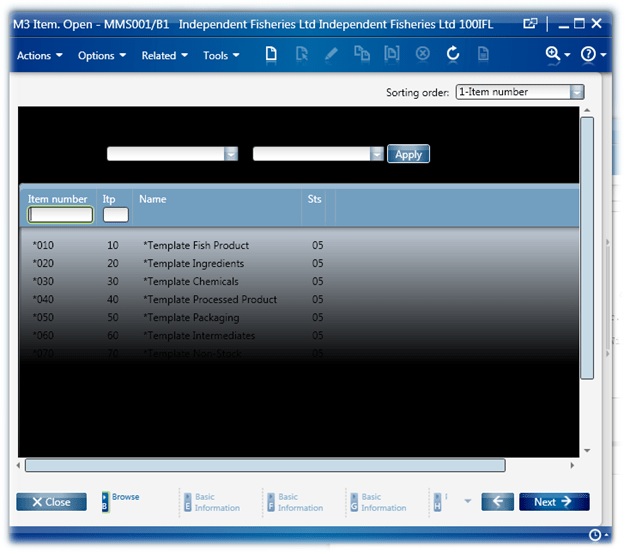
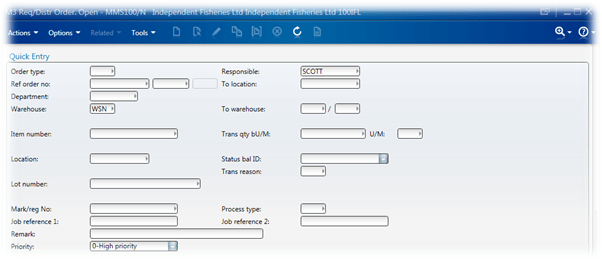
If we look at MMS100/N we see we have all the fields that we require – well – the Lot Number doesn’t appear initially which we can work around that. And we will need to add a field for the MO, but the field is purely a place holder.

The first things first, we need the Lot Number. If we enter some basic information in to the panel and then press enter and…

Presumably if the product is lot controlled the Lot Number field will appear. You’ll also notice that we have a “Confirm” that appeared, so we need to have a second enter to confirm the transaction.

So, we know we have a couple of challenges – handling the Lot Number, adding a new textbox and finally handling the need for a ‘Confirm’.

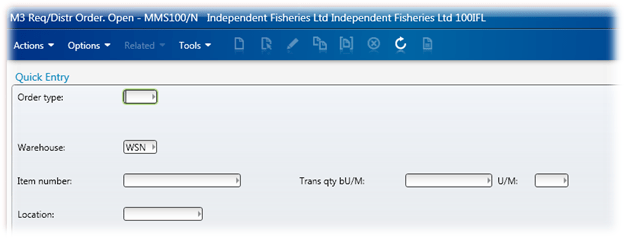
We will use the screen personalisations to hide the fields that we don’t care about – Tools -> Personalize -> Show/Hide Fields…

Which leaves us with:

Then we use our script to move fields around, add the MO and then we make the Lot Number TextBox and Label visible and Enabled

            // retrieve the controls that we need to move or manipulate
            var tbBano = ScriptUtil.FindChild(content, "WRBANO");
            var lbBanoLabel = ScriptUtil.FindChild(content, "WBA0415");
            var tbOrderType = ScriptUtil.FindChild(content, "WGTRTP");

            var tbWarehouse = ScriptUtil.FindChild(content, "WGWHLO");
            var tbOrderType = ScriptUtil.FindChild(content, "WGTRTP");
            var tbToLocation = ScriptUtil.FindChild(content, "WRWHSL");
            var tbTransactionQuantity = ScriptUtil.FindChild(content, "WRTRQT");
            var tbItemNumber = ScriptUtil.FindChild(content, "WRITNO");

            var lbItemNumber = ScriptUtil.FindChild(content, "WIT0115");

            var lbToWarehouse = ScriptUtil.FindChild(content, "WWH0115");
            var lbTransactionQty = ScriptUtil.FindChild(content, "WTR0115");

            var lbToLocation = ScriptUtil.FindChild(content, "WWS0115");

            // Set the defaults
            tbOrderType.Text = "PRF";
            tbWarehouse.Text = "WSN";

            // we do this so that we can move the focus if this control gets focus
            // (which it does by default when the panel opens)
            tbOrderType.add_GotFocus(OntbOrderTypeGotFocus);

            // we need to add a textbox for the Manufacturing Order number
            gtbManufacturingOrder = new TextBox();
            var lbManufacturingOrder = new Label();
            
            // do the repositioning of the controls
            if(null != tbWarehouse)
            {
                Grid.SetColumn(tbWarehouse, 15);
                Grid.SetRow(tbWarehouse, 2);
                tbWarehouse.TabIndex = 100;
                Grid.SetColumn(lbToWarehouse, 1);
                Grid.SetRow(lbToWarehouse, 2);
            }

            if(null != tbItemNumber)
            {
                Grid.SetColumn(tbItemNumber, 15);
                Grid.SetRow(tbItemNumber, 3);
                tbItemNumber.TabIndex = 1;
                Grid.SetColumn(lbItemNumber, 1);
                Grid.SetRow(lbItemNumber, 3);
            }
            else
            {
                MessageBox.Show("No tbItemNumber");
            }

            if(null != gtbManufacturingOrder)
            {
                lbManufacturingOrder.Content = "M/O Number:";
                Grid.SetColumn(lbManufacturingOrder, 2);
                Grid.SetRow(lbManufacturingOrder, 4);
                content.Children.Add(lbManufacturingOrder);

                Grid.SetColumnSpan(gtbManufacturingOrder, 16);
                Grid.SetColumn(gtbManufacturingOrder, 15);
                Grid.SetRow(gtbManufacturingOrder, 4);
                gtbManufacturingOrder.Name = "MO";
                gtbManufacturingOrder.TabIndex = 2;
                gtbManufacturingOrder.Margin = new Thickness(3,0,0,0);
                content.Children.Add(gtbManufacturingOrder);
                // when we unload this control, we want to know - this way we can clean up our events
                gtbManufacturingOrder.add_Unloaded(OngtbManufacturingOrderUnloaded);
            }

            if(null != tbBano)
            {
                Grid.SetColumn(tbBano, 15);
                Grid.SetRow(tbBano, 5);

                tbBano.Visibility = Visibility.Visible;
                tbBano.IsEnabled = true;

                tbBano.TabIndex = 3;

                lbBanoLabel.Visibility = Visibility.Visible;
                lbBanoLabel.IsEnabled = true;

                Grid.SetColumn(lbBanoLabel, 1);
                Grid.SetRow(lbBanoLabel, 5);
            }
            else
            {
                MessageBox.Show("No tbBano");
            }

            if(null != tbTransactionQuantity)
            {
                Grid.SetColumn(tbTransactionQuantity, 15);
                Grid.SetRow(tbTransactionQuantity, 6);
                tbTransactionQuantity.TabIndex = 4;
                Grid.SetColumn(lbTransactionQty, 1);
                Grid.SetRow(lbTransactionQty, 6);
            }
            else
            {
                MessageBox.Show("No tbTransactionQuantity");
            }

            if(null != tbToLocation)
            {
                Grid.SetColumn(tbToLocation, 15);
                Grid.SetRow(tbToLocation, 7);
                tbToLocation.TabIndex = 5;
                Grid.SetColumn(lbToLocation, 1);
                Grid.SetRow(lbToLocation, 7);
            }
            else
            {
                MessageBox.Show("No tbToLocation");
            }

The next problem is that when we enter MMS100/N the focus is in the Order Type field, but we want it in the Item Number (we pre-populate the Order Type and Warehouse fields).

So we cheat 😉 When the Order Type TextBox gets the focus we set the focus to the Item Number

        public function OntbOrderTypeGotFocus(sender: Object, e: RoutedEventArgs)
        {
            if(null != gContent)
            {
                var tbItemNumber = ScriptUtil.FindChild(gContent, "WRITNO");
                if(null != tbItemNumber)
                {
                    // if this control gets focus, move the focus to the item number textbox
                    tbItemNumber.Focus();
                }
            }
        }

When we hit enter, our lot number field gets cleared 😦 so we need to repopulate it, we do this by monitoring the Requested() storing the lot number and then repopulating it on the RequestCompleted() event. We also want to make sure that we only hit enter when we have the Confirm menu AND we have a value in the Item Number field. As discussed in a previous post (https://potatoit.wordpress.com/2012/01/16/extracting-the-error-message/)we will extract the ‘error’ message, we do that by inspecting the controller.Runtime.Result for the Confirm message.

        public function OnRequestCompleted(sender: Object, e: RequestEventArgs)
        {
            gdebug.WriteLine("OnRequestCompleted() Event Command Type: " + e.CommandType);
            gdebug.WriteLine("OnRequestCompleted() Event Command Value: " + e.CommandValue);
            gdebug.WriteLine("OnRequestCompleted() gLotNumber: " + gLotNumber);

            // verify that these are the events we are looking for!
            if(e.CommandType == MNEProtocol.CommandTypeKey)
            {
                if(e.CommandValue == MNEProtocol.KeyEnter)
                {
                    gdebug.WriteLine("OnRequestCompleted() gLotNumber: " + gLotNumber);
                    var tbBano = ScriptUtil.FindChild(gContent, "WRBANO");
                    var tbITNO = ScriptUtil.FindChild(gContent, "WRITNO");

                    // we will only set the lot number if we have an item in
                    // the Item TextBox, this way we don't
                    // accidently populate the lot number if we are getting
                    // the screen refresh after a committed transaction
                    if(false == String.IsNullOrEmpty(tbITNO.Text))
                    {
                        if(null != gController.Runtime.Result)
                        {
                            if(-1 != gController.Runtime.Result.IndexOf("<Msg>Confirm</Msg>"))
                            {
                                // repopulate the lot number
                                tbBano.Text = gLotNumber;
                                // press enter to commit the transaction
                                gController.PressKey(MNEProtocol.KeyEnter);
                            }
                        }
                    }
                    else
                    {
                        // reset the lot number back to null
                        gLotNumber = null;
                    }
                }
            }
        }

We also need to supress users pressing F4 (as all the information should be on barcodes)

        public function OnRequesting(sender: Object, e: CancelRequestEventArgs)
        {
            if(e.CommandType == MNEProtocol.CommandTypeKey)
            {
                // suppress the F4
                if(e.CommandValue == MNEProtocol.KeyF4)
                {
                    e.Cancel = true;
                }
            }
        }

Now lets put it all together

// Script Description:
//  This script is used for the forklifts, and will only run on MMS100/N
//  - will change the positions of various controls on panel MMS100/N
//  - will add a new textbox for the manufacturing order number (even though it isn't used, but it will be on the barcode labels
//  - will change the tab order
//  - will automatically press enter a second time to confirm the transaction
//  - will make the Lot Number field visible
// Prerequisits:
//  - Textboxes not required should be hidden!
//			<Scripts>
//				<Script progid="MMS100_BarcodeView_V001" argument="" target="" />
//			</Scripts>
//			<HiddenFields>
//				<HiddenField name="WRE0115" />
//				<HiddenField name="WRO1515" />
//				<HiddenField name="WTW0415" />
//				<HiddenField name="WDE0415" />
//				<HiddenField name="WTW0215" />
//				<HiddenField name="LBL_L57T5" />
//				<HiddenField name="WSTA115" />
//				<HiddenField name="WRSCD15" />
//				<HiddenField name="WGS0415" />
//				<HiddenField name="WTOF115" />
//				<HiddenField name="WGS0215" />
//				<HiddenField name="WGS0315" />
//				<HiddenField name="WRE2015" />
//				<HiddenField name="WPR0915" />
//				<HiddenField name="WGRESP" />
//				<HiddenField name="WGRORN" />
//				<HiddenField name="WGRORL" />
//				<HiddenField name="WGRORX" />
//				<HiddenField name="WGTWSL" />
//				<HiddenField name="WGDEPT" />
//				<HiddenField name="WGTWLO" />
//				<HiddenField name="WGTRDY" />
//				<HiddenField name="WRRSCD" />
//				<HiddenField name="WGGSR3" />
//				<HiddenField name="WGTOFP" />
//				<HiddenField name="WGGSR1" />
//				<HiddenField name="WGGSR2" />
//				<HiddenField name="WGREMK" />
//				<HiddenField name="WRSTAS" />
//				<HiddenField name="WGPRIO" />
//			</HiddenFields>
//          <TabOrder>WRBANO=102,WGTRTP=2147483647,WGWHLO=2147483647,WRITNO=101,WRTRQT=103,WRALUN=2147483647,WRWHSL=104,</TabOrder>

// 20120112 V001    * Initial Script Finished
//          V009    * Focus will go to the Item Number field if the OrderType field gets selected
// 20120113 V010    * removed the F4 functionality (it doesn't work for the lots anyway and the forklifts should never use lookups)
// 20120116 V011    * if incorrect data is added (eg. ITNO) when we loop attempting to submit the data

import System;
import System.Windows;
import System.Windows.Controls;
import MForms;

package MForms.JScript
{
    class MMS100_BarcodeView_V011
    {
        var gtbManufacturingOrder : TextBox = null;
        
        var gController = null;
        var gdebug = null;
        var gContent = null;

        var gLotNumber;

        public function Init(element: Object, args: Object, controller : Object, debug : Object)
        {
            var content : Object = controller.RenderEngine.Content;

            gController = controller;
            gdebug = debug;
            gContent = content;

            // retrieve the controls that we need to move or manipulate
            var tbBano = ScriptUtil.FindChild(content, "WRBANO");
            var lbBanoLabel = ScriptUtil.FindChild(content, "WBA0415");
            var tbOrderType = ScriptUtil.FindChild(content, "WGTRTP");

            var tbWarehouse = ScriptUtil.FindChild(content, "WGWHLO");
            var tbOrderType = ScriptUtil.FindChild(content, "WGTRTP");
            var tbToLocation = ScriptUtil.FindChild(content, "WRWHSL");
            var tbTransactionQuantity = ScriptUtil.FindChild(content, "WRTRQT");
            var tbItemNumber = ScriptUtil.FindChild(content, "WRITNO");

            var lbItemNumber = ScriptUtil.FindChild(content, "WIT0115");

            var lbToWarehouse = ScriptUtil.FindChild(content, "WWH0115");
            var lbTransactionQty = ScriptUtil.FindChild(content, "WTR0115");

            var lbToLocation = ScriptUtil.FindChild(content, "WWS0115");

            // Set the defaults
            tbOrderType.Text = "PRF";
            tbWarehouse.Text = "WSN";

            // we do this so that we can move the focus if this control gets focus
            // (which it does by default when the panel opens)
            tbOrderType.add_GotFocus(OntbOrderTypeGotFocus);

            // we need to add a textbox for the Manufacturing Order number
            gtbManufacturingOrder = new TextBox();
            var lbManufacturingOrder = new Label();
            
            // do the repositioning of the controls
            if(null != tbWarehouse)
            {
                Grid.SetColumn(tbWarehouse, 15);
                Grid.SetRow(tbWarehouse, 2);
                tbWarehouse.TabIndex = 100;
                Grid.SetColumn(lbToWarehouse, 1);
                Grid.SetRow(lbToWarehouse, 2);
            }

            if(null != tbItemNumber)
            {
                Grid.SetColumn(tbItemNumber, 15);
                Grid.SetRow(tbItemNumber, 3);
                tbItemNumber.TabIndex = 1;
                Grid.SetColumn(lbItemNumber, 1);
                Grid.SetRow(lbItemNumber, 3);
            }
            else
            {
                MessageBox.Show("No tbItemNumber");
            }

            if(null != gtbManufacturingOrder)
            {
                lbManufacturingOrder.Content = "M/O Number:";
                Grid.SetColumn(lbManufacturingOrder, 2);
                Grid.SetRow(lbManufacturingOrder, 4);
                content.Children.Add(lbManufacturingOrder);

                Grid.SetColumnSpan(gtbManufacturingOrder, 16);
                Grid.SetColumn(gtbManufacturingOrder, 15);
                Grid.SetRow(gtbManufacturingOrder, 4);
                gtbManufacturingOrder.Name = "MO";
                gtbManufacturingOrder.TabIndex = 2;
                gtbManufacturingOrder.Margin = new Thickness(3,0,0,0);
                content.Children.Add(gtbManufacturingOrder);
                // when we unload this control, we want to know - this way we can clean up our events
                gtbManufacturingOrder.add_Unloaded(OngtbManufacturingOrderUnloaded);
            }

            if(null != tbBano)
            {
                Grid.SetColumn(tbBano, 15);
                Grid.SetRow(tbBano, 5);

                tbBano.Visibility = Visibility.Visible;
                tbBano.IsEnabled = true;

                tbBano.TabIndex = 3;

                lbBanoLabel.Visibility = Visibility.Visible;
                lbBanoLabel.IsEnabled = true;

                Grid.SetColumn(lbBanoLabel, 1);
                Grid.SetRow(lbBanoLabel, 5);
            }
            else
            {
                MessageBox.Show("No tbBano");
            }

            if(null != tbTransactionQuantity)
            {
                Grid.SetColumn(tbTransactionQuantity, 15);
                Grid.SetRow(tbTransactionQuantity, 6);
                tbTransactionQuantity.TabIndex = 4;
                Grid.SetColumn(lbTransactionQty, 1);
                Grid.SetRow(lbTransactionQty, 6);
            }
            else
            {
                MessageBox.Show("No tbTransactionQuantity");
            }

            if(null != tbToLocation)
            {
                Grid.SetColumn(tbToLocation, 15);
                Grid.SetRow(tbToLocation, 7);
                tbToLocation.TabIndex = 5;
                Grid.SetColumn(lbToLocation, 1);
                Grid.SetRow(lbToLocation, 7);
            }
            else
            {
                MessageBox.Show("No tbToLocation");
            }
            gController.add_RequestCompleted(OnRequestCompleted);
            gController.add_Requested(OnRequested);
            gController.add_Requesting(OnRequesting);
        }

        public function OntbOrderTypeGotFocus(sender: Object, e: RoutedEventArgs)
        {
            if(null != gContent)
            {
                var tbItemNumber = ScriptUtil.FindChild(gContent, "WRITNO");
                if(null != tbItemNumber)
                {
                    // if this control gets focus, move the focus to the item number textbox
                    tbItemNumber.Focus();
                }
            }
        }

        public function OngtbManufacturingOrderUnloaded(sender: Object, e: RoutedEventArgs)
        {
            // remove the events that we are subscribed to
            gtbManufacturingOrder.remove_Unloaded(OngtbManufacturingOrderUnloaded);
            gController.remove_RequestCompleted(OnRequestCompleted);
            gController.remove_Requested(OnRequested);
            gController.remove_Requesting(OnRequesting);
        }

        public function OnRequesting(sender: Object, e: CancelRequestEventArgs)
        {
            if(e.CommandType == MNEProtocol.CommandTypeKey)
            {
                // suppress the F4
                if(e.CommandValue == MNEProtocol.KeyF4)
                {
                    e.Cancel = true;
                }
            }
        }

        public function OnRequested(sender: Object, e: RequestEventArgs)
        {
            gdebug.WriteLine("OnRequested() Event Command Type: " + e.CommandType);
            gdebug.WriteLine("OnRequested() Event Command Value: " + e.CommandValue);
            if(e.CommandType == MNEProtocol.CommandTypeKey)
            {
                if(e.CommandValue == MNEProtocol.KeyEnter)
                {
                    var tbBano = ScriptUtil.FindChild(gContent, "WRBANO");

                    // save the Lot Number for later
                    // we do this because we have to do a 'double enter'
                    // to commit the transaction and then lot number value
                    // disappears
                    gLotNumber = tbBano.Text;
                }
            }
        }

        public function OnRequestCompleted(sender: Object, e: RequestEventArgs)
        {
            gdebug.WriteLine("OnRequestCompleted() Event Command Type: " + e.CommandType);
            gdebug.WriteLine("OnRequestCompleted() Event Command Value: " + e.CommandValue);
            gdebug.WriteLine("OnRequestCompleted() gLotNumber: " + gLotNumber);

            // verify that these are the events we are looking for!
            if(e.CommandType == MNEProtocol.CommandTypeKey)
            {
                if(e.CommandValue == MNEProtocol.KeyEnter)
                {
                    gdebug.WriteLine("OnRequestCompleted() gLotNumber: " + gLotNumber);
                    var tbBano = ScriptUtil.FindChild(gContent, "WRBANO");
                    var tbITNO = ScriptUtil.FindChild(gContent, "WRITNO");

                    // we will only set the lot number if we have an item in
                    // the Item TextBox, this way we don't
                    // accidently populate the lot number if we are getting
                    // the screen refresh after a committed transaction
                    if(false == String.IsNullOrEmpty(tbITNO.Text))
                    {
                        if(null != gController.Runtime.Result)
                        {
                            if(-1 != gController.Runtime.Result.IndexOf("<Msg>Confirm</Msg>"))
                            {
                                // repopulate the lot number
                                tbBano.Text = gLotNumber;
                                // press enter to commit the transaction
                                gController.PressKey(MNEProtocol.KeyEnter);
                            }
                        }
                    }
                    else
                    {
                        // reset the lot number back to null
                        gLotNumber = null;
                    }
                }
            }
        }
    }
}


Enjoy! 🙂

Posted in Development, M3 / MoveX | Tagged , , , , , , , , | 1 Comment

Modification Removal – Freecap In OIS101 – BackgroundWorker and Adding Columns

In this post I will be rather wordy, as it marks a turning point – the realisation of a dream 😉 If you want to avoid some of the excessive chatter I’ve divided this in to sections so you can easily get past the BS – just scroll down to “The Problem”, or if you want to avoid explanations, scroll down to “And the Result” to see the script itself – extensively commented.

The Background

Sometimes when a business project is of sufficient size, snap decisions get made which have long term impacts – sadly with our implementation there were a number of wants in sensitive areas that required mods which were authorised for which we are still paying for over seven years later.

There are always holes in functionality – even with tailored software you’ll discover a perceived need in a certain piece of functionality that was overlooked or was only uncovered after extensive use of a product. People tend to think differently, and some work in rather unusual chaotic ways – so your efficient way may not be the efficient way for someone else.

For those of you that haven’t met me, I have been quite an advocate of modification removal through the use of jscripts – I’ve tried to raise awareness of some of the benefits of jscripts instead of mods in the NZ M3 community – even made a few jabs at Lawson to try to get them to get the word out to the consultants. Infact one of the selling points of upgrading to M3 10.1 here was that we would have access to two very kewl technologies – Smart Office (yay!) and WebServices which should allow us to remove almost all of our modifications.

To keep short timeframes to keep our staff focused, our upgrade was inplace – all mods were uplifted as is with some consulting time spared to provide areas that we can look at process improvement/mod removal. We would then quietly start working on modification removal through process change or jscripts throughout the 2011 year. This didn’t pan out due to spending the better part of 2011 scrambling to get our network running properly after some substantial earthquakes.

Why this long post? Well, if you’ve been reading this blog for a while, you’ll notice I like the sound of my own words 😉 And well, to be honest, I am quite excited to finally be able to move forward and clean up a lot of loose ends.

The Problem

We are predominantly an export company, ~80 – 85% of our product gets exported in shipping containers. A single container could have a single SKU of product, or it could have a dozen different SKUs. However, one thing that we have to do is ensure containers are packed to capacity. A container that isn’t packed to capacity increases the chances of product getting damaged considerably and isn’t very efficient.

We had previous systems where we could key in an order and it would calculate the approximate percentage of a 20′ container they would consume – these systems varied from a spreadsheet to a sprawling database in FileMaker. Our staff could determine how many containers needed to be booked or if an order needed to be increased or decreased.

In the efforts to remove peripheral repositories of data, a modification was made to OIS101 so it would take the Free Cap Units in MMS001 and calculate a container percentage of each individual line. It would then also provide a total percentage. The Free Cap Units in MMS001 were expressed as a percentage of a 20′ container that a single unit would consume.

Given the modification is in a rather sensitive area – which has been proven to create the occasional head-ache, and given the modification is purely for display, it would be nice to have it removed. Also, knew it would be challenging as there would be a need for several ‘new’ techniques to achieve success.

Sometimes the Simplest Things…

…can be insanely complicated. 🙂

The concept was that I’d add a new column to the ListView in the Init(), I’d spin up a BackgroundWorker thread to retrieve the Free Cap units through webservices – this WebService would actually use the SQL component and request all of the lines and do the actual math to calculate the freecap – returning each line with the appropriately calculated free cap value. I’d iterate through the lines, extract the ITNO and the ORQT and search for them in the data returned from the webservice so I could extract the container percentage. Then I would populate my column with the data and finally create a total which I’d display in a TextBox I added by simply adding all of the container percentages together and writing it out to a TextBox.

Adding columns in Smart Office wasn’t hard, as I previously posted. Actually getting them to work properly however was non-trivial – so the entire project got shelved due to frustration and time commitments to disaster recovery.

But then I spied a posting by Thibaud http://thibaudatwork.wordpress.com/2011/09/22/how-to-add-a-column-to-a-list/ which described how to do it quite nicely. I did some work based on the posting and got it working quite happily, so I was nearly ready to spend some time on this again.

Over and above this, as I mentioned above I had wanted to look in to spinning it up a background thread – I had been toying with the concept but as part of it wanted to figure out how to use delegates in jscript to get around updating content on controls from a different thread (only the UI thread can update controls). Eventually I re-read the .Net documentation and realised that the OnWorkerCompleted event was called on the UI thread – I swear the MSDN documentation didn’t say that when I first started playing with BackgroundWorker but then I am prone to skim reading :-). Shortly after that and much to my delight Karin posted an article on the BackgroundWorker thread http://lawsonsmartoffice.wordpress.com/2011/12/19/calling-m3-apis-in-jscript-on-a-background-thread/ – I did have to laugh at the Simpsons picture.

So, all of the pieces were falling in to place…

The WebService

I won’t go through the creation of the WebService as I have done so in a previous post – and this particular posting is long enough as is. However, here is a snapshot of the completed WebService


WebService Tweaks from Previous Code

The previous code that I had used to process webservice results wasn’t up to the task of what I wanted to achieve. I needed to take the stream that was returned and then read it in a controlled fashion, creating objects from a new class which would be added to an array that we could search.

To this end, I made significant changes to the decodeSOAPResult() function, including needing to orientate my code – getting it to the correct depth to start processing the OrderLineCapItem elements. To do this I created this wee loop.

                // loop through the incoming stream until
                // we get to our OrderLineCapItem Element
                while(xmrReader.Read())
                {
                    if(xmrReader.NodeType == XmlNodeType.Element)
                    {
                        if(false == String.IsNullOrEmpty(xmrReader.Name))
                        {
                            if(0 == String.Compare("OrderLineCapItem",xmrReader.Name))
                            {
                                break;
                            }
                        }
                    }
                }

Once we were at our starting point we could extract useful information. I would process an element at a time, extracting the value and populating a OrderLineCapItem object with the values until we had populated all of our values. Then it would be pushed in to an array.


Not All ListViews are Created Equal

I knew that not all of our views had the Item Number and the Quantity in the same column, so this meant I needed to be pretty dynamic in the way that I determined their location. After a little bit of fumbling around I noticed that the ListControl.Columns had the four digit name of the column, so I created a little loop that would look for ITNO and ORQT. As it turns out, one of the Views used ORQA instead of ORQT – so we also look for that.

            // loop through the ListControl columns looking for
            // specific column names (ITNO, ORQT, ORQA)
            for(var j = 0; j < lcListControl.Columns.Count; j++)
            {
                // call me paranoid
                if(false == String.IsNullOrEmpty(lcListControl.Columns[j]))
                {
                    // we're searching for the position of ITNO
                    if(0 == String.Compare("ITNO", lcListControl.Columns[j]))
                    {
                        giITNOPos = j;
                        gdebug.WriteLine("ITNO found! " + j);
                    }
                    // now search for the quantity
                    else if(0 == String.Compare("ORQT", lcListControl.Columns[j]))
                    {
                        giORQTPos = j;
                        gdebug.WriteLine("ORQT found! " + j);
                    }
                    // and again, the quantity
                    else if(0 == String.Compare("ORQA", lcListControl.Columns[j]))
                    {
                        giORQTPos = j;
                        gdebug.WriteLine("ORQA found! " + j);
                    }
                }
                // if we have found the both the item number
                // and the quantity, then we can exit the loop
                if( (-1 != ITNOPos) && (-1 != ORQTPos) )
                {
                    break;
                }
            }

I also had my memory refreshed :-[ that there are events will remove controls from the panel and call the Init(), this meant that I needed to dynamically determine where the percentage column that I added was. Should be trivial, but it wasn’t quite as easy as I hoped. I ended up creating a function which would loop through the ListView columns and search for the text that I added.

        // look through the column contents for the string
        // % of Container
        // this will be the column that we should be working
        // with
        public function findPercentageColumn(acColumns) : Int32
        {
            var result : Int32 = -1;
 
            // reverse loop through the columns (our column will tend to be at the end)
            // for(var i = 0; i < acColumns.Count; i++)
            for(var i = (acColumns.Count-1); -1 < i; i--)
            {
                // retrieve a column header
                var chColumnHeader = acColumns[i].Header;
 
                // extract its content (most of the standard ones
                // will have StackPanels, but we're lazy and
                // haven't bothered, we just have some text
                var strContent = chColumnHeader.Content;
 
                if(0 == String.Compare("% of Container", strContent))
                {
                    // we have found the column we are after
                    // now we should return the result and break
                    // from the loop
                    result = i;
                    break;
                }
            }
 
            return(result);
        }

And the Result…

And finally we get to the code itself. I still have user validation to occur (mainly around pulling out the modification itself rather than the script), but we’re looking pretty good. Don’t forget to change the username and password for logging in to the webservices in createSOAPRequest()

As always, code is presented as is without any warranty of any sort. It may or may not work for you, create world peace or put an end to reality tv…

import System;
import System.Windows;
import System.Windows.Controls;
import MForms;
 
import System.IO;
import System.Net;
// import System.Collections.Generic;
//import System.Collections.ObjectModel;
import System.ComponentModel;
 
import Mango.UI.Core;
 
import System.Xml;
import System.Xml.Serialization;
import System.Web.Services.Protocols;
 
import Mango.UI.Services.Lists;
 
package MForms.JScript
{
    class ColumnTest_V007
    {
        var gdebug;
 
        var giITNOPos : Int32 = -1;    // item number position
        var giORQTPos : Int32 = -1;    // order quantity position
 
        var gtbTotalPercentage : TextBox = null;
 
        var gController = null;
        var glvListView = null;
 
        var gobjArray : Array = null;
 
        var giItemsPopulatedUpTo : Int32 = 0;   // this keeps track of the number of rows that we populated in our column
        var giColumnIndex : Int32 = -1;          // this is where we have created our column
 
        var gbwBackgroundWorker : BackgroundWorker = new BackgroundWorker();
 
        var gstrOrderNumber = "";
 
        // this is how we will format percentage strings - we want consistency in the
        // two areas that we use this
        // N4 = number, to 4 decimal places
        var gstrPercentageFormat = "N4";
 
        public function Init(element: Object, args: Object, controller : Object, debug : Object)
        {
            gdebug = debug;
            gController = controller;
 
            var content : Object = controller.RenderEngine.Content;
 
            // we set the items populated up to back to 0 here so when we add/delete/refresh the listview
            // we actually repopulate everything
            giItemsPopulatedUpTo = 0;
 
            // create a label with the content of "Container %" and add it our panel
            var lblTotalPercentageTotal = new Label();
            lblTotalPercentageTotal.Content = "Container %:";
 
            // for consistency we *should* use the Lawson settings, for
            // height, margin and padding etc so here goes 🙂
            lblTotalPercentageTotal.MinHeight = Configuration.ControlHeight;
            lblTotalPercentageTotal.Height = Configuration.ControlHeight;
            lblTotalPercentageTotal.Margin = Configuration.ControlMargin;;
            lblTotalPercentageTotal.Padding = Configuration.ControlPadding;;
            // set the label position
            Grid.SetColumnSpan(lblTotalPercentageTotal, 13);
            Grid.SetColumn(lblTotalPercentageTotal, 55);
            Grid.SetRow(lblTotalPercentageTotal, 1);
            // finally add the label to the panel
            content.Children.Add(lblTotalPercentageTotal);
 
            // create the actual TextBox which will show the container percentage
            gtbTotalPercentage = new TextBox();
            // set it to read only
            gtbTotalPercentage.IsReadOnly = true;
            gtbTotalPercentage.IsEnabled = false;
            gtbTotalPercentage.Width = 100;
 
            gtbTotalPercentage.MinHeight = Configuration.ControlHeight;
            gtbTotalPercentage.Height = Configuration.ControlHeight;
            gtbTotalPercentage.Margin = Configuration.ControlMargin;;
            gtbTotalPercentage.Padding = Configuration.ControlPadding;;
 
 
            // set the TextBox position
            Grid.SetColumnSpan(gtbTotalPercentage, 13);
            Grid.SetColumn(gtbTotalPercentage, 65);
            Grid.SetRow(gtbTotalPercentage, 1);
                
            // finally add the TextBox to the grid
            content.Children.Add(gtbTotalPercentage);
 
            // we want to know when the TotalPercentage TextBox is unloaded,
            // this gives us an opportunity to do some clean up
            gtbTotalPercentage.add_Unloaded(OngtbTotalPercentageUnloaded);
 
            // we want to keep track on RequestCompleted and Requested events
            // RequestCompleted is particularly importanted as we need to
            // handle page down events where additional data may be added
            // to the listview - which we then need to populate
            gController.add_RequestCompleted(OnRequestCompleted);
            // gController.add_Requested(OnRequested);
 
            // we want to subscribe to the DoWork and RunWorkerCompleted
            // events of our background worker thread.
            // our Background worker thread will do the webservice call
            // and we will then use the RunWorkerCompleted to actually
            // populate our results
            gbwBackgroundWorker.add_DoWork(OnDoWork);
            gbwBackgroundWorker.add_RunWorkerCompleted(OnRunWorkerCompleted);
 
            glvListView = controller.RenderEngine.ListControl.ListView;
 
            // we need to retrieve our order number
            var tbOrderNUmber = ScriptUtil.FindChild(content, "OAORNO");
 
            // store the order number for usage elsewhere
            gstrOrderNumber = tbOrderNUmber.Text;
 
            // add our new column
            createColumnHeader(controller.RenderEngine.ListControl, "% of Container");
 
            // run the backgroundworker threads task
            gbwBackgroundWorker.RunWorkerAsync();
 
            //createColumnHeader(controller.RenderEngine.ListControl, "% of Container");
        }
 
        // this function actually goes out, constructs and calls our webservice
        // on our background thread
        public function OnDoWork(sender : Object, e : DoWorkEventArgs)
        {
            try
            {
                // gobjArray = doRequest(createSOAPRequest("0000071780"));
                // gobjArray = doRequest(createSOAPRequest("0000037455"));
                gobjArray = doRequest(createSOAPRequest(gstrOrderNumber));
            }
            catch(ex)
            {
                gdebug.WriteLine("OnDoWork() - Exception: " + ex.message);
            }
        }
 
        // once our backgroundworker thread has finished, we need to update the UI
        public function OnRunWorkerCompleted(sender : Object, e : RunWorkerCompletedEventArgs)
        {
            try
            {
                // populate the new column with the new container percentage values
                populateNewColumn(glvListView, gobjArray);
                // update the total textbox with the total percentage
                populateContainerTotalTextBox(gobjArray);
            }
            catch(ex)
            {
                gdebug.WriteLine("OnRunWorkerCompleted() - Exception: " + ex.message);
            }
        }
 
        
        public function OngtbTotalPercentageUnloaded(sender: Object, e: RoutedEventArgs)
        {
            cleanup();
        }
 
        // this function will go out and do some cleanup
        public function cleanup()
        {
            // remove the events that we have subscribed to
            gbwBackgroundWorker.remove_DoWork(OnDoWork);
            gbwBackgroundWorker.remove_RunWorkerCompleted(OnRunWorkerCompleted);
            
            gController.remove_RequestCompleted(OnRequestCompleted);
            gtbTotalPercentage.remove_Unloaded(OngtbTotalPercentageUnloaded);
        }
 
        // we will calculate the total percentage our entire order consumes
        public function populateContainerTotalTextBox(aobjArray : Array)
        {
            var dblTotal : double = 0.0;
            try
            {
                // loop through the array returned from our webservice
                // the array will be ALL of the lines in the order,
                // not just the lines that Smart Office currently has loaded
                for(var i = 0; i < aobjArray.length; i++)
                {
                    var olciCurrent : OrderLineCapItem = aobjArray[i];
                    if(null != olciCurrent)
                    {
                        // In the past I have seen odd values in the lower
                        // part of doubles
                        if(olciCurrent.CONTAINERPERCENTAGE > 0.000001)
                        {
                            dblTotal += (olciCurrent.CONTAINERPERCENTAGE/100);
                        }
                    }
                }
                // format and display based on the value in the gstrPercentageFormat
                gtbTotalPercentage.Text = dblTotal.ToString(gstrPercentageFormat);
            }
            catch(ex)
            {
                gdebug.WriteLine("populateContainerTotalTextBox() Exception: " + ex.Message);
            }
        }
 
        // go our and do the heavy lifting and populate the new column
        // this function doesn't need to do any calculations as we
        // will actually just search through our array of values looking
        // for a match on quantity and item code
        public function populateNewColumn(alvListView, aobjArray : Array)
        {
            try
            {
                if(null != aobjArray)
                {
                    // we need the positions of the Item Number and Quantity columns
                    // so we have seed information to search on
                    if( (-1 != giITNOPos) && (-1 != giORQTPos) )
                    {
                        var itItemList = alvListView.Items;
 
                        for(var i = giItemsPopulatedUpTo; i < itItemList.Count; i++)
                        {
                            var clColumns = alvListView.View.Columns;
                            var itItem = itItemList[i];
                            var itOldArray = itItem.Items;
 
                            // create an array of strings that will store our new 
                            // values - we will be removing the entire row and 
                            // adding a replacement
                            var itNewArray = new String[clColumns.Count];
 
                            var strBase : Object[] = itItemList[i].Items[giITNOPos];
 
                            // retrieve the Item Number
                            var strITNO : String = strBase[giITNOPos];
 
                            // retrieve the quantity
                            var strORQT : String = strBase[giORQTPos];
 
                            // look for an entry that matches both the item number and quantity
                            var olciMatched = searchForProduct(aobjArray, strITNO , strORQT);
                            
                            if(null != olciMatched)
                            {
                                // copy the old values to the array that will be displayed
                                itOldArray.CopyTo(itNewArray, 0);
 
                                // set our added columns value to the container percentage
                                // we also make sure that we format the value as per
                                // the settings in gstrPercentageFormat
                                itNewArray[giColumnIndex] = (olciMatched.CONTAINERPERCENTAGE/100).ToString(gstrPercentageFormat);
 
                                // change the items so they are our new values
                                itItem.Items = itNewArray;
 
                                // remove the original row from our listview
                                itItemList.RemoveAt(i);
                                // insert our new row - maintaining its position in the listview
                                itItemList.Insert(i, itItem);
                            }
                        }
                        // keep track of where we have populated up to
                        giItemsPopulatedUpTo = itItemList.Count;        // we don't want to populate the column if it is already been populated
                    }
                }
            }
            catch(exouter)
            {
                gdebug.WriteLine("populateNewColumn() Exception: " + exouter.message);
            }
        }
 
        // look through the column contents for the string
        // % of Container
        // this will be the column that we should be working
        // with
        public function findPercentageColumn(acColumns) : Int32
        {
            var result : Int32 = -1;
 
            // reverse loop through the columns (our column will tend to be at the end)
            // for(var i = 0; i < acColumns.Count; i++)
            for(var i = (acColumns.Count-1); -1 < i; i--)
            {
                // retrieve a column header
                var chColumnHeader = acColumns[i].Header;
 
                // extract its content (most of the standard ones
                // will have StackPanels, but we're lazy and
                // haven't bothered, we just have some text
                var strContent = chColumnHeader.Content;
 
                if(0 == String.Compare("% of Container", strContent))
                {
                    // we have found the column we are after
                    // now we should return the result and break
                    // from the loop
                    result = i;
                    break;
                }
            }
 
            return(result);
        }
 
        // this function will go out and create our column header
        public function createColumnHeader(alcControl, astrColumnName : String)
        {
            var lcListControl = alcControl;
            var lvListView = alcControl.ListView;
            var clColumns = lvListView.View.Columns;
 
            // locate the percentage column, if it doesn't exist
            // then we should add it.
            // we do this here as when certain operations are called
            // our controls get removed and the Init() is called
            // again.
            giColumnIndex = findPercentageColumn(clColumns);
            if(-1 == giColumnIndex)
            {
                var gvchColumnHeader = new GridViewColumnHeader();
                var gvcColumn = new GridViewColumn();
 
                // set the column name, we should really use a StackPanel
                // here so everything lines but, but I'm lazy 😉
                gvchColumnHeader.Content = astrColumnName;
                // set the header of the column to our new header object
                gvcColumn.Header = gvchColumnHeader;
 
                gvcColumn.CellTemplateSelector = new ListCellTemplateSelector(clColumns.Count, alcControl.Columns);
 
                // finally, attach the column to our columns list
                clColumns.Add(gvcColumn);
 
                // store the position of our new column
                giColumnIndex = clColumns.Count - 1;
            }
 
 
            // loop through the ListControl columns looking for
            // specific column names (ITNO, ORQT, ORQA)
            for(var j = 0; j < lcListControl.Columns.Count; j++)
            {
                // call me paranoid
                if(false == String.IsNullOrEmpty(lcListControl.Columns[j]))
                {
                    // we're searching for the position of ITNO
                    if(0 == String.Compare("ITNO", lcListControl.Columns[j]))
                    {
                        giITNOPos = j;
                        gdebug.WriteLine("ITNO found! " + j);
                    }
                    // now search for the quantity
                    else if(0 == String.Compare("ORQT", lcListControl.Columns[j]))
                    {
                        giORQTPos = j;
                        gdebug.WriteLine("ORQT found! " + j);
                    }
                    // and again, the quantity
                    else if(0 == String.Compare("ORQA", lcListControl.Columns[j]))
                    {
                        giORQTPos = j;
                        gdebug.WriteLine("ORQA found! " + j);
                    }
                }
                // if we have found the both the item number
                // and the quantity, then we can exit the loop
                if( (-1 != ITNOPos) && (-1 != ORQTPos) )
                {
                    break;
                }
            }
        }
 
        // this function will search through the array returned from our webservice
        // for a matching item number and quantity, to finally return the associated
        // OrderLineCapItem object
        private function searchForProduct(arArray, astrItemNumber : String, astrQuantity : String) : OrderLineCapItem
        {
            var result : OrderLineCapItem = null;
 
            //gdebug.WriteLine("searchForProduct Array Length = " + arArray.length);
            for(var i = 0; i < arArray.length; i++)
            {
                var olciCurrent : OrderLineCapItem = arArray[i];
                if(null != olciCurrent)
                {
                    if((olciCurrent.OBITNO != null) && (olciCurrent.OBORQT != null))
                    {
                        // extract the item number, trim any trailing whitespaces
                        var strItem : String = olciCurrent.OBITNO.Trim();
                        var strQuantity : String = olciCurrent.OBORQT;
 
                        if(0 == String.Compare(strItem, astrItemNumber))
                        {
                            if(0 == String.Compare(strQuantity, astrQuantity))
                            {
                                // we have a match, return the OrderLineCapItem
                                // and break from the loop
                                result = olciCurrent;
                                break;
                            }
                        }
                    }
                }
            }
 
            return(result);
        }
 
        public function createSOAPRequest(astrOrderNumber : String) : String
        {
            return("<soapenv:Envelope xmlns:soapenv=\"http://schemas.xmlsoap.org/soap/envelope/\" xmlns:mws2=\"http://mws.intentia.net/mws2\" xmlns:get=\"http://www.indfish.co.nz/FreeCapsSQL/GetFreeCaps\"><soapenv:Header><mws2:mws><mws2:user>potatoit</mws2:user><mws2:password>potatoit </mws2:password><mws2:company>100</mws2:company><mws2:division>IFL</mws2:division></mws2:mws></soapenv:Header><soapenv:Body><get:GetFreeCaps><get:OrderNumber>" + astrOrderNumber + "</get:OrderNumber></get:GetFreeCaps></soapenv:Body></soapenv:Envelope>");
        }
 
        // in previous situations when using WebServices I didn't need to
        // worry so much about a list of data being returned, this meant
        // that tweaks are needed to make this work with a list of data
        public function doRequest(astrXMLRequest : String) : Array
        {
            var result : Array;
            // we are going to use the HttpWebRequest object
            // http://msdn.microsoft.com/en-us/library/system.net.httpwebrequest.aspx
            // and we want to connect to the ItemFreeCaps2 service
            var hwrRequest : HttpWebRequest = WebRequest.Create("http://wlmx02.indfish.co.nz:12000/lwstest/services/FreeCapsSQL");
 
            // ensure we actually managed to create something
            if(null != hwrRequest)
            {
                // here we're defining our actions and content types
                hwrRequest.Headers.Add("SOAPAction","\"\"");
                hwrRequest.ContentType = "text/xml;charset=\"utf-8\"";
                hwrRequest.Method = "POST";
                hwrRequest.Accept = "text/xml";
 
                hwrRequest.Proxy = GlobalProxySelection.GetEmptyWebProxy();
 
                // we are going to use a stream to write out our request (and also read it later)
                var strmStream : Stream = hwrRequest.GetRequestStream();
                if(null != strmStream)
                {
                    // SOAP is basically just xml, so we are going to use the XML framework
                    // to make our lives easier.
                    // Create an XML Document
                    var xmdDocument : XmlDocument = new XmlDocument();
                    if(null != xmdDocument)
                    {
                        // we then add the String to our XML document
                        xmdDocument.LoadXml(astrXMLRequest);
 
                        // the save of the document to our stream actually sends the request
                        // to the server
                        xmdDocument.Save(strmStream);
 
                        // close our stream
                        strmStream.Close();
 
                        // this section is wrapped in a try .. catch()
                        // block because I had a lot of problems getting
                        // this running initially.
                        try
                        {
                            // now we want to get a response
                            var wresponse : WebResponse = hwrRequest.GetResponse();
                            if(null != wresponse)
                            {
                                // we like using streams, so get the stream
                                // connection
                                strmStream = wresponse.GetResponseStream();
                                if(null != strmStream)
                                {
                                    // create a streamreader to retrieve the data
                                    var srStreamReader : StreamReader = new StreamReader(strmStream);
                                    if(null != srStreamReader)
                                    {
                                        // and finally we pass the stream handle to the decode
                                        // function
                                        var objResult = decodeSOAPResult(srStreamReader);
                                        if(null != objResult)
                                        {
                                            result = objResult;
                                        }
                                        else
                                        {
                                            gdebug.WriteLine("no result from request");
                                        }
 
                                        // close the response
                                        wresponse.Close();
 
                                        // close the stream reader
                                        srStreamReader.Close();
                                    }
                                }
                            }
                            else
                            {
                                gdebug.WriteLine("No Response was returned");
                            }
                        }
                        catch(e)
                        {
                            gdebug.WriteLine("Exception: " + e.message);
                        }
                    }
                }
            }
            else
            {
                gdebug.WriteLine("doRequest() unable to create");
            }
            return(result);
        }
 
        public function decodeSOAPResult(asrStream : StreamReader)
        {
            var result;
            try
            {
                // create an XmlReader from the stream handle
                var xmrReader = XmlReader.Create(asrStream);
 
                // loop through the incoming stream until
                // we get to our OrderLineCapItem Element
                while(xmrReader.Read())
                {
                    if(xmrReader.NodeType == XmlNodeType.Element)
                    {
                        if(false == String.IsNullOrEmpty(xmrReader.Name))
                        {
                            if(0 == String.Compare("OrderLineCapItem",xmrReader.Name))
                            {
                                break;
                            }
                        }
                    }
                }
                
                // this is the array where we will be storing our objects
                var olciArray = new Array();
 
                // continue reading until we hit the end of file (EOF)
                while(false == xmrReader.EOF)
                {
                    var olciCurrent : OrderLineCapItem = new OrderLineCapItem();
                    xmrReader.ReadStartElement("OrderLineCapItem");
 
                    xmrReader.ReadStartElement("OBORNO");
                    
                    olciCurrent.OBORNO = xmrReader.ReadString();
                    xmrReader.ReadEndElement();
                    xmrReader.ReadStartElement("OBITNO");
                    
                    olciCurrent.OBITNO = xmrReader.ReadString();
                    xmrReader.ReadEndElement();
                    xmrReader.ReadStartElement("MMFCU1");
                    
                    olciCurrent.MMFCU1 = xmrReader.ReadString();
                    xmrReader.ReadEndElement();
                    xmrReader.ReadStartElement("OBORQT");
                    
                    olciCurrent.OBORQT = xmrReader.ReadString();
                    xmrReader.ReadEndElement();
                    xmrReader.ReadStartElement("CONTAINERPERCENTAGE");
                    
                    olciCurrent.CONTAINERPERCENTAGE = xmrReader.ReadString();
                    xmrReader.ReadEndElement();
 
                    xmrReader.ReadEndElement();
 
                    // add our newly populate object to the array
                    olciArray.push(olciCurrent);
 
                    if(false == String.IsNullOrEmpty(xmrReader.Name))
                    {
                        if(0 != String.Compare("OrderLineCapItem",xmrReader.Name))
                        {
                            // exit if the next element isn't an OrderLineCapItem element
                            break;
                        }
                    }
 
                }
                // close the reader
                xmrReader.Close();
                // return our array
                result = olciArray;
            }
            catch(ex)
            {
                gdebug.WriteLine("Exception decoding the SOAP request " + ex.message);
            }
            return(result);
        }
 
        public function OnRequestCompleted(sender: Object, e: RequestEventArgs)
        {
            // verify that these are the events we are looking for!
            if(e.CommandType == MNEProtocol.CommandTypePage)
            {
                // we had a page event, this means that we may have new data
                // that needs its percentages to be updated
                populateNewColumn(glvListView, gobjArray);
            }
        }
    }
 
    public class OrderLineCapItem
    {
        var OBORNO : String;
        var OBITNO : String;
        var MMFCU1 : double;
        var OBORQT : double;
        var CONTAINERPERCENTAGE : double;
    }
}
 

Happy coding!

Posted in Development, M3 / MoveX, Webservices | Tagged , , , , , , , , | 4 Comments