Extracting the Error Message

It’s been a while since my last meaningful post – I’ve been tied up with our DR Project (but working with some pretty funky technologies – I like Virtualisation, but now that I have been working with a Veeam Backup and Replication my love of the technology has increased substantially). On the plus side, during my break I started thinking and playing around with methods to remove some of our modifications – something that I have been preaching for over a year now but fallout from pesky national state of emergency got in the way – so I expect to be posting a few more articles over the next week or so.

One of the headaches that I’ve had with Smart Office and jscripts is handling messages that come back from the server – be they information, warnings or errors.

I’ve needed to keep track of them for GL Imports and Budget Imports and more recently my work on removing one of our modifications (which I will be discussing soon). Previously I’d walk the visual tree looking for the control which displayed the error message at the bottom of the panel – a method which works but isn’t really fantastic and encounters issues if the user has their error messages displayed in a dialog box.

The removal of one of our modifications is a panel that has been changed to remove a lot of needless fields, and change the tab-order for our forklift users. Our forklift users do tend to get a little bored at times and are more likely than most of my other staff to change settings – for example, turning dialog box notifications on :-@

So, I wanted something a little more robust, not to mention I find it a little offensive that I should have to jump through those hoops to get a simple piece of information.

Out came Visual Studios Object Browser and a search for the word “Error” – looks like there are lots of methods to retrieve various error information within Smart Office but nothing seemed to fit the bill. The few that did seemed to fail when I created a script to test them.

But fate smiled upon me – and I found something interesting. MForms.Runtime has a class called Runtime, under Runtime is a property called “Result”. Looked very promising.

So I threw together a little wee script which would query what was returned. And well, it’s a fair bit of information to be honest, but I hit pay-dirt.

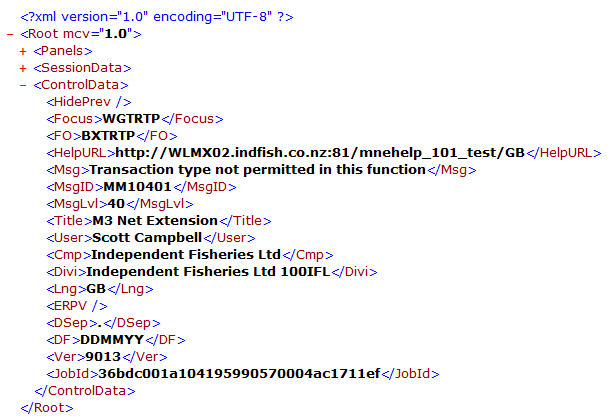
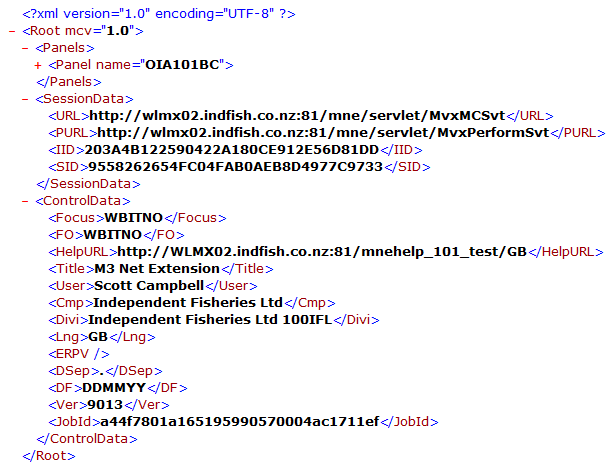
The Runtime.Result property returns an xml document which provides layout information for the panel, information about the session and then ControlData. It is the ControlData element that I was interested in.

Under the ControlData element there was three elements that held information that I was looking for, <Msg> <MsgID> <MsgLvl>, ok, well it’s really only one of these that I was interested in – the <Msg> element. It contains the data / message that will be displayed to the user. If there is no error/warning/information, then the message element won’t appear at all in the response document – so you can search for the existence of the <Msg> element within the document <string>.IndexOf(“<Msg>”) and fail if it exists, or succeed if it doesn’t exist.


Runtime.Result property returned by MMS100 – it shows a message of “Transaction type not permitted in this function”

Runtime.Result property returned by OIS101 after adding a line – it shows no <Msg> element whatsoever as no error occurred.

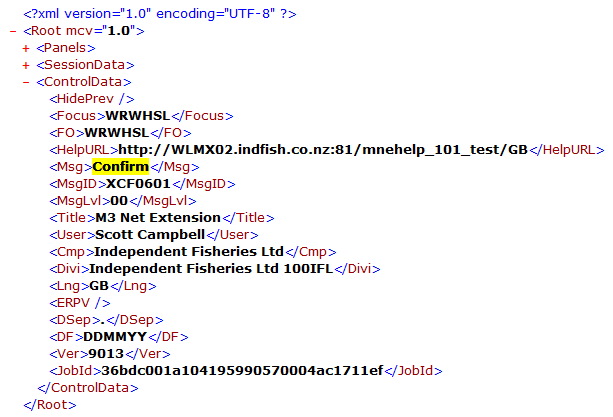
And the curveball

MMS100/N Quick Entry on a lot controlled item comes up with a request to confirm before the submission of the transaction.

Below is the script that I used to extract the XMLDocument.

If you attach it to OIS101 and then add a line with an incorrect product code you’ll see the results – run the script again then try again entering a correct product code.

Oh, if anyone finds a better way then please let me know 🙂

import System;
import System.Windows;
import System.Windows.Controls;
import MForms;
import Mango.Core;
import MForms.Controls;

import Mango.UI.Services.Applications;

package MForms.JScript {
   class testResponse {
   
           var gController;
           var gDebug;
      public function Init(element: Object, args: Object, controller : Object, debug : Object) {
            gController = controller;
            gDebug = debug;
            
         var content : Object = controller.RenderEngine.Content;

         // TODO Add your code here

         gController.add_RequestCompleted(OnRequestCompleted);
      }
      
      public function OnRequestCompleted(sender: Object, e: RequestEventArgs)
      {
          if(e.CommandType == MNEProtocol.CommandTypeKey)
          {
              if(e.CommandValue == MNEProtocol.KeyEnter)
              {
                  if(null != gController.Runtime.Result)
                  {
                      gDebug.WriteLine(gController.Runtime.Result);

// remove the event handler
                  gController.remove_RequestCompleted(OnRequestCompleted);
              }
          }
      }
      
   }
}


Posted in Development, How Far is Too Far?, M3 / MoveX | Tagged , | 3 Comments

Inforum 2012

Flights booked, all signed up for Inforum and then off to Moab for some mountain biking before a quick road trip to San-Fran 🙂

Posted in M3 / MoveX, Misc | Tagged | 2 Comments

So What Happens when you Hit that Compile Button?

After winding down from upgrading one of our primary servers to VMware 5, I thought I’d have a little look at seeing if I could figure out how to use delegates in a Jscript when I came across a very odd wee error “System.IO.FileNotFoundException: Could not load file or assembly ‘file:///C:\Users\Scott\AppData\Local\Temp\df5xdu2m.dll’ or one of its dependencies. The system cannot find the file specified.

File name: ‘file:///C:\Users\Scott\AppData\Local\Temp\df5xdu2m.dll'”

Being curious I thought, huh? I compiled a different script and the error went away, compiling my delegate test script it came back so off I dutifully went to my temp directory to have a look at this file. Fairly small and then it clicked! But I figured I’d double check to make sure what I thought I saw was infact actually happening. I compiled a large script and the file changed its size considerably.

Getting a little excited (I had wondered about where scripts go when you compile them but had just been too lazy to fire up process monitor to look) I pointed Visual Studios Object browser at the .dll and was pleasantly surprised.

This was effectively my compiled class.

So, it looks like when you hit that compile button Smart Office will compile the file in to a .dll in your temp directory, it will then presumably bind to that .dll file when you hit the run button.

Pretty nifty eh? 🙂

Posted in How Far is Too Far?, M3 / MoveX | 1 Comment

Writing Non-Standard Characters – Re: Serial Communications

So, in my previous blog post I mentioned a friend was looking at reading some data over the serial port from a set of scales. He did however come up against a small problem, the scales needed to be set a command code before they would output the weight.

So a pure send -> receive relationship.

Of-course the next stumbling block is that they want a byte code of 5 to be sent to initiate the conversation, not so easy now 😦

Thankfully Jscript has a pretty easy way to deal with this situation, the String object has a method called fromCharCode() which will take a decimal value and spit out the character code.

An example here is outputting the character code 48 (which is the number 0) would look something like this:

var strCode2 : String = String.fromCharCode(48);
debug.WriteLine(strCode2);

Happy coding! 🙂

Posted in Development, M3 / MoveX | Tagged , , | Leave a comment

JScripts and Serial Communications – Scales

Ah, the joys of trying to catch up on over 12 months of patching and upgrading servers, sadly between it and working through the finer details of our DR Plan there has been very little time for me to really invest much time in jscripts recently.

A few weeks ago I had an interesting conversation with a friend of mine. He asked me about whether or not it was possible to read values from a set of scales over a serial port through a jscript, they wanted a button that a user could push which would read the weight from scales and then submit it. I of-course replied confidently, yes – however you may need some fudging around to access the serial port – thinking in the order of using pinvoke.

As I was telling him about how when I last looked the .Net framework didn’t have direct functionality that supported interfacing to the COM ports, I searched msdn and came across a pleasant surprise, that pleasant surprise being System.IO.Ports and under that is a nice little object called SerialPort.

So, curious as I was I said I’d throw together a proof of concept.

As I didn’t have a set of scales to test, but I did have a Cisco switch handy I figured I’d just see what was involved in sending some data so it returned the initial command prompt. To be honest, the biggest hassle and nearly the most amount of time spent on this was moving the switch close enough to my computer and trying to find a power point!

Reading through the specifications that I was sent and some previous experience with retrieving data from serial devices that are dumb and just spew forth data, I decided that after each step I’d display a MessageBox. If you were looking at using this as a basis for your own solution you may want to look at saving things like the COM port settings, parity etc out to the registry or a configuration file rather than hard coding them as I did. Also there are some great examples of retrieving things like the available COM ports in the msdn documentation.

As mentioned, this is a proof of concept only, you can’t get much simpler than this but it should illustrate Opening/Closing and Reading/Writing from a serial port.

A few things to be wary of, when I was testing this I didn’t wrap any of the code in a try statement, when it crashed it took really nuked my Lawson Smart Office session. Getting an exception of the ReadLine is something I would expect to happen and potentially be a valid response due to a timeout. It would be prudent to also wrap the entire code in an exception handler.

Anyways, code commented as always.

import System;
import System.Windows;
import System.Windows.Controls;
import MForms;

import System.IO.Ports;

package MForms.JScript
{
    class SerialPortTest_000
    {
        public function Init(element: Object, args: Object, controller : Object, debug : Object)
        {
            // create our SerialPort Object
            // http://msdn.microsoft.com/en-us/library/system.io.ports.serialport.aspx
            var spSerialPort = new SerialPort();

            if(null != spSerialPort)
            {
                spSerialPort.PortName = "COM1";          // the COM port we are going to use
                spSerialPort.BaudRate = 9600;            // the Baud
                spSerialPort.Parity = Parity.None;       // parity - http://msdn.microsoft.com/en-us/library/system.io.ports.parity.aspx
                spSerialPort.DataBits = 8;               // databits
                spSerialPort.StopBits = 1;               // stopbits
                spSerialPort.Handshake = Handshake.None; // Handshake - http://msdn.microsoft.com/en-us/library/system.io.ports.handshake.aspx

                // timeouts
                spSerialPort.ReadTimeout = 500;
                spSerialPort.WriteTimeout = 500;

                MessageBox.Show("About to Open");
                spSerialPort.Open();                     // Open the serial port

                MessageBox.Show("About to Write");
                spSerialPort.WriteLine("\n");            // Cisco switches like a linefeed to be sent before they return anything

                MessageBox.Show("About to Read");

                // we will read two lines of data and display them
                // it is important that you wrap things in an exception
                // handler, if you don't when things go wrong they will
                // go *VERY* wrong and will typically take out Lawson
                // Smart Office
                // infact, the entire serial port sequence should be wrapped
                // in a try statement 
               try
                {
                    var strData : String = spSerialPort.ReadLine();

 
                    strData += spSerialPort.ReadLine();
                }
                catch(ex)
                {
                }
                

                // show the data
                MessageBox.Show("Data = '" + strData + "'");

                // close the serialport
                spSerialPort.Close();
            }

        }
    }
}

Have fun!

Posted in Development, M3 / MoveX, Misc | Tagged | 2 Comments

Setting the DatePicker

It’s been a wee while since my last post – time being sucked up by a new AS400 and various other non-M3 issues that I’ve needed to address…but most of those issues are now resolved so back to jscripts.

I got an email last night requesting some help about setting the Date field within CAS950. The person was setting the Text property of the control but nothing was happening. The Text property was a valid property in the control, but didn’t appear to have any effect.

Personally having had experienced similar frustration with Date Pickers from .Net I had a suspicion on what the issue was.

First thing that I did was find out what the control type was. As illustrated before I grab the control and do a GetType(), then I used Visual Studio to take a look at what methods and properties are available.

And we see a Value property which takes a System.DateTime – looks very promising!

A quick test, and yup, it was correct.

The code is below:


import System;
import System.Windows;
import System.Windows.Controls;

import MForms;

package MForms.JScript
{
   class cas950

   {
      public function Init(element: Object, args: Object, controller : Object, debug : Object)
      {

            var content : Object = controller.RenderEngine.Content;
            
            // TODO Add your code here
            var WFTRDT = ScriptUtil.FindChild(content, "WFTRDT");
            var dtCurrent : DateTime = DateTime.Now;
            
            WFTRDT.Value = dtCurrent;
            MessageBox.Show(WFTRDT.GetType());
      }
   }
}


Happy coding! 🙂

Posted in Development, M3 / MoveX | Tagged | 9 Comments

Happy 1st Birthday – a quick ramble

Well, 365 days ago marked my first post to this blog and hasn’t a lot changed? I had been hoping to post a nifty script to mark this day, however it was fantastic weather-wise which meant mountain biking and I got a copy of a remastered Akira on BluRay so… 🙂

September 2010, that first month only 11 views, now there is more than that on a typical day.

We haven’t quite hit the 8,000 views since the blog was started – sitting at 7,970 but the day is young yet 🙂 But I think that there is a clear need for further information from Lawson about some of the fantastic things their products can do; someone to evangelise the likes of jscripts and not to just the customer but to the internal organisation.

Hopefully under Infor we shall see encouragement to share some of the tips and trips both internally and externally.
(it is good to see that at least one staff member from LPD is posting, YAY! 🙂 – check the Related Sites page)

It has been fantastic to get feedback and advice from other customers like us, Lawson Consultants and even staff from LPD! I must say that I’ve learnt a lot over the last year.

Anyway, some quick stats…
Busiest day was 255 views on the 13th of April which was also the busiest month sitting at 1285 views. Average views per day this year is 29.

Onwards and upwards 🙂

Posted in Misc | Leave a comment

A Few Wee Changes

The more astute may notice that there are a few new additions to the titlebar which will help prevent some of the older but useful posts from getting lost in history 🙂

Related Sites – some other sites which may be of use

Scripts that do something useful – ‘complete’ scripts that actually do something useful

the Basics – is a page that will run through the more basic uses of jscripts, such as adding simple buttons

Useful Tools – some of the more useful tools I have found when developing against M3

Posted in Uncategorized | Leave a comment

ControlTag

Today is the second day of being stuck at home due to heavy (by Christchurch standards) snow which has meant that I have had more time to focus on writing up the details of replacing a modification with a combination of a custom control, web-services and jscripts, that and learning about the fun of digging your driveway out.

While working through the existing modification I wondered about look up fields in M3, the ones with those little arrows to the right

The thing that I was really interested in was what control they use?

So for the purposes of expedience I just created a quick script which retrieved the control object and did a GetType() on it. Much to my surprise it was a plain old TextBox 😦

So, my next thought was were Lawson doing some XAML magic? I had a quick look at the Microsoft documentation on XAML and quickly got side tracked and bored and decided to assume that there was something more interesting going on…not that XAML isn’t interesting, it just gets a little arcane when you are trying to figure out how to reverse engineer something.

I started looking for interesting controls in the Visual Studio object browser and that didn’t get far, so I started looking at the RenderEngine – perhaps there was some magic happening there. I couldn’t see anything but one thing stuck out…”AddTextBoxHistory” – I haven’t seen any textboxes in Smart Office that really have a history of commands so I wondered if it was a control that was being reused for something other than the original intended purpose (yup, a random leap). A bit of a search through the Object Browser yielded pay-dirt. “IsHistory” as part of the MForms.ControlTag object.

Gears started turning, small amounts of smoke escaping my ears as I remembered I had come across some issues when I had commandeered a <UIElements>.Tag field. (https://potatoit.wordpress.com/2011/04/02/control-tag-shouldnt-be-used-by-your-scripts/ – and to think, I had almost had the name of that object in the subject of my post! :-))

This ControlTag needed investigation, and investigate I did – there are only three properties but there are several exposed public objects, and what do we have? “IsBrowseable” This tag is set to true if the field is browsable and false if not. I’m guessing, but I suspect you need to use the AddElement method from MForms.Render.RenderEngine if you wanted to add your own control with the little wee triangle, setting the IsBrowseable flag after the control has been added doesn’t do anything.

Other interesting data in this object “ReferenceField” and “ReferenceFile” – these, at least in the case of our modification identify the column and table respectively in the database that the field corresponds to!

Code as follows, you’ll just need to change the TextBox that you are searching for to something that makes sense in your environment.

import System;
import System.Windows;
import System.Windows.Controls;
import MForms;

package MForms.JScript 
{
    class Test
    {
        public function Init(element: Object, args: Object, controller : Object, debug : Object)
        {
            var content : Object = controller.RenderEngine.Content;

            // WEBKRF is the TextBox we are interested in
            var tbControl = ScriptUtil.FindChild(content,"WEBKRF");
            if(null != tbControl)
            {
                if(null != tbControl.Tag)
                {
                    // show the type of the Tag object
                    MessageBox.Show("Type: " + tbControl.Tag.GetType());
                    // extract the ControlTag object
                    var ctTag : ControlTag = tbControl.Tag;
                    // show some interesting information
                    MessageBox.Show("IsBrowsable: " + ctTag.IsBrowsable);
                    MessageBox.Show("ReferenceField: " + ctTag.ReferenceField);
                    MessageBox.Show("ReferenceFile: " + ctTag.ReferenceFile);
                }
            }
        }
    }
}

Have fun! 🙂

Posted in Development, How Far is Too Far?, M3 / MoveX | Tagged | 1 Comment

Importing BUS100 Budgets via WebServices Part II

Ok, so I posted some code about submitting importing budgets last week. And now we have some improvements.

Since last week I have had some time to think about the script and some of the improvements. I didn’t really like the fact that the username and password were stored in the spreadsheet, so I’ve added code which will create a WPF Window which will prompt the user for a username and password.

Over and above this I now have a method that will determine the number of rows that we need to go down to rather than using a keyword such as End.

And last but not least we will write an OK or an exception per line that we submit in volume V on the spreadsheet so the user can easily determine which submissions haven’t worked correctly.

So to start with…

        // construct and display a window to ask a user for a username and password
        // which we will use for the web services
        private function passwordPrompt() : boolean 
        {
            var bResult : boolean = false;
            wndPasswordPrompt = new Window();

            if(null != wndPasswordPrompt)
            {
                var spVertical : StackPanel = new StackPanel();
                var spHorizontal1 : StackPanel = new StackPanel();
                var spHorizontal2 : StackPanel = new StackPanel();
                var spHorizontal3 : StackPanel = new StackPanel();
                var lbUsername : Label = new Label();
                var lbPassword : Label = new Label();
                var tbUsername : TextBox = new TextBox();
                var pbPassword : PasswordBox = new PasswordBox();
                var btnOk : Button = new Button();
                var btnCancel : Button = new Button();

                wndPasswordPrompt.Title = "Please enter you username and password";

                wndPasswordPrompt.Width = 280;
                wndPasswordPrompt.Height = 150;

                lbUsername.Content = "Username:";
                lbPassword.Content = "Password:";

                lbUsername.Width = 80;
                lbPassword.Width = 80;

                tbUsername.Width = 150;
                pbPassword.Width = 150;

                tbUsername.Margin = new Thickness(2);
                pbPassword.Margin = new Thickness(2);

                tbUsername.Name = "tbUsername";
                pbPassword.Name = "pbPassword";

                btnOk.Content = "Ok";
                btnCancel.Content = "Cancel";

                btnOk.IsDefault = true;
                btnOk.Margin = new Thickness(10);

                btnCancel.IsCancel = true;
                btnCancel.Margin = new Thickness(10);

                spHorizontal1.Children.Add(lbUsername);
                spHorizontal1.Children.Add(tbUsername);
                spHorizontal2.Children.Add(lbPassword);
                spHorizontal2.Children.Add(pbPassword);

                spHorizontal3.Children.Add(btnOk);
                spHorizontal3.Children.Add(btnCancel);
                spHorizontal3.HorizontalAlignment = System.Windows.HorizontalAlignment.Stretch;

                spVertical.Margin = new Thickness(5);
                spVertical.Orientation = System.Windows.Controls.Orientation.Vertical;
                spHorizontal1.Orientation = System.Windows.Controls.Orientation.Horizontal;
                spHorizontal2.Orientation = System.Windows.Controls.Orientation.Horizontal;
                spHorizontal3.Orientation = System.Windows.Controls.Orientation.Horizontal;

                wndPasswordPrompt.Content = spVertical;
                spVertical.Children.Add(spHorizontal1);
                spVertical.Children.Add(spHorizontal2);
                spVertical.Children.Add(spHorizontal3);
                
                btnOk.add_Click(OnbtnDialogOKClick);
                btnCancel.add_Click(OnbtnDialogCancelClick);

                if(true == (bResult = wndPasswordPrompt.ShowDialog()))
                {
                    gstrUsername = tbUsername.Text;
                    gstrPassword = pbPassword.Password;
                }
                else
                {
                    gstrUsername = null;
                    gstrPassword = null;
                }

                // remove the OK and cancel events
                btnOk.remove_Click(OnbtnDialogOKClick);
                btnCancel.remove_Click(OnbtnDialogCancelClick);

                wndPasswordPrompt = null;
            }
            return(bResult);
        }

        public function OnbtnDialogOKClick(sender: Object, e: RoutedEventArgs)
        {
            wndPasswordPrompt.DialogResult = true;
            wndPasswordPrompt.Close();
        }

        public function OnbtnDialogCancelClick(sender: Object, e: RoutedEventArgs)
        {
            wndPasswordPrompt.Close();
        }

The passwordPrompt() method will create a Window, in that window we add a vertical StackPanel which has three horizontal StackPanels, we then have a label and TextBox, then a label and PasswordBox before finally adding an OK and Cancel button. We need to also had the events for the OK and Cancel.

Then we display the window.

Determining the last row of the spreadsheet is the next enhancement.

giMaxRow = gwbWorkbook.ActiveSheet.Cells(gwbWorkbook.ActiveSheet.Rows.Count,1).End(-4162).Row;

This will basically go to the bottom most cell in column A and then go up until it encounters a non-empty cell and we’ll record that bottom cell. We will then only scan down to that cell. We use this method rather than using the End keyword.

Anyways, the code…

import System;
import System.IO;
import System.Net;
import System.Windows;
import System.Windows.Controls;
import MForms;

import System.Web.Services.Protocols;
import System.Xml;

import System.Text;
import Excel;
import System.Reflection;

package MForms.JScript
{
    class BUS100_BudgetImport_002
    {
		var giicInstanceController : IInstanceController = null;    // this is where we will store the IInstanceController to make it available to the rest of the class
		var ggrdContentGrid : Grid = null;          // this is the Grid that we get passed by the Init()
		var gexaApplication = null;                 // Excel.Application object        

		var gwbWorkbook = null;                     // here we will store the Workbook object
		
		var giStartRow : int = 7;                   // the starting row in the Spreadsheet
		var giMaxRow : int = 10000;                 // the end row in the Spreadsheet
        var giCurrentRowBUS101_B1 : int = 7;        // the row we will start from

        var gstrCompany : String = null;
        var gstrDivision : String = null;
        var gstrBudgetNumber : String = null;
        var gstrBudgetVersion : String = null;

        var gstrUsername : String = null;           // the username that we will use to log in to the WebServices
        var gstrPassword : String = null;           // the password that we will use to log in to the WebServices

        var btnImportBudget : Button = null;

        var wndPasswordPrompt : Window = null;      // this is the window we will display requesting the username and password

        var gdebug;

        public function Init(element: Object, args: Object, controller : Object, debug : Object)
        {
            gdebug = debug;
			var content : Object = controller.RenderEngine.Content;

            // add a button to retrieve the free caps of an item
			btnImportBudget = new Button();
            // the button will display "FreeCap"
			btnImportBudget.Content = "Import";

            // set the position of the button
			Grid.SetColumnSpan(btnImportBudget, 10);
			Grid.SetColumn(btnImportBudget, 11);
			Grid.SetRow(btnImportBudget, 0);

            // actually add the button to the panel
			content.Children.Add(btnImportBudget);

            // we want to know about the click and unloaded events, so we register our interest here
            btnImportBudget.add_Click(OnbtnImportBudgetClick);
            btnImportBudget.add_Unloaded(OnbtnImportBudgetClickUnloaded);
        }


		public function OnbtnImportBudgetClickUnloaded(sender: Object, e: RoutedEventArgs)
		{
            // remove the events that we are subscribed to
			btnImportBudget.remove_Click(OnbtnImportBudgetClick);
			btnImportBudget.remove_Unloaded(OnbtnImportBudgetClickUnloaded);
		}

        // this will submit the header to the webservice
        // we statically set the Company & Division in our case
        private function handleHeader()
        {
            // "WETX40" - Description
            // "WETX15" - Name
            // "WEBSPR" - Start Period
            // "WECRTP" - Exchange Rate
            // "WENPAM" - Number of Periods
            // "WEUPDB" - Update Balance File (Checkbox)
            //gstrUsername = retrieveFromActiveSheet("B1");           // retrieve the username from the spreadsheet
            //gstrPassword = retrieveFromActiveSheet("B2");           // retrieve the password from the spreadsheet

            var w1buno : String = retrieveFromActiveSheet("B3");    // budget number
            var w1bver : String = retrieveFromActiveSheet("D3");    // version number

            gstrCompany = "100";                                    // statically set our company for us
            gstrDivision = "IFL";                                   // statically set out division
            gstrBudgetNumber = w1buno;
            gstrBudgetVersion = w1bver;


            var wetx40 : String = retrieveFromActiveSheet("B4");    // description
            var wetx15 : String = retrieveFromActiveSheet("B4");    // name
            var webspr : String = retrieveFromActiveSheet("D4");    // start period
            // var wecrtp : String = "1"; //retrieveFromActiveSheet("B3");
            var wecrtp : String = retrieveFromActiveSheet("K4");    // exchange rate tp
            var wenpam : String = retrieveFromActiveSheet("G4");    // number of periods
            // var weupdb : String = retrieveFromActiveSheet("B3");
            var weupdb : String = retrieveFromActiveSheet("I4");    // should we update the budget
            var strUpdate : String = "1";

            // check to ensure a value for the update budget
            if(true == doWeHaveAValueFromSpreadsheet(weupdb))
            {
                if(0 == String.Compare(weupdb, "true", true))
                {
                    strUpdate = "1";
                }
                else if(0 == String.Compare(weupdb, "yes", true))
                {
                    strUpdate = "0";
                }
            }
            doRequest(addBudgetHeader(wetx40, wetx15, webspr, wecrtp, wenpam, strUpdate));  // send the request
            handleLines();
        }

        // this function will go through the spreadsheet looking for values to submit
        // to the SOAP interface
        private function handleLines()
        {
            while(giCurrentRowBUS101_B1 <= giMaxRow)    // we will loop through until we hit MaxRows
            {
                var w1ait1 : String = retrieveFromActiveSheet("A" + giCurrentRowBUS101_B1);     // retrieve the first dimension from the spreadsheet

                if(true == doWeHaveAValueFromSpreadsheet(w1ait1))   // if the dimension doesn't exist then there isn't any point retrieving any other dimensions
                {
                    if(0 == String.Compare("End", w1ait1, true))    // if we come across End we should break from our line loop
                    {
                        break;
                    }

                    var w1ait2 : String = retrieveFromActiveSheet("B" + giCurrentRowBUS101_B1);     // dimension 1
                    var w1ait3 : String = retrieveFromActiveSheet("C" + giCurrentRowBUS101_B1);     // dimension 2
                    var w1ait4 : String = retrieveFromActiveSheet("D" + giCurrentRowBUS101_B1);     // dimension 4
                    var w1ait5 : String = retrieveFromActiveSheet("E" + giCurrentRowBUS101_B1);     // dimension 5
                    var w1ait6 : String = retrieveFromActiveSheet("F" + giCurrentRowBUS101_B1);     // dimension 6
                    var w1ait7 : String = retrieveFromActiveSheet("G" + giCurrentRowBUS101_B1);     // dimension 7
                    var w1cucd : String = retrieveFromActiveSheet("H" + giCurrentRowBUS101_B1);     // 
                    var w1amtn : String = retrieveFromActiveSheet("I" + giCurrentRowBUS101_B1);     // 

                    var strPeriod1 : String = retrieveFromActiveSheet("J" + giCurrentRowBUS101_B1);     // value for period 1
                    var strPeriod2 : String = retrieveFromActiveSheet("K" + giCurrentRowBUS101_B1);     // value for period 2
                    var strPeriod3 : String = retrieveFromActiveSheet("L" + giCurrentRowBUS101_B1);     // value for period 3
                    var strPeriod4 : String = retrieveFromActiveSheet("M" + giCurrentRowBUS101_B1);     // value for period 4
                    var strPeriod5 : String = retrieveFromActiveSheet("N" + giCurrentRowBUS101_B1);     // value for period 5
                    var strPeriod6 : String = retrieveFromActiveSheet("O" + giCurrentRowBUS101_B1);     // value for period 6
                    var strPeriod7 : String = retrieveFromActiveSheet("P" + giCurrentRowBUS101_B1);     // value for period 7
                    var strPeriod8 : String = retrieveFromActiveSheet("Q" + giCurrentRowBUS101_B1);     // value for period 8
                    var strPeriod9 : String = retrieveFromActiveSheet("R" + giCurrentRowBUS101_B1);     // value for period 9
                    var strPeriod10 : String = retrieveFromActiveSheet("S" + giCurrentRowBUS101_B1);    // value for period 10
                    var strPeriod11 : String = retrieveFromActiveSheet("T" + giCurrentRowBUS101_B1);    // value for period 11
                    var strPeriod12 : String = retrieveFromActiveSheet("U" + giCurrentRowBUS101_B1);    // value for period 12

                    var sbSOAPString : StringBuilder = new StringBuilder(5000);     // we use a string builder which we will add to as we process our data
                    if(null != sbSOAPString)
                    {
                        sbSOAPString.Append('<soapenv:Envelope xmlns:soapenv="http://schemas.xmlsoap.org/soap/envelope/" xmlns:mws2="http://mws.intentia.net/mws2" xmlns:add="http://www.indfish.co.nz/BUS100/AddBudgetLines"><soapenv:Header><mws2:mws><mws2:user>' + gstrUsername + '</mws2:user><mws2:password>' + gstrPassword + '</mws2:password><mws2:company>' + gstrCompany + '</mws2:company><mws2:division>' + gstrDivision + '</mws2:division></mws2:mws></soapenv:Header><soapenv:Body><add:AddBudgetLines maxRecords="100"><!--Zero or more repetitions:--><add:AddBudgetLinesItem>');
                        buildSOAP(sbSOAPString, "add:Company", gstrCompany);
                        buildSOAP(sbSOAPString, "add:Division", gstrDivision);
                        buildSOAP(sbSOAPString, "add:BudgetNumber", gstrBudgetNumber);
                        buildSOAP(sbSOAPString, "add:BudgetVersion", gstrBudgetVersion);
                        buildSOAP(sbSOAPString, "add:AccountingDimension1", w1ait1);
                        buildSOAP(sbSOAPString, "add:AccountingDimension2", w1ait2);
                        buildSOAP(sbSOAPString, "add:AccountingDimension3", w1ait3);
                        buildSOAP(sbSOAPString, "add:AccountingDimension4", w1ait4);
                        buildSOAP(sbSOAPString, "add:AccountingDimension5", w1ait5);
                        buildSOAP(sbSOAPString, "add:AccountingDimension6", w1ait6);
                        buildSOAP(sbSOAPString, "add:AccountingDimension7", w1ait7);

                        buildSOAP(sbSOAPString, "add:Currency", w1cucd);
                        buildSOAP(sbSOAPString, "add:Curve", null);
                        buildSOAP(sbSOAPString, "add:TotalForeignCurrencyAmountBudget", null);
                        buildSOAP(sbSOAPString, "add:TotalBudgetQuantity", null);
                        buildSOAP(sbSOAPString, "add:ForeignCurrencyAmountBudget1", convertTo2DecimalPlaces(strPeriod1));
                        buildSOAP(sbSOAPString, "add:ForeignCurrencyAmountBudget2", convertTo2DecimalPlaces(strPeriod2));
                        buildSOAP(sbSOAPString, "add:ForeignCurrencyAmountBudget3", convertTo2DecimalPlaces(strPeriod3));
                        buildSOAP(sbSOAPString, "add:ForeignCurrencyAmountBudget4", convertTo2DecimalPlaces(strPeriod4));
                        buildSOAP(sbSOAPString, "add:ForeignCurrencyAmountBudget5", convertTo2DecimalPlaces(strPeriod5));
                        buildSOAP(sbSOAPString, "add:ForeignCurrencyAmountBudget6", convertTo2DecimalPlaces(strPeriod6));
                        buildSOAP(sbSOAPString, "add:ForeignCurrencyAmountBudget7", convertTo2DecimalPlaces(strPeriod7));
                        buildSOAP(sbSOAPString, "add:ForeignCurrencyAmountBudget8", convertTo2DecimalPlaces(strPeriod8));
                        buildSOAP(sbSOAPString, "add:ForeignCurrencyAmountBudget9", convertTo2DecimalPlaces(strPeriod9));
                        buildSOAP(sbSOAPString, "add:ForeignCurrencyAmountBudget10", convertTo2DecimalPlaces(strPeriod10));
                        buildSOAP(sbSOAPString, "add:ForeignCurrencyAmountBudget11", convertTo2DecimalPlaces(strPeriod11));
                        buildSOAP(sbSOAPString, "add:ForeignCurrencyAmountBudget12", convertTo2DecimalPlaces(strPeriod12));
                        buildSOAP(sbSOAPString, "add:ForeignCurrencyAmountBudget13", null);
                        buildSOAP(sbSOAPString, "add:ForeignCurrencyAmountBudget14", null);
                        buildSOAP(sbSOAPString, "add:ForeignCurrencyAmountBudget15", null);
                        buildSOAP(sbSOAPString, "add:BudgetQuantity1", null);
                        buildSOAP(sbSOAPString, "add:BudgetQuantity2", null);
                        buildSOAP(sbSOAPString, "add:BudgetQuantity3", null);
                        buildSOAP(sbSOAPString, "add:BudgetQuantity4", null);
                        buildSOAP(sbSOAPString, "add:BudgetQuantity5", null);
                        buildSOAP(sbSOAPString, "add:BudgetQuantity6", null);
                        buildSOAP(sbSOAPString, "add:BudgetQuantity7", null);
                        buildSOAP(sbSOAPString, "add:BudgetQuantity8", null);
                        buildSOAP(sbSOAPString, "add:BudgetQuantity9", null);
                        buildSOAP(sbSOAPString, "add:BudgetQuantity10", null);
                        buildSOAP(sbSOAPString, "add:BudgetQuantity11", null);
                        buildSOAP(sbSOAPString, "add:BudgetQuantity12", null);
                        buildSOAP(sbSOAPString, "add:BudgetQuantity13", null);
                        buildSOAP(sbSOAPString, "add:BudgetQuantity14", null);
                        buildSOAP(sbSOAPString, "add:BudgetQuantity15", null);

                        sbSOAPString.Append('</add:AddBudgetLinesItem></add:AddBudgetLines></soapenv:Body></soapenv:Envelope>');
                        doRequest(sbSOAPString.ToString());
                    }
                    else
                    {
                        return(null);
                    }
                }

                giCurrentRowBUS101_B1++;        // increment our spreadsheet position
            }
        }

		public function OnbtnImportBudgetClick(sender: Object, e: RoutedEventArgs)
		{
			try
			{
                // here we do some initialisation of Excel
				InitialiseExcel();

				var strFilename : String = retrieveImportFile();            // retrieve the filename of the Excel spreadsheet to open
				if((null != strFilename) && (null != gexaApplication))      // ensure that not only do we have a filename, but we also managed to initialise Excel
				{
                    if(true == passwordPrompt())
                    {
					    gwbWorkbook = gexaApplication.Workbooks.Open(strFilename);  // open the spreadsheet
					    if(null != gwbWorkbook)
					    {
						    gwbWorkbook.Saved = true;               // get rid of those annoying save messages

                            giMaxRow = gwbWorkbook.ActiveSheet.Cells(gwbWorkbook.ActiveSheet.Rows.Count,1).End(-4162).Row;      // get the end row
                            
                            handleHeader();                         // kick off the creation of the header, this in turn will create the lines
                            gwbWorkbook.Save();                     // save the spreadsheet

                            MessageBox.Show("Finished Import");     // provide some feedback that we are finished
					    }
					    else MessageBox.Show("Failed to Open Workbook");
                    }
				}
				else MessageBox.Show("Filename or Excel doesn't exist: " + strFilename);
			}
			catch(exException)
			{
				MessageBox.Show("Error: " + exException.description);
			}
            CleanUp();
		}

        // send the WebService Request
        public function doRequest(astrXMLRequest : String)
        {
            // we are going to use the HttpWebRequest object
            // http://msdn.microsoft.com/en-us/library/system.net.httpwebrequest.aspx
            // and we want to connect to the ItemFreeCaps2 service
            var hwrRequest : HttpWebRequest = WebRequest.Create("http://wlmx02.indfish.co.nz:12000/lwstest/services/BUS100");

            // ensure we actually managed to create something
            if(null != hwrRequest)
            {
                // here we're defining our actions and content types
                hwrRequest.Headers.Add("SOAPAction","\"\"");
                hwrRequest.ContentType = "text/xml;charset=\"utf-8\"";
                hwrRequest.Method = "POST";
                hwrRequest.Accept = "text/xml";

                hwrRequest.Proxy = GlobalProxySelection.GetEmptyWebProxy();

                // we are going to use a stream to write out our request (and also read it later)
                var strmStream : Stream = hwrRequest.GetRequestStream();
                if(null != strmStream)
                {
                    // SOAP is basically just xml, so we are going to use the XML framework
                    // to make our lives easier.
                    // Create an XML Document
                    var xmdDocument : XmlDocument = new XmlDocument();
                    if(null != xmdDocument)
                    {
                        // we then add the String to our XML document
                        xmdDocument.LoadXml(astrXMLRequest);

                        // the save of the document to our stream actually sends the request
                        // to the server
                        xmdDocument.Save(strmStream);

                        // close our stream
                        strmStream.Close();

                        // this section is wrapped in a try .. catch()
                        // block because I had a lot of problems getting
                        // this running initially.
                        try
                        {
                            // now we want to get a response
                            var wresponse : WebResponse = hwrRequest.GetResponse();
                            if(null != wresponse)
                            {
                                // we like using streams, so get the stream
                                // connection
                                strmStream = wresponse.GetResponseStream();
                                if(null != strmStream)
                                {
                                    // create a streamreader to retrieve the data
                                    var srStreamReader : StreamReader = new StreamReader(strmStream);
                                    if(null != srStreamReader)
                                    {
                                        // and finally we read the data
                                        var strXML : String = srStreamReader.ReadToEnd();
                                        // close the response
                                        wresponse.Close();
                                        // close the stream reader
                                        srStreamReader.Close();

                                        // lets load the xml we read
                                        xmdDocument.LoadXml(strXML);

                                        var xel = xmdDocument.DocumentElement;
                                        gwbWorkbook.ActiveSheet.Range("V" + giCurrentRowBUS101_B1).Value = "OK";        // write an ok to the spreadsheet
                                    }
                                }
                            }
                            else
                            {
                                gdebug.WriteLine("No Response was returned");
                            }
                        }
                        catch(e)
                        {
                            gdebug.WriteLine("Exception: " + e.message);
                            gwbWorkbook.ActiveSheet.Range("V" + giCurrentRowBUS101_B1).Value = "Exception - " + e.message;  // write an exception to the spreadsheet
                        }
                    }
                }
            }
            else
            {
                gdebug.WriteLine("doRequest() unable to create");
            }
        }


                // findNode will recurse through the XmlNodes until if finds
        // and Element with astrElementName as a name, it will
        // then return that node.
        public function findNode(axmnNode : XmlNode, astrElementName : String)
        {
            var result : XmlNode = null;
            if(null != axmnNode)
            {
                if(String.Compare(astrElementName, axmnNode.Name, true) == 0)
                {
                    result = axmnNode;
                }
                else
                {
                    if(true == axmnNode.HasChildNodes)
                    {
                        result = findNode(axmnNode.FirstChild, astrElementName);
                    }
                    if(null != axmnNode.NextSibling)
                    {
                        result = findNode(axmnNode.NextSibling, astrElementName);
                    }
                }
            }
            return result;
        }

        // here we will create the budget header SOAP request
        private function addBudgetHeader(astrDescription : String, astrName : String, astrStartPeriod : String, astrExchangeRate : String, astrNumberPeriods : String, astrUpdateBudget : String) : String 
        {
            // because we have to build the request on the fly we will use a StringBuilder
            // it helps prevent memory fragmentation
            var sbSOAPString : StringBuilder = new StringBuilder(5000);
            if(null != sbSOAPString)
            {
                sbSOAPString.Append('<soapenv:Envelope xmlns:soapenv="http://schemas.xmlsoap.org/soap/envelope/" xmlns:mws2="http://mws.intentia.net/mws2" xmlns:add="http://www.indfish.co.nz/BUS100/AddBudgetHeader"><soapenv:Header><mws2:mws><mws2:user>' + gstrUsername + '</mws2:user><mws2:password>' + gstrPassword + '</mws2:password><mws2:company>' + gstrCompany + '</mws2:company><mws2:division>' + gstrDivision + '</mws2:division></mws2:mws></soapenv:Header><soapenv:Body><add:AddBudgetHeader maxRecords="100"><add:AddBudgetHeaderItem>');
                buildSOAP(sbSOAPString, "add:Company", gstrCompany);
                buildSOAP(sbSOAPString, "add:Division", gstrDivision);
                buildSOAP(sbSOAPString, "add:BudgetNumber", gstrBudgetNumber);
                buildSOAP(sbSOAPString, "add:BudgetVersion", gstrBudgetVersion);
                buildSOAP(sbSOAPString, "add:Description", "Test");
                buildSOAP(sbSOAPString, "add:Name", "Test");
                buildSOAP(sbSOAPString, "add:StartPeriodBudget", astrStartPeriod);
                buildSOAP(sbSOAPString, "add:ExchangeRateType", astrExchangeRate);
                buildSOAP(sbSOAPString, "add:NumberOfPeriods", astrNumberPeriods);
                buildSOAP(sbSOAPString, "add:RoundingoffCategory", null);
                buildSOAP(sbSOAPString, "add:UpdateBalanceFile", astrUpdateBudget);
                buildSOAP(sbSOAPString, "add:AllocationTemplate", null);
                buildSOAP(sbSOAPString, "add:ObjectAccessGroup", null);
                sbSOAPString.Append('</add:AddBudgetHeaderItem></add:AddBudgetHeader></soapenv:Body></soapenv:Envelope>');
                return(sbSOAPString.ToString());
            }
            else
            {
                return(null);
            }
        }


        // this is a little function to encapsulate a value within an XML element
        // if we don't have a value then the element isn't added - if we add the element with the
        // empty value we will get an exception back from the webservice
        private function buildSOAP(atbFinalString : StringBuilder, astrElement : String, astrValue : String)
        {
            if(false == String.IsNullOrEmpty(astrValue))
            {
                atbFinalString.Append("<" + astrElement + ">" + astrValue + "</" + astrElement + ">");
            }
        }

        // retrieve some data from the active spreadsheet
        // at a specific location
		private function retrieveFromActiveSheet(astrPosition : String)
		{
			var strValue : String = gwbWorkbook.ActiveSheet.Range(astrPosition).Value;
			if(true == String.IsNullOrEmpty(strValue))
			{
				strValue = "";
			}
            else if(0 == String.Compare(strValue, "undefined"))
            {
                strValue = "";
            }

			return(strValue);
		}

        // display an OpenFileDialog box
        // and extract the result
		private function retrieveImportFile()
		{
			var result : String = null;
			var ofdFile = new System.Windows.Forms.OpenFileDialog();    // we have to use the forms OpenFileDialog unfortunately
			if(null != ofdFile)
			{
				ofdFile.Multiselect = false;
				ofdFile.Filter = "Excel Files (*.xls;*.xlsx)|*.xls;*.xlsx|All Files (*.*)|*.*"; // filter on xls or xlsx files only
				
				if(true == ofdFile.ShowDialog())
				{
					result = ofdFile.FileName;
				}
			}
			return(result);
		}

        // our central cleanup function
        private function CleanUp()
        {
            CleanUpExcel();
        }

        // our Import button is being unloaded, now's a good time to clean
        // everything up
		private function OnImportFromExcelUnloaded(sender : Object, e : RoutedEventArgs)
		{
			if(null != btnImportBudget)
			{
				btnImportBudget.remove_Click(OnbtnImportBudgetClick);
				btnImportBudget.remove_Unloaded(OnbtnImportBudgetClickUnloaded);
			}
		}

        private function convertTo2DecimalPlaces(astrValue : String)
        {
            var strResult : String = "";

            if(false == String.IsNullOrEmpty(astrValue))
            {
                var dblTemp : double = astrValue;
                strResult = dblTemp.ToString("#.##");
            }

            return(strResult);
        }

        // check to ensure that we have a value when we extract from the 
        // spreadsheet
        private function doWeHaveAValueFromSpreadsheet(astrValue : String)
        {
            var bResult : boolean = false;
            if(false == String.IsNullOrEmpty(astrValue))
            {
                if(0 != String.Compare(astrValue, "undefined"))
                {
                    bResult = true;
                }
            }
            return(bResult);
        }

        // close Excel and any workbooks
        private function CleanUpExcel()
        {
                // check to ensure we have a Workbook object
                // before we attempt to close the workbook
                if(null != gwbWorkbook)
                {
                    gwbWorkbook.Close();
                    gwbWorkbook = null;
                }
                // make sure we have actually created
                // the Excel Application object before
                // we Quit
                if(null != gexaApplication)
                {
                    gexaApplication.Quit();
                    gexaApplication = null;
                }
        }

        // Initialise Excel, essentially start the Excel Application and set it to visible
		private function InitialiseExcel()
		{
			var result = null;
			try
			{
				gexaApplication = new ActiveXObject("Excel.Application");
				gexaApplication.Visible = true;
				
				result = gexaApplication;
			}
			catch(exException)
			{
				MessageBox.Show("Error: " + exException.Message + Environment.NewLine + exException.StackTrace);
			}
			return(result);
		}

        // construct and display a window to ask a user for a username and password
        // which we will use for the web services
        private function passwordPrompt() : boolean 
        {
            var bResult : boolean = false;
            wndPasswordPrompt = new Window();

            if(null != wndPasswordPrompt)
            {
                var spVertical : StackPanel = new StackPanel();
                var spHorizontal1 : StackPanel = new StackPanel();
                var spHorizontal2 : StackPanel = new StackPanel();
                var spHorizontal3 : StackPanel = new StackPanel();
                var lbUsername : Label = new Label();
                var lbPassword : Label = new Label();
                var tbUsername : TextBox = new TextBox();
                var pbPassword : PasswordBox = new PasswordBox();
                var btnOk : Button = new Button();
                var btnCancel : Button = new Button();

                wndPasswordPrompt.Title = "Please enter you username and password";

                wndPasswordPrompt.Width = 280;
                wndPasswordPrompt.Height = 150;

                lbUsername.Content = "Username:";
                lbPassword.Content = "Password:";

                lbUsername.Width = 80;
                lbPassword.Width = 80;

                tbUsername.Width = 150;
                pbPassword.Width = 150;

                tbUsername.Margin = new Thickness(2);
                pbPassword.Margin = new Thickness(2);

                tbUsername.Name = "tbUsername";
                pbPassword.Name = "pbPassword";

                btnOk.Content = "Ok";
                btnCancel.Content = "Cancel";

                btnOk.IsDefault = true;
                btnOk.Margin = new Thickness(10);

                btnCancel.IsCancel = true;
                btnCancel.Margin = new Thickness(10);

                spHorizontal1.Children.Add(lbUsername);
                spHorizontal1.Children.Add(tbUsername);
                spHorizontal2.Children.Add(lbPassword);
                spHorizontal2.Children.Add(pbPassword);

                spHorizontal3.Children.Add(btnOk);
                spHorizontal3.Children.Add(btnCancel);
                spHorizontal3.HorizontalAlignment = System.Windows.HorizontalAlignment.Stretch;

                spVertical.Margin = new Thickness(5);
                spVertical.Orientation = System.Windows.Controls.Orientation.Vertical;
                spHorizontal1.Orientation = System.Windows.Controls.Orientation.Horizontal;
                spHorizontal2.Orientation = System.Windows.Controls.Orientation.Horizontal;
                spHorizontal3.Orientation = System.Windows.Controls.Orientation.Horizontal;

                wndPasswordPrompt.Content = spVertical;
                spVertical.Children.Add(spHorizontal1);
                spVertical.Children.Add(spHorizontal2);
                spVertical.Children.Add(spHorizontal3);
                
                btnOk.add_Click(OnbtnDialogOKClick);
                btnCancel.add_Click(OnbtnDialogCancelClick);

                if(true == (bResult = wndPasswordPrompt.ShowDialog()))
                {
                    gstrUsername = tbUsername.Text;
                    gstrPassword = pbPassword.Password;
                }
                else
                {
                    gstrUsername = null;
                    gstrPassword = null;
                }

                // remove the OK and cancel events
                btnOk.remove_Click(OnbtnDialogOKClick);
                btnCancel.remove_Click(OnbtnDialogCancelClick);

                wndPasswordPrompt = null;
            }
            return(bResult);
        }

        public function OnbtnDialogOKClick(sender: Object, e: RoutedEventArgs)
        {
            wndPasswordPrompt.DialogResult = true;
            wndPasswordPrompt.Close();
        }

        public function OnbtnDialogCancelClick(sender: Object, e: RoutedEventArgs)
        {
            wndPasswordPrompt.Close();
        }
    }
}

Posted in M3 / MoveX, Webservices | Tagged , , , , , | Leave a comment