Importing BUS100 Budgets via WebServices

In my last post I was talking about importing Budgets for BUS100 from a spreadsheet by purely using jscripts, and it was a miserable failure; well, not quite miserable, but sadly didn’t work in a way suitable to deploy to users.

It would probably be a better idea to break down the script and submit a CASE to Lawson but meh! Let us do something fun and have another play with WebServices.

I won’t go through detailing the creation of our web services, if you are unsure, then take a look at my previous post https://potatoit.wordpress.com/2011/04/18/calling-webservices-from-jscript-in-lso-%E2%80%93-a-rough-cut/

So, I created a couple of methods for BUS100, AddBudgetHeader and AddBudgetLines which correspond to the BUS100MI AddBudgetHeader and AddBudgetLines APIs

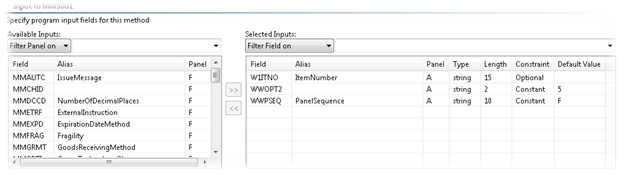
APIs from MRS001

And from the Lawson WebService Designer


Thankfully most of the work on this project has been done.

There are a few interesting things that I came across – the WebServices will produce an exception when if we pass an element without a value, so we dynamically build the request and the WebServices seem pretty reasonable from a performance perspective from limited testing.

There is definite room for improvement and optimisation. For example, we can submit multiple lines in one request and we can look at removing things like the password from the spreadsheet after we have completed submission.

It’s also worth noting that having the keyword End in column A will terminate the scanning of the spreadsheet (quicker than iterating through all the blank rows in Excel).

But enough of this jibber-jabber, we want to see code! 🙂

Spreadsheet Template Below

import System;
import System.IO;
import System.Net;
import System.Windows;
import System.Windows.Controls;
import MForms;

import System.Web.Services.Protocols;
import System.Xml;

import System.Text;
import Excel;
import System.Reflection;

package MForms.JScript
{
    class BUS100_BudgetImport_001
    {
		var giicInstanceController : IInstanceController = null;    // this is where we will store the IInstanceController to make it available to the rest of the class
		var ggrdContentGrid : Grid = null;                          // this is the Grid that we get passed by the Init()
		var gexaApplication = null;                                 // Excel.Application object        

		var gwbWorkbook = null;                                     // here we will store the Workbook object
		
		var giStartRow : int = 7;                                  // the starting row in the Spreadsheet
		var giMaxRow : int = 10000;                                 // the end row in the Spreadsheet
        var giCurrentRowBUS101_B1 : int = 7;

        var gstrCompany : String = null;
        var gstrDivision : String = null;
        var gstrBudgetNumber : String = null;
        var gstrBudgetVersion : String = null;

        var gstrUsername : String = null;
        var gstrPassword : String = null;

        var btnImportBudget : Button = null;

        var gdebug;

        public function Init(element: Object, args: Object, controller : Object, debug : Object)
        {
            gdebug = debug;
			var content : Object = controller.RenderEngine.Content;

            // add a button to retrieve the free caps of an item
			btnImportBudget = new Button();
            // the button will display "FreeCap"
			btnImportBudget.Content = "Import";

            // set the position of the button
			Grid.SetColumnSpan(btnImportBudget, 10);
			Grid.SetColumn(btnImportBudget, 11);
			Grid.SetRow(btnImportBudget, 0);

            // actually add the button to the panel
			content.Children.Add(btnImportBudget);

            // we want to know about the click and unloaded events, so we register our interest here
            btnImportBudget.add_Click(OnbtnImportBudgetClick);
            btnImportBudget.add_Unloaded(OnbtnImportBudgetClickUnloaded);
        }


		public function OnbtnImportBudgetClickUnloaded(sender: Object, e: RoutedEventArgs)
		{
            // remove the events that we are subscribed to
			btnImportBudget.remove_Click(OnbtnImportBudgetClick);
			btnImportBudget.remove_Unloaded(OnbtnImportBudgetClickUnloaded);
		}

        // this will submit the header to the webservice
        // we statically set the Company & Division in our case
        private function handleHeader()
        {
            // "WETX40" - Description
            // "WETX15" - Name
            // "WEBSPR" - Start Period
            // "WECRTP" - Exchange Rate
            // "WENPAM" - Number of Periods
            // "WEUPDB" - Update Balance File (Checkbox)
            gstrUsername = retrieveFromActiveSheet("B1");           // retrieve the username from the spreadsheet
            gstrPassword = retrieveFromActiveSheet("B2");           // retrieve the password from the spreadsheet

            var w1buno : String = retrieveFromActiveSheet("B3");    // budget number
            var w1bver : String = retrieveFromActiveSheet("D3");    // version number

            gstrCompany = "100";                                    // statically set our company for us
            gstrDivision = "IFL";                                   // statically set out division
            gstrBudgetNumber = w1buno;
            gstrBudgetVersion = w1bver;


            var wetx40 : String = retrieveFromActiveSheet("B4");
            var wetx15 : String = retrieveFromActiveSheet("B4");
            var webspr : String = retrieveFromActiveSheet("D4");
            // var wecrtp : String = "1"; //retrieveFromActiveSheet("B3");
            var wecrtp : String = retrieveFromActiveSheet("K4");
            var wenpam : String = retrieveFromActiveSheet("G4");
            // var weupdb : String = retrieveFromActiveSheet("B3");
            var weupdb : String = retrieveFromActiveSheet("I4");
            var strUpdate : String = "1";

            if(true == doWeHaveAValueFromSpreadsheet(weupdb))
            {
                if(0 == String.Compare(weupdb, "true", true))
                {
                    strUpdate = "1";
                }
                else if(0 == String.Compare(weupdb, "yes", true))
                {
                    strUpdate = "0";
                }
            }
            doRequest(addBudgetHeader(wetx40, wetx15, webspr, wecrtp, wenpam, strUpdate));  // send the request
            handleLines();
        }

        // this function will go through the spreadsheet looking for values to submit
        // to the SOAP interface
        private function handleLines()
        {
            while(giCurrentRowBUS101_B1 <= giMaxRow)    // we will loop through until we hit MaxRows
            {
                var w1ait1 : String = retrieveFromActiveSheet("A" + giCurrentRowBUS101_B1);     // retrieve the first dimension from the spreadsheet

                if(true == doWeHaveAValueFromSpreadsheet(w1ait1))   // if the dimension doesn't exist then there isn't any point retrieving any other dimensions
                {
                    if(0 == String.Compare("End", w1ait1, true))    // if we come across End we should break from our line loop
                    {
                        break;
                    }

                    var w1ait2 : String = retrieveFromActiveSheet("B" + giCurrentRowBUS101_B1);     // dimension 1
                    var w1ait3 : String = retrieveFromActiveSheet("C" + giCurrentRowBUS101_B1);     // dimension 2
                    var w1ait4 : String = retrieveFromActiveSheet("D" + giCurrentRowBUS101_B1);     // dimension 4
                    var w1ait5 : String = retrieveFromActiveSheet("E" + giCurrentRowBUS101_B1);     // dimension 5
                    var w1ait6 : String = retrieveFromActiveSheet("F" + giCurrentRowBUS101_B1);     // dimension 6
                    var w1ait7 : String = retrieveFromActiveSheet("G" + giCurrentRowBUS101_B1);     // dimension 7
                    var w1cucd : String = retrieveFromActiveSheet("H" + giCurrentRowBUS101_B1);     // 
                    var w1amtn : String = retrieveFromActiveSheet("I" + giCurrentRowBUS101_B1);     // 

                    var strPeriod1 : String = retrieveFromActiveSheet("J" + giCurrentRowBUS101_B1);     // value for period 1
                    var strPeriod2 : String = retrieveFromActiveSheet("K" + giCurrentRowBUS101_B1);     // value for period 2
                    var strPeriod3 : String = retrieveFromActiveSheet("L" + giCurrentRowBUS101_B1);     // value for period 3
                    var strPeriod4 : String = retrieveFromActiveSheet("M" + giCurrentRowBUS101_B1);     // value for period 4
                    var strPeriod5 : String = retrieveFromActiveSheet("N" + giCurrentRowBUS101_B1);     // value for period 5
                    var strPeriod6 : String = retrieveFromActiveSheet("O" + giCurrentRowBUS101_B1);     // value for period 6
                    var strPeriod7 : String = retrieveFromActiveSheet("P" + giCurrentRowBUS101_B1);     // value for period 7
                    var strPeriod8 : String = retrieveFromActiveSheet("Q" + giCurrentRowBUS101_B1);     // value for period 8
                    var strPeriod9 : String = retrieveFromActiveSheet("R" + giCurrentRowBUS101_B1);     // value for period 9
                    var strPeriod10 : String = retrieveFromActiveSheet("S" + giCurrentRowBUS101_B1);    // value for period 10
                    var strPeriod11 : String = retrieveFromActiveSheet("T" + giCurrentRowBUS101_B1);    // value for period 11
                    var strPeriod12 : String = retrieveFromActiveSheet("U" + giCurrentRowBUS101_B1);    // value for period 12

//                if(true == doWeHaveAValueFromSpreadsheet(w1ait1))
//                {

                    var sbSOAPString : StringBuilder = new StringBuilder();
                    if(null != sbSOAPString)
                    {
                        sbSOAPString.Append('<soapenv:Envelope xmlns:soapenv="http://schemas.xmlsoap.org/soap/envelope/" xmlns:mws2="http://mws.intentia.net/mws2" xmlns:add="http://www.indfish.co.nz/BUS100/AddBudgetLines"><soapenv:Header><mws2:mws><mws2:user>' + gstrUsername + '</mws2:user><mws2:password>' + gstrPassword + '</mws2:password><mws2:company>' + gstrCompany + '</mws2:company><mws2:division>' + gstrDivision + '</mws2:division></mws2:mws></soapenv:Header><soapenv:Body><add:AddBudgetLines maxRecords="100"><!--Zero or more repetitions:--><add:AddBudgetLinesItem>');
                        buildSOAP(sbSOAPString, "add:Company", gstrCompany);
                        buildSOAP(sbSOAPString, "add:Division", gstrDivision);
                        buildSOAP(sbSOAPString, "add:BudgetNumber", gstrBudgetNumber);
                        buildSOAP(sbSOAPString, "add:BudgetVersion", gstrBudgetVersion);
                        buildSOAP(sbSOAPString, "add:AccountingDimension1", w1ait1);
                        buildSOAP(sbSOAPString, "add:AccountingDimension2", w1ait2);
                        buildSOAP(sbSOAPString, "add:AccountingDimension3", w1ait3);
                        buildSOAP(sbSOAPString, "add:AccountingDimension4", w1ait4);
                        buildSOAP(sbSOAPString, "add:AccountingDimension5", w1ait5);
                        buildSOAP(sbSOAPString, "add:AccountingDimension6", w1ait6);
                        buildSOAP(sbSOAPString, "add:AccountingDimension7", w1ait7);

                        buildSOAP(sbSOAPString, "add:Currency", w1cucd);
                        buildSOAP(sbSOAPString, "add:Curve", null);
                        buildSOAP(sbSOAPString, "add:TotalForeignCurrencyAmountBudget", null);
                        buildSOAP(sbSOAPString, "add:TotalBudgetQuantity", null);
                        buildSOAP(sbSOAPString, "add:ForeignCurrencyAmountBudget1", convertTo2DecimalPlaces(strPeriod1));
                        buildSOAP(sbSOAPString, "add:ForeignCurrencyAmountBudget2", convertTo2DecimalPlaces(strPeriod2));
                        buildSOAP(sbSOAPString, "add:ForeignCurrencyAmountBudget3", convertTo2DecimalPlaces(strPeriod3));
                        buildSOAP(sbSOAPString, "add:ForeignCurrencyAmountBudget4", convertTo2DecimalPlaces(strPeriod4));
                        buildSOAP(sbSOAPString, "add:ForeignCurrencyAmountBudget5", convertTo2DecimalPlaces(strPeriod5));
                        buildSOAP(sbSOAPString, "add:ForeignCurrencyAmountBudget6", convertTo2DecimalPlaces(strPeriod6));
                        buildSOAP(sbSOAPString, "add:ForeignCurrencyAmountBudget7", convertTo2DecimalPlaces(strPeriod7));
                        buildSOAP(sbSOAPString, "add:ForeignCurrencyAmountBudget8", convertTo2DecimalPlaces(strPeriod8));
                        buildSOAP(sbSOAPString, "add:ForeignCurrencyAmountBudget9", convertTo2DecimalPlaces(strPeriod9));
                        buildSOAP(sbSOAPString, "add:ForeignCurrencyAmountBudget10", convertTo2DecimalPlaces(strPeriod10));
                        buildSOAP(sbSOAPString, "add:ForeignCurrencyAmountBudget11", convertTo2DecimalPlaces(strPeriod11));
                        buildSOAP(sbSOAPString, "add:ForeignCurrencyAmountBudget12", convertTo2DecimalPlaces(strPeriod12));
                        buildSOAP(sbSOAPString, "add:ForeignCurrencyAmountBudget13", null);
                        buildSOAP(sbSOAPString, "add:ForeignCurrencyAmountBudget14", null);
                        buildSOAP(sbSOAPString, "add:ForeignCurrencyAmountBudget15", null);
                        buildSOAP(sbSOAPString, "add:BudgetQuantity1", null);
                        buildSOAP(sbSOAPString, "add:BudgetQuantity2", null);
                        buildSOAP(sbSOAPString, "add:BudgetQuantity3", null);
                        buildSOAP(sbSOAPString, "add:BudgetQuantity4", null);
                        buildSOAP(sbSOAPString, "add:BudgetQuantity5", null);
                        buildSOAP(sbSOAPString, "add:BudgetQuantity6", null);
                        buildSOAP(sbSOAPString, "add:BudgetQuantity7", null);
                        buildSOAP(sbSOAPString, "add:BudgetQuantity8", null);
                        buildSOAP(sbSOAPString, "add:BudgetQuantity9", null);
                        buildSOAP(sbSOAPString, "add:BudgetQuantity10", null);
                        buildSOAP(sbSOAPString, "add:BudgetQuantity11", null);
                        buildSOAP(sbSOAPString, "add:BudgetQuantity12", null);
                        buildSOAP(sbSOAPString, "add:BudgetQuantity13", null);
                        buildSOAP(sbSOAPString, "add:BudgetQuantity14", null);
                        buildSOAP(sbSOAPString, "add:BudgetQuantity15", null);

                        sbSOAPString.Append('</add:AddBudgetLinesItem></add:AddBudgetLines></soapenv:Body></soapenv:Envelope>');
                        doRequest(sbSOAPString.ToString());
                    }
                    else
                    {
                        return(null);
                    }
                }

                giCurrentRowBUS101_B1++;
            }
        }

		public function OnbtnImportBudgetClick(sender: Object, e: RoutedEventArgs)
		{
			try
			{
                // here we do some initialisation of Excel
				InitialiseExcel();

				var strFilename : String = retrieveImportFile();            // retrieve the filename of the Excel spreadsheet to open
				if((null != strFilename) && (null != gexaApplication))      // ensure that not only do we have a filename, but we also managed to initialise Excel
				{
					gwbWorkbook = gexaApplication.Workbooks.Open(strFilename);  // open the spreadsheet
					if(null != gwbWorkbook)
					{
						gwbWorkbook.Saved = true;                               // get rid of those annoying save messages
                        handleHeader();                         // kick off the creation of the header, this in turn will create the lines
                        MessageBox.Show("Finished Import");     // provide some feedback that we are finished
					}
					else MessageBox.Show("Failed to Open Workbook");
				}
				else MessageBox.Show("Filename or Excel doesn't exist: " + strFilename);
			}
			catch(exException)
			{
				MessageBox.Show("Error: " + exException.description);
			}
            CleanUp();
		}

        // send the WebService Request
        public function doRequest(astrXMLRequest : String)
        {
            // we are going to use the HttpWebRequest object
            // http://msdn.microsoft.com/en-us/library/system.net.httpwebrequest.aspx
            // and we want to connect to the ItemFreeCaps2 service
            var hwrRequest : HttpWebRequest = WebRequest.Create("http://wlmx02.indfish.co.nz:12000/lwstest/services/BUS100");

            // ensure we actually managed to create something
            if(null != hwrRequest)
            {
                // here we're defining our actions and content types
                hwrRequest.Headers.Add("SOAPAction","\"\"");
                hwrRequest.ContentType = "text/xml;charset=\"utf-8\"";
                hwrRequest.Method = "POST";
                hwrRequest.Accept = "text/xml";

                hwrRequest.Proxy = GlobalProxySelection.GetEmptyWebProxy();

                // we are going to use a stream to write out our request (and also read it later)
                var strmStream : Stream = hwrRequest.GetRequestStream();
                if(null != strmStream)
                {
                    // SOAP is basically just xml, so we are going to use the XML framework
                    // to make our lives easier.
                    // Create an XML Document
                    var xmdDocument : XmlDocument = new XmlDocument();
                    if(null != xmdDocument)
                    {
                        // we then add the String to our XML document
                        xmdDocument.LoadXml(astrXMLRequest);

                        // the save of the document to our stream actually sends the request
                        // to the server
                        xmdDocument.Save(strmStream);

                        // close our stream
                        strmStream.Close();

                        // this section is wrapped in a try .. catch()
                        // block because I had a lot of problems getting
                        // this running initially.
                        try
                        {
                            // now we want to get a response
                            var wresponse : WebResponse = hwrRequest.GetResponse();
                            if(null != wresponse)
                            {
                                // we like using streams, so get the stream
                                // connection
                                strmStream = wresponse.GetResponseStream();
                                if(null != strmStream)
                                {
                                    // create a streamreader to retrieve the data
                                    var srStreamReader : StreamReader = new StreamReader(strmStream);
                                    if(null != srStreamReader)
                                    {
                                        // and finally we read the data
                                        var strXML : String = srStreamReader.ReadToEnd();
                                        // close the response
                                        wresponse.Close();
                                        // close the stream reader
                                        srStreamReader.Close();

                                        // lets load the xml we read
                                        xmdDocument.LoadXml(strXML);

                                        var xel = xmdDocument.DocumentElement;

                                    }
                                }
                            }
                            else
                            {
                                gdebug.WriteLine("No Response was returned");
                            }
                        }
                        catch(e)
                        {
                            gdebug.WriteLine("Exception: " + e.message);
                        }
                    }
                }
            }
            else
            {
                gdebug.WriteLine("doRequest() unable to create");
            }
        }


                // findNode will recurse through the XmlNodes until if finds
        // and Element with astrElementName as a name, it will
        // then return that node.
        public function findNode(axmnNode : XmlNode, astrElementName : String)
        {
            var result : XmlNode = null;
            if(null != axmnNode)
            {
                if(String.Compare(astrElementName, axmnNode.Name, true) == 0)
                {
                    result = axmnNode;
                }
                else
                {
                    if(true == axmnNode.HasChildNodes)
                    {
                        result = findNode(axmnNode.FirstChild, astrElementName);
                    }
                    if(null != axmnNode.NextSibling)
                    {
                        result = findNode(axmnNode.NextSibling, astrElementName);
                    }
                }
            }
            return result;
        }

        // here we will create the budget header SOAP request
        private function addBudgetHeader(astrDescription : String, astrName : String, astrStartPeriod : String, astrExchangeRate : String, astrNumberPeriods : String, astrUpdateBudget : String) : String 
        {
            // because we have to build the request on the fly we will use a StringBuilder
            // it helps prevent memory fragmentation
            var sbSOAPString : StringBuilder = new StringBuilder(5000);
            if(null != sbSOAPString)
            {
                sbSOAPString.Append('<soapenv:Envelope xmlns:soapenv="http://schemas.xmlsoap.org/soap/envelope/" xmlns:mws2="http://mws.intentia.net/mws2" xmlns:add="http://www.indfish.co.nz/BUS100/AddBudgetHeader"><soapenv:Header><mws2:mws><mws2:user>' + gstrUsername + '</mws2:user><mws2:password>' + gstrPassword + '</mws2:password><mws2:company>' + gstrCompany + '</mws2:company><mws2:division>' + gstrDivision + '</mws2:division></mws2:mws></soapenv:Header><soapenv:Body><add:AddBudgetHeader maxRecords="100"><add:AddBudgetHeaderItem>');
                buildSOAP(sbSOAPString, "add:Company", gstrCompany);
                buildSOAP(sbSOAPString, "add:Division", gstrDivision);
                buildSOAP(sbSOAPString, "add:BudgetNumber", gstrBudgetNumber);
                buildSOAP(sbSOAPString, "add:BudgetVersion", gstrBudgetVersion);
                buildSOAP(sbSOAPString, "add:Description", "Test");
                buildSOAP(sbSOAPString, "add:Name", "Test");
                buildSOAP(sbSOAPString, "add:StartPeriodBudget", astrStartPeriod);
                buildSOAP(sbSOAPString, "add:ExchangeRateType", astrExchangeRate);
                buildSOAP(sbSOAPString, "add:NumberOfPeriods", astrNumberPeriods);
                buildSOAP(sbSOAPString, "add:RoundingoffCategory", null);
                buildSOAP(sbSOAPString, "add:UpdateBalanceFile", astrUpdateBudget);
                buildSOAP(sbSOAPString, "add:AllocationTemplate", null);
                buildSOAP(sbSOAPString, "add:ObjectAccessGroup", null);
                sbSOAPString.Append('</add:AddBudgetHeaderItem></add:AddBudgetHeader></soapenv:Body></soapenv:Envelope>');
                return(sbSOAPString.ToString());
            }
            else
            {
                return(null);
            }
        }


        // this is a little function to encapsulate a value within an XML element
        // if we don't have a value then the element isn't added - if we add the element with the
        // empty value we will get an exception back from the webservice
        private function buildSOAP(atbFinalString : StringBuilder, astrElement : String, astrValue : String)
        {
            if(false == String.IsNullOrEmpty(astrValue))
            {
                atbFinalString.Append("<" + astrElement + ">" + astrValue + "</" + astrElement + ">");
            }
        }

        // retrieve some data from the active spreadsheet
        // at a specific location
		private function retrieveFromActiveSheet(astrPosition : String)
		{
			var strValue : String = gwbWorkbook.ActiveSheet.Range(astrPosition).Value;
			if(true == String.IsNullOrEmpty(strValue))
			{
				strValue = "";
			}
            else if(0 == String.Compare(strValue, "undefined"))
            {
                strValue = "";
            }

			return(strValue);
		}

        // display an OpenFileDialog box
        // and extract the result
		private function retrieveImportFile()
		{
			var result : String = null;
			var ofdFile = new System.Windows.Forms.OpenFileDialog();    // we have to use the forms OpenFileDialog unfortunately
			if(null != ofdFile)
			{
				ofdFile.Multiselect = false;
				ofdFile.Filter = "Excel Files (*.xls;*.xlsx)|*.xls;*.xlsx|All Files (*.*)|*.*"; // filter on xls or xlsx files only
				
				if(true == ofdFile.ShowDialog())
				{
					result = ofdFile.FileName;
				}
			}
			return(result);
		}

        // our central cleanup function
        private function CleanUp()
        {
            CleanUpExcel();
        }

        // our Import button is being unloaded, now's a good time to clean
        // everything up
		private function OnImportFromExcelUnloaded(sender : Object, e : RoutedEventArgs)
		{
			if(null != btnImportBudget)
			{
				btnImportBudget.remove_Click(OnbtnImportBudgetClick);
				btnImportBudget.remove_Unloaded(OnbtnImportBudgetClickUnloaded);
			}
		}

        private function convertTo2DecimalPlaces(astrValue : String)
        {
            var strResult : String = "";

            if(false == String.IsNullOrEmpty(astrValue))
            {
                var dblTemp : double = astrValue;
                strResult = dblTemp.ToString("#.##");
            }

            return(strResult);
        }

        // check to ensure that we have a value when we extract from the 
        // spreadsheet
        private function doWeHaveAValueFromSpreadsheet(astrValue : String)
        {
            var bResult : boolean = false;
            if(false == String.IsNullOrEmpty(astrValue))
            {
                if(0 != String.Compare(astrValue, "undefined"))
                {
                    bResult = true;
                }
            }
            return(bResult);
        }

        // close Excel and any workbooks
        private function CleanUpExcel()
        {
                // check to ensure we have a Workbook object
                // before we attempt to close the workbook
                if(null != gwbWorkbook)
                {
                    gwbWorkbook.Close();
                    gwbWorkbook = null;
                }
                // make sure we have actually created
                // the Excel Application object before
                // we Quit
                if(null != gexaApplication)
                {
                    gexaApplication.Quit();
                    gexaApplication = null;
                }
        }

        // Initialise Excel, essentially start the Excel Application and set it to visible
		private function InitialiseExcel()
		{
			var result = null;
			try
			{
				gexaApplication = new ActiveXObject("Excel.Application");
				gexaApplication.Visible = true;
				
				result = gexaApplication;
			}
			catch(exException)
			{
				MessageBox.Show("Error: " + exException.Message + Environment.NewLine + exException.StackTrace);
			}
			return(result);
		}

    }
}


Have fun! 🙂
Posted in Development, M3 / MoveX, Webservices | Tagged , , , , | Leave a comment

Budget Import (BUS100) – Almost

Well, this one was a pretty disappointing endeavour. After nailing the Journal Importing down I would have expected budget importing from an Excel spreadsheet to be fairly straight forward too. How wrong I was.

I had expected to maybe invest around 20 hours of casual work (working whilst watching some tv), I’d be well north of 80 hours now. And why you ask – or why would you spend so much time on this? I’m not sure 🙂

The worst part is that when I run the script in the “Script Tool” it works perfectly assuming in the RequestCompleted I have a <debug>.WriteLine() (which was well within the 20 hours I budgeted) – it just bombs when it is deployed.

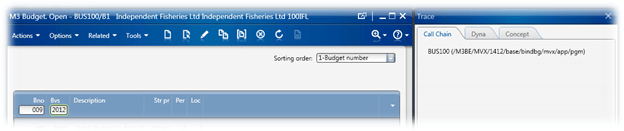
BUS100 works a little differently to other programs which you will see below, let us use Trace to see what happens when we key in a budget normally.

We go to BUS100/B1 and key in a new Budget Number and a Budget Version

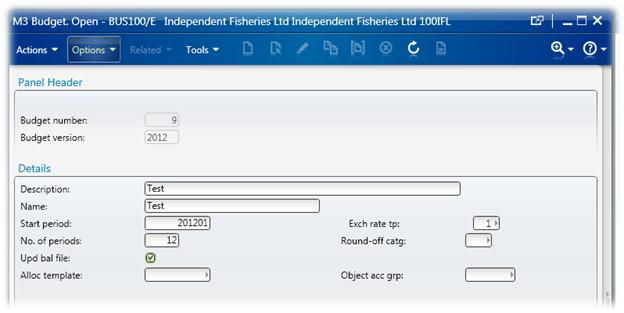
Then we hit Create, this will issue a “User interaction: Option -1 BUS100/B1” and takes us to BUS100/E

We fill in the details

And hit Next.

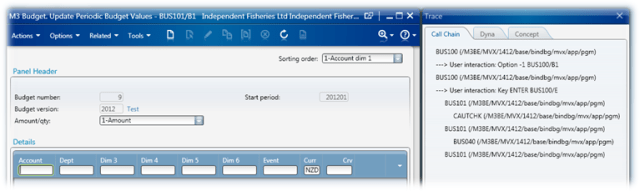
Our user interaction is “Key ENTER BUS100/E” and we end up in BUS101/B1

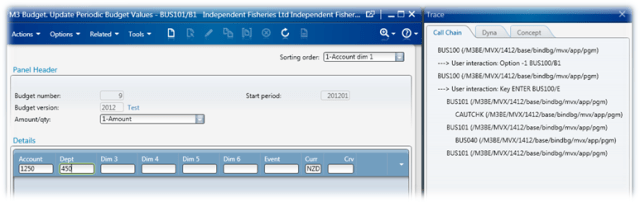
It is here that we start keying in the accounts that we are going to create budgets for.

And then we hit Create.

Just like our other Create we have a User interaction: Option -1 BUS101/B1

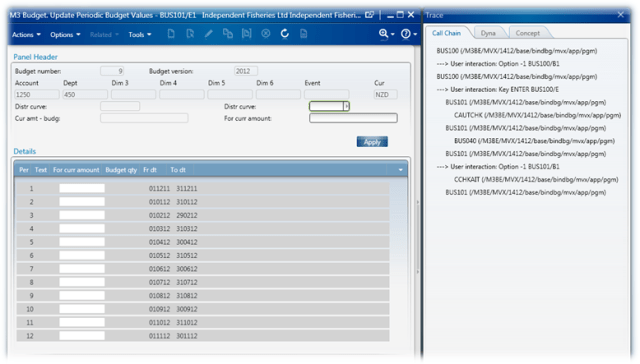
Now the interesting thing about this panel is that we have an Apply button and we need to enter in our values in to the rows of a ListView. The really interesting part is that we need to issue either 2 Nexts or F1 and then Next in order to continue.

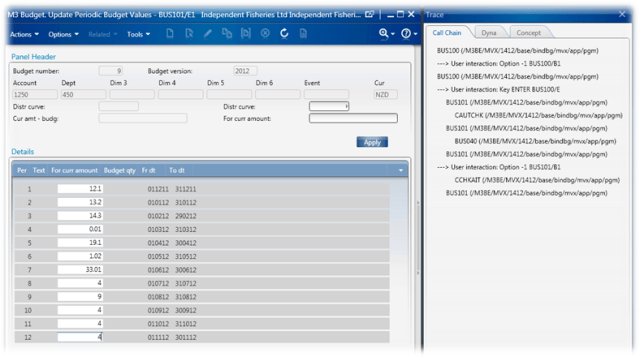
So, I have entered some values below

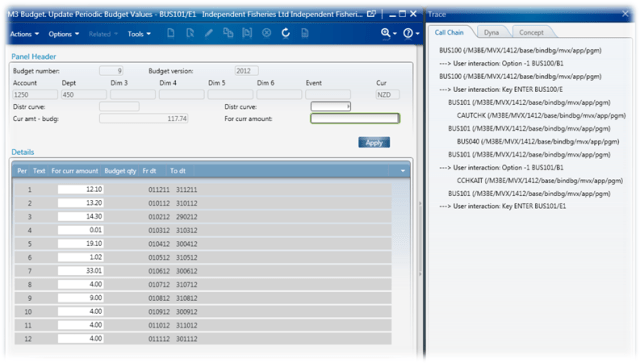
Now if I hit Next

We can see we have the User interaction: Key ENTER BUS101/E1
And we can see that the panel hasn’t changed; everything though is to two decimal places (btw, ensuring the values are at two decimal places doesn’t remove the need for the double enter or Apply Enter combo).

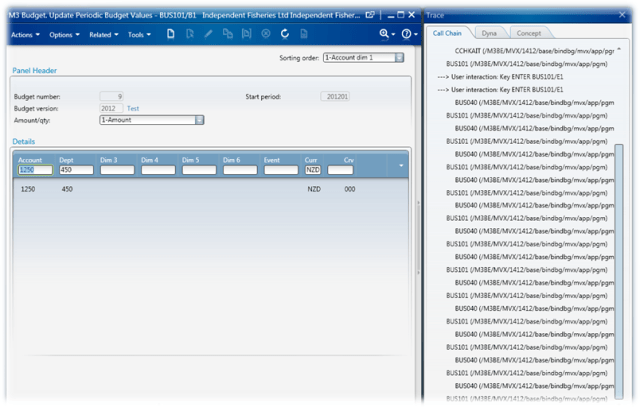
Now we hit Next again.

We can see that another User interaction: Key ENTER BUS101/E1 occurred and now we are back to BUS101/B1 ready to enter our next account that we want a budget against.

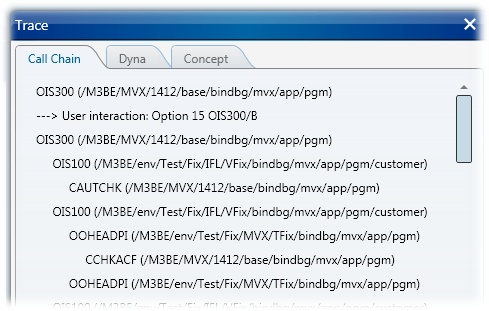
For the sake of completeness – the Apply button is like the first Next, and the call chain is as follows:

Ok, so those are the events that we need to check for in our RequestCompleted event, and we now also know what command to issue for the Apply button in BUS101/E1. And our basic flow

  1. Enter Budget Number and Budget Version (BUS100/B1)
  2. Hit Create (Option -1)
  3. Fill in the Description, Name, Start Period, Exchange Rate TP, No. Periods and tick the Upd bal file on BUS100/E
  4. Hit Next (Key ENTER)
  5. Loop through our accounts
    1. Enter Account and Department (BUS101/B1)
    2. Hit Create (Option -1)
    3. Loop through our Periods
      1. Fill in the “For curr amount” (BUS101/E1)
    4. Hit Apply (Key F1)
    5. Hit Next (Key ENTER)
  6. Finished

Pretty straight forward really isn’t it?

It works perfectly when you run the script in the Script Tool, however when deployed to the server it doesn’t. Eventually I ended up added extensive logging in to the code so I could see what was going on. It turns out that when the script is deployed and we hit either the first Next (or Apply) our panel is changing from BUS101/E1 to BUS101/B1 instead of staying on BUS101/E1 and as such nothing ever gets saved – we just end up with nothing in BUS101/B1

Very interesting. Anyways, sample spreadsheet is below

Oh, before we go too far, I guess I should point out a couple of the niftier things in this code…

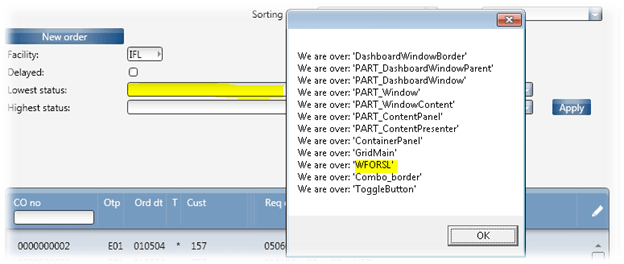
As we need to populate values in the TextBoxes inside the ListView on BUS100/B1 and BUS101/B1 I created a function which will do the heavy lifting for us called getListViewHeaderTextBox()

You’ll also see us calling System.IO.File.AppendAllText() to write data out to a text file.

And finally, we actually set a CheckBox in this code :-O

As I previously mentioned, adding an output to the debug.WriteLine() makes the script work when using the Scripting Tool, why I am not sure and of-course the debugging is disabled when we deploy. I tried to effectively simulate this by using the Sytem.IO.File.AppendAllText() function, but that didn’t help.

So, the path forward appears to be figure out how to simulate the debug.WriteLine() or to effectively create the object manually when running the script or look at WebServices to do the real work of the script.

Eitherway, there are a handy functions in this script, a few new techniques so I thought it would be worth publishing.

import System;
import System.Text;
import System.Windows;
import System.Windows.Controls;
import System.Windows.Media;
import System.Windows.Media.Media3D;

import System.Threading;
import System.TimeSpan;

import MForms;
import Mango.UI.Core;
import Mango.UI.Core.Util;
import Mango.UI.Services;
import Mango.Services;
import Mango.UI.Services.Lists;

import Excel;
import System.Reflection;

package MForms.JScript
{
    class BudgetImport_V059
    {
		var giicInstanceController : IInstanceController = null;    // this is where we will store the IInstanceController to make it available to the rest of the class
		var ggrdContentGrid : Grid = null;                          // this is the Grid that we get passed by the Init()
		var gexaApplication = null;                                 // Excel.Application object
		
		var gbtnImportFromExcel : Button = null;                    // this is the button that we will put on to the panel that will kick off the whole import
		var glvListView : ListView = null;                          // this is the ListView on the panel
		
		var gwbWorkbook = null;                                     // here we will store the Workbook object
		
		var giStartRow : int = 7;                                  // the starting row in the Spreadsheet
		var giMaxRow : int = 10000;                                 // the end row in the Spreadsheet
		var giCurrentRowBUS101_E1 : int = 7;                        // the current row in the Spreadsheet
        var giLVRowBUS101_E1 : int = 0;                             // ListView row
        var giCurrentRowBUS101_B1 : int = 7;
		var giLVRowBUS101_B1 : int = 0;                             // ListView row

		var gbLookForResponse = false;                              // should we be looking for a response?

        var gobjStatusBUS100_B1 = null;                                      // the statusbar
        var gobjStatusBUS101_B1 = null;
        var gobjStatusBUS101_E1 = null;

        var gbRequest : boolean = false;                            // the request event 

        var giNumberOfPeriods : int = 0;                            // this is the number of periods that we have

        var giBUS101_E1Count : int;                             // we need to press enter twice on BUS101_E1

        var gobjDebug;

        public function Init(element: Object, args: Object, controller : Object, debug : Object)
        {
            // lets make some of the controls and other
            // bits pieces available to other sections of our code
            gobjDebug = debug;
			ggrdContentGrid = controller.RenderEngine.Content;
			giicInstanceController = controller;
			glvListView = controller.RenderEngine.ListControl.ListView;
			
			try
			{
                // create the button for importing
				gbtnImportFromExcel = new Button();
				gbtnImportFromExcel.Content = "Import";

				Grid.SetColumnSpan(gbtnImportFromExcel, 10);
				Grid.SetColumn(gbtnImportFromExcel, 1);
				Grid.SetRow(gbtnImportFromExcel, 22);
				
                // finally add the control to the grid
				ggrdContentGrid.Children.Add(gbtnImportFromExcel);
				
				// ----- Events -----
				gbtnImportFromExcel.add_Click(OnImportFromExcelClicked);
				gbtnImportFromExcel.add_Unloaded(OnImportFromExcelUnloaded);

			}
			catch(exException)
			{
				MessageBox.Show("Error: " + exException.Message + Environment.NewLine + exException.StackTrace);
			}
        }


        // this is where we actually do the import
		private function OnImportFromExcelClicked(sender : Object, e : RoutedEventArgs)
		{
			try
			{
                // here we do some initialisation of Excel
				InitialiseExcel();

				var strFilename : String = retrieveImportFile();            // retrieve the filename of the Excel spreadsheet to open
				if((null != strFilename) && (null != gexaApplication))      // ensure that not only do we have a filename, but we also managed to initialise Excel
				{
					gwbWorkbook = gexaApplication.Workbooks.Open(strFilename);  // open the spreadsheet
					if(null != gwbWorkbook)
					{
				        giicInstanceController.add_RequestCompleted(OnRequestCompleted);    // subscribe to the RequestCompleted event
                        
                        gbRequest = true;

						gwbWorkbook.Saved = true;                               // get rid of those annoying save messages

                        // here I am saving some information for the C:\Temp\BUS101.txt file to diagnose what is going on
                        System.IO.File.AppendAllText("C:\\Temp\\BUS100.txt", DateTime.Now.ToString("yyyyMMdd HH:mm:ss") + " ******* OnImportFromExcelClicked: Start" + Environment.NewLine);

                        // no we actually kick off our process
                        handleBUS100_B1();
					}
					else MessageBox.Show("Failed to Open Workbook");
				}
				else MessageBox.Show("Filename or Excel doesn't exist: " + strFilename);
			}
			catch(exException)
			{
				MessageBox.Show("Error: " + exException.description);
			}
		}


		public function OnRequestCompleted(sender: Object, e: RequestEventArgs)
		{
            var strError : String = null;

            // log information to a file for later analysis
            System.IO.File.AppendAllText("C:\\Temp\\BUS100.txt", DateTime.Now.ToString("yyyyMMdd HH:mm:ss") + " OnRequestCompleted: Entering function" + Environment.NewLine);

            try
            {
                gobjDebug.WriteLine("OnRequestCompleted: giBUS101_E1Count = " + giBUS101_E1Count + " CommandType: " + e.CommandType + " CommandValue: " + e.CommandValue);  // we need this command for our script to work properly!

                System.IO.File.AppendAllText("C:\\Temp\\BUS100.txt", DateTime.Now.ToString("yyyyMMdd HH:mm:ss") + " OnRequestCompleted: giBUS101_E1Count = " + giBUS101_E1Count + " CommandType: " + e.CommandType + " CommandValue: " + e.CommandValue + " - giicInstanceController.RenderEngine.PanelHeader - " + giicInstanceController.RenderEngine.PanelHeader + Environment.NewLine);

			    if(e.CommandType == MNEProtocol.CommandTypeKey)     // we're looking for a key event
			    {
				    if(e.CommandValue == MNEProtocol.KeyEnter)      // specifically we're looking the enter key event
				    {
                        strError = checkForError();                 // check for any errors

                        if(true == String.IsNullOrEmpty(strError))
                        {
					        if(true == giicInstanceController.RenderEngine.PanelHeader.EndsWith("BUS100/B1"))   // are we on panel BUS100/B1?
					        {
                                System.IO.File.AppendAllText("C:\\Temp\\BUS100.txt", DateTime.Now.ToString("yyyyMMdd HH:mm:ss") + " OnRequestCompleted: about to call handleBUS100_B1" + Environment.NewLine);
						        handleBUS100_B1();     // handle panel E
                                System.IO.File.AppendAllText("C:\\Temp\\BUS100.txt", DateTime.Now.ToString("yyyyMMdd HH:mm:ss") + " OnRequestCompleted: returned from call handleBUS100_B1" + Environment.NewLine);
                                strError = checkForError();
					        }
                            else if(true == giicInstanceController.RenderEngine.PanelHeader.EndsWith("BUS101/B1")) // are we on panel BUS101/B1
                            {
                                strError = checkForError();

                                if(true != String.IsNullOrEmpty(strError))
                                {
                                    giCurrentRowBUS101_B1 = giMaxRow + 1;   // if there was an error we should effectively stop processing
                                }
                                else
                                {
                                    if(giCurrentRowBUS101_B1 <= giMaxRow)   // giMaxRow is the maximum row that we should go down to on the spreadsheet
                                    {
                                        giBUS101_E1Count = 0;       // this keeps track of how many 'enters' we have pressed on BUS101/E1 - one of my earlier attempts

                                        System.IO.File.AppendAllText("C:\\Temp\\BUS100.txt", DateTime.Now.ToString("yyyyMMdd HH:mm:ss") + " OnRequestCompleted: about to call handleBUS101_B1" + Environment.NewLine);
                                        handleBUS101_B1();    // handle panel j
                                        System.IO.File.AppendAllText("C:\\Temp\\BUS100.txt", DateTime.Now.ToString("yyyyMMdd HH:mm:ss") + " OnRequestCompleted: returned from call handleBUS101_B1" + Environment.NewLine);
                                    }
                                }
                            }
					        else if(true == giicInstanceController.RenderEngine.PanelHeader.EndsWith("BUS101/E1")) // are we on panel BUS101/E1
					        {
                                System.IO.File.AppendAllText("C:\\Temp\\BUS100.txt", DateTime.Now.ToString("yyyyMMdd HH:mm:ss") + " OnRequestCompleted: Found BUS101/E1 from an ENTER" + Environment.NewLine);
                                strError = checkForError();

                                if(0 == giBUS101_E1Count)   // if this is the first time we are on BUS101/E1 then we should fill in our values
                                {
                                    if(true != String.IsNullOrEmpty(strError))
                                    {
                                        giCurrentRowBUS101_E1 = giMaxRow + 1;   // if there is an error we should of-course stop looking through the spreadsheet and exit
                                    }
                                    else
                                    {
                                        System.IO.File.AppendAllText("C:\\Temp\\BUS100.txt", DateTime.Now.ToString("yyyyMMdd HH:mm:ss") + " OnRequestCompleted: about to call handleBUS101_E1" + Environment.NewLine);
                                        handleBUS101_E1();    // handle BUS101/E1 - populate our values
                                        System.IO.File.AppendAllText("C:\\Temp\\BUS100.txt", DateTime.Now.ToString("yyyyMMdd HH:mm:ss") + " OnRequestCompleted: returned from call handleBUS101_E1" + Environment.NewLine);
                                    }
                                }
                                else
                                {
                                    System.IO.File.AppendAllText("C:\\Temp\\BUS100.txt", DateTime.Now.ToString("yyyyMMdd HH:mm:ss") + " OnRequestCompleted: giBUS101_E1Count = " + giBUS101_E1Count + " about to press enter " + Environment.NewLine);
                                    
                                    giBUS101_E1Count = 0;   // we reset out count here as we are greater than 0
                                    giicInstanceController.PressKey("ENTER");   // this should be our 'second' enter
                                }
					        }
                        }
                        else
                        {
                            // setLineStatus(strError);
                        }
				    }
                    else if(0 == String.Compare("F1", e.CommandValue))  // if we are working on F1 rather than two enters, then when we hit F1 we should press ENTER
                    {
                        System.IO.File.AppendAllText("C:\\Temp\\BUS100.txt", DateTime.Now.ToString("yyyyMMdd HH:mm:ss") + " OnRequestCompleted: F1 was pressed" + Environment.NewLine);
                        // below was commented out so I could see the behaviour
//                        if(true == giicInstanceController.RenderEngine.PanelHeader.EndsWith("BUS101/E1"))
//                        {
                            System.IO.File.AppendAllText("C:\\Temp\\BUS100.txt", DateTime.Now.ToString("yyyyMMdd HH:mm:ss") + " OnRequestCompleted: Found BUS101/E1 from F1 about to press enter" + Environment.NewLine);
                            giicInstanceController.PressKey("ENTER");
                            System.IO.File.AppendAllText("C:\\Temp\\BUS100.txt", DateTime.Now.ToString("yyyyMMdd HH:mm:ss") + " OnRequestCompleted: Found BUS101/E1 from F1 after press enter" + Environment.NewLine);
//                        }
                    }
                    else
                    {
                        System.IO.File.AppendAllText("C:\\Temp\\BUS100.txt", DateTime.Now.ToString("yyyyMMdd HH:mm:ss") + " OnRequestCompleted: if(e.CommandValue == MNEProtocol.KeyEnter)" + Environment.NewLine);
                    }
			    }
                else if(e.CommandType == MNEProtocol.CommandTypeListOption)
                {
                    if(e.CommandValue == MNEProtocol.OptionCreate)
                    {
                        if(true == String.IsNullOrEmpty(strError))
                        {
					        if(true == giicInstanceController.RenderEngine.PanelHeader.EndsWith("BUS100/E"))   // are we on panel BUS100/E?
					        {
                                System.IO.File.AppendAllText("C:\\Temp\\BUS100.txt", DateTime.Now.ToString("yyyyMMdd HH:mm:ss") + " OnRequestCompleted: List about to call handleBUS100_E" + Environment.NewLine);
						        handleBUS100_E();     // handle panel E
                                System.IO.File.AppendAllText("C:\\Temp\\BUS100.txt", DateTime.Now.ToString("yyyyMMdd HH:mm:ss") + " OnRequestCompleted: List  returned from call handleBUS100_E" + Environment.NewLine);
                                strError = checkForError();
					        }
					        else if(true == giicInstanceController.RenderEngine.PanelHeader.EndsWith("BUS101/E1")) // are we on panel BUS101/E1
					        {
                                strError = checkForError();

                                if(true != String.IsNullOrEmpty(strError))
                                {
                                    giCurrentRowBUS101_E1 = giMaxRow + 1;
                                }
                                else
                                {
                                    System.IO.File.AppendAllText("C:\\Temp\\BUS100.txt", DateTime.Now.ToString("yyyyMMdd HH:mm:ss") + " OnRequestCompleted: List about to call handleBUS101_E1 " + giicInstanceController.RenderEngine.PanelHeader + Environment.NewLine);
                                    handleBUS101_E1();    // handle 
                                    System.IO.File.AppendAllText("C:\\Temp\\BUS100.txt", DateTime.Now.ToString("yyyyMMdd HH:mm:ss") + " OnRequestCompleted: List returned from call handleBUS101_E1 " + giicInstanceController.RenderEngine.PanelHeader + Environment.NewLine);
                                    //giicInstanceController.PressKey("ENTER");
                                    //System.IO.File.AppendAllText("C:\\Temp\\BUS100.txt", DateTime.Now.ToString("yyyyMMdd HH:mm:ss") + " OnRequestCompleted: List returned from call handleBUS101_E1 - pressing enter " + giicInstanceController.RenderEngine.PanelHeader + Environment.NewLine);
                                }
					        }
                        }
                        else
                        {
                            MessageBox.Show("There was an error");
                        }
                    }
                }
                if(null != giicInstanceController.Response)
                {
                    if(0 == String.Compare(giicInstanceController.Response.Request.RequestType.ToString(), "Panel"))    // we should look at doing a cleanup here as we are leaving the panel
                    {
                        if((MNEProtocol.CommandTypeKey == giicInstanceController.Response.Request.CommandType) && (MNEProtocol.KeyF03 == giicInstanceController.Response.Request.CommandValue))
                        {
                            System.IO.File.AppendAllText("C:\\Temp\\BUS100.txt", DateTime.Now.ToString("yyyyMMdd HH:mm:ss") + " OnRequestCompleted: About to CleanUp()" + Environment.NewLine);
                            CleanUp();
                            System.IO.File.AppendAllText("C:\\Temp\\BUS100.txt", DateTime.Now.ToString("yyyyMMdd HH:mm:ss") + " OnRequestCompleted: We've called CleanUp()" + Environment.NewLine);
                        }
                    }
                }
            }
            catch(ex)
            {
                MessageBox.Show(ex.message);
            }
            if(null != strError)
            {
                CleanUp();
            }
            System.IO.File.AppendAllText("C:\\Temp\\BUS100.txt", DateTime.Now.ToString("yyyyMMdd HH:mm:ss") + " OnRequestCompleted: Exiting function" + Environment.NewLine);
		}

        // This function will go out and actually enter our budget and the version
        private function handleBUS100_B1()
        {
            System.IO.File.AppendAllText("C:\\Temp\\BUS100.txt", DateTime.Now.ToString("yyyyMMdd HH:mm:ss") + " handleBUS100_B1: Entering function" + Environment.NewLine);
            // "W1BUNO" - Budget Number
            // "W1BVER" - Budget Version
            var w1buno : String = retrieveFromActiveSheet("B3");    // retrieve our Budget Number from the spreadsheet
            var w1bver : String = retrieveFromActiveSheet("D3");    // retrieve our Budget Version from the spreadsheet
            if(false == String.IsNullOrEmpty(w1buno))
            {
                if(false == String.IsNullOrEmpty(w1bver))
                {
                    var tbW1BUNO : TextBox = getListViewHeaderTextBox(glvListView, "W1BUNO");   // populate the ListViewHeader textbox with our Budget Number
                    if(null != tbW1BUNO)
                    {
                        tbW1BUNO.Text = w1buno;
                    }
                    else MessageBox.Show("W1BUNO not found!");

                    var tbW1BVER : TextBox = getListViewHeaderTextBox(glvListView, "W1BVER");   // populate the ListViewHeader textbox with our Budget Version
                    if(null != tbW1BVER)
                    {
                        tbW1BVER.Text = w1bver;
                    }
                    else MessageBox.Show("W1BVER not found!");

                    giicInstanceController.ListOption("-1");    // create the budget
                }
            }
            System.IO.File.AppendAllText("C:\\Temp\\BUS100.txt", DateTime.Now.ToString("yyyyMMdd HH:mm:ss") + " handleBUS100_B1: Exiting function" + Environment.NewLine);
        }

        // handleBUS100_E will enter the information specific to the budget - this is number of periods
        // starting period etc
        private function handleBUS100_E()
        {
            System.IO.File.AppendAllText("C:\\Temp\\BUS100.txt", DateTime.Now.ToString("yyyyMMdd HH:mm:ss") + " handleBUS100_E: Exiting function" + Environment.NewLine);
            // "WETX40" - Description
            // "WETX15" - Name
            // "WEBSPR" - Start Period
            // "WECRTP" - Exchange Rate
            // "WENPAM" - Number of Periods
            // "WEUPDB" - Update Balance File (Checkbox)

            var wetx40 : String = retrieveFromActiveSheet("B4");    // Budget Description
            var wetx15 : String = retrieveFromActiveSheet("B4");    // Budget Name
            var webspr : String = retrieveFromActiveSheet("D4");    // Start Period
            // var wecrtp : String = "1"; //retrieveFromActiveSheet("B3"); 
            var wecrtp : String = retrieveFromActiveSheet("K4");    // Exchange Rate
            var wenpam : String = retrieveFromActiveSheet("G4");    // Number of Periods
            // var weupdb : String = retrieveFromActiveSheet("B3");
            var weupdb : String = retrieveFromActiveSheet("I4");    // Update Balance File?
            var bUpdate : boolean = false;

            if(true == doWeHaveAValueFromSpreadsheet(weupdb))       // do some basic verification of the value from the spreadsheet
            {
                if(0 == String.Compare(weupdb, "true", true))       // this is our checkbox so we want a True/False value
                {
                    bUpdate = true;
                }
                else if(0 == String.Compare(weupdb, "yes", true))
                {
                    bUpdate = true;
                }
            }

            if(true == doWeHaveAValueFromSpreadsheet(wenpam))       // do some basic verification of the number value from the spreadsheet
            {
                giNumberOfPeriods = parseInt(wenpam);               // this is the number of periods, we were going to use this value for the looping purposes in BUS101/E1 but didn't get that far
            }
            

            setM3TextField("WETX40", wetx40);           // set the description
            setM3TextField("WETX15", wetx15);           // set the name
            setM3TextField("WEBSPR", webspr);           // set the start period
            setM3TextField("WECRTP", wecrtp);           // set the exchange rate
            setM3TextField("WENPAM", wenpam);           // set the number of periods
            setM3CheckboxField("WEUPDB", bUpdate);      // and set the Checkbox to update the balance file
            
            
            giicInstanceController.PressKey("ENTER");   // press the enter key
            System.IO.File.AppendAllText("C:\\Temp\\BUS100.txt", DateTime.Now.ToString("yyyyMMdd HH:mm:ss") + " handleBUS100_E: Exiting function" + Environment.NewLine);
        }

        // here we handle Panel BUS101/B1, where we record the gl account information that we will be applying the budget against
        private function handleBUS101_B1()
        {
            System.IO.File.AppendAllText("C:\\Temp\\BUS100.txt", DateTime.Now.ToString("yyyyMMdd HH:mm:ss") + " handleBUS101_B1: Exiting function" + Environment.NewLine);
            // "W1AIT1" - 
            // "W1AIT2" - 
            // "W1AIT3" - 
            // "W1AIT4" - 
            // "W1AIT5" - 
            // "W1AIT6" - 
            // "W1AIT7" - 
            // "W1CUCD" - NZD
            // "W1AMTN" - Curve

            // retrieve the records from the spreadsheet
            var w1ait1 : String = retrieveFromActiveSheet("A" + giCurrentRowBUS101_B1);
            var w1ait2 : String = retrieveFromActiveSheet("B" + giCurrentRowBUS101_B1);
            var w1ait3 : String = retrieveFromActiveSheet("C" + giCurrentRowBUS101_B1);
            var w1ait4 : String = retrieveFromActiveSheet("D" + giCurrentRowBUS101_B1);
            var w1ait5 : String = retrieveFromActiveSheet("E" + giCurrentRowBUS101_B1);
            var w1ait6 : String = retrieveFromActiveSheet("F" + giCurrentRowBUS101_B1);
            var w1ait7 : String = retrieveFromActiveSheet("G" + giCurrentRowBUS101_B1);
            var w1cucd : String = retrieveFromActiveSheet("H" + giCurrentRowBUS101_B1);
            var w1amtn : String = retrieveFromActiveSheet("I" + giCurrentRowBUS101_B1);

            if(true == doWeHaveAValueFromSpreadsheet(w1ait1))   // verify that we at least have the first dimension of the Account (the rest we don't need to have)
            {

                // set the ListView TextBoxes for each of the values
                setListViewHeaderTextBox(giicInstanceController.RenderEngine.ListControl.ListView, "W1AIT1", w1ait1); 
                setListViewHeaderTextBox(giicInstanceController.RenderEngine.ListControl.ListView, "W1AIT2", w1ait2);
                setListViewHeaderTextBox(giicInstanceController.RenderEngine.ListControl.ListView, "W1AIT3", w1ait3);
                setListViewHeaderTextBox(giicInstanceController.RenderEngine.ListControl.ListView, "W1AIT4", w1ait4);
                setListViewHeaderTextBox(giicInstanceController.RenderEngine.ListControl.ListView, "W1AIT5", w1ait5);
                setListViewHeaderTextBox(giicInstanceController.RenderEngine.ListControl.ListView, "W1AIT6", w1ait6);

                setListViewHeaderTextBox(giicInstanceController.RenderEngine.ListControl.ListView, "W1CUCD", w1cucd);
                setListViewHeaderTextBox(giicInstanceController.RenderEngine.ListControl.ListView, "W1AMTN", w1amtn);

                giCurrentRowBUS101_B1++;    // increment the spreadsheet row we are looking at
                giicInstanceController.ListOption("-1");    // create
            }
            System.IO.File.AppendAllText("C:\\Temp\\BUS100.txt", DateTime.Now.ToString("yyyyMMdd HH:mm:ss") + " handleBUS101_B1: Exiting function" + Environment.NewLine);
        }


        // actually populate the actual retrieval and imputting of the budget values themselves
        private function handleBUS101_E1()
        {
            System.IO.File.AppendAllText("C:\\Temp\\BUS100.txt", DateTime.Now.ToString("yyyyMMdd HH:mm:ss") + "handleBUS101_E1: Entering, giBUS101_E1Count = " + giBUS101_E1Count + Environment.NewLine);
            // below disabled purely for debugging purposes
//            if(giCurrentRowBUS101_E1 <= giMaxRow)
//            {
                // retrieve each of our periods from the spreadsheet
                var strPeriod1 : String = retrieveFromActiveSheet("J" + (giCurrentRowBUS101_B1 - 1));
                var strPeriod2 : String = retrieveFromActiveSheet("K" + (giCurrentRowBUS101_B1 - 1));
                var strPeriod3 : String = retrieveFromActiveSheet("L" + (giCurrentRowBUS101_B1 - 1));
                var strPeriod4 : String = retrieveFromActiveSheet("M" + (giCurrentRowBUS101_B1 - 1));
                var strPeriod5 : String = retrieveFromActiveSheet("N" + (giCurrentRowBUS101_B1 - 1));
                var strPeriod6 : String = retrieveFromActiveSheet("O" + (giCurrentRowBUS101_B1 - 1));
                var strPeriod7 : String = retrieveFromActiveSheet("P" + (giCurrentRowBUS101_B1 - 1));
                var strPeriod8 : String = retrieveFromActiveSheet("Q" + (giCurrentRowBUS101_B1 - 1));
                var strPeriod9 : String = retrieveFromActiveSheet("R" + (giCurrentRowBUS101_B1 - 1));
                var strPeriod10 : String = retrieveFromActiveSheet("S" + (giCurrentRowBUS101_B1 - 1));
                var strPeriod11 : String = retrieveFromActiveSheet("T" + (giCurrentRowBUS101_B1 - 1));
                var strPeriod12 : String = retrieveFromActiveSheet("U" + (giCurrentRowBUS101_B1 - 1));

                // ensure that we have the correct ListView from the current panel and give it the focus
                var lvListView : ListView = giicInstanceController.RenderEngine.ListControl.ListView;
                giicInstanceController.RenderEngine.ListControl.Focus();
               

                giCurrentRowBUS101_E1 = giCurrentRowBUS101_E1 + 1;

                 System.IO.File.AppendAllText("C:\\Temp\\BUS100.txt", DateTime.Now.ToString("yyyyMMdd HH:mm:ss") + "handleBUS101_E1: ListView Count = " + lvListView.Items.Count + " "  + giicInstanceController.RenderEngine.PanelHeader + Environment.NewLine);

                if(lvListView.Items.Count >= 1)
                {
                    if(0 == giBUS101_E1Count)   // if this is the first time we are called
                    {
                        for(var i : int = 0; i < lvListView.Items.Count; i++)   // loop through each of the periods adding a value to each period
                        {
                            var strValue : String = null;

                            if(0 == i)
                            {
                                strValue = strPeriod1;
                            }
                            else if(1 == i)
                            {
                                strValue = strPeriod2;
                            }
                            else if(2 == i)
                            {
                                strValue = strPeriod3;
                            }
                            else if(3 == i)
                            {
                                strValue = strPeriod4;
                            }
                            else if(4 == i)
                            {
                                strValue = strPeriod5;
                            }
                            else if(5 == i)
                            {
                                strValue = strPeriod6;
                            }
                            else if(6 == i)
                            {
                                strValue = strPeriod7;
                            }
                            else if(7 == i)
                            {
                                strValue = strPeriod8;
                            }
                            else if(8 == i)
                            {
                                strValue = strPeriod9;
                            }
                            else if(9 == i)
                            {
                                strValue = strPeriod10;
                            }
                            else if(10 == i)
                            {
                                strValue = strPeriod11;
                            }
                            else if(11 == i)
                            {
                                strValue = strPeriod12;
                            }

                            var lviItem : ListRow = lvListView.Items[i];
                            if(null != lviItem)
                            {
                                if(null != lviItem.Items)
                                {
                                    var ecEditableCell : EditableCell = lviItem.Items[2];   // we want the 3rd column
                                    if(null != ecEditableCell)
                                    {
                                        ecEditableCell.Text = convertTo2DecimalPlaces(strValue);    // populate the EditCell (or the box in the ListView) with a value to two decimal places
                                    }
                                }
                            }
                        }
                        giBUS101_E1Count = giBUS101_E1Count + 1;

                        System.IO.File.AppendAllText("C:\\Temp\\BUS100.txt", DateTime.Now.ToString("yyyyMMdd HH:mm:ss") + " handleBUS101_E1: About to Press " + MNEProtocol.KeyF1() + " - Panel Header: " + giicInstanceController.RenderEngine.PanelHeader + Environment.NewLine);
                        giicInstanceController.PressKey("F1");  // press F1 (or the Apply button)
                    }
                    else
                    {
                        System.IO.File.AppendAllText("C:\\Temp\\BUS100.txt", "Second enter pressed " + giBUS101_E1Count + Environment.NewLine);
                        giBUS101_E1Count = giBUS101_E1Count + 1;
                        giicInstanceController.PressKey("ENTER");   // press the enter key
                    }
                }
            System.IO.File.AppendAllText("C:\\Temp\\BUS100.txt", DateTime.Now.ToString("yyyyMMdd HH:mm:ss") + "   **** handleBUS101_E1: Exiting function" + Environment.NewLine);
        }

        // a little wee helper function that will search for a TextBox name
        // and set the TextBox value
		private function setM3TextField(astrName : String, astrValue : String)
		{
			var tbTextBox : TextBox = ScriptUtil.FindChild(ggrdContentGrid, astrName);
			if(null != tbTextBox)
			{
				tbTextBox.Text = astrValue;
			}
			else MessageBox.Show("Can't find: " + astrName);
		}

        // this helper function will find and then set the value of our CheckBox
		private function setM3CheckboxField(astrName : String, abValue : boolean)
		{
			var cbCheckBox : CheckBox = ScriptUtil.FindChild(ggrdContentGrid, astrName);
			if(null != cbCheckBox)
			{
                if(true == abValue)
                {
                    cbCheckBox.IsChecked = true;
                }
                else
                {
                    cbCheckBox.IsChecked = false;
                }
                
			}
			else MessageBox.Show("Can't find: " + astrName);
		}

        // retrieve some data from the active spreadsheet
        // at a specific location
		private function retrieveFromActiveSheet(astrPosition : String)
		{
			var strValue : String = gwbWorkbook.ActiveSheet.Range(astrPosition).Value;
			if(true == String.IsNullOrEmpty(strValue))
			{
				strValue = "";
			}
            else if(0 == String.Compare(strValue, "undefined"))
            {
                strValue = "";
            }

			return(strValue);
		}

        // check for errors
        // We will go out and look for the status control if we 
        // don't have it
        private function checkForError()
        {
            var strResult : String = null;
            var strStatusMessage : String = null;
            var objCurrentErrorBox = null;

            try
            {
                if(true == giicInstanceController.RenderEngine.PanelHeader.EndsWith("BUS100/B1"))
                {
                    if(null == gobjStatusBUS100_B1)              // have we found the status control, if not, try to find it
                    {
                        gobjStatusBUS100_B1 = findControl();     // do the actual finding of the control
                    }
                    if(null != gobjStatusBUS100_B1)
                    {
                        objCurrentErrorBox = gobjStatusBUS100_B1;
                    }
                    else
                    {
                        MessageBox.Show("Couldn't find the StatusBar");
                    }
                }
                else if(true == giicInstanceController.RenderEngine.PanelHeader.EndsWith("BUS101/B1"))
                {
                    if(null == gobjStatusBUS101_B1)              // have we found the status control, if not, try to find it
                    {
                        gobjStatusBUS101_B1 = findControl();     // do the actual finding of the control
                    }
                    if(null != gobjStatusBUS101_B1)
                    {
                        objCurrentErrorBox = gobjStatusBUS101_B1;
                    }
                    else
                    {
                        MessageBox.Show("Couldn't find the StatusBar");
                    }
                }
                else if(true == giicInstanceController.RenderEngine.PanelHeader.EndsWith("BUS101/E1"))
                {
                    if(null == gobjStatusBUS101_E1)              // have we found the status control, if not, try to find it
                    {
                        gobjStatusBUS101_E1 = findControl();     // do the actual finding of the control
                    }
                    if(null != gobjStatusBUS101_E1)
                    {
                        objCurrentErrorBox = gobjStatusBUS101_E1;
                    }
                    else
                    {
                        MessageBox.Show("Couldn't find the StatusBar");
                    }
                }

                if(null != objCurrentErrorBox)
                {
                    // now we should extract the status
                    strStatusMessage = objCurrentErrorBox.Content.ToString();
                    if(false == String.IsNullOrEmpty(strStatusMessage))
                    {
                        strResult = strStatusMessage;
                        MessageBox.Show("There was an error, cannot continue! '" + objCurrentErrorBox.Content.toString() + "'");
                    }
                }
            }
            catch(ex)
            {
                MessageBox.Show("checkForError() exception: " + ex.message);
            }

            return(strResult);
        }

        // display an OpenFileDialog box
        // and extract the result
		private function retrieveImportFile()
		{
			var result : String = null;
			var ofdFile = new System.Windows.Forms.OpenFileDialog();    // we have to use the forms OpenFileDialog unfortunately
			if(null != ofdFile)
			{
				ofdFile.Multiselect = false;
				ofdFile.Filter = "Excel Files (*.xls;*.xlsx)|*.xls;*.xlsx|All Files (*.*)|*.*"; // filter on xls or xlsx files only
				
				if(true == ofdFile.ShowDialog())
				{
					result = ofdFile.FileName;
				}
			}
			return(result);
		}

        private function CleanUp()
        {
            if(true == gbRequest)
            {
                giicInstanceController.remove_RequestCompleted(OnRequestCompleted);
        	    //giicInstanceController.remove_RequestCompleted(OnRequested);
            }
            gbRequest = false;
            CleanUpExcel();
        }

        // our Import button is being unloaded, now's a good time to clean
        // everything up
		private function OnImportFromExcelUnloaded(sender : Object, e : RoutedEventArgs)
		{
			if(null != gbtnImportFromExcel)
			{
				gbtnImportFromExcel.remove_Click(OnImportFromExcelClicked);
				gbtnImportFromExcel.remove_Unloaded(OnImportFromExcelUnloaded);
			}
		}

        // ==========================================
        // ============ Helper Functions ============
        // ==========================================

        // set the value of the text in a column header
        private function setListViewHeaderTextBox(alvListView : ListView, astrName : String, astrValue : String)
        {
            var tbTextBox : TextBox = getListViewHeaderTextBox(alvListView, astrName);

            if(null != tbTextBox)
            {
                if(null != astrName)
                {
                    tbTextBox.Text = astrValue;
                }
                else
                {
                    tbTextBox.Text = "";
                }
            }
            else MessageBox.Show("TextBox " + astrName + " not found!");
        }


        // this function will give us access to TextBoxes within the header of a ListView
        private function getListViewHeaderTextBox(alvListView : ListView, astrFieldName : String)
        {
            var tbResult : TextBox = null;
            if(null != alvListView)
            {
                var gvGridView : GridView = alvListView.View;       // get the GridView of the ListView
                if(null != gvGridView)
                {
                    for(var i : int = 0; i < gvGridView.Columns.Count; i++) // cycle through the columns
                    {
                        if(null != gvGridView.Columns[i].Header)            // check that the header isn't empty
                        {
                            try
                            {
                                if(0 == String.Compare(gvGridView.Columns[i].Header.GetType(), "System.Windows.Controls.GridViewColumnHeader"))
                                {
                                    if(0 == String.Compare(gvGridView.Columns[i].Header.Content.GetType(), "System.Windows.Controls.StackPanel"))   // verify that we have a StackPanel
                                    {
                                        if(gvGridView.Columns[i].Header.Content.Children.Count >= 2)    // if we have more than 1 child then we aren't just a label, but a label and a TextBox
                                        {
                                            if(0 == String.Compare(gvGridView.Columns[i].Header.Content.Children[1].GetType(), "System.Windows.Controls.TextBox"))  // verify the second child in the StackPanel is a TextBox
                                            {
                                                var tbTextBox : TextBox = gvGridView.Columns[i].Header.Content.Children[1]; // retrieve the TextBox
                                                if(null != tbTextBox)
                                                {
                                                    if(0 == String.Compare(tbTextBox.Name, astrFieldName, true))        // compare that TextBoxes name
                                                    {
                                                        tbResult = tbTextBox;   // return the textbox and break from the loop
                                                        break;
                                                    }
                                                }
                                            }
                                        }
                                    }
                                }
                            }
                            catch(ex)
                            {
                                MessageBox.Show("Exception on column " + i);
                            }

                        }
                    }
                }
            }
            else MessageBox.Show("No ListView found!");

            return(tbResult);
        }

        // convert a string value to 2 decimal places
        private function convertTo2DecimalPlaces(astrValue : String)
        {
            var strResult : String = "";

            if(false == String.IsNullOrEmpty(astrValue))
            {
                var dblTemp : double = astrValue;
                strResult = dblTemp.ToString("#.##");
            }

            return(strResult);
        }

        // check to ensure that we have a value when we extract from the 
        // spreadsheet
        private function doWeHaveAValueFromSpreadsheet(astrValue : String)
        {
            var bResult : boolean = false;
            if(false == String.IsNullOrEmpty(astrValue))
            {
                if(0 != String.Compare(astrValue, "undefined"))
                {
                    bResult = true;
                }
            }
            return(bResult);
        }

        private function CleanUpExcel()
        {
                // check to ensure we have a Workbook object
                // before we attempt to close the workbook
                if(null != gwbWorkbook)
                {
                    gwbWorkbook.Close();
                    gwbWorkbook = null;
                }
                // make sure we have actually created
                // the Excel Application object before
                // we Quit
                if(null != gexaApplication)
                {
                    gexaApplication.Quit();
                    gexaApplication = null;
                }
        }

		private function InitialiseExcel()
		{
			var result = null;
			try
			{
				gexaApplication = new ActiveXObject("Excel.Application");
				gexaApplication.Visible = true;
				
				result = gexaApplication;
			}
			catch(exException)
			{
				MessageBox.Show("Error: " + exException.Message + Environment.NewLine + exException.StackTrace);
			}
			return(result);
		}

        // find a specific control
        private function findControl()
        {
            var result = null;
            var objTopControl = goUp(ggrdContentGrid);      // go up the visual tree to somewhere useful

            if(null != objTopControl)   // we found 'somewhere useful' 😉
            {
                result = findControlInner(objTopControl, 0, "labelStatus"); // search for a control with a name "labelStatus"
            }
            else MessageBox.Show("Went up without success");

            return(result);
        }

        // this function goes down the tree looking for a specific object
        private function findControlInner(parent : Object, depth : int, astrControlName : String)
        {
            var objResult = null;

            try
            {
                if(null != parent)
                {
                    // get the type of our object, we do this
                    // so we can check if the object inherits
                    // from a DependencyObject
                    var parentobjType : Type = parent.GetType();
                    if(parentobjType.IsSubclassOf(DependencyObject) == true)
                    {
                        for(var i=0; i < VisualTreeHelper.GetChildrenCount(parent);i++)
                        {
                            // retrieve the child object
                            var current : Object = VisualTreeHelper.GetChild(parent,i);
                            if(null != current)
                            {
                                // here we shall deterine the type of the new object
                                var objType = current.GetType();

                                if(null != objType)
                                {
                                    // we're looking for the Name property, because
                                    // this is what I am interested in
                                    var objPropertyName = objType.GetProperty("Name");
                                    if(null != objPropertyName)
                                    {
                                        var strName = objPropertyName.GetValue(current);
                                        if(null != strName)
                                        {
                                            if(0 == String.Compare(strName, astrControlName))
                                            {
                                                objResult = current;

                                                break;
                                            }

                                            // does the current object have any children?
                                            if(VisualTreeHelper.GetChildrenCount(current) >= 1)
                                            {
                                                // recurse down
                                                objResult = findControlInner(current, depth+1, astrControlName);
                                                if(null != objResult)
                                                {
                                                    break;
                                                }
                                            }
                                        }
                                    }
                                }
                            }
                        }
                    }
                }
            }
            catch(ex)
            {
                //debug.WriteLine("!-! Exception: " + ex.Message + " " + ex.StackTrace);
            }

            return(objResult);
        }

        // go up the VisualTree until we get to PART_Window
        private function goUp(aContent : Object)
        {
            var parent : Object = aContent;
            var lastParent : Object = aContent;
            var result : Object = null;

            // here we will loop UP the VisualTree seeking the top
            while(null != (parent = VisualTreeHelper.GetParent(parent)))
            {
                lastParent = parent;

                var objType = lastParent.GetType();
                var objPropertyName = objType.GetProperty("Name");
                var strName : String = objPropertyName.GetValue(lastParent)

                if(null != strName)
                {
                    // PART_ContentPanel
                    if(String.Compare(strName,"PART_Window") == 0)
                    {
                        result = parent;

                        break;
                    }
                }
            }
            return(result);
        }
    }
}


Happy coding! 🙂

Posted in Development, M3 / MoveX | 5 Comments

Poor Mans Security – fudging user authorisations in CRS692

Ok, been a wee while since my last post and lots of exciting things have been happening. Got the new firewall bedded down, finally added ‘automatic’ link redundancy to our WAN through the addition of OSPF, preparing a phone system upgrade, new more comprehensive DR plans, not to mention the plethora of other little bits of pieces – things are finally coming together.

This post was originally planned to be around BUS100 and importing budgets, sadly what I expected to be a 20 hours of coding turned in to a marathon effort involving my last 4 weekends without a satisfactory solution…so instead, we’ll talk about poor mans security…

The Problem:

Our Account Manager doesn’t like the idea of the people paying the bills being able to update and commit bank account details especially when EFTs are involved. We are pretty lucky in our organisation that there is a fairly high level of well deserved trust, however the AP staff being able to change the bank accounts in CRS692 isn’t good.

Now our Account Manager wants our AP staff to be able to update the bank details, but when they do so the status should change to 10 – so no payments can be made. Then another specifically designated person will need to change the status back to 20 before any more EFTs can be put through.

Standard M3 will not do this – Lawsons option is PFI. A quick chat to our Lawson Account Manager and we discover (unsurprisingly) that PFI was several zeros more expensive than we could justify for this particular problem and there wasn’t an immediate need for PFI in other areas.

So, another jscript was born. Before you cry out that this script can be circumvented fairly easily, yes, yes it can – I’m not aware of a way to stop people changing their customisations against a specific panel. However this is a little security through obscurity which has been deemed ‘adequate’ for the time being. I am certainly open to other suggestions on how we can address this issue properly 🙂

This script expands on a previous post “Validating Bank Account Details – Cancelling the Savehttps://potatoit.wordpress.com/2011/02/06/validating-bank-account-details-%E2%80%93-cancelling-the-save/ adding functionality which will disable the Status ComboBox in CRS692/E unless you are a specific user AND when Next is pressed it will change the Status to 10 if there was a change AND the user isn’t one of our authorised users. The script is smart enough to allow the user to Next through the screen when there are no changes without modifying the status.

Without further a-do the code

import System;
import System.Windows;
import System.Windows.Controls;
import MForms;

import Mango.Services;

package MForms.JScript
{
	class ValidateBankDetails_012
	{
		var giicInstanceController : IInstanceController = null;    // this is where we will store the IInstanceController to make it available to the rest of the class
		var ggrdContentGrid : Grid = null;                          // this is the Grid that we get passed by the Init()

        var gstrOriginalBank : String = null;       // store the original 'Bank' component of the bank account
        var gstrOriginalBranch : String = null;     // store the original 'Branch' component of the bank account
        var gstrOriginalAccount : String = null;    // store the original 'Account' component of the bank account
        var gstrOriginalSuffix : String = null;     // store the original 'Suffix' component of the bank account

		var tbBank : TextBox = null;                // here we cache the Bank TextBox
		var tbBranch : TextBox = null;              // here we cache the Branch TextBox
		var tbAccount : TextBox = null;             // here we cache the Account TextBox
		var tbSuffix : TextBox = null;              // here we cache the Suffix TextBox

        var cmbStatus : ComboBox = null;            // here we cache the Status ComboBox

		public function Init(element: Object, args: Object, controller : Object, debug : Object)
		{
			giicInstanceController = controller;                // save the controller to a more accessible variable
			ggrdContentGrid = controller.RenderEngine.Content;  // save the Content Grid to a more accessbile variable
			
            initSetup(giicInstanceController);                  // go out and do some of our setup

			giicInstanceController.add_Requesting(OnRequesting);    // add our event so we can actually respond to user interaction
		}
		
        // this little function will go out and retrieve the TextBoxes
        // and ComboBox that we are interested in
        private function retrieveTextBoxes()
        {
            try
            {
                ggrdContentGrid = giicInstanceController.RenderEngine.Content;  // we have some issues during testing navigating backwards and fowards through panels, so we retrieve our content object here again
			    tbBank = ScriptUtil.FindChild(ggrdContentGrid, "W1BF02");       // Bank
			    tbBranch = ScriptUtil.FindChild(ggrdContentGrid, "W2BF04");     // Branch
			    tbAccount = ScriptUtil.FindChild(ggrdContentGrid, "W3BF07");    // Account
			    tbSuffix = ScriptUtil.FindChild(ggrdContentGrid, "W4BF03");     // Suffix
                cmbStatus = ScriptUtil.FindChild(ggrdContentGrid, "WWSTAT");    // Status
            }
            catch(ex)
            {
                MessageBox.Show("retrieveTextBoxes Exception: " + ex.message);
            }
        }

        private function initSetup(aiicInstanceController : IInstanceController)
        {
            try
            {
                giicInstanceController = aiicInstanceController;

                // retrieve the TextBoxes and Combobox that we will be working with
                retrieveTextBoxes();

                if(null != tbBank)
                {
                    gstrOriginalBank = tbBank.Text;         // get the 'original' value of the Bank
                }
                if(null != tbBranch)
                {
                    gstrOriginalBranch = tbBranch.Text;     // get the 'original' value of the Branch
                }
                if(null != tbAccount)
                {
                    gstrOriginalAccount = tbAccount.Text;   // get the 'original' value of the Account
                }
                if(null != tbSuffix)
                {
                    gstrOriginalSuffix = tbSuffix.Text;     // get the 'original' value of the Suffix
                }

                if(null != cmbStatus)
                {
                    // if the user isn't jbloggs or jdoe then disable the status ComboBox
                    if((0 != String.Compare(ApplicationServices.UserContext.UserName, "jbloggs", true)) && (0 != String.Compare(ApplicationServices.UserContext.UserName, "jdoe", true)))
                    {
                        cmbStatus.IsEnabled = false;
                    }
                }
            }
            catch(ex)
            {
                MessageBox.Show("initSetup() Exception " + ex.message);
            }
        }
		
        // clean up in this case is pretty basic - remove our event
        private function cleanpUp()
        {
            try
            {
                giicInstanceController.remove_Requesting(OnRequesting);
            }
            catch(exClose)
            {
                MessageBox.Show("cleanpUp() exception when removing requesting Event " + exClose.message);
            }
        }

		public function OnRequesting(sender: Object, e: CancelRequestEventArgs)
		{
			try
			{
				if(e.CommandType == MNEProtocol.CommandTypeKey)     // we're looking for a key event
				{
					if(e.CommandValue == MNEProtocol.KeyEnter)      // specifically we're looking the enter key event
					{
                        try
                        {
						    if(true == giicInstanceController.RenderEngine.PanelHeader.EndsWith("CRS692/E"))   // are we on panel E?
						    {
                                retrieveTextBoxes();
                                if(true == haveWeChangedAnyDetails())       // have the bank account details been changed?
                                {
							        if(false == validBankAccount())         // is the bank account valid?
							        {
								        e.Cancel = true;                    // it wasn't valid so cancel the request
							        }
                                    else
                                    {
                                        if(null != cmbStatus)
                                        {
                                            // we changed our account, if the user isn't jbloggs or jdoe then we need to change the status to 10 (which is index 0 in the ComboBox)  We can do this even when the ComboBox is disabled
                                            if((0 != String.Compare(ApplicationServices.UserContext.UserName, "jbloggs", true)) && (0 != String.Compare(ApplicationServices.UserContext.UserName, "jdoe", true)))
                                            {
                                                cmbStatus.SelectedIndex = 0;
                                            }
                                        }
                                    }
                                }
                                if(false == e.Cancel)
                                {
                                    cleanpUp();
                                }
						    }
                        }
                        catch(exKeyEnter)
                        {
                            MessageBox.Show("KeyEnter Exception: " + exKeyEnter.message);
                        }

					}
					else if( (e.CommandValue == MNEProtocol.KeyF3) || (e.CommandValue == MNEProtocol.KeyF03))
					{
                        try
                        {
                            giicInstanceController.remove_Requesting(OnRequesting);
                        }
                        catch(exClose)
                        {
                            MessageBox.Show("F3 pressed, exception when removing requesting Event " + exClose.message);
                        }
						
					}
				}
			}
			catch(ex)
			{
			    MessageBox.Show(ex.message);
			}
		}
		
        // check to see if two strings are equal (ignoring case)
        // this includes if they are both Null or Empty
        // return true if they are the same
        private function areStringsEqual(astrString1 : String, astrString2 : String)
        {
            var bResult : boolean = false;

            if( (false == String.IsNullOrEmpty(astrString1)) && (false == String.IsNullOrEmpty(astrString2)) )
            {
                if(0 == String.Compare(astrString1, astrString2, true))
                {
                    bResult = true;
                }
            }
            else
            {
                if( (true == String.IsNullOrEmpty(astrString1)) && (true == String.IsNullOrEmpty(astrString2)) )
                {
                    bResult = true;
                }
            }

            return(bResult);
        }

        // check to see if we have changed any details 
        private function haveWeChangedAnyDetails()
        {
            var bResult : boolean = false;

            // compare our existing TextBoxes against the original values
            if(false == areStringsEqual(gstrOriginalBank, tbBank.Text))
            {
                bResult = true;
            }
            if(false == areStringsEqual(gstrOriginalBranch, tbBranch.Text))
            {
                bResult = true;
            }
            if(false == areStringsEqual(gstrOriginalAccount, tbAccount.Text))
            {
                bResult = true;
            }
            if(false == areStringsEqual(gstrOriginalSuffix, tbSuffix.Text))
            {
                bResult = true;
            }

            return(bResult);
        }

        // this is the heart of the class
        // we will turn the background textbox to green
        // if we have a semi-valid account
        // If we know that we don't have the correct number
        // of characters then we set the background to orange
        // and we cancel the saving of the information
		public function validBankAccount()
		{
			var bResult : boolean = false;
			try
			{
				var bError : boolean = false;       // this is where we keep track of if there is an error
				
				var bBankOK : boolean = false;
				var bBranchOK : boolean = false;
				var bAccountOK : boolean = false;
				var bSuffixOK : boolean = false;
				
				var strError : String = null;
				
                // in our world, our bank is two characters
				if(false == String.IsNullOrEmpty(tbBank.Text))
				{
					if(tbBank.Text.Length != 2)
					{
						strError = "Bank is incorrect";
						tbBank.Background = System.Windows.Media.Brushes.Orange;
						bError = true;
					}
					else
					{
						bBankOK = true;
					}
				}
				else bBankOK = true;
				
				if(true == bBankOK)
				{
					tbBank.Background = System.Windows.Media.Brushes.LightGreen;
				}
				
                // 4 characters for the branch
				if(false == String.IsNullOrEmpty(tbBranch.Text))
				{
					if(tbBranch.Text.Length != 4)
					{
						tbBranch.Background = System.Windows.Media.Brushes.Orange;
						bError = true;
					}
					else
					{
						bBranchOK = true;
					}
				}
				else bBranchOK = true;
				
				if(true == bBranchOK)
				{
					tbBranch.Background = System.Windows.Media.Brushes.LightGreen;
				}
				
                // 7 characters for the account
				if(false == String.IsNullOrEmpty(tbAccount.Text))
				{
					if(tbAccount.Text.Length != 7)
					{
						tbAccount.Background = System.Windows.Media.Brushes.Orange;
						bError = true;
					}
					else bAccountOK = true;
				}
				else bAccountOK = true;
				
				if(true == bAccountOK)
				{
					tbAccount.Background = System.Windows.Media.Brushes.LightGreen;
				}
				
                // three characters for the suffix
				if(false == String.IsNullOrEmpty(tbSuffix.Text))
				{
					if(tbSuffix.Text.Length != 3)
					{
						tbSuffix.Background = System.Windows.Media.Brushes.Orange;
						bError = true;
					}
					else bSuffixOK = true;
				}
				else bSuffixOK = true;
				
				if(true == bSuffixOK)
				{
					tbSuffix.Background = System.Windows.Media.Brushes.LightGreen;
				}
				
				if( (false == bSuffixOK) && (false == bAccountOK) && (false == bBranchOK) && (false == bBankOK) )
				{
				}
				else bResult = true;

			}
			catch(ex)
			{
				MessageBox.Show("Error validating the bank account");
			}
			if(true == bError)
			{
                // cancel the save
				bResult = false;
				MessageBox.Show("Sorry, but you haven't entered the account number correctly");
			}
			return(bResult);
		}
	}
}


Be aware that this is the first cut being presented for testing…so it’s entirely possible that you may find a scenario that it breaks in…

Have fun!

Posted in Development, M3 / MoveX | Tagged , , , , , | 3 Comments

Focus on an EditCell in a ListView

It’s been longer than I hoped between blog postings – I’ve been tied up with putting in a new firewall and sorting out our fixed lines and mobiles – too many balls in the air at once at the moment to focus on the magical work of jscripts.

But an email came in to me whilst I was sleeping this morning – the question was “how do I set the focus on one of the editable cells within a ListView in the Init()?”

To be honest, I thought it wasn’t going to be possible – I’ve fought with the bubbling messaging mechanisms of the .Net framework before; projects I have the source code for and it’s been a nightmare, let alone something where I don’t control the raw code.

But I figured I’d give it a shot. After a couple of hours of trying I was writing a fairly long and detailed email explaining how I had failed miserably when I had an epiphany. It was almost like one of those dramatic House moments where someone says something which provides the association you need to solution the illness…errr…problem.

First things first…the program we are talking about is MWS422 and we want to set the focus on the “To loc” cell.

First things first, I wanted to determine what exactly the cell was – if it was simply a TextBox then it wouldn’t be too much of an issue, we could just issue a .Focus() against the TextBox when we got hold of the control. So, I wrote some code which iterated through each of the items in the first row of the ListView.

if(lvListView.Items.Count >= 1)
{
     var lviItem : ListRow = lvListView.Items[0];
     if(null != lviItem)
     {
        if(null != lviItem.Items)
        {
           // we need to determine the type of the object we are looking at, so we will check each time
           for(var i = 0; i < lviItem.Items.Length; i++)
           {
               MessageBox.Show(lviItem.Items[i].GetType());
           }
        }
     }
}

Ok, so now we now that we have an EditableCell I took at look in the Object Browser in Visual Studio to see if it was inherited from the TextBox control.

Sadly not, that would be way too easy. Interestingly I didn’t really see much of any help which would indicate what this control really is. Perhaps this overlays some control and they subscribe to the PropertyChanged event to determine when things should be changed?? Who knows…?

So, the next thing to do was just try calling .Focus() against the EditableCell and well, that didn’t work…

Which meant last restore…trawl through the object tree in Visual Studio to see if there was anything that could be related. As luck would have it, I started with the ListControl – I know that there are a lot of helper style functions with this object so…

I found these two entries – well actually, I found FocusFirstEditableCell() first and that appeared to set the focus to only the first row in the ListView, not quite enough for me. So with a little bit of playing I discovered that the FocusOnCell() would actually set the focus to the desired cell. FocusOnCell takes a variable called Name, and as luck would have it, the EditableCell has a property called Name.

So, the next thing I did was determine the Name of the cell in the fourth column. (well, actually I did this step after I discovered FocusFirstEditableCell() wouldn’t work and before I found out that FocusOnCell() would work but hey!)

if(lvListView.Items.Count >= 1)
{
     var lviItem : ListRow = lvListView.Items[0];
     if(null != lviItem)
     {
        if(null != lviItem.Items)
        {
           var ecEditableCell : EditableCell = lviItem.Items[3];
           // Display the name of the cell
           MessageBox.Show(ecEditableCell.Name);
        }
     }
}

I created a button which allowed me to test to ensure that the code was working and it was.

Now as I mentioned previously, I’ve had issues playing around with the focus of cells…and this took 7 iterations before I had the epiphany, all failed miserably, at best I could select the Row. It was complicated by having to copy the scripts to the server to test, we can’t just run it from the LSO jscript editor.

I tried subscribing to the changing of the selecteditem in the ListView as an example, but this didn’t work until it occurred to me, subscribe to the focus event on the ListView and fire our FocusOnCell() – and it worked! :-).

Anyways, code is below. Bear in mind that this is Proof of Concept, so if you loose focus and then reset the focus on the ListView the first row will be selected so you may want to modify a little.

import System;
import System.Windows;
import System.Windows.Controls;
import MForms;

import Mango.UI.Services.Lists;

package MForms.JScript
{
    class MWS422_SetFocusInListView_009
    {
        var gcController;
        var gbtnShowName : Button;      // this is the button that we will be adding
        var giChangeCount : int = 0;

        public function Init(element: Object, args: Object, controller : Object, debug : Object)
        {
            var content : Object = controller.RenderEngine.Content;
            var lvListView : ListView = controller.RenderEngine.ListControl.ListView;
            // TODO Add your code here
            gcController = controller;

            // add a button to the panel for testing
            gbtnShowName = new Button();
            gbtnShowName.Content = "Test Focus";
            Grid.SetColumnSpan(gbtnShowName, 15);
            Grid.SetColumn(gbtnShowName, 1);
            Grid.SetRow(gbtnShowName, 22);
            content.Children.Add(gbtnShowName);

            gbtnShowName.add_Click(OnShowNameClicked);

            lvListView.add_GotFocus(OnGotFocus);

            // this will set the focus to the first item in the listview
            controller.RenderEngine.ListControl.FocusFirstEditableCell();
            // this would set the focus to the cell called R1C4
            gcController.RenderEngine.ListControl.FocusOnCell("R1C4");


//            if(lvListView.Items.Count >= 1)
//            {
//                var lviItem : ListRow = lvListView.Items[0];//lvListView.ItemContainerGenerator.ContainerFromItem(lvListView.Items[0]);
//                if(null != lviItem)
//                {
//                    if(null != lviItem.Items)
//                    {
//                        // we need to determine the type of the object we are looking at, so we will check each time
//                        for(var i = 0; i < lviItem.Items.Length; i++)
//                        {
//                            MessageBox.Show(lviItem.Items[i].GetType());
//                        }
//                        // In my case, the cell we are looking at is in the forth column (I know from running the code above that it is an EditableCell)
//                        var ecEditableCell : EditableCell = lviItem.Items[3];
//                        // Display the name of the cell
//                        MessageBox.Show(ecEditableCell.Name);
//                    }
//                }
//            }
        }

        // this will actually do the setting of the focus
        function OnShowNameClicked(sender : Object, e : RoutedEventArgs)
        {
            // highlight the first item in the ListVIew
            gcController.RenderEngine.ListControl.FocusFirstEditableCell();
            // now set the focus on the specific EditableCell
            gcController.RenderEngine.ListControl.FocusOnCell("R1C4");
        }

        function OnGotFocus(sender : Object, e : RoutedEventArgs)
        {
            // highlight the first item in the ListVIew
            gcController.RenderEngine.ListControl.FocusFirstEditableCell();
            // now set the focus on the specific EditableCell
            gcController.RenderEngine.ListControl.FocusOnCell("R1C4");
        }

    }
}

Happy Coding!

Posted in Development, M3 / MoveX | Tagged | 11 Comments

Calling your own Assembly from JScript

Ok, one of the topics I keep alluding to (but getting side tracked) is how unsuitable Jscript is for larger scale projects – well at least in my mind :-). Jscript is a scripting language rather than a full blown development language, and though nifty, it really does show.

Take for example events, ok, you can subscribe to events within Jscript, but you can’t create them…

Multiple files – it’s kinda difficult to split your projects in to multiple files to make it more manageable.

But as per usual, there is a way around these things.

This post will go in to describe adding your own custom control to a standard Smart Office panel and with good reason…

We have a modification which essentially allows us to capture some additional information – it is a PITA mod and was poorly conceived (a lot of that blame can be firmly placed on our shoulders, but I would have hoped the consultant would have told us we were being idiots :-)).

Figure 1 – A Very Bad Idea

In short we record information about an order going on to a vessel, it creates a route and will record some information about numbers of containers, ETAs, ETDs and if there is any pre-carriage vessels and ports we need to worry about. Sure, there are better ways to capture the information but bear with me.

In order to mitigate the pain whilst we look at streamlining the process, wouldn’t it be nice if I could create my own control and drop it over the top of a standard M3 panel. The user fills in the information and I write it out to the database – yanking the modification but for all intents and purposes any reports that we have won’t know anything has changed.

Now we can do it, but with Jscript it will be a pretty cumbersome, it will be far easier to use C# and design a proper user control with XAML in Visual Studio and then just use a Jscript to call functions from my C# code compiled in to a .dll. Using the .dll and Visual Studio we also get the luxury of Intellisense.

So this post is about creating a .dll and calling a function of that .dll from Jscript – the dlls function will add a button to a panel and subscribe to the buttons events. When we hit the button we will draw our custom control on to the panel. You’ll have to forgive the dropping of the controls over top of others – this is proof of concept 🙂 and something that I think is quite exciting!

So first of all, in Visual Studio I am going to create a Class Library, I am calling it AddButtonToPanelExample

I am then going to add a WPF User Control (Right click on the project, Add -> New Item, select WPF -> User Control (WPF)), we can then use the WPF editor to customise our control and start building code.

Below is the XAML

<UserControl x:Class="AddButtonToPanelExample.AddCustomControlToPanelExample"
             xmlns="http://schemas.microsoft.com/winfx/2006/xaml/presentation"
             xmlns:x="http://schemas.microsoft.com/winfx/2006/xaml"
             xmlns:mc="http://schemas.openxmlformats.org/markup-compatibility/2006" 
             xmlns:d="http://schemas.microsoft.com/expression/blend/2008" 
             mc:Ignorable="d" 
             d:DesignHeight="352" d:DesignWidth="603">
    <Grid Background="#FF5C9F6D">
        <TextBlock Height="23" HorizontalAlignment="Left" Margin="12,12,0,0" Name="textBlock1" Text="Order Number:" VerticalAlignment="Top" />
        <TextBox Height="23" HorizontalAlignment="Left" Margin="98,9,0,0" Name="textBox1" VerticalAlignment="Top" Width="120" />
        <TextBlock Height="23" HorizontalAlignment="Left" Margin="86,107,0,0" Name="textBlock2" Text="Vessel:" VerticalAlignment="Top" />
        <TextBox Height="23" HorizontalAlignment="Left" Margin="128,104,0,0" Name="textBox2" VerticalAlignment="Top" Width="120" />
        <TextBlock Height="23" HorizontalAlignment="Left" Margin="80,136,0,0" Name="textBlock3" Text="Voyage:" VerticalAlignment="Top" />
        <TextBox Height="23" HorizontalAlignment="Left" Margin="128,133,0,0" Name="textBox3" VerticalAlignment="Top" Width="120" />
        <TextBlock Height="23" HorizontalAlignment="Left" Margin="38,53,0,0" Name="textBlock4" Text="Customer:" VerticalAlignment="Top" />
        <TextBox Height="23" HorizontalAlignment="Left" Margin="98,50,0,0" Name="textBox4" VerticalAlignment="Top" Width="120" />
    </Grid>
</UserControl>

Which looks like this (aesthetics aren’t my strong suit ;-))

I am going to add a new reference to my project (Right Click on References and select Add Reference). You will want to find the MForms.dll in the install of Smart Office, in my case “C:\Users\Scott\AppData\Local\Apps\2.0\K3HXJ5OH.H0Y\MHKPBLEQ.Z77\http..tion_3eefdc12643b7dbb_0009.0001_5f058381d83db388\MForms.dll”, we need this assembly so we can do the actual adding of our control to the panel.

Solution Explorer should show something like this:

And the code itself

using System;
using System.Collections.Generic;
using System.Linq;
using System.Text;
using System.Windows;
using System.Windows.Controls;

// using MForms;


namespace AddButtonToPanelExample
{
    public class AddButtonToPanelExample
    {
        // a property where we get / set the InstanceController from Smart Office
        public MForms.InstanceController InstanceController { get; set; }

        // this method will go out and add our button to the panel
        public void AddButtonToPanel(string astrName)
        {
            // ensure that we have an InstanceController, no point in proceeding if we don't
            if (null != InstanceController)
            {
                // create our new button
                Button btnNewButton = new Button();
                if (null != btnNewButton)
                {
                    // set the content and position of the button
                    btnNewButton.Content = "PotatoIT!";
                    Grid.SetColumnSpan(btnNewButton, 10);
                    Grid.SetColumn(btnNewButton, 0);
                    Grid.SetRow(btnNewButton, 1);

                    // subscribe to the click event of the button
                    btnNewButton.Click += new RoutedEventHandler(btnNewButton_Click);

                    // finally add the button to our Smart Office Panel
                    InstanceController.RenderEngine.Content.Children.Add(btnNewButton);
                }
            }
        }

        // this is our event handler for the clicking of the button
        void btnNewButton_Click(object sender, RoutedEventArgs e)
        {
            // create a new instance of our custom control
            AddCustomControlToPanelExample ccCustomControl = new AddCustomControlToPanelExample();
            if (null != ccCustomControl)
            {
                // set its position, height and width
                Grid.SetColumnSpan(ccCustomControl, 60);
                Grid.SetColumn(ccCustomControl, 0);
                Grid.SetRow(ccCustomControl, 2);
                Grid.SetRowSpan(ccCustomControl, 10);

                // finally add it to the panel
                InstanceController.RenderEngine.Content.Children.Add(ccCustomControl);
            }
        }
    }
}

Compile this code as release code and you should get a .dll. We will be loading this .dll from our Jscript, so you need to know the path. In my case I have copied the .dll to a folder in my desktop (C:\Users\Scott\Desktop\x\AddButtonToPanelExample.dll)

Ok, now we are ready to tackle the jscript side. There’s really not a lot in it, so I will let the comments speak for themselves.

import System;
import System.Reflection;
import System.Windows;
import System.Windows.Controls;
import MForms;

package MForms.JScript
{
    class ExternalCodeExample
    {
        public function Init(element: Object, args: Object, controller : Object, debug : Object)
        {
            // load our assembly
            var clExampleClassLibrary : Assembly = Assembly.LoadFrom("C:\\Users\\Scott\\Desktop\\x\\AddButtonToPanelExample.dll");
            var content : Object = controller.RenderEngine.Content;

            if(null != clExampleClassLibrary)
            {
                // now we need to actually initialise an instance of the assembly / create an object of type AddButtonToPanelExample (from the AddButtonToPanelExample namespace)
                var objButtonToPanel = clExampleClassLibrary.CreateInstance("AddButtonToPanelExample.AddButtonToPanelExample", true);
                if(null != objButtonToPanel)
                {
                    // we set the controller on our object (we could pass this as an argument if we really want)
                    objButtonToPanel.InstanceController = controller;
                    // finally call the function which will add a button to the panel
                    objButtonToPanel.AddButtonToPanel("PotatoIT!");
                }
                else MessageBox.Show("Failed to create instance");
                
            }
            else
            {
                MessageBox.Show("Failed to load Assembly");
            }
        }
    }
}

Execute the script against say OIS300 and you should see something similar to below:

Our Jscript goes out and retrieves my assembly which is written in C#, it then calls the assembly function AddButtonToPanel() which adds the PotatoIT! Button. So we are out in managed code world within my assembly. The AddButtonToPanel() function will also subscribe to the Click event of the button we have added.

Clicking on the button adds the custom user control to the window.

But WHY?! WHY?! Would you do such a thing? Aside from “Because I can” ;-), this opens up a world of possibilities. With this I can now go out and create a .dll which talks back to other services, in the case of our Vessel Mod, I can record all of the information and write it to the database without the modification! We can also hide things like passwords in this dll which the user would be easily able to see within a Jscript. We can also develop more complex code in a friendly environment.

There are some considerations – distributing the .dll (and any supporting .dlls). You may be able to include them in your Smart Office install, or distribute them to your users by setting the dll path so it is a URL on a webserver, or create a separate installer that you roll out with your tool of choice. And you may need to recompile your .dll against the new mform if Smart Office changes.

Also, there is some credit that needs to go to Thibaud Schneider, I read a PDF entitled “How to consume a Lawson Web Service from a Personalized Script in Smart Office”, there some examples of loading an assembly dynamically in Jscript – and though they didn’t work for my project due to some of the dodgy stuff I am doing, but they pointed me in the right direction. Thank you!

Happy coding… 🙂

Posted in Development, How Far is Too Far?, M3 / MoveX | Tagged , | 2 Comments

Don’t Forget about Trace in Smart Office

One of the useful little things that I keep on forgetting to talk about is, don’t forget about Trace.

Trace is handy if you want to step through the what a user is doing and the classes that M3 is using for a process. It’s quite interesting and can be useful especially when you are stepping through Web Service creation.

So if I open OIS300 and go to Tools -> Trace. Then click on Start and right click on an order and go Open Related -> Order Lines

And you can see the “User Interaction: Option 15” and then the various classes that get loaded going in to OIS100 & OIS101.

Pretty kewl really!

But wait, there’s more!

Select the Dyna tab and hit stop. Add a line to the order…is that something that resembles table names that I see? Why, yes it is!

Now how useful is that?!

Anyways, have fun! 🙂


Posted in M3 / MoveX | Tagged , | 4 Comments

Manipulating the Rows in ListViews – Kinda

My previous posting I talked about using web services, specifically I used the example to retrieve the Free Cap Units for an item and yes, I chose that for a good reason.

We use the Free Cap Units to represent the number of cartons we can fit in to a 20′ container. We have a modification which takes the quantity a user entered in to OIS101 and divides it against the Free Cap Units – this gives our staff an idea of how much of a 20′ container product is consuming. We have a percentage per line and a total percentage

My ultimate aim was to use web services to extract the free cap units per item (using a SQL Web Service), create my own calculations, add a total TextBox and add an extra column to the ListView which will contain the percentage. Sounds pretty straight forward? Well five days of fairly solid testing and I still haven’t come to a solution that I liked – which may well be forest for the trees.

I have a solution, but it is a very distinct hack (firmly under the “How Far is Too Far” category) and I’m less than happy with it – I suspect that this is something that would need to be developed with the SDK.

The basic premise is that we need to add a column, and then remove each item in the list, add the new piece of data and then add the item back in to the listview.

My investigation in to this is what todays post is about…

If you’ve played around with WPF and ListViews you’d probably be thinking that Lawson used bindings – but not so – I’m guessing that Lawson have done this so they can better handle situations where an order has a large number of lines (if you remember from a previous post I mentioned that Smart Office grabs rows in groups of around 30 records).

Eitherway, we can prove that they aren’t using bindings through Reflection.


            // Retrieve the ListControl
            var lvListControl = controller.RenderEngine.ListControl;
            // Retrieve the ListView from the ListControl
            var lvListView = lvListControl.ListView;
            // Retrieve the GridView, the GridView contains the columns
            var gvGrid : GridView = lvListControl.GridView;
            if(null != gvGrid)
            {
            	if(gvGrid.Columns.Count >= 1)
            	{
                        // Here we retrieve the binding for the first column in the Grid
            		var bndBinding : Binding = gvGrid.Columns[0].DisplayMemberBinding;
            		if(null != bndBinding)
            		{
                                // there is a binding, so show the path
            			MessageBox.Show(bndBinding.Path);
            		}
            		else MessageBox.Show("No Binding");	// there was no binding
            	}
            }
            else MessageBox.Show("No Grid");

I dropped this in to the Init() function for OIS101 which yielded the message “No Binding”

So, the next thing that we need to do is look at the more traditional approach of how ListViews work. So we need to take a look at the type of object the items in the list are. To do so I used the following code.


            if(lvListView.Items.Count >= 1)
            {
            	MessageBox.Show("lvListView.Items Type = " + lvListView.Items.GetType() + Environment.NewLine + "lvListView.Items[0] Type = " + lvListView.Items[0].GetType());
            	var lviItem = lvListView.ItemContainerGenerator.ContainerFromItem(lvListView.Items[0]);
            	if(null != lviItem)
            	{
            		MessageBox.Show("Content = " + lviItem.Content);
            	}
            	else MessageBox.Show("No ListView Item");
            }
            else MessageBox.Show("No items in listview");


This shows us that we are using Mango.UI.Services.Lists.ListRow objects, an class that is derived from Mango.UI.Services.Lists.IListRow. If we then take a look at the ListRow object then we can see some nifty things but frustratingly after some experimentation nothing that obviously allows us to change anything.

Interesting tidbit, I spent a while trying to understand how the framework knew how to extract the data

Apparently there is a “DefaultMemberAttribute”, how nifty 🙂

But as per usual, getting side-tracked. Adding a column to a ListView is really easy and it looks like Lawson have provided us with lots of clues in the functions available in the ListControl object. We have AddListColumn()

And some properties that talk about Columns

Looks pretty straight forward?

	private function addColumn(alcListControl : ListControl, astrColumnName : String)
	{
	    // create a MForms.ListColumn
            var lcListColumn : MForms.ListColumn = new MForms.ListColumn();
            if(null != lcListColumn)
            {
            	// Add the ListColumn to the ListControl
            	alcListControl.AddListColumn(lcListColumn);

            	// here we add our column name to the Names, Columns and Headers
            	alcListControl.ColumnNames.Add("FreeCap");
            	alcListControl.Columns.Add("FreeCap");
            	alcListControl.Headers.Add("FreeCap");
            	// and here we set the text that will appear in the header
            	alcListControl.GridView.Columns[alcListControl.GridView.Columns.Count-1].Header = astrColumnName;
            }

	}


Well, yup, it is very easy to add a column, but getting something meaningful displayed in that column is a challenge.

When we use this method and add data we appear to have a link to column 0, a change to column 0 effects the new column that we have added and vice versa.

Other things of note, we have to remove the ListRow and then re-add it to update.

This is what the end result looks like

(Just to confuse the issue, the Free Units is a column added by our MOD – but it was the last column added so it has been overwritten by the word POTATO).

Anyways, getting late, so here is the code. At the moment the addDataToColumnBasic() will overwrite the last column with our data. My plan of attack will probably be to choose a column which doesn’t have much in the way of useful data and overwrite it until I can figure out a clean way to handle this – or maybe put in an enhancement request 🙂

I have left some of the experimentation code in place – addDataToColumn2() is the original function that I used to explore what was happening – largely so you can get an idea that this has been a case of try, try, try again. addDataToColumn() has been left there – my attempt to mimic what Smart Office does based on what functions and properties are exposed though I am clearly missing something. Others may find the code useful and be kind enough to provide a solution 🙂

import System;
import System.Windows;
import System.Windows.Controls;
import System.Windows.Data;
import MForms;
import Mango.UI.Core;
import Mango.UI.Services.Lists;

package MForms.JScript
{
	class DisplayBindings
	{
		var gctrlControl;
		public function Init(element: Object, args: Object, controller : Object, debug : Object)
		{
			var content : Object = controller.RenderEngine.Content;
			gctrlControl = controller;

			  // retrieve the ListControl
            var lvListControl = controller.RenderEngine.ListControl;
            // extract the ListView from the ListControl
            var lvListView = lvListControl.ListView;
            // extract the GridView from the ListControl
            // the GridView actually contains the columns
            var gvGrid : GridView = lvListControl.GridView;
            if(null != gvGrid)
            {
            	if(gvGrid.Columns.Count >= 1)
            	{
            		// here we are looking to see if any of the columns are bound
            		// to specific object properties
            		var bndBinding : Binding = gvGrid.Columns[0].DisplayMemberBinding;
            		if(null != bndBinding)
            		{
            			// this should tell us the path if we have a binding
            			MessageBox.Show(bndBinding.Path);
            		}
            		else MessageBox.Show("No Binding");	// if not binding then we will get a message "No Binding"
            	}
            }
            else MessageBox.Show("No Grid");
            
            // on the assumption that we didn't have a binding, we need to discover what type
            // of object is in the rows of the ListView
            if(lvListView.Items.Count >= 1)
            {
            	MessageBox.Show("lvListView.Items Type = " + lvListView.Items.GetType() + Environment.NewLine + "lvListView.Items[0] Type = " + lvListView.Items[0].GetType());
            	var lviItem = lvListView.ItemContainerGenerator.ContainerFromItem(lvListView.Items[0]);
            	if(null != lviItem)
            	{
            		MessageBox.Show("Content = " + lviItem.Content);
            	}
            	else MessageBox.Show("No ListView Item");
            }
            else MessageBox.Show("No items in listview");
            
            // to experiemtn, uncomment the next two lines and comment out the 3rd
            //addColumn(lvListControl, "Free Cap");
            // addDataToColumn(lvListControl);
            addDataToColumnBasic(lvListControl);
            
            // finally resize the colums to fit the content
            lvListControl.ResizeColumns();
		}

		// here we add the data to an existing column (the best solution I have so far)
		private function addDataToColumnBasic(alcListControl : ListControl)
		{
			try
			{
				// loop through each item in the listview
				for(var i :int = 0; i < alcListControl.ListView.Items.Count; i++)
				{
					// we are always going to work with item 0, it will eventually
					// be removed from the list and then added back to the end
					var lrCurrentListRow : ListRow = alcListControl.ListView.Items[0];

					if(null != lrCurrentListRow)
					{
						// remove the ListRow
						alcListControl.ListView.Items.Remove(lrCurrentListRow);
						// Change the last column contents
						lrCurrentListRow.Items[lrCurrentListRow.Items.length-1] = "POTATO " + i;
						// now we add the ListRow back to the list (effectively updating)
						alcListControl.ListView.Items.Add(lrCurrentListRow);
					}
				}
			}
			catch(e)
			{
				MessageBox.Show("Exception: " + e.message);
			}
		}

		// this one will assume that we are adding a new column (so we need to 
		// uncomment 	addColumn() in the Init() function) and we create
		// a new ListRow and use as many of the functions that we can see
		// in the Object Viewer to be as true as possible to how Smart Office
		// works
		private function addDataToColumn(alcListControl : ListControl)
		{
			try
			{
				// loop through the items in the list
				for(var i :int = 0; i < alcListControl.ListView.Items.Count; i++)
				{
					// always retrieve item 0, we remove items and add them to the end of the
					// list so each loop will bring us a new item to play with
					var lrCurrentListRow : ListRow = alcListControl.ListView.Items[0];
					var newListRow : ListRow;
					if(null != lrCurrentListRow)
					{
						// remove the item from the ListView
						alcListControl.ListView.Items.Remove(lrCurrentListRow);
						
						// create a new ListRow mimicing the one that we just removed
						// the important thing is that we are adding 1 to the column count
						newListRow = new ListRow(lrCurrentListRow.Name, lrCurrentListRow.Items.length + 1, lrCurrentListRow.IsSelected, lrCurrentListRow.IsProtected, false);
						if(null != newListRow)
						{
							// now we need to loop through the items and copy them
							// from the original ListRow to the new ListRow
							for(var j : int = 0; j < lrCurrentListRow.Items.length; j++)
							{
								newListRow.Add(lrCurrentListRow.Items[j]);
							}
							// add our new column
							newListRow.Add("POTATO");
							
							// add our newly created ListRow - it won't have the
							// formatting of the original one, but this is just 
							// a test
							alcListControl.ListView.Items.Add(newListRow);
						}
						
						
					}
				}
			}
			catch(e)
			{
				MessageBox.Show("Exception: " + e.message);
			}
		}

		// add a new column to the ListControl
		private function addColumn(alcListControl : ListControl, astrColumnName : String)
		{
            var lcListColumn : MForms.ListColumn = new MForms.ListColumn();
            if(null != lcListColumn)
            {
            	// do the actual add of the column
            	alcListControl.AddListColumn(lcListColumn);
            	
            	// not sure if they were needed , but filled
            	// them in just incase
            	alcListControl.ColumnNames.Add("FreeCap");
            	alcListControl.Columns.Add("FreeCap");
            	alcListControl.Headers.Add("FreeCap");
            	
				// set the display test of the column
            	alcListControl.GridView.Columns[alcListControl.GridView.Columns.Count-1].Header = astrColumnName;
            	
            }
		}

		// this function isn't commented, it is a whole heap of code
		// that I wrote to explore and test various options, it is 
		// included here purely to illustrate some of the random
		// ideas thrown at this to try and solve the problem, again
		// this stuff assumes that we have called the addColumn() function
		private function addDataToColumn2(alcListControl : ListControl)
		{
			var jCount : int = 0;
			var kCount : int = 0;
			try
			{
				
				for(var i :int = 0; i < alcListControl.ListView.Items.Count; i++)
				{
					var itmItem = alcListControl.ListView.Items[0];
					if(null != itmItem)
					{
						alcListControl.ListView.Items.Remove(itmItem);
						jCount = itmItem.Items.Count;
						if(kCount == 0)
						{
							kCount = itmItem.ColumnCount;
						}
						itmItem.Index = 15;
						//itmItem.Items[alcListControl.ListView.Items.Count-1] = "POT" + i;
						itmItem.GridViewColumns = alcListControl.GridView.Columns;
						MessageBox.Show("Condition Count = " + itmItem.Conditions.Count + " Type = " + itmItem.Conditions.GetType());
						var cnd :  Mango.UI.Services.Lists.IListRow.CellCondition[] = new  Mango.UI.Services.Lists.IListRow.CellCondition[16];
						itmItem.Conditions = cnd;
						//MessageBox.Show(alcListControl.GridView.Columns.Count);
						
						//var tmpListCell : ListCell = new ListCell();
						
						//MessageBox.Show(tmpListCell.GetType());
						
						//var arNewArray : System.Object[] = new System.Object[16];
						
						//for(var j : int = 0; j < itmItem.Items.Count; j++)
						//{
						//	arNewArray[j] = itmItem.Items[j];
							//itmItem.Items[14] = "POT" + i;
							//itmItem.Add("POT" + i);
							
							//MessageBox.Show(itmItem.Items.GetType());
							
						//}
						//MessageBox.Show("arNewArray: " + arNewArray.GetType() + ", itmItem: " + itmItem.Items.GetType());
						//arNewArray[15] = "POT" + i;
						//itmItem.Items = arNewArray;
						//MessageBox.Show(itmItem.Items + Environment.NewLine + itmItem.Items.GetType() + Environment.NewLine + itmItem.Items[0].GetType() + " = " + itmItem.Items[0] + Environment.NewLine + itmItem.Items[0][0].GetType() + " = " + itmItem.Items[0][0] + " *** " + + itmItem.Items[2][2]);
						
						var strTemp : String;
						for(var j : int = 0; j < itmItem.Items.length; j++)
						{
							strTemp = strTemp + j + ": " + itmItem.Items + Environment.NewLine;
							strTemp = strTemp + j + ": " + itmItem.Items[j] + " = " + itmItem.Items[j].GetType() + Environment.NewLine;
							
							var itmSubItem = itmItem.Items[j];
							if(itmSubItem.GetType().IsArray == true)
							{
								for(var k : int = 0; k < itmSubItem.length; k++)
								{
									strTemp = strTemp + " - " + k + ": " + itmSubItem[k] + " = " + itmSubItem[k].GetType() + Environment.NewLine;
								}
							}
							else MessageBox.Show("Not an array");
						}
						MessageBox.Show(strTemp);
						
						var strRawData = itmItem.Items + "," + "POT" + i;
						//MessageBox.Show(strRawData);
//						itmItem.Items = strRawData.Split(",");
//						MessageBox.Show(itmItem.Items);
						
						// itmItem.Items[0][15] = "POT" + i;
						itmItem.Items = strRawData.Split(",");
						//itmItem.Items[0] = strRawData.Split(",");
						itmItem.Add("POT" + i);
						//itmItem.Items[15][15] = "POT" + i;
						alcListControl.ListView.Items.Add(itmItem);
						
						
						//gctrlControl.UpdateListRow(alcListControl.ListView.Items.Count-1);
					}
					
				}
				MessageBox.Show("addDataToColumn count = " + jCount + ", " + kCount);
				// alcListControl.ListView.
			}
			catch(e)
			{
				MessageBox.Show("Exception addDataToColumn: " + e.message + " : " + jCount);
			}
		}
		

	}
}


Happy coding!

Posted in Development, How Far is Too Far?, M3 / MoveX | 6 Comments

Calling WebServices from jscript in LSO – A Rough Cut

So, here it is, how to call WebServices from Jscript in LSO.

In my experience with scripting languages, they typically aren’t great when it comes to handling complex tasks such as processing XML files. Sure, they can but you put a lot of effort in to developing a solution and that solution ends up being difficult to maintain.

Before we dive in to this we need to talk a little bit about some nifty things about Web Services and M3 – there will be a rant, there will be shouting and screaming and inevitably there will be tears and reconciliation, it is a long journey of discovery to get web services working.

Lawson have some smart cookies working for them, infact, I’d even go as far as saying very very smart cookies :-). To bridge the M3 and S3 clients they have weaved some pretty chaotic magic and created something that is beautiful in … um … some way…Oh, lets approach this from another angle. I have person who I am training and I thought it would be a great idea to draw a diagram which illustrates how Smart Office talks to the servers – and it gets messy very quickly (just how many servers do we need to tap to log in and run a program in M3… :-O). However, through the tangled web of communications we have been given something very kewl.

  • We can wrap those dastardly M3 APIs in a WebService
  • We can wrap display programs in a WebService (honestly, how mind blowing is that?)
  • We can wrap an SQL query in a WebService

You’ll notice that I underlined wrap in each instance – this is an important distinction. We are literally going to wrap a web-service around existing functionality. We create the web-services ourselves with a licenced tool from Lawson call Lawson Web Service Designer (LWS Designer) – a plugin for Eclipse. I especially like the whole concept of wrapping the ‘display’ or presentation layer interface so you get all of the business engine validation, something that I have found lacking when dealing with the APIs.

So LWS Designer allows us to wrap functionality and present as a web service. It also allows us to create test scripts so we can easily test our web service and ensure that it is behaving as we expect.

In this post, I am going to do the following, I am going to create a web service to retrieve the Free Cap Units for a product, from MMS001/F. We will then add a button to MMS001/B1 which will retrieve the Free Cap Units for a specific product.

I am going to assume that you have got LWS Designer installed and configured correctly – which can be a challenge in itself (though a little easier if you read the install document ;-)) and your servers are set up to run Web Services.

Fire up LWS Designer, right click on your repository and select “New web service”

We’re going to call this Web Service ItemFreeCaps2 and we want to use the wizard to help us create the web service, so make sure there is a tick in the “Start the new web service method wizard on finish”.

Click on Finish.

In this instance I want to wrap around a display program (MMS001/F). Lawson do recommend using the APIs where-ever possible, I expect that this is because screen formats can be changed which will cause failures in your web-services – something to be very wary of when you look at upgrading.

Select your configuration (I have an environment for Test and one for Prod – these typically get set up by Lawsons)

Enter a username and password for the environment.

Select a configuration – we are going to use the Standard MoveX Display Programs.

Select the Display Program we want to wrap (MMS001)

We’re going to call our method “FreeCaps”

Click on Finish and LWS Designer will go out and create the WebService.

Because there is an API, we get a warning telling us that we should use an API rather than a display program. We will ignore this. As noted previously, please make sure that you are thorough when you are planning and executing your testing when you look at doing upgrades. I suspect that display program web-services are prime candidates to break.

Display programs act just like the program would, this means that we need to set up our web-service to effectively run through the same keystroke sequences that the client would in order to get to the panel we want before we can extract out Free Cap Units.

Our sequence of events will be

Start at Panel A
Populate the Item Number (as defined by the input from the web service)
Set the Panel Sequence (to just F)
Set the Option (5 to display)
Press Enter (this will take us to panel F for our desired Item Number)


So, we need to create our Panel Sequence. Click on New.

As mentioned previously, we want to enter on panel A. The simple fact that we have panel A defined will mean that we can add parameters on the “Input to MMS001” section later.

We need to extract data from panel F, so we need this to be defined aswell.

Now we need to define out inputs, we are only going to be using inputs on MMS001/A.

W1ITNO = the Item Number, we set this to optional without a default value. We will be specifying the Item Number in our web-service. I did originally want to return a list of items if no item number was supplied, however I forgot that you cannot retrieve a list of items from a display program wrapped in a web service.
WWOPT2 = what option we will be executing when we ‘press’ enter (5 = Display), we will be hardcoding to display with a constant.
WWPSEQ = the panel sequence (we only want to go to Panel F). we will be hardcoding to only deal with panel F

To illustrate the relationship to MMS001/A

W1ITNO to the Item Number
WWOPT2 is not visibile
WWPSEQ is the panel sequence

Now that we have our inputs we want to retrieve our Free Cap Units from panel F

Now that we have everything defined, hit Save.

Now we need to go to the Overview tab

Where we need to deploy the created web-service.

Select the environment to deploy to – in my case Test.

Before anyone tries, wlmx02.indfish.co.nz doesn’t not resolve externally – so don’t bother 😉

Select the configuration – again, Test. Click on Finish and if LWS Designer and your environments are configured correctly you should see something like:

At this point you can create Test scripts. I’m not going to do this in this posting, but I certainly recommend using the Testing so you can quickly test your web services work as you expect.

Select the Server link.


Select the List Web Services

The Service Endpoint is where the service itself actually lives and is what we will be sending our crafted SOAP request to.

We have a wsdl which we can use with the likes of Microsoft Visual Studio. Clicking on it will take you to the link that you can enter in to Visual Studios Add Service Reference

So, now we have deployed we can finally get on to jscripting.

Now I will confess that I spent the better part of a day trying to get the scripting working properly – until I found a tool called soapUI (http://www.soapui.org/) – it allows you to basically generate tests for web-services and it allowed me to finally get the correct syntax for issuing my request to the server.

For the purposes of this test I have statically defined the request. I am using a company of 100, division of IFL and an Item Number of 03265. The usernames and passwords will need to be changed for your environment.

<mws2:user>potatoitadm</mws2:user>

<mws2:password>potato</mws2:password>

<mws2:company>100</mws2:company>

<mws2:division>IFL</mws2:division>


<fre:ItemNumber>03265</fre:ItemNumber>


As per usual I have extensive comments in the code itself. And I would like to stress that this is very rough cut code, proof of concept – I intend to refine this considerably as I investigate taking advantage of this for production purposes.


Our item with its free cap units.

And our scripts result.

Anyway, here’s the code – have fun!


import System;
import System.IO;
import System.Net;
import System.Windows;
import System.Windows.Controls;
import MForms;

import System.Web.Services.Protocols;
import System.Xml;

package MForms.JScript
{
	class FreeCapTest
	{
        var gdebug;
        var btnFreeCaps : Button;

		public function Init(element: Object, args: Object, controller : Object, debug : Object)
		{
            gdebug = debug;
			var content : Object = controller.RenderEngine.Content;
			
            // add a button to retrieve the free caps of an item
			btnFreeCaps = new Button();
            // the button will display "FreeCap"
			btnFreeCaps.Content = "FreeCap";
			
            // set the position of the button
			Grid.SetColumnSpan(btnFreeCaps, 10);
			Grid.SetColumn(btnFreeCaps, 11);
			Grid.SetRow(btnFreeCaps, 0);
			
            // actually add the button to the panel
			content.Children.Add(btnFreeCaps);

            // we want to know about the click and unloaded events, so we register our interest here
            btnFreeCaps.add_Click(OnbtnFreeCapsClick);
            btnFreeCaps.add_Unloaded(OnbtnFreeCapsClickUnloaded);
		}

		public function OnbtnFreeCapsClickUnloaded(sender: Object, e: RoutedEventArgs)
		{
            // remove the events that we are subscribed to
			btnFreeCaps.remove_Click(OnbtnFreeCapsClick);
			btnFreeCaps.remove_Unloaded(OnbtnFreeCapsClickUnloaded);
		}

		public function OnbtnFreeCapsClick(sender: Object, e: RoutedEventArgs)
		{
			gdebug.WriteLine("OnbtnFreeCapsClick() Pressed");
            // call our doRequest function - this will actually go out and do all of the heavy lifting
            doRequest();
		}

        public function doRequest()
        {
            // we are going to use the HttpWebRequest object
            // http://msdn.microsoft.com/en-us/library/system.net.httpwebrequest.aspx
            // and we want to connect to the ItemFreeCaps2 service
            var hwrRequest : HttpWebRequest = WebRequest.Create("http://wlmx02.indfish.co.nz:12000/lwstest/services/ItemFreeCaps2");
            
            // ensure we actually managed to create something
            if(null != hwrRequest)
            {
                // here we're defining our actions and content types
                hwrRequest.Headers.Add("SOAPAction","\"\"");
                hwrRequest.ContentType = "text/xml;charset=\"utf-8\"";
                hwrRequest.Method = "POST";
                hwrRequest.Accept = "text/xml";

                hwrRequest.Proxy = GlobalProxySelection.GetEmptyWebProxy();

                // we are going to use a stream to write out our request (and also read it later)
                var strmStream : Stream = hwrRequest.GetRequestStream();
                if(null != strmStream)
                {
                    // SOAP is basically just xml, so we are going to use the XML framework
                    // to make our lives easier.
                    // Create an XML Document
                    var xmdDocument : XmlDocument = new XmlDocument();
                    if(null != xmdDocument)
                    {
                        // we have a function here which generates our request and returns it in to this
                        // string
                        var gfcString = getFreeCaps();

                        // we then add the string to our XML document
                        xmdDocument.LoadXml(gfcString);

                        // the save of the document to our stream actually sends the request
                        // to the server
                        xmdDocument.Save(strmStream);

                        // close our stream
                        strmStream.Close();

                        // this section is wrapped in a try .. catch()
                        // block because I had a lot of problems getting
                        // this running initially.
                        try
                        {
                            // now we want to get a response
                            var wresponse : WebResponse = hwrRequest.GetResponse();
                            if(null != wresponse)
                            {
                                // we like using streams, so get the stream
                                // connection
                                strmStream = wresponse.GetResponseStream();
                                if(null != strmStream)
                                {
                                    // create a streamreader to retrieve the data
                                    var srStreamReader : StreamReader = new StreamReader(strmStream);
                                    if(null != srStreamReader)
                                    {
                                        // and finally we read the data
                                        var strXML : String = srStreamReader.ReadToEnd();
                                        // close the response
                                        wresponse.Close();
                                        // close the stream reader
                                        srStreamReader.Close();

                                        // lets load the xml we read
                                        xmdDocument.LoadXml(strXML);

                                        var xel = xmdDocument.DocumentElement;

                                        // search through the data until we find an element
                                        // with the name "NumberOfFreeCapacityUnits"
                                        var xmnRes = findNode(xel,"NumberOfFreeCapacityUnits");
                                        if(null != xmnRes)
                                        {
                                            // write the value out to the debug output
                                            gdebug.WriteLine(xmnRes.InnerText);
                                        }
                                    }
                                }
                            }
                            else
                            {
                                gdebug.WriteLine("No Response was returned");
                            }
                        }
                        catch(e)
                        {
                            gdebug.WriteLine("Exception: " + e.message);
                        }
                    }
                }
            }
            else
            {
                gdebug.WriteLine("doRequest() unable to create");
            }
        }

        // findNode will recurse through the XmlNodes until if finds
        // and Element with astrElementName as a name, it will
        // then return that node.
        public function findNode(axmnNode : XmlNode, astrElementName : String)
        {
            var result : XmlNode = null;
            if(null != axmnNode)
            {
                if(String.Compare(astrElementName, axmnNode.Name, true) == 0)
                {
                    result = axmnNode;
                }
                else
                {
                    if(true == axmnNode.HasChildNodes)
                    {
                        result = findNode(axmnNode.FirstChild, astrElementName);
                    }
                    if(null != axmnNode.NextSibling)
                    {
                        result = findNode(axmnNode.NextSibling, astrElementName);
                    }
                }
            }
            return result;
        }

        // this is a convenient function where we 
        // define our SOAP envelope.  For the purposes
        // of testing, we have hard-coded the entire thing
		public function getFreeCaps()
		{
			var strXML : String = '<soapenv:Envelope xmlns:soapenv="http://schemas.xmlsoap.org/soap/envelope/" xmlns:mws2="http://mws.intentia.net/mws2" xmlns:fre="http://www.indfish.co.nz/ItemFreeCaps2/FreeCaps">   <soapenv:Header>      <mws2:mws>         <mws2:user>potatoitadm</mws2:user>         <mws2:password>potato</mws2:password>         <mws2:company>100</mws2:company>         <mws2:division>IFL</mws2:division>      </mws2:mws>   </soapenv:Header>   <soapenv:Body>      <fre:FreeCaps>         <fre:MMS001>            <!--Optional:-->            <fre:ItemNumber>03265</fre:ItemNumber>         </fre:MMS001>      </fre:FreeCaps>   </soapenv:Body></soapenv:Envelope>';

            return strXML;
		}
	}
}


Posted in Development, M3 / MoveX, Webservices | Tagged , , | 11 Comments

Finding the name of a Control with the IsMouseOver property

Ok, I got sidetracked. I had intended to map out the layout of the controls that are common between most programs within Smart Office, but I wanted to have a bit of a play around with something a little more interesting that would get me back in to the Smart Office jscript headspace…

Wouldn’t it be nice to just move your mouse pointer over the top of a control and be able to determine the controls name? I thought it would be 🙂

The controls under the WPF framework tend to have a property called “IsMouseOver” (http://msdn.microsoft.com/en-us/library/system.windows.uielement.ismouseover.aspx), it’s a pretty handy property for quickly checking to see if…well, err, if the mouse is currently over the control.

Now as I am sure many of you are aware, controls are layered over top of each other, this is particularly so under WPF. Infact with WPF you basically have some foundation type controls and you can use that to build up some pretty complex and kewl controls, it also means that there is a huge level of customisation available without too much drama!

Why rabbit on about this? Well, the code that I am providing in this little talk will display all of the layers of controls. It also means that when we actually find the control we want, we may display some other control names that we weren’t really interested in – as an example, a Button often has a Border around it.

Yes, you can go to the effort of filtering all that out, and infact the first cut of the code only showed the relevant name, but I am far more interested in knowing what is going on with everything under the hood – background (no pun intended) information. It also means that we can do a little investigation on some of the other controls that are lower down on the presentation layer than the panel itself.

So, I can over over the “Start” or “Run Program” bar and find out the name of that control.


When you are doing this sort of thing it may be helpful to also display the object type aswell to give you a better clue as to which of these entries is infact that TextBox into which we enter commands.

To help keep the noise down a little, I have a couple of options within the code – suppression of controls without names and the ability to only search up the tree to the PART_ContentPanel

var gbFindOnlyMainControl = false; // set this to true if we don't want to go all the way up the tree 
var gbSupressNullControlNames = true; // supress the controls that don't have a name 


But if we take a look at OIS300, we want to find out the name of the status fields when the “Sorting Order” is set to “All Orders”.


I make sure that the Show Name button currently has focus. I then hover over one of the fields and hit the spacebar.


The highlighted sections indicate the field name for the Lowest Status. Typically the control name you want to reference will be below the “GridMain” object.


A few things about this code. I’ve added a button on to the screen, this isn’t exactly friendly to those of you who live in a mouse driven world. Basically you need to have the “Show Name” control as the control with the focus before you hover your mouse over the desired control. You can do this by hitting the tab key until it gets the little bars on the outside of the control as per below:


Then it is simply a case of moving your mouse pointer over the desired control and pressing the space bar once. Wait a couple of seconds and a MessageBox will appear exposing the VisualTree structure in all its naked glory.

A keyboard shortcut could be added, but I’m too lazy at the moment to do that. 🙂

Anyways, code is below, have fun.

 
//
// A script to show how to determine the structure of the controls
// in Smart Office and discover the Name of a specific control
//
// V001 20110304 * Completed
// 
import System;
import System.Text;
import System.Windows;
import System.Windows.Controls;
import System.Windows.Input;
import System.Windows.Media;
import System.Windows.Media.Media3D;

import MForms;
import Mango.UI.Core;
import Mango.UI.Core.Util;
import Mango.UI.Services;
import Mango.Services;

import System.Reflection;

package MForms.JScript
{
    class IsMouseOver
    {
        var gbtnShowName : Button;      // this is the button that we will be adding
        var content;
        var objTopControl;              // the topmost object we could find in the Visual Tree
        var gstrControls : String;      // and this is the string that will store the objects the mouse is over.
        var gbFindOnlyMainControl = false;  // set this to true if we don't want to go all the way up the tree
        var gbSupressNullControlNames = true;   // supress the controls that don't have a name

        public function Init(element: Object, args: Object, controller : Object, debug : Object)
        {
            content = controller.RenderEngine.Content;

            // create and add the button to the screen
            gbtnShowName = new Button();
            gbtnShowName.Content = "Show Name";
            Grid.SetColumnSpan(gbtnShowName, 15);
            Grid.SetColumn(gbtnShowName, 1);
            Grid.SetRow(gbtnShowName, 22);
         
            content.Children.Add(gbtnShowName);

            // now we find the topmost control, we will go down through the controls
            // searching for objects that we are hovering over.
            objTopControl = goUp(content);

            // monitor the click and unloaded events
            gbtnShowName.add_Click(OnShowNameClicked);
            gbtnShowName.add_Unloaded(OnShowNameUnloaded);
        }
      
        function OnShowNameClicked(sender : Object, e : RoutedEventArgs)
        {
            // clear the string that has the controls we are hovering over
            gstrControls = "";

            // now we go out and actually search down through the controls
            // adding any control which has the IsMouseOver set to true
            findControlInner(objTopControl,0,null);

            // check to see if we found anything
            if(String.IsNullOrEmpty(gstrControls) == false)
            {
                // show the message
                MessageBox.Show(gstrControls);
            }
        }
      
        function OnShowNameUnloaded(sender : Object, e : RoutedEventArgs)
        {
            if(null != gbtnShowName)
            {
                gbtnShowName.remove_Click(OnShowNameClicked);
                gbtnShowName.remove_Unloaded(OnShowNameUnloaded);
            }
        }
      
        // this function goes down the tree looking for an object which has the IsMouseOver property set to true
        private function findControlInner(parent : Object, depth : int, astrControlName : String)
        {
            var objResult = null;

            try
            {
                if(null != parent)
                {
                    // get the type of our object, we do this
                    // so we can check if the object inherits
                    // from a DependencyObject
                    var parentobjType : Type = parent.GetType();
                    if(parentobjType.IsSubclassOf(DependencyObject) == true)
                    {
                        for(var i=0; i < VisualTreeHelper.GetChildrenCount(parent);i++)
                        {
                            // retrieve the child object
                            var current : Object = VisualTreeHelper.GetChild(parent,i);
                            if(null != current)
                            {
                                // here we shall deterine the type of the new object
                                var objType = current.GetType();

                                if(null != objType)
                                {
                                    // we're looking for the Name and the
                                    // IsMouseOver properties
                                    var objPropertyName = objType.GetProperty("Name");
                                    var objPropertyIsMouseOver = objType.GetProperty("IsMouseOver");

                                    // do these properties exist on the object that we are examining?
                                    if((null != objPropertyName) && (null != objPropertyIsMouseOver))
                                    {
                                        // retrieve the Name value for the current object
                                        var strName = objPropertyName.GetValue(current);

                                        // retrieve the IsMouseOver value for the current object
                                        var strIsMouseOver = objPropertyIsMouseOver.GetValue(current);
                                        if(null != strName)
                                        {
                                            // if the IsMouseOver value = true then we should add it to our list
                                            if(0 == String.Compare(strIsMouseOver, "true", true))
                                            {
                                                var bSupressName = false;
                                                if(true == gbSupressNullControlNames)
                                                {
                                                    if(false == String.IsNullOrEmpty(strName))
                                                    {
                                                        bSupressName = false;
                                                    }
                                                    else
                                                    {
                                                        bSupressName = true;
                                                    }
                                                }
                                                if(false == bSupressName)
                                                {
                                                    gstrControls = gstrControls + "We are over: '" + strName + "'" + Environment.NewLine;
                                                }

                                            }
                                        }
                                    }
                                }
                                
                                // does the current object have any children?
                                if(VisualTreeHelper.GetChildrenCount(current) >= 1)
                                {
                                    // recurse down
                                    findControlInner(current, depth+1, astrControlName);
                                }
                            }
                        }
                    }
                }
            }
            catch(ex)
            {

            }

            return(objResult);
        }

        // go up the VisualTree
        private function goUp(aContent : Object)
        {
            var parent : Object = aContent;
            var lastParent : Object = aContent;
            var result : Object = null;

            // here we will loop UP the VisualTree seeking the very top
            while(null != (parent = VisualTreeHelper.GetParent(parent)))
            {
                lastParent = parent;

                // if gbFindOnlyMainControl is set to true then we aren't
                // interested in getting all controls, only the lower 
                // controls on the panel
                if(true == gbFindOnlyMainControl)
                {
                    var objType = lastParent.GetType();
                    var objPropertyName = objType.GetProperty("Name");
                    var strName : String = objPropertyName.GetValue(lastParent)
	 
                    if(null != strName)
                    {
                        if(String.Compare(strName,"PART_ContentPanel") == 0)
                        {
                            result = parent;
	 
                            break;
                        }
                    }
                }

            }
            
            if(false == gbFindOnlyMainControl)
            {
                if(null == parent)
                {
                    result = lastParent;
                }
            }
            return(result);
        }      
    }
}


Happy Coding!

Posted in Uncategorized | Tagged , , , | 4 Comments

Control.Tag shouldn’t be used by your scripts!

If you were planning on using the control.Tag field for your scripts, don’t!

Smart Office does occasionally uses this generic tag for its own purposes, if you do use it then there is a good chance you will crash Smart Office!

Onwards and upwards 🙂

Posted in Uncategorized | Tagged | Leave a comment