Inconsistent Behaviour & Odds and Sods – Trouble In Paradise

Without belabouring the point, Smart Office rocks, but some things about it are immensely frustrating…ok, ok, the actual immensely frustrating part was troubleshooting the problem when my phone line has an intermittent fault – dumping my ADSL connection – frequently.

This may be a case of telling people how to suck eggs, but if you haven’t had the joy then this may save your some time: Don’t assume a script will behave identically when you run it in the Script Tool vs. Deploying it to the server!

Recently I posted about an update to Programmatically Scrolling through ListViews.
https://potatoit.wordpress.com/2011/01/02/programmatically-scrolling-through-lists-in-m3-part-iii/
The script worked perfectly running it in the Scripting Tool built in to Smart Office, however as soon as I deployed it to the server it wouldn’t work. And so begins the trials!

But first, there are some other bits and pieces that I had work through first…

Deploying Scripts:

  • I had been told that when deploying scripts, you needed to restart the LSO Server – seemed a little strange and the documentation was a little on the vague side
  • The Scripting Clear Cache didn’t ‘seem’ to be consistent

Restarting the LSO Server doesn’t seem to be a requirement – typically a simple clear cache and copying the updated script to the publish directory was enough (though I did seem to experience the odd issue), though the most consistent way I could ensure that my updated troubleshooting script was updated was by changing the class name. So in the case of the article above, I simply appended the iteration (eg. PMS050_B_SendKey_001) to the end of the class and saved it as a new file, copied the file to the jscript directory loaded the Smart Office Client and when I ran PMS050 it would load and compile the script. Yup, 100% client side. To quote the documentation:

If a new version of a script is deployed to the MNE server, Lawson Smart Office must be restarted to load the new version of the script. If a script with compilation errors is loaded by Lawson Smart Office, it will be marked as faulty and no further attempts will be made to execute it. When a corrected version has been deployed all running Lawson Smart Office clients must be restarted to load the updated script.” – I think that the underlined section (my emphasis) is where the person who told me to restart the server got muddled, but still, it could be clarified – maybe a diagrammed section on the specifics on what happens when a script is loaded against a panel, and the events and order they can be expected in – how and where the scripts are cached 😉

Incidentally, if you set Smart Office to log debug events (Show -> Lawson Smart Office -> General -> Log Level), then you can see when the client downloads the script. The location C:\Users\Scott\AppData\Local\Apps\2.0\Data\94YJYYY0.CVY\R3XJN15K.GRH\http..tion_3eefdc12643b7dbb_0009.0001_0654d9605bc969c8\Data\LawsonClient.log (where the later sections will probably be different on your computer, the former will probably be different too), you’ll see a line something like:
2011-01-05 20:09:21,335 [Mango.Main] INFO Mango.UI.Script.ScriptManager.LoadScript – Loaded script from url http://<servername>:81/mne/jscript//PMS050_B_SendKey_V3_026.js
Very handy when you are trying to determine if your script has been loaded.

So, it was around the 20th iteration (yes, took that long!) that I finally discovered the source of my woes with the scrolling script for PMS050, it turns out that the the OnRequestCompleted() event was being unsubscribed when the panel loaded, so the Init() method was called and then an event that fired the OnRequestedCompleted() method occurred that wasn’t a PageDown, this meant that the OnRequestedCompleted() event was then unsubscribed from.

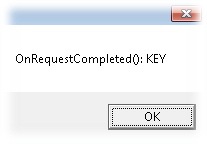
To illustrate the difference between the published script vs. running from the Script Tool I have a quick little script which will display a MessageBox when the RequestCompleted event is fired.


import System;
import System.Windows;
import System.Windows.Controls;
import MForms;

package MForms.JScript
{
    class RequestTest
    {
      public function Init(element: Object, args: Object, controller : Object, debug : Object)
      {
       var content : Object = controller.RenderEngine.Content;

       // subscribe to our event
       controller.add_RequestCompleted(OnRequestCompleted);
      }

      public function OnRequestCompleted(sender: Object, e: RequestEventArgs)
      {
       // display a messagebox with the event name
       MessageBox.Show("OnRequestCompleted(): " + e.CommandType.ToString());
      }
    }
}

Compile and then Run this from the Script Tool against say OIS300, you won’t see a MessageBox appear. Deploy the script to your server and then attach it to say OIS300 again. When you run OIS300, immediately after the Window appears you’ll get a MessageBox.

If the Sorting Order or Inquiry Type is changed you’ll get a KEY CommandType.

If either of these happened my event would be unsubscribed 😦 (that teaches me for blindly copying code :-))

It is a little disappointing that the behaviour here is different between the Script Tool and actually deploying it to the server. It makes it very difficult to debug issues. I suspect that simulating those events were simply overlooked when Lawson created the Scripting Tool and now they would be difficult to add.

Wouldn’t it be nice if the Scripting Tool actually had the option to launch the program that you were coding against – then you’d actually see the behaviour before you deploy it in to an environment which is challenging to debug? Maybe time to request an enhancement, I doubt that in this case I will have much luck logging the issue in CASE.

Anyway, I hope that this will save some people a few hours of frustration.

And for those that are interested – with my programmatically scrolling through the ListView, I ended up removing the remove_RequestCompleted from the OnRequestCompleted() method and added it instead to when one of my controls gets destroyed.

Cheers,
Scott

Posted in M3 / MoveX | Leave a comment

Programmatically Scrolling Through Lists in M3 Part III

Well, this is the third instalment in this little tale – proof that the time spent blogging about some of this stuff can yield good feedback that helps me solve my problems. Tonight is a night of credit where credit is deserved 🙂

If you want a recap:
https://potatoit.wordpress.com/2010/11/18/programatically-scrolling-through-lists-and-m3/

And
https://potatoit.wordpress.com/2010/12/02/lso-scrolling-through-lists-hasmorerows/

Of particular interest is the comments section of the first link where Karin provided some very useful information that solved several of my issues and prompted me to do some significant changes to my code.

So, if you didn’t trawl through the links above, then here is the issue “user wants to easily scroll through a long list to a specific item on PMS050/B1”

In previous incarnations, the code I was testing was a hack that would simulate the depression of the PageDown key on the currently active Window on the currently active Application. Of-course, if the focus changes then we have all sorts of problems.

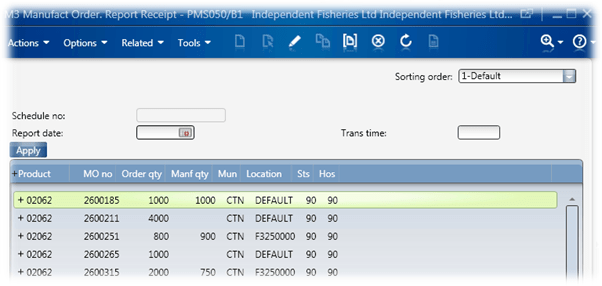
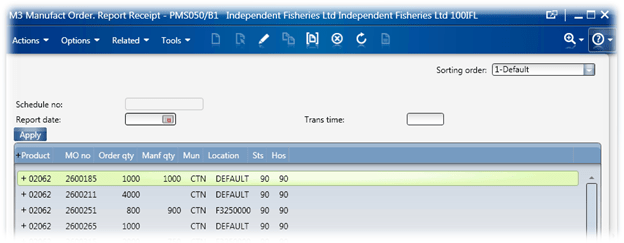
So, below is a snapshot of the normal PMS050/B panel, not a lot in the way of options.
I go out and add a TextBox and two Buttons so it looks like this:

The user keys in their ITNO in to the TextBox and then they hit Go to Item, this will scroll through the list until we get an ITNO match. We will then scroll that row in to view and highlight it.

If the user gets impatient, then we have a Stop button to break out to the search – the stop button is very simple, it sets a class Boolean variable, gbRunning to false. Code later will check this variable and only continue if gbRunning is to true.

        public function OnStopClick(sender: Object, e: RoutedEventArgs)
        {
            // later in the code we will check this variable to see
            // if the user wants us to stop prematurely
            gbRunning = false;
        }

Instead of the “Go to Item” button containing all of the looping code, it will just check if the ITNO is in the currently loaded records, if not it will do a single PageDown. After that, the RequestCompleted event takes over and effectively does the looping for us.

        public function OnClick(sender: Object, e: RoutedEventArgs)
        {
            // set our running state to True
            gbRunning = true;
            
            // set the Found to false
            gbFound = false;
            
            // set the position that we are starting from back to 0
            giLVItemCount = 0;
            
            // do a search for the item before polling the server
            // for more data.
            // In this instance we are comparing the value of the
            // TextBox we added against column 0 in the ListView
            searchForSpecificITNO(gtbTextBox.Text, 0);
            
            // if gbFound is still false then we want to request
            // more data from the server
            if(false == gbFound)
            {
                pageDown();
            }
        }


The RequestCompleted event occurs after records have been retrieved from the server and added to the ListView, this provides us with the perfect event to do our checking. We will then call another PageDown() if we can’t find out ITNO.


        public function OnRequestCompleted(sender: Object, e: RequestEventArgs)
        {
            // verify that these are the events we are looking for!
            if((e.CommandType == MNEProtocol.CommandTypePage) && (e.CommandValue == MNEProtocol.CommandValuePageDown))
            {
                // if we are still running, fantastic!
                if(true == gbRunning)
                {
                    // have we already matched the item we are looking for?
                    if(false == gbFound)
                    {
                        // now do the search of the data
                        searchForSpecificITNO(gtbTextBox.Text, 0);
                    }
                    // did we find the Item?
                    if(gbFound == true)
                    {
                        gbRunning = false;
                    }
                    else
                    {
                        // issue a pageDown() to retrieve some more records from the server
                        pageDown();
                    }
                }
            }
            else
            {
                gdebug.WriteLine("OnRequestCompleted() Other command, disconnecting event");
                gcontroller.remove_RequestCompleted(OnRequestCompleted);
            }
        }


Our PageDown call is now from mforms::IInstanceController::PageDown()

        // issue the actual PageDown command, but only if we have more
        // rows.  If we don't then we will display a MessageBox informing
        // the user we couldn't find the item they requested.
        private function pageDown()
        {
            try
            {
                var listControl = gcontroller.RenderEngine.ListControl;

                
                // there is no point in getting more rows if we have all of the rows
                if(true == listControl.HasMoreRows)
                {
                    // 'press' the Page Down key
                    gcontroller.PageDown(listControl);
                }
                else
                {
                    gbRunning = false;
                    MessageBox.Show("Sorry, but no item of '" + gtbTextBox.Text + "' was found");
                }
                
            }
            catch(ex)
            {
                //MessageBox.Show(ex.Message);
                gdebug.WriteLine(ex.Message + " " + ex.StackTrace);
            }
        }

Anyways, here is the complete code below, gratuitous use of comments. Still needs some polish, but is functional. For my user I will probably add code in there so they can search on the MO Number exclusively, Item Number exclusively or a combination of the two.

// Name: PMS050_B_SendKey
// Version: 3.03 2010-12-03
// Description: adds a TextBox and Button and will scroll
//    through the listview until it finds a matching product
//
// Notes: 
// We use mforms.IInstanceController.PageDown,
//  this will effectively force the client to retrieve more rows from the server
//    We use an undocumented feature in the ListControl called
//     HasMoreRows to determine when we should stop scrolling
//
// Revision History:
//    1.00    2010-12-02    * Completed
//    1.01    2010-12-03    * removed some of the debugging
//                            * we reset giLVItemCount to zero whenever the 'Go To Item' button is clicked
// 3.03    2011-01-02    * we now subscribe to the Requested and RequestCompleted events,
//                              which allows us to determine when the records have been returned from the server
//                              before attempting to search again.  Credit to Karin Portillo
//                            * We now use the controller.PageDown() to issue the pagedown - a little safer
//                              then the previous hack - ok, ALOT safer 😉  Credit to Karin Portillo
//                            * added functionality to break the search

import System;
import System.Windows;
import System.Windows.Controls;
import MForms;

package MForms.JScript
{
    class PMS050_B_SendKey
    {
        var gdebug, gcontroller;
        
        // this is the button that initiates the search
        var gbtnGotoItem : Button;
        // the TextBox that the user keys the Item Number in to
        var gtbTextBox : TextBox;
        
        // are we currently looking for a match?
        var gbRunning = false;
        
        // have we found a match?
        var gbFound = false;
        
        // this effectively becomes our start position to begin the search from
        // so after we have done a pageDown() we don't search from the beginning,
        // but where we last left off
        var giLVItemCount = 0;

        // the stop button
        var gbtnStop : Button;
        
        public function Init(element: Object, args: Object, controller : Object, debug : Object)
        {
            var content : Object = controller.RenderEngine.Content;
            
            // save these aganist the class so we
            // can use them in other functions
            gcontroller = controller;
            gdebug = debug;


            // create the TextBox that contains the
            // ITNO
            gtbTextBox = new TextBox();
            gtbTextBox.Width = 50;
            
            // create the Button that will
            // initiate the search
            gbtnGotoItem = new Button();
            gbtnGotoItem.Content = "Go to Item";
            Grid.SetColumnSpan(gbtnGotoItem, 10);
            Grid.SetColumn(gbtnGotoItem, 11);
            Grid.SetRow(gbtnGotoItem, 0);

            gbtnStop = new Button();
            gbtnStop.Content = "Stop";

            Grid.SetColumnSpan(gbtnStop, 10);
            Grid.SetColumn(gbtnStop, 19);
            Grid.SetRow(gbtnStop, 0);

            Grid.SetColumnSpan(gtbTextBox,12);
            Grid.SetColumn(gtbTextBox, 0);
            Grid.SetRow(gtbTextBox, 0);
            
            // Add the controls
            controller.RenderEngine.Content.Children.Add(gtbTextBox);                                
            controller.RenderEngine.Content.Children.Add(gbtnGotoItem);
            controller.RenderEngine.Content.Children.Add(gbtnStop);

            // add the events for the controls
            gbtnGotoItem.add_Click(OnClick);
            gbtnGotoItem.add_Unloaded(OnUnloaded);
            gbtnStop.add_Click(OnStopClick);
            gbtnStop.add_Unloaded(OnStopUnloaded);
            
            // we subscribe to these events so we can determine when
            // a PageDown() has been issued and when the server has
            // returned the data.
            // It is within the RequestCompleted() that we will effectively
            // loop through looking for our data.
            controller.add_Requested(OnRequested);
            controller.add_RequestCompleted(OnRequestCompleted);


        }

        // issue the actual PageDown command, but only if we have more
        // rows.  If we don't then we will display a MessageBox informing
        // the user we couldn't find the item they requested.
        private function pageDown()
        {
            try
            {
                var listControl = gcontroller.RenderEngine.ListControl;
                // ensure that the ListControl has focus
                //listControl.Focus();
                
                // there is no point in getting more rows if we have all of the rows
                if(true == listControl.HasMoreRows)
                {
                    // 'press' the Page Down key
                    gcontroller.PageDown(listControl);
                }
                else
                {
                    gbRunning = false;
                    MessageBox.Show("Sorry, but no item of '" + gtbTextBox.Text + "' was found");
                }
                
            }
            catch(ex)
            {
                //MessageBox.Show(ex.Message);
                gdebug.WriteLine(ex.Message + " " + ex.StackTrace);
            }
        }

        // searchForSpecificITNO
        //  scroll down through the alvListControl until we match our ITNO
        // astrITNO = the Item Number (we actually do a IndexOf when we compare)
        // aiColumnNumber = the column that we should look for the astrITNO in
        private function searchForSpecificITNO(astrITNO, aiColumnNumber)
        {

            try
            {
                if(!String.IsNullOrEmpty(astrITNO))
                {
                    var lvListControl = gcontroller.RenderEngine.ListControl;
                    var lvListView = lvListControl.ListView;

                    // have we found the ITNO?
                    gbFound = false;
                    
                    // loop through the current items in the list, we want to make sure that we
                    // start at the last value so we don't search the same items multiple times
                    for(var iCount : int = giLVItemCount; iCount < lvListView.Items.Count; iCount++)
                    {
                        // retrieve the current record
                        var itmCurrentItem = lvListView.Items[iCount];
                        if(null != itmCurrentItem)
                        {
                            // ensure that there the column we are searching for isn't
                            // null on the current record
                            if(!String.IsNullOrEmpty(itmCurrentItem[aiColumnNumber]))
                            {
                                // convert the current item to a string
                                var strCurrentString = itmCurrentItem[aiColumnNumber].ToString();
                                
                                // we only care about a partial match
                                if(-1 != strCurrentString.IndexOf(astrITNO))
                                {
                                    // because we are nice, we'll scroll the first matching
                                    // item in to view
                                    lvListView.ScrollIntoView(itmCurrentItem);
                                    lvListView.SelectedItem = itmCurrentItem;
                                    gbFound = true;
                                    break;
                                }
                            }
                        }
                    }
                    if(false == gbFound)
                    {
                        // we didn't find the item, we want to make note
                        // of the previous item count (I was using this
                        // originally so I knew when to stop, however the loop
                        // would complete before M3 had returned the new records :-O
                        giLVItemCount = lvListView.Items.Count;
                    }
                }
            }
            catch(ex)
            {
                gdebug.WriteLine(ex.Message);
            }
            return(gbFound);
        }
        
        public function OnStopClick(sender: Object, e: RoutedEventArgs)
        {
            // later in the code we will check this variable to see
            // if the user wants us to stop prematurely
            gbRunning = false;
        }

        public function OnClick(sender: Object, e: RoutedEventArgs)
        {
            // set our running state to True
            gbRunning = true;
            
            // set the Found to false
            gbFound = false;
            
            // set the position that we are starting from back to 0
            giLVItemCount = 0;
            
            // do a search for the item before polling the server
            // for more data.
            // In this instance we are comparing the value of the
            // TextBox we added against column 0 in the ListView
            searchForSpecificITNO(gtbTextBox.Text, 0);
            
            // if gbFound is still false then we want to request
            // more data from the server
            if(false == gbFound)
            {
                pageDown();
            }
        }

        // some unloaded events - us cleaning up
        public function OnStopUnloaded(sender: Object, e: RoutedEventArgs)
        {
            gbRunning = false;
            gbtnStop.remove_Click(OnStopClick);
            gbtnStop.remove_Unloaded(OnStopUnloaded);
        }

        public function OnUnloaded(sender: Object, e: RoutedEventArgs)
        {
            gbtnGotoItem.remove_Click(OnClick);
            gbtnGotoItem.remove_Unloaded(OnUnloaded);
        }

        public function OnRequested(sender: Object, e: RequestEventArgs)
        {
            if(e.CommandType == MNEProtocol.CommandTypePage)
            {
                //gdebug.WriteLine("OnRequested() Page command");
                // This is before the request for more lines is done
            }
            else
            {
                gdebug.WriteLine("OnRequested() Other command, disconnecting event");
                gcontroller.remove_Requested(OnRequested);
            }
        }

        public function OnRequestCompleted(sender: Object, e: RequestEventArgs)
        {
            // verify that these are the events we are looking for!
            if((e.CommandType == MNEProtocol.CommandTypePage) && (e.CommandValue == MNEProtocol.CommandValuePageDown))
            {
                // if we are still running, fantastic!
                if(true == gbRunning)
                {
                    // have we already matched the item we are looking for?
                    if(false == gbFound)
                    {
                        // now do the search of the data
                        searchForSpecificITNO(gtbTextBox.Text, 0);
                    }
                    // did we find the Item?
                    if(gbFound == true)
                    {
                        gbRunning = false;
                    }
                    else
                    {
                        // issue a pageDown() to retrieve some more records from the server
                        pageDown();
                    }
                }
            }
            else
            {
                gdebug.WriteLine("OnRequestCompleted() Other command, disconnecting event");
                gcontroller.remove_RequestCompleted(OnRequestCompleted);
            }
        }
        
    }
}

Enjoy!

Posted in Development, How Far is Too Far?, M3 / MoveX | 1 Comment

Other Sites of Interest

In the interest of prolific posting today…

http://movexblog.blogspot.com

Enjoy 🙂

Posted in M3 / MoveX | Leave a comment

Resizing and Reclaiming Dead Space Part 2

So, to follow up on my previous article I decided that there was even more that could be done to reclaiming dead space on MMS121.

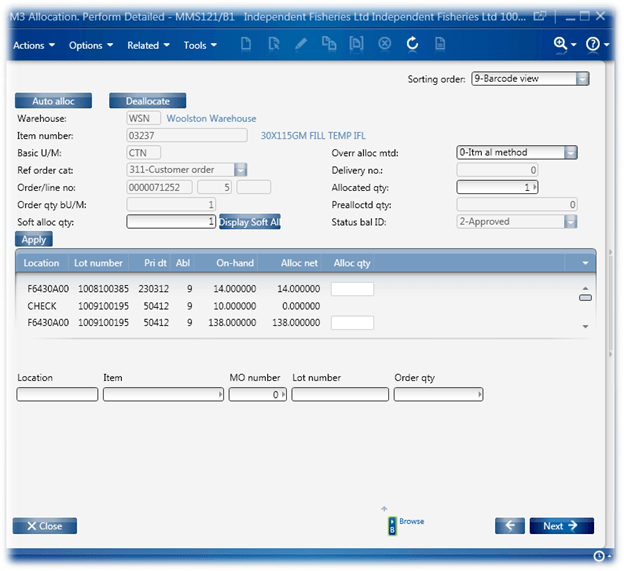
Before we go too far, it’s worth pointing out that our MMS121 is modified to add Sorting Order 9, this adds some extra TextBoxes and labels down the bottom.

There are a lot of controls that are on the screen that are of no use or interest, hiding the unneeded controls doesn’t actually reclaim any space until we start moving controls around. So to that end.

Here’s what we have to work with.

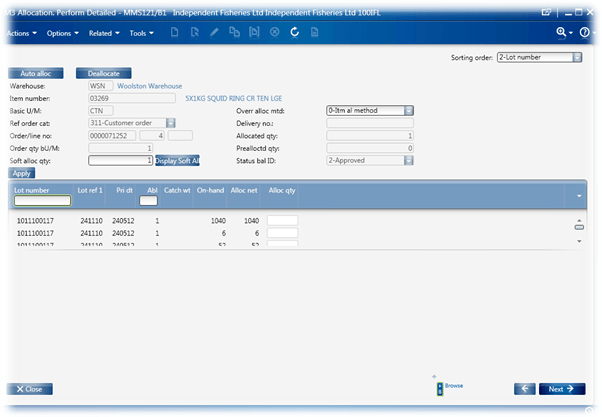
And after some jscript magic, this is what we end up with.

There is still some space that can be reclaimed down the bottom but it creates some issues with our forklifts.

Now there was a lot of experimentation that went in to this. The hiding of the controls and the moving them was easy, not to mention resizing the ListView, maybe few hours of mucking around. The kicker was handling the ability to resize the Window and keep everything visible, stretched and sized properly – it’s wasn’t strictly needed for our purposes but I was curious.

The second issue was when the Sorting Order is changed or the user hits Refresh then it redraws the controls – all our added controls and changes effectively get reset see https://potatoit.wordpress.com/2010/12/23/where-did-my-control-go/ for some more detail.

We also manually change the visibility (yes, I know we don’t have to do it programmatically).

Other points of interest –

Controller.Host.HostTitle shows us the title of the Window.

Controller.RenderEngine.InquiryType is the current Sort Order


This can probably be slimmed down even more as some of the code is probably redundant as I continue to refine.


import System;
import System.Text;
import System.Windows;
import System.Windows.Controls;
import System.Windows.Media;
import System.Windows.Media.Media3D;
import MForms;
import Mango.UI.Core;
import Mango.UI.Core.Util;
import Mango.UI.Services;
import Mango.Services;

package MForms.JScript
{
   class MMS121
   {
           var gController;
           var gContent;
           var gDebug;
           var grdLVParent : Grid;
           var glvListView : ListView;
           var gbtnPickButton : Button;
           var gcmbSortOption : ComboBox;

       public function Init(element: Object, args: Object, controller : Object, debug : Object)
       {
           var ihHost : Mango.Services.IInstanceHost = controller.Host;
           var fweElement : System.Windows.FrameworkElement;
           var objWinData : Mango.Core.Persistance.WindowData;

           if(null != ihHost)
           {
               //MessageBox.Show(ihHost.HostTitle);
           }
           
           if(String.Compare("9",controller.RenderEngine.InquiryType) == 0)
           {
                  gController = controller;
                  gDebug = debug;
    
                var content : Object = controller.RenderEngine.Content;
                gContent = content;
                
                var lcListControl : ListControl = controller.RenderEngine.ListControl;
    
                glvListView  = lcListControl.ListView;
                 
                grdLVParent = glvListView.Parent;
                
                //ListObjects();
                
                gbtnPickButton = new Button();
                gbtnPickButton.Content = "PICK";
                Grid.SetColumnSpan(gbtnPickButton, 10);
                Grid.SetColumn(gbtnPickButton, 65);
                Grid.SetRow(gbtnPickButton, 2);
                content.Children.Add(gbtnPickButton);
    
                hideControls();
                moveControls();
                LVResize();
                
                gbtnPickButton.add_Click(OnClick);
                gbtnPickButton.add_Unloaded(OnUnloaded);
                
                grdLVParent.add_SizeChanged(OnGridSizeChanged);
                grdLVParent.add_Unloaded(OnGridUnloaded);
                goUp();
                }
        }


     private function findComboBox(parent : Object, depth : int, debug : Object)
      {
            try
            {
                if(null != parent)
                {
                    // get the type of our object, we do this
                    // so we can check if the object inherits
                    // from a DependencyObject
                    var parentobjType : Type = parent.GetType();
                    if(parentobjType.IsSubclassOf(DependencyObject) == true)
                    {                           
                        for(var i=0; i < VisualTreeHelper.GetChildrenCount(parent);i++)
                        {
                            // retrieve the child object
                            var current : Object = VisualTreeHelper.GetChild(parent,i);
                            if(null != current)
                            {
                                // here we shall deterine the type of the new object
                                var objType = current.GetType();
                                
                                if(null != objType)
                                {
                                    // we're looking for the Name property, because
                                    // this is what I am interested in
                                    var objPropertyName = objType.GetProperty("Name");
                                    if(null != objPropertyName)
                                    {
                                        var strName = objPropertyName.GetValue(current);
                                        if(null != strName)
                                        {
                                            if(0 == String.Compare(strName,"WWQTTP"))
                                            {
                                                gcmbSortOption = current;
                                                //MessageBox.Show("Found!");
                                                //return (current);
                                                break;
                                            }
                                            
                                            // does the current object have any children?
                                            if(VisualTreeHelper.GetChildrenCount(current) >= 1)
                                            {
                                                // recurse down
                                                findComboBox(current, depth+1, debug);
                                            }
    
                                        }
                                    }
                                }
                                

                            }
                            }

                    }
                }
            }
            catch(ex)
            {
                debug.WriteLine("!-! Exception: " + ex.Message + " " + ex.StackTrace);
            }
      }

        private function goUp()
        {
           var parent : Object = gContent;
           var lastParent : Object = gContent;
    
           // here we will loop UP the VisualTree seeking the top
           while(null != (parent = VisualTreeHelper.GetParent(parent)))
           {
               lastParent = parent;
               
               var objType = lastParent.GetType();
               var objPropertyName = objType.GetProperty("Name");
               var strName : String = objPropertyName.GetValue(lastParent)
               
               if(null != strName)
               {
                   if(String.Compare(strName,"ContainerPanel") == 0)
                   {
                       for(var i : int = 0; i < lastParent.Children.Count; i++)
                       {
                           var con = findComboBox(lastParent);
                           if(null != con)
                           {
                               MessageBox.Show("xxFound!");
                           }
                           break;
                       }
                       
                       break;
                   }
               }
               // PART_ContentPanel
           }
        }


        private function hideControl(astrName : String)
        {
            var objControl = ScriptUtil.FindChild(gContent, astrName);
            if(null != objControl)
            {
                var objType = objControl.GetType();
                var objPropertyVisible = objType.GetProperty("Visibility");
                if(null != objPropertyVisible)
                {
                    objPropertyVisible.SetValue(objControl,Visibility.Collapsed);
                }
            }
        }

        private function hideControls()
        {
            hideControl("X__7714");        // "Auto alloc" button
            hideControl("X__7715");        // "Deallocate" button
            hideControl("X__7716");        // "Display Soft Allocation" button
            hideControl("XT_0168");        // "Apply" button
            hideControl("WUN0215");        // Basic U/M
            hideControl("WNOAA15");        // Over Alloc Mtd
            hideControl("WRO1915");        // Ref Order Cat
            hideControl("WRI0315");        // 'Delivery    no.:'

            hideControl("WSTA115");        //'Status    bal    ID:'
            hideControl("MWWHLO");        // 'WSN'
            hideControl("MMUNMS");        //
            hideControl("M3RIDI");        //
            hideControl("M9RIDI");
            hideControl("M9RIDI");
            hideControl("WBNOAA");
            hideControl("WWORCA");
            hideControl("WWH0115");
            hideControl("LBL_L20T2");
            hideControl("WOR0515");
            hideControl("WXORQT");
            hideControl("WPQ0515");
            hideControl("WXPQTT");
            hideControl("WLSTAS");
        }

        private function moveControl(astrName : String, aiColumn : int, aiRow : int)
        {
            var objControl = ScriptUtil.FindChild(gContent, astrName);
            if(null != objControl)
            {
                if(-1 != aiColumn)
                {
                    Grid.SetColumn(objControl, aiColumn);
                }
                if(-1 != aiRow)
                {
                    Grid.SetRow(objControl, aiRow);
                }
                
            }
        }

        private function moveControls()
        {
            moveControl("WIT0115", -1, 0);
            moveControl("MMITNO", -1, 0);
            moveControl("LBL_L32T3", -1, 0);
            moveControl("MM12103", -1, 1);
            moveControl("MM12103", -1, 1);
            moveControl("M3RIDN", -1, 1);
            moveControl("M3RIDL", -1, 1);
            moveControl("M3RIDX", -1, 1);
            
            moveControl("MM12105", -1, 2);
            moveControl("WXSQTY", -1, 2);
            
            moveControl("WAL0315", -1, 2);
            moveControl("WXALQT", 52, 2);
            moveControl("M9ALQT", 52, 2);
            
            glvListView.VerticalAlignment = VerticalAlignment.Stretch;
            var rdfRowDefinitionCollection : RowDefinitionCollection = grdLVParent.RowDefinitions;
            var iRowCount = rdfRowDefinitionCollection.Count;
            
            // make sure taht the margin is set to 0
            var mgMargin : Thickness = new Thickness(0,70,0,50);
            glvListView.Margin = mgMargin;
            glvListView.Height = double.NaN;

            Grid.SetRow(glvListView,3);
            // set the listview so it spans all of the rows
            //Grid.SetRowSpan(glvListView, iRowCount);
            moveControl("List", -1, 0);
        }

        public function LVResize()
        {
            glvListView.VerticalAlignment = VerticalAlignment.Stretch;
            var rdfRowDefinitionCollection : RowDefinitionCollection = grdLVParent.RowDefinitions;
            var iRowCount = rdfRowDefinitionCollection.Count;
            
            // make sure taht the margin is set to 0
            var mgMargin : Thickness = new Thickness(0,70,0,70);
            glvListView.Margin = mgMargin;
            glvListView.Height = double.NaN;
            glvListView.MinHeight = 200;
            Grid.SetRow(glvListView,3);
            // set the listview so it spans all of the rows
            Grid.SetRowSpan(glvListView, iRowCount-5);
            //changeMinimumHeight();
            moveControl("List", -1, 0);
        }

        private function changeMinimumHeight()
        {
            var rdfRowDefinitionCollection : RowDefinitionCollection = grdLVParent.RowDefinitions;
            var iRowCount = rdfRowDefinitionCollection.Count;
            for(var i : int = 0; i < iRowCount; i++)
            {
                rdfRowDefinitionCollection[i].MinHeight = 0;
            }
        }

        
        // We will use the interactive launching of the Normal Option
        private function listOptionNormal()
        {
            try
            {
                if(null != gController)
                {
                    gController.PressKey("F21");
                }
                else
                {
                    MessageBox.Show("Controller Class not initiated");
                }
            }
            catch(ex)
            {
                MessageBox.Show("Exception: " + ex.Message);
            }
        }


        public function OnGridSizeChanged(sender : Object, e : SizeChangedEventArgs)
        {
            LVResize();
        }
        
        public function OnGridUnloaded(sender : Object, e : RoutedEventArgs)
        {
            grdLVParent.remove_Unloaded(OnGridUnloaded);
            grdLVParent.remove_SizeChanged(OnGridSizeChanged);
        }

        public function OnClick(sender: Object, e: RoutedEventArgs) 
        {
            listOptionNormal();
        }

        public function OnUnloaded(sender: Object, e: RoutedEventArgs) 
        {
            gbtnPickButton.remove_Click(OnClick);
            gbtnPickButton.remove_Unloaded(OnUnloaded);
        }

   }
}

Posted in Development, How Far is Too Far?, M3 / MoveX | 1 Comment

Where Did My Control Go?

Update 2011/01/02 – if you read the comments below, you’ll note that Al mentions that the issue where Init() isn’t called when the Sorting Order / Inquiry Type changes I am talking about here doesn’t occur when you publish the code – it appears to only be when you are testing in the Script Tool! :-[

So, Smart Office rocks! The Jscript functionality is awesome. But…

You add a control to a B panel, and then change the “Sorting Order” and your control disappears – somewhat irritating.

This is a challenge that I recently came across and still don’t have a nice solution, I have yet to find an event that I can subscribe to that allows me to redraw my controls.

Lawson Smart Office does some nifty stuff, when you change the Sorting Order the controls that sit below the Sort Order ComboBox are removed and destroyed, and then the new controls associated with the new Sorting Order are added – any events that you had tied to those controls is now invalid.

However, the Init() method isn’t called again so your controls don’t get added.

I have a little script which illustrates this with Dialog Boxes. The script was used against OIS300. We have subscribed to the Sorting Order ComboBox SelectChanged event and the unload even of the ListView (I only did one control to illustrate what was happening).

Getting to the Sort Order ComboBox is a little bit of a challenge aswell, we can’t find it with the ScriptUtil.FindChild() so we have to do it the hard way, and that is walk up the tree and then walk down the visual tree until we find WWQTTP – the Sort Order ComboBox.

In this script the following will happen

  1. Change Sorting Order
  2. Event: ListView unloaded
  3. Event: ComboBox Selection Changed -1
  4. Event: ComboBox Selection Changed -1
  5. Event: ComboBox Selection Changed new selection
  6. Event: ComboBox Selection Changed new selection
  7. Controls are re-added (no event added for this)

The ListView event will only fire once, because the we subscribed to the ListView Unloaded event and that ListView no-longer exists.

import System;
import System.Windows;
import System.Windows.Controls;
import System.Windows.Media;
import System.Windows.Media.Media3D;
import MForms;

package MForms.JScript
{
   class Sample
   {
           var gController;
           var gContent;
           var gDebug;
           var grdLVParent : Grid;
           var glvListView : ListView;
           var gbtnPickButton : Button;
           var gcmbSortOption : ComboBox;

      public function Init(element: Object, args: Object, controller : Object, debug : Object)
      {
              gController = controller;
              gDebug = debug;

            var content : Object = controller.RenderEngine.Content;
            gContent = content;

            var lcListControl : ListControl = controller.RenderEngine.ListControl;

            glvListView  = lcListControl.ListView;

            grdLVParent = glvListView.Parent;

            grdLVParent.add_Unloaded(OnGridUnloaded);

            glvListView.add_Unloaded(OnListViewUnloaded);

            goUp();

            if(null != gcmbSortOption)
            {
                gcmbSortOption.add_SelectionChanged(onComboBoxSelectionChanged)
            }
      }

          public function OnListViewUnloaded(sender : Object, e : RoutedEventArgs)
        {
            MessageBox.Show("ListView Unloaded");
        }

          public function OnGridUnloaded(sender : Object, e : RoutedEventArgs)
        {
            MessageBox.Show("Grid Unloaded");
        }

        public function onComboBoxSelectionChanged(sender : Object, e : SelectionChangedEventArgs)
        {
            MessageBox.Show("ComboBox Selection Changed" + gcmbSortOption.SelectedIndex);
        }

      private function findComboBox(parent : Object, depth : int, debug : Object)
      {
            try
            {
                if(null != parent)
                {
                    // get the type of our object, we do this
                    // so we can check if the object inherits
                    // from a DependencyObject
                    var parentobjType : Type = parent.GetType();
                    if(parentobjType.IsSubclassOf(DependencyObject) == true)
                    {
                        // loop through the children of this object
                        for(var i=0; i < VisualTreeHelper.GetChildrenCount(parent);i++)                         {                             // retrieve the child object                             var current : Object = VisualTreeHelper.GetChild(parent,i);                             if(null != current)                             {                                 // here we shall deterine the type of the new object                                 var objType = current.GetType();                                                                  if(null != objType)                                 {                                     // we're looking for the Name property, because                                     // this is what I am interested in                                     var objPropertyName = objType.GetProperty("Name");                                     if(null != objPropertyName)                                     {                                         var strName = objPropertyName.GetValue(current);                                         if(null != strName)                                         {                                           if(0 == String.Compare(strName,"WWQTTP"))                                           {                                                 gcmbSortOption = current;                                                 break;                                           }                                                                                          // does the current object have any children?                                           if(VisualTreeHelper.GetChildrenCount(current) >= 1)
                                          {
                                                // recurse down
                                                findComboBox(current, depth+1, debug);
                                                }
                                            }
                                        }
                                    }
                                }
                       }
                    }
                }
            }
            catch(ex)
            {
                debug.WriteLine("!-! Exception: " + ex.Message + " " + ex.StackTrace);
            }
      }

        private function goUp()
        {
           var parent : Object = gContent;
           var lastParent : Object = gContent;

           // here we will loop UP the VisualTree seeking the top
           while(null != (parent = VisualTreeHelper.GetParent(parent)))
           {
               lastParent = parent;

               var objType = lastParent.GetType();
               var objPropertyName = objType.GetProperty("Name");
               var strName : String = objPropertyName.GetValue(lastParent)

               if(null != strName)
               {
                   if(String.Compare(strName,"ContainerPanel") == 0)
                   {
                       for(var i : int = 0; i < lastParent.Children.Count; i++)
                       {
                           var con = findComboBox(lastParent);
                           if(null != con)
                           {
                               MessageBox.Show("xxFound!");
                           }
                           break;
                       }

                       break;
                   }
               }

           }
        }
   }
}

Posted in Development, M3 / MoveX | 2 Comments

Don’t forget the Grid Borderlines!

I was considering setting some borders around each row and column when I stumbled across this little gem in the scripting documentation.

Ctrl-Shift-G will turn on the grid lines, it is useful to see when you are trying to determine the behaviour of a specific row when trying to determine how things should move.

Posted in M3 / MoveX | Leave a comment

Resizing a Control and Reclaiming Dead Space

So, what do you do when you have a lot of wasted real-estate and users complaining?

You can call Lawson and get a modification – paying a premium and dealing with all those nasty issues associated with modifications or use some jscript magic 🙂

The situation we had was with the ListView in MMS121, it was very small and there was a large amount of wasted space below it. Something that was causing a little bit of consternation.

Now if you have some WPF experience then you’d think that this would be a simple process – retrieve the ListView and set the Height, but sadly not.

The parent object of the ListView is a GridView (incidentally its parent is a ScrollView), this GridView is divided up in to Rows and Columns. The height of a control is limited by the total height of the rows that the control spans.

By default the ListView spans 7 rows, it will expand proportionally as you expand the window.

And to complicate things a little further when you resize the window some of the settings you apply to the ListView disappear.

So, we need to increase the rows we span, set the height to Nan (so it resizes with the Grid) and set the Height to ‘Stretch’ and then update these settings each time the Grid is resized.

The finished result looks like this.

And the code itself…


// Name: MMS121
// Version: 1.00 2010-12-13
// Description: Resizes the ListView so it uses all of the 
//  windows real-estate
//
// Revision History:
//	1.00	2010-12-13	* Completed

import System;
import System.Windows;
import System.Windows.Controls;
import MForms;

package MForms.JScript
{
   class MMS121
   {
   		var gController;
   		var gDebug;
   		var grdLVParent : Grid;
   		var glvListView : ListView;

       public function Init(element: Object, args: Object, controller : Object, debug : Object)
       {
      		gController = controller;
      		gDebug = debug;

			var content : Object = controller.RenderEngine.Content;
			
			var lcListControl : ListControl = controller.RenderEngine.ListControl;
			glvListView  = lcListControl.ListView;
			 
			grdLVParent = glvListView.Parent;
			
			LVResize();
			 
			grdLVParent.add_SizeChanged(OnGridSizeChanged);
			grdLVParent.add_Unloaded(OnGridUnloaded);
		}

		public function LVResize()
		{
			// we want to get a count of the rows so we can span them all
			var rdfRowDefinitionCollection : RowDefinitionCollection = grdLVParent.RowDefinitions;
			var iRowCount = rdfRowDefinitionCollection.Count;
			// make sure taht the margin is set to 0
			var mgMargin : Thickness = new Thickness(0);
			glvListView.Margin = mgMargin;

			// set the listview so it spans all of the columns
			Grid.SetRowSpan(glvListView, iRowCount);
			// set the Height so it is the same height as the Grid (NaN)
			glvListView.Height = grdLVParent.Height;
			// set a minimum height, this gets around an issue where if the window
			// becomes very small we don't seem to work properly (unless LVResize is
			// manually fired AFTER the window has resized)
			glvListView.MinHeight = 310;

			// and the key, make sure that we are stretching the control
			glvListView.VerticalAlignment = VerticalAlignment.Stretch;
		}

		public function OnGridSizeChanged(sender : Object, e : SizeChangedEventArgs)
		{
			LVResize();
		}
		
		public function OnGridUnloaded(sender : Object, e : RoutedEventArgs)
		{
			grdLVParent.remove_Unloaded(OnGridUnloaded);
			grdLVParent.remove_SizeChanged(OnGridSizeChanged);
		}

   }
}

Posted in Uncategorized | Leave a comment

LSO Scrolling through Lists & HasMoreRows

In my last post I write about being able to programmatically scroll through an M3 list, you may want to do this for several reasons – such as populating the ListView so you can enumerate through its entire contents and not just the records that were initially retrieved.

I vaguely mentioned that the reason I was looking in to it was due to some very specific requirements – we have a mod in PMS050 which makes manufacturing reporting for ‘normal’ staff challenging. Closing a MO ends up being done through PMS050 panel B. Panel B doesn’t have much in the way of filtering.

As a temporary work around I decided that I would add a TextBox for an product number (ITNO) and a button which would initiate a script that would look for the Textbox value in the first column of the ListView, if ITNO wasn’t found, it will simulate two page downs and then check to see if it can find ITNO – this process will be repeated until it finds ITNO or we reach the end of the list.

There were a number of challenges around this:

  • LSO will retrieve a small sample of records and display them. As you start scrolling down a ListView it will retrieve another block of records to be displayed – we never know exactly how many records make up the ListView. The ListView itself has no idea either. This makes determining if we have reached the bottom of the list challenging.
  • When LSO requests its next set of records it takes time, during my testing my loop would complete up to 4 times before the new records were retrieved and added to the ListView – so I couldn’t compare a previous record count (ListView.Items.Count) against the record count after the page down.
  • How do you simulate the key depression and what are the ramifications?

Addressing point 1, this took a while to resolve until I caved and investigated the LSO UI assembly. Smart Office wraps a WPF ListView in the ListControl object, and one of the properties that the ListControl exposes is HasMoreRows. HasMoreRows is Boolean and will be true as long as there are more records to retrieve. Once we have hit the last it will be false.

Point 2, once I discovered this variable, issue two just disappeared 🙂

Point 3, well, that’s discussed in my previous post, however this did have some unforeseen issues. The usage of SendKeys from the Windows.Forms assembly will send the keys to the currently active Window and control. If you open another Window then it will take the focus and of-course will start receiving the SendKeys events – not so much of an issue for most situations but it is a problem nonetheless. I did take a look at creating a KeyEventArgs object and using the RaiseEvent of the ListControl which I would expect to get around the issue but I couldn’t get it to consistently work – but that’s why we have versions of software 🙂

Below is a snap of the final product.

Now with that over, here’s the code that I will be distributing to my user.


// Name: PMS050_B_SendKey
// Version: 1.00 2010-12-02
// Description: adds a TextBox and Button and will scroll
//	through the listview until it finds a matching product
//
// Notes: Simulates key depressions for PageDown, this 
//	has the undesired effect of working on the currently
//	active window.
//	We use an undocumented feature in the ListControl called
//	HasMoreRows to determine when we should stop scrolling
//	* Using KeyEventArgs should be investigated further
//		var k :KeyEventArgs = new KeyEventArgs(Keyboard.PrimaryDevice, Keyboard.PrimaryDevice.ActiveSource, 0, Key.Next);
//		k.RoutedEvent = Keyboard.KeyDownEvent;
//		listControl.ListView.RaiseEvent(k);
//	* Determine a method to break the loop in a friendly fashion

import System;
import System.Windows;
import System.Windows.Controls;
// used for the SendWait
import System.Windows.Forms;
import MForms;

package MForms.JScript {
   class PMS050_B_SendKey {
   		var gdebug, gbtnGotoItem, gcontroller, gtbTextBox;
   		var gbRunning = false;
   		var giLVItemCount = 0;
   		var gbtnStop;
   		
		public function Init(element: Object, args: Object, controller : Object, debug : Object)
		{
			try
			{
				// save these aganist the class so we
				// can use them in other functions
				gcontroller = controller;
				gdebug = debug;

				// create the TextBox that contains the
				// ITNO
				gtbTextBox = new TextBox();
				gtbTextBox.Width = 50;
				
				// create the Button that will
				// initiate the search
				gbtnGotoItem = new Button();
				gbtnGotoItem.Content = "Go to Item";
				Grid.SetColumnSpan(gbtnGotoItem, 10);
				Grid.SetColumn(gbtnGotoItem, 11);
				Grid.SetRow(gbtnGotoItem, 0);

				gbtnStop = new Button();
				gbtnStop.Content = "Stop";

				Grid.SetColumnSpan(gbtnStop, 10);
				Grid.SetColumn(gbtnStop, 19);
				Grid.SetRow(gbtnStop, 0);

				Grid.SetColumnSpan(gtbTextBox,12);
				Grid.SetColumn(gtbTextBox, 0);
				Grid.SetRow(gtbTextBox, 0);
				
				// Add the controls
				controller.RenderEngine.Content.Children.Add(gtbTextBox);								
				controller.RenderEngine.Content.Children.Add(gbtnGotoItem);
				//controller.RenderEngine.Content.Children.Add(gbtnStop);
				
				gbtnGotoItem.add_Click(OnClick);
				gbtnGotoItem.add_Unloaded(OnUnloaded);
				gbtnStop.add_Click();
				gbtnStop.add_Unloaded();
			}
			catch(ex)
			{
				debug.WriteLine(ex.Message);
			}
      }

		// check to make sure that the ListControl currently has
		// focus, if yes, then we will issue the pagedown sendkey
		private function pageDown(alcListControl)
		{
			try
			{
				// ensure that the ListControl has focus
				alcListControl.Focus();
				// 'press' the Page Down key
				System.Windows.Forms.SendKeys.SendWait("{PGDN}");
				System.Windows.Forms.SendKeys.SendWait("{PGDN}");
			}
			catch(ex)
			{
				//MessageBox.Show(ex.Message);
				gdebug.WriteLine(ex.Message + " " + ex.StackTrace);
			}
		}
		
		// searchForSpecificITNO
		//  scroll down through the alvListControl until we match our ITNO
		// alvListControl = the ListView that we want to interate through
		// astrITNO = the Item Number (we actually do a IndexOf when we compare)
		// aiColumnNumber = the column that we should look for the astrITNO in
		private function searchForSpecificITNO(alvListControl, astrITNO, aiColumnNumber)
		{
			try
			{
				if(!String.IsNullOrEmpty(astrITNO))
				{
					var lvListView = alvListControl.ListView;
					// set the focus to the ListView
					alvListControl.Focus();

					// start off with a pagedown, the user probably
					// won't do a search if they can already see it
					// on the screen
					pageDown(alvListControl);

					// have we found the ITNO?
					var bFound = false;
					
					// we need 3 conditions to be true before we exit this while loop
					//  1). has the ITNO been found?
					//  2). is there more rows to be retrieved?
					//  3). should we continue running - ideally we want to add a method to cancel the looping in a future version
					while((false == bFound) && (true == alvListControl.HasMoreRows) && (true == gbRunning))
					{
						// loop through the current items in the list, we want to make sure that we
						// start at the last value so we don't search the same items multiple times
						for(var iCount : int = giLVItemCount; iCount < lvListView.Items.Count; iCount++)
						{
							// retrieve the current record
							var itmCurrentItem = lvListView.Items[iCount];
							if(null != itmCurrentItem)
							{
								// ensure that there the column we are searching for isn't
								// null on the current record
								if(!String.IsNullOrEmpty(itmCurrentItem[aiColumnNumber]))
								{
									// convert the current item to a string
									var strCurrentString = itmCurrentItem[aiColumnNumber].ToString();
									
									// we only care about a partial match
									if(-1 != strCurrentString.IndexOf(astrITNO))
									{
										// because we are nice, we'll scroll the first matching
										// item in to view
										lvListView.ScrollIntoView(itmCurrentItem);
										lvListView.SelectedItem = itmCurrentItem;
										bFound = true;
										break;
									}
								}
							}
						}
						if(false == bFound)
						{
							// we didn't find the item, we want to make note
							// of the previous item count (I was using this
							// originally so I knew when to stop, however the loop
							// would complete before M3 had returned the new records :-O
							giLVItemCount = lvListView.Items.Count;

							// pagedown twice!
							pageDown(alvListControl);
							pageDown(alvListControl);

						}
						else
						{
							break;
						}
					}
				}
			}
			catch(ex)
			{
				gdebug.WriteLine(ex.Message);
			}
		}

		public function OnStopClick(sender: Object, e: RoutedEventArgs)
		{
			gbRunning = false;
		}

		public function OnClick(sender: Object, e: RoutedEventArgs)
		{
			gbRunning = true;	// this is what we require for our loop
			try
			{
				if(null != gcontroller)
				{
					// retrieve the ListView
					var listControl = gcontroller.RenderEngine.ListControl;
					gdebug.WriteLine("listControl");
					// set the focus to the ListView
					listControl.Focus();
					gdebug.WriteLine("listControl.Focus()");
					searchForSpecificITNO(listControl, gtbTextBox.Text, 0);
	
				}
				else
				{
					MessageBox.Show("no controller");
				}				
			}
			catch(ex)
			{
				gdebug.WriteLine(ex.Message);
			}
		}

		public function OnStopUnloaded(sender: Object, e: RoutedEventArgs)
		{
			gbRunning = false;
			gbtnStop.remove_Click(OnStopClick);
			gbtnStop.remove_Unloaded(OnStopUnloaded);
		}

		public function OnUnloaded(sender: Object, e: RoutedEventArgs)
		{
			gbtnGotoItem.remove_Click(OnClick);
			gbtnGotoItem.remove_Unloaded(OnUnloaded);
		}

   }
}

Posted in Development, How Far is Too Far?, M3 / MoveX | Leave a comment

Programatically Scrolling Through Lists and M3

Been a little while since my last post as we have just gone live with 10.1, but here goes…

So, one of my staff uses PMS050 panel A, and it doesn’t really have much in the way of easily getting down through the list to the product that you desire, so roll on jscript!

This was an interesting problem and not one that was really all that obvious to solve. The PressKey from IInstanceController method that Lawson provide didn’t seem to work, so I needed another way.

But first, there is a little other detail that we should discuss. When an M3 panel loads and has a ListView it will only retrieve enough records to populate the list + a few more. So your item master (MMS001) there may be several thousand entries, however when you first load MMS001 it will only retrieve maybe 40 records and depending on the size of the list display 30. When you scroll down the list the next group of records will be retrieved and added to the ListView.

This is pretty nifty and makes the solution scalable when there are large amounts of records. This creates a big problem if you have a situation where you have a customer order with 100 lines, with jscript if you enumerate the ListView you’ll only get the number or records that M3 has currently loaded in to the ListView, you won’t get all of those other lines – so you effectively need to scroll through the entire list first before you try enumerating.

Using System.Windows.Forms.SendKeys.SendWait () we can simulate a keypress.

So, the first thing that we need to do is import the Assembly.

import System.Windows.Forms;

Then we need to set the focus to the ListView

var listControl = gcontroller.RenderEngine.ListControl;
listControl.Focus();

And finally, do the actual send

System.Windows.Forms.SendKeys.SendWait(“{PGDN}”);

And putting it all together…

import System;
import System.Windows;
import System.Windows.Controls;
// used for the SendWait
import System.Windows.Forms;
import MForms;

package MForms.JScript {
   class TestSendKey {
   		var debug, button, content, gcontroller;
		public function Init(element: Object, args: Object, controller : Object, debug : Object)
		{
			try
			{
				this.gcontroller = controller;
				
				content = controller.RenderEngine.Content;
				
				button = new Button();
				button.Content = "Page Down";
				Grid.SetColumnSpan(button, 10);
				Grid.SetColumn(button, 10);
				Grid.SetRow(button, 0);
				content.Children.Add(button);
				button.add_Click(OnClick);
				button.add_Unloaded(OnUnloaded);
			}
			catch(ex)
			{
				debug.WriteLine(ex.Message);
			}
      }

		public function OnClick(sender: Object, e: RoutedEventArgs) 
		{
			try
			{
				// retrieve the ListView
				var listControl = gcontroller.RenderEngine.ListControl;

				// set the focus to the ListView
				listControl.Focus();
				// 'press' the Page Down key
				System.Windows.Forms.SendKeys.SendWait("{PGDN}");
				System.Windows.Forms.SendKeys.SendWait("{PGDN}");
			}
			catch(ex)
			{
				debug.WriteLine(ex.Message);
			}
		}

		public function OnUnloaded(sender: Object, e: RoutedEventArgs) 
		{
			button.remove_Click(OnClick);
			button.remove_Unloaded(OnUnloaded);
		}

   }
}

Update 20101122 – please be aware that SendKeys will send the key depression to the currently active window!

Posted in Development, M3 / MoveX | 12 Comments

Exploring the Smart Office Visual Tree – Figuring out the Field Names V2

And the revised version that doesn’t exhibit the excessive memory consumption issue mentioned in my previous post.

import System;
import System.Text;
import System.Windows;
import System.Windows.Controls;
import System.Windows.Media;
import System.Windows.Media.Media3D;
import System.Reflection;
import MForms;

package MForms.JScript {
   class VTWalker {
      public function Init(element: Object, args: Object, controller : Object, debug : Object) 
      {
      		var sbBuilder : StringBuilder = new StringBuilder(5000);
      		// this is a grid that appears on our panel, interestingly it doesn't include some of the higher
      		// level controls on the main panel
         	var content : Object = controller.RenderEngine.Content;

			// to prove that we are indeed a Grid.
		  	//debug.WriteLine("content object type = " + content.GetType().ToString());
		  	
		  	var parent : Object = content;
		  	var lastParent : Object = content;

		  	// here we will loop UP the VisualTree seeking the top
		  	while(null != (parent = VisualTreeHelper.GetParent(parent)))
		  	{
		  		lastParent = parent;
		  	}
		  	//debug.WriteLine(" ************ ");
		  	//debug.WriteLine(" ************ ");
		  	//debug.WriteLine("From Grid downwards");
		  	// output the tree from the Grid down, if you want to
		  	// go from the very highest Parent, then change content to lastParent
		  	displayChildren(sbBuilder, lastParent, 1, debug);
		  	debug.WriteLine(sbBuilder.ToString());
		  	// debug.WriteLine("Finished, debug object type = " + debug.GetType().ToString());
      }
      
      // displayChildren
      //  display information for each of the objects children
      //  recurse down the tree
      // parent - the object whose children we want to investigate
      // depth  - we keep track of the depth so we can indent our output to make reading easier
      // debug  - so we can output our data
      private function displayChildren(sbBuilder : StringBuilder, parent : Object, depth : int, debug : Object)
      {
      		try
      		{
	      		if(null != parent)
	      		{
	      			// get the type of our object, we do this
	      			// so we can check if the object inherits
	      			// from a DependencyObject
	      			var parentobjType : Type = parent.GetType();
	      			if(parentobjType.IsSubclassOf(DependencyObject) == true)
	      			{
	      				// loop through the children of this object
		      			for(var i=0; i < VisualTreeHelper.GetChildrenCount(parent);i++)
		      			{
		      				// retrieve the child object
		      				var current : Object = VisualTreeHelper.GetChild(parent,i);
		      				if(null != current)
		      				{
		      					// here we shall deterine the type of the new object
						  		var objType = current.GetType();
						  		// we're looking for the Name property, because
						  		// this is what I am interested in
						  		var objPropertyInfo = objType.GetProperty("Name");
						  		var objPropertyVisible = objType.GetProperty("Visibility");
						  		
						  		// strPadding allows us to indent
						  		var strPadding : String = "";
						  		for(var j = 0; j < (depth * 4); j++)
						  		{
						  			strPadding += " ";
						  		}
						  		
						  		// if objPropertyInfo is null then
						  		// we couldn't find the Name property
						  		if(null != objPropertyInfo)
						  		{
						  			// output the name of the object
						  			//debug.WriteLine(strPadding + "Object name: " + objPropertyInfo.GetValue(current));
						  			sbBuilder.Append(strPadding + "Object name: " + objPropertyInfo.GetValue(current));
						  			sbBuilder.Append(Environment.NewLine);
						  		}
						  		else
						  		{
						  			//debug.WriteLine(strPadding + "Object name: Unknown");
						  		}
						  		// output the objects type
						  		//debug.WriteLine(strPadding + "Object Type: " + objType.ToString());
						  		sbBuilder.Append(strPadding + "Object Type: " + objType.ToString());
						  		sbBuilder.Append(Environment.NewLine);
						  		
						  		if(null != objPropertyVisible)
						  		{
						  			//debug.WriteLine(strPadding + "Object Visibility: " + objPropertyVisible.GetValue(current).ToString());
						  			sbBuilder.Append(strPadding + "Object Visibility: " + objPropertyVisible.GetValue(current).ToString());
						  			sbBuilder.Append(Environment.NewLine);
						  		}
						  		
						  		// does the current object have any children?
						  		if(VisualTreeHelper.GetChildrenCount(current) >= 1)
						  		{
						  			// recurse down
						  			displayChildren(sbBuilder, current, depth+1, debug);
						  		}
		      				}
		      			}
	      			}
	      		}
      		}
      		catch(ex)
      		{
      			debug.WriteLine("!-! Exception: " + ex.Message + " " + ex.StackTrace);
      		}
      }
   }
}

Posted in Uncategorized | Leave a comment