Upgrading from Smart Office 10.0.5.2.16 to 10.1.1.0.19

I like shiny new things. Apparently I’m attracted to flashing lights aswell, which explains the working in IT.

FWIW, in my mind, I was justifying the use of .Net4.5 and access to the new parallelism functionality that is available.

Because I like new toys, and because I didn’t really have a hope of getting budget approval for an Infor upgrade of Smart Office, I figured I’d do some research, use my DR environment and test doing an upgrade by myself.

During the research I came across two major stumbling blocks.

1). Our M3 UI Adapter wasn’t supported under 10.1

2). Smart Office doesn’t get upgraded, it gets replaced <sigh>

So, pouring over the documentation in my usual manner I looked to see if I could run multiple grids against a single BE and couldn’t find an answer – this may well have been because there wasn’t a section that said “Running Multiple Grids against a Single BE” but that’s a conversation for another day.

I caved and flicked a quick message to the resident Infor techy and asked “Can you have multiple grids against the same BE” which resulted in a resounding (ok, somewhat paraphrased) “not sure”.

This meant I was going to have to take a risk and potentially hose one of my environments and then get someone in to fix the issue. Not really something that appeals to me but I was planning on using my DR environment to test against. The beauty of this is, AS400 aside, the supporting services are all virtualised and get refreshed each night. Plus they have snapshots that I can quickly and easily revert back to.

As it turned out, doing the upgrade on my DR environment turned out to be a real drama that was going to absorb far too much time so I took a calculated risk and decided to try against our TEST environment. Our TEST environment has only been used a few times over the last 12 months and most people test in DEVE – don’t ask.

To make me more nervous, we have our production AS400, it runs our DEVE, PROD and TEST environments (we are a small company, so even with the AS400 we run, it’s more than capable of hosting the lot and more). Likewise, our Smart Office server has three environments, DEVE, PROD, TEST.

Upgrading one environment shouldn’t affect any of the others, but it really just didn’t feel good.

My plan of attack became:

1). Upgrade the M3 UI Adapter (10.0.1.0 to 10.2.1.0)

2). Ensure that Smart Office 10.0.5.2.x still works without issue

3). Export the Smart Office settings using the MangoAdminTool

4). Uninstall Smart Office 10.0.5.2

5). Install Smart Office 10.1.1.0.x

6). Import Smart Office settings and Test

7). Congratulate myself heartily for my death defying feat
Continue reading

Posted in How Far is Too Far?, M3 / MoveX, Misc, Uncategorized | 15 Comments

Smart Office SDK – First Project Part 8 – the Next, Previous, Close, the Toolbar and CommandBar – Gah!

Sometimes things don’t go according to plan, sometimes you fail to dig through enough information which will save you a lot of work…

In my previous post https://potatoit.wordpress.com/2013/09/19/smart-office-sdk-first-project-part-7-the-toolbar/ I talked about recreating the M3 toolbar with the select, create, display options etc on it. (I was close to producing an enhancement request asking for access to the object which creates the toolbar – but then the psychological damage incurred when using the XtremePortal made me reconsider. 🙂 )

Today I was looking for a way to get the little arrow you see next to the “Next” button or the cross on the close. I couldn’t find anything similar in the images. It turns out that I was looking in the wrong place. And to my surprise I discovered the Mango.DesignSystem namespace and the goodies it contains.


Namely the “ThemeIconButton” and it has a nice property called “IconName” which has the enumerable list “ThemeIconButtonName” in that enumeration there is the handy “Next”, “Previous”, and “Close” entries.

So by defining <ThemeIconButton Content=”Close” IconName=”Close” IsPrimary=”False” IconAlignment=”Left” /> I could have a standard styled Close button…yay!

…But…
Continue reading

Posted in Development, M3 / MoveX, SDK | 4 Comments

Smart Office SDK – First Project Part 7 – the Toolbar

Update: see https://potatoit.wordpress.com/2013/10/03/smart-office-sdk-first-project-part-8-the-next-previous-close-the-toolbar-and-commandbar-gah/ for a cleaner implementation of this code.

This is the 7th in a long series of posts of using the Smart Office SDK to remove modifications

In this post I’ll discuss the trials and tribulations of recreating parts of the M3 Select/Create/Change toolbar using the Smart Office SDK.

vs

Continue reading

Posted in Development, M3 / MoveX, SDK | Leave a comment

Smart Office SDK – First Project Part 6 – the Browse Control

This is the 6th in a long series of posts of using the Smart Office SDK to remove modifications – yes I am still on the first project.

In this post I’ll be discussing the Browse Control and creating our own equivalent functionality.


Continue reading

Posted in Development, M3 / MoveX, SDK | 1 Comment

Using the pretty Infor Images – but which is the right one?

I am a simple man – so it will come as no surprise that I get a little puzzled by some of the enumerations in ISO and what they actually mean. Colours, aesthetics, meh. 🙂

As I was in the process of trying to create a look-a-like create/edit toolbar like thisfor my replacement of a modification, I wasn’t really sure which icons I should be using.

I knew that I should be using the Mango.UI.Core.ImageResources from the Mango.UI.dll but really, what did the different variations mean?
Continue reading

Posted in Development, M3 / MoveX | 1 Comment

Heads Up – ISO 10.1 & Customer Name Label

On the weekend I was doing a little work for someone who was in the process of upgrading to BE15, and ISO10.1 when I came across a rather odd issue. It prompted me to upgrade my test environment Smart Office to 10.1 – an interesting and somewhat enlightening process I might add.

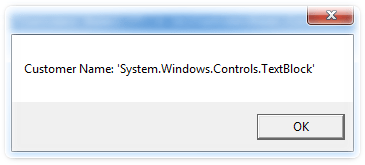
They had a script that would retrieve the customers name from OIS101 and use that as an argument in a call to another program – and under ISO10.1 instead of getting the customers name, they got some text back saying “System.Window.Controls.TextBlock”.

With a little investigation, it turns out that Smart Office now has a TextBlock within the labels Content property where we traditionally would have had a string. So now we need to dig a little deeper to retrieve the actual text content.

So, after my upgrade I looked at reproducing and documenting the issue – excuse the eye bleeding orange…err…coral.

Traditionally I could have simply gone out and done this:

var lblCustomerName : Label = ScriptUtil.FindChild(content, "LBL_L26T2");
MessageBox.Show("Customer Name: '"  + lblCustomerName.Content + "'");

However, this yields

I’m sure that there is some witty comment that could be said here but meh…

If we’re really lazy, then we can change our code to this:

var lblCustomerName : Label = ScriptUtil.FindChild(content, "LBL_L26T2");
MessageBox.Show("Customer Name: '"  + lblCustomerName.Content.Text + "'");

…which provides something a little more like we expect.

Guess it highlights the old “test, test and test” 🙂


Posted in Development, M3 / MoveX | Leave a comment

The Resource “styleListView” could not be resolved

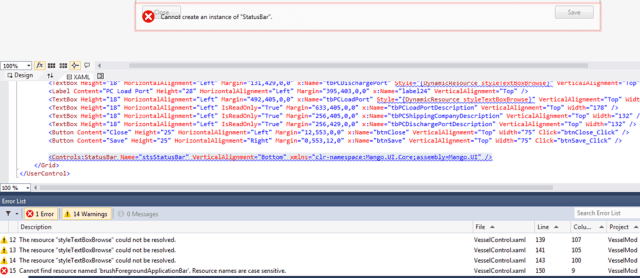
For a while I’ve been getting some nasty warnings and errors from Visual Studio 2012 with my SDK projects when adding references to the Infor resources. You get the message ‘the resource “styleListView” could not be resolved’ and none of my controls in the Visual Studio 2012 designer would be skinned with the Smart Office theme.

Even worse, I’d get some errors in some instances (such as referencing the StatusBar). But I’d compile and the feature would run without issue and be nicely skinned.

Looks pretty ugly doesn’t it?

I’d had a very casual look in to the issue and had come across a known bug in Visual Studio so didn’t really look in to it much further, until the other day. It just started to bug me, so it was time to investigate.

First thing I did was create a brand new project, just to verify the ones that I had been working hadn’t been messed up with my meddling or fat-fingered typing.

I then added a listview and made reference to the Smart Office styleListView, I added the appropriate assembly references in to the .xaml. Same issue.

As a matter of last resort (desperate times call for desperate measures and all that :-)), I scanned the release notes for the SDK and the DevelopersGuide pdf for anything that would give me a clue as to what I was doing wrong. And nada.

I compiled the samples in the SDK under Visual Studio 2012 and they were skinned correctly. Very odd.

I look at the references and all of mine seem identical. I have a read through a couple of manuals I own on C# and they only confirm that what I am doing is largely correct.

So…at a loss, I go back to the absolute basics – no assumptions…

As you’re probably aware, you can assign a resource dictionary to the application. I hadn’t bothered looking at that as it is generated by the template we use to create our LSOSDK project.

So I look in to the samples LawsonClient project App.xaml and see this:

And I take a look at my fresh projects LawsonClient App.xaml and see this:

So, I add the ui:MangoApplication.Resources to my LawsonClient App.xaml like so:

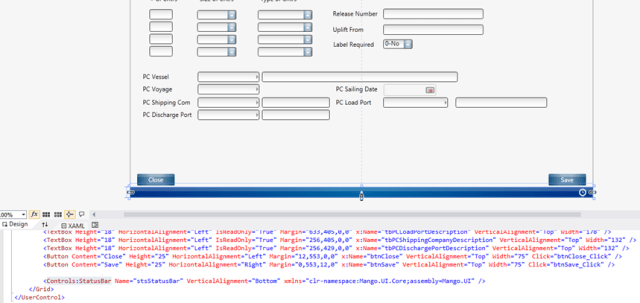
And then clean my solution, and finally rebuild and all of the errors go away. Applying the extra information to my original project in Visual Studio 2012 designer everything looks much better!


Posted in Development, SDK | Tagged | 1 Comment

The Elusive MDBREADMI – Installing an Industry Enrichment Pack

Over the past year or so I’ve heard several mentions of MDBREAD. Generally at times that I am thinking of other things or aren’t close enough to a trusted computer that has access to my environment.

But one of the modifications I am writing would benefit from being able to read a table so I decided to take a look.

A quick look in MRS001 yielded nothing. And though my googlefu may have been a little twitchy the other day, I turned up references to MDBREAD but not how to use it.

So I reluctantly turned to the Infor Knowledgebase.

As it turns out, the MDBREAD functionality is an industry enhancement, and sadly we were well and truly live on 10.1 before that enhancement came out.

Given that Infor have been flying the “easy to install”, “functionality separation”, “non-disruptive pick and choose features” flags for the last few years I wondered just how hard it would be to install the enhancement myself. And it was remarkably simple and painless. The installation and setup took < 15 minutes. The searching for all of the information on the other-hand was in the order of several hours.

To save others the pain of having to use the knowledgebase, I’ve documented the steps that I went through below, follow them at your own risk.

Reference documents

M3 BE Generic API database read – Industry Enrichment Package 2 ReadMe – M3_BE_Generic_API_db_read_IEP_2_ReadMe.pdf
M3 BE Enrichment Package Overview – M3BEEPO_14.1.2.0.pdf
M3 Business Engine and M3 Foundation Installation Guide – M3BEIG_14.1.2.0_A.pdf

Continue reading

Posted in M3 / MoveX, Misc | Tagged | Leave a comment

OIS300 Sorting Order 8 – Remember the Responsible

This morning I was down in my export staffs office looking in to an issue when I noticed that one staff member was going in to OIS300 (sorting order 8) and entering in their username to the responsible field.

It turns out that they almost exclusively use this specific view AND have to type in their username each time – each and every day, so say at least 220 times per year (4 weeks annual leave, 5 day working week + some extra days off) over the last 9 years!

That just seemed wrong to me. We have the power, we have the technology – let us show the users we care 🙂

A quick twenty minute hack and we have a solution, a little wee script which will set the responsible to the username.

I deploy to a couple of the staff and get their feedback, and they would also like the high status set to 44 (how quickly they become demanding :-)). I also noticed that the initial cut of the script would always set the responsible to their username – so if they changed the responsible and pressed enter, their username would populate the responsible again even though they had the other persons records.

Another quick hack and testing and we have a script that sets the responsible and sets the high status when the username newly enters OIS300. I’m sure there will be some further tweaks to this wee script but it’s certainly made a couple of staff pretty happy.

Anyways, here’s the script – as per usual – well, actually it’s probably a little more verbose than usual – commented extensively:

// OIS300 Default the Responsible to the current user when in sorting order 8
// and set the high status to 44
import System;
import System.Windows;
import System.Windows.Controls;
import MForms;
import Mango.Services;

package MForms.JScript
{
    class OIS300_DefaultResponsible_002
    {
        var gController = null;
        var gstrInstanceCacheName = "OIS300_DefaultResponsible";
        public function Init(element: Object, args: Object, controller : Object, debug : Object)
        {
            var content : Object = controller.RenderEngine.Content;
            gController = controller;

            // how much code can we fit on one line??
            // check the sorting order, username and check to make sure we are entering this for the first time
            // note the instancecache portion, this ensures that we only fire our script
            // when we enter OIS300 Sorting Order 8 once during the lifespan of this instance
            if((null != controller.PanelState) && (false == String.IsNullOrEmpty(controller.PanelState.SortingOrder)) && ("8" == controller.PanelState.SortingOrder) && (false == String.IsNullOrEmpty(ApplicationServices.UserContext.UserName)) && (false == InstanceCache.ContainsKey(gController, gstrInstanceCacheName)))
            {
                // the textbox that we will populate with the users name
                var tbResponsible : TextBox = ScriptUtil.FindChild(content, "W1OBKV");
                // the combobox with the status that we shall change
                var cmbHighOrderStatus : ComboBox = ScriptUtil.FindChild(content, "WTORST");
                if(null != tbResponsible)
                {
                    // set the name of the user to the responsible field
                    tbResponsible.Text = ApplicationServices.UserContext.UserName;
                    // set it so the contents are selected, we do this
                    // so it means they can just start typing to get
                    // rid of their name if they are after another persons orders
                    tbResponsible.SelectAll();
                    // we want to keep track of whether we are a new instance
                    // if not, we don't run (see the if statement earlier)
                    // If we don't do this then each time the user changes the responsible
                    // manually and presses enter, their name will appear in the responsbile
                    InstanceCache.Add(gController, gstrInstanceCacheName, "1");
                    // we want to guarauntee our cache is clear, it should clear when we
                    // close, but...
                    controller.add_Requested(OnRequested);
                    // now we set our high status
                    if(null != cmbHighOrderStatus)
                    {
                        cmbHighOrderStatus.SelectedValue = "44";
                    }
                }
            }
        }

        public function OnRequested(sender: Object, e: RequestEventArgs)
        {
            // we are closing so lets be doubly sure and manually delete our
            // flag saying that we have run
            if( (e.CommandValue == MNEProtocol.KeyF03) || (e.CommandValue == MNEProtocol.KeyF12))
            {
                InstanceCache.Remove(gController, gstrInstanceCacheName);
            }
            // remove the request event subscription
            gController.remove_Requested(OnRequested);
        }
    }
}

Posted in Development, M3 / MoveX | Leave a comment

Mod-Removal and the Unexpected Surprises; OIS101 – Remembering the UoM

A script to retain the quantity U/M and price U/M after each line is entered in OIS101.
Continue reading

Posted in Development, M3 / MoveX | Leave a comment