30K & Inforum 2013

Well, 30,000 views has been and gone – a nice milesone 🙂

I’m just on the first leg of my journey home to Christchurch, NZ from Orlando, USA after attending Inforum 2013.

And, I must say that I am quite impressed with what I saw, especially the enthusiasm of some of the Infor staff. Last year felt like we had a lot of promises, this year saw the delivery on many of them. ION being the centerpoint underpinning several of these technologies.

One technology that they thrashed was Ming.le Social (and I really mean thrashed) – kinda reminds me a lot of a Google Wave for business.

The new version of Smart Office looks very nice and is built upon .Net 4.5 (so that should mean we get access to some of the nifty parallel computing commands like await!), looking forward to getting my hands on it and seeing what we can get it to do. The new H5 client looks like it is coming along nicely too with Mashups being delivered to the thin client in a pretty slick fashion. Some nice new stuff coming out in Enterprise Search too.

One of the great things about events about this is the gems – a nice wee offhand comment about using a technology in a slightly non-conventional way to streamline a process. One of the really nice ones that I walked away with was about using Event Hub to trigger an action which caused MeC to create a new order based on the data from the event the triggered MeC.
It is the gems that are key; people talking about how they have thought outside the box, providing food for thought, kindling the thought processes.
I tend to come away from these events charged, enthusiastic about technologies and what they promise to deliver.

And thanks to the Inforum staff member who picked who I was and shook my hand – I was rather taken aback, but you put a broad smile on my face for the rest of the day with your comments (sorry I didn’t get your name) 🙂

Posted in Inforum | Leave a comment

Smart Office SDK – First Project Part 5 – styleTextBoxBrowse

Update, please see Karins comments below for a far better solution 🙂

The browse TextBoxes – we’re all familiar when them. A nice clean way of providing lookups attached to a TextBox.

I have a number of these in my existing Vessel Modification and as previously mentioned I want to create a nice seamless user experience – this unfortunately means that we need to replicate this functionality. A quick browse through the SDK DevelopersGuide.pdf I see that they have a section of “Application Resources” and under it there is the styleTextBoxBrowse, described as “Named TextBox style that includes a browse button. The browse button is a small arrow to the right point to the right”. Sounds like us!

Continue reading

Posted in Development, M3 / MoveX, SDK | Tagged | 4 Comments

ISO Crashes when Launched from Visual Studio 2012 (SDK)

Typically if working from home, when I have been developing with the SDK I’ve been RDP’ing in to my work computer which is running Visual Studio 2010. I haven’t upgraded my work computers Visual Studio to 2012 yet as 2012 I find challenging on a number of fronts (and the upper case menu names, gah!).

However, my home computer has been upgraded.

This evening I was creating a project to test and every time I would launch the test from Visual Studio 2012 ISO would crash.

When it crashed I’d save the lawsonclient.log and I’d see this

2013-03-31 22:43:15,392 [9] INFO Mango.UI.Client.MangoApplication.OnStartup – —— Application Started ——

2013-03-31 22:43:15,845 [9] INFO Mango.Services.Helper.ApplicationParameters.GetQueryStringParameters – Application is NOT started in ‘NetworkDeployed’ mode. This is happens only if the client is used in Development.

2013-03-31 22:43:15,861 [9] INFO Mango.Services.Helper.ApplicationParameters.UseUrlParameters – Main server taken from URL parameter. Main server = https://potato.it.local:30006

2013-03-31 22:43:29,925 [10] INFO Mango.Services.Helper.VerifyServer.Verify – LSO server https://potato.it.local:30006 is used.

2013-03-31 22:43:37,090 [10] INFO Mango.Services.Helper.VerifyServer.Verify – User ‘scampbell’ successfully authenticated

2013-03-31 22:43:38,371 [10] INFO Mango.Core.Services.Helper.GridInfo.Log – Grid Applications contextroots:

Grid App Type = SYSTEM Grid App Name = SYSTEM

    Module = SYSTEMWeb Service context roots

    Module = SYSTEM    Rest Service context roots

        Url = https://potato.it.local:30006/grid/ Auth type =server

    Module = SYSTEM    Web Application context roots

        Url = https://potato.it.local:30006/grid/ui/ Auth type =server

Grid App Type = Companion Grid App Name = CompanionGrid

    Module = CompanionGridWeb Service context roots

    Module = CompanionGrid    Rest Service context roots

    Module = CompanionGrid    Web Application context roots

        Url = https://potato.it.local:30006/companion/ Auth type =server

Grid App Type = GDBC Grid App Name = GDBC

    Module = GDBCWeb Service context roots

    Module = GDBC    Rest Service context roots

    Module = GDBC    Web Application context roots

        Url = https://potato.it.local:30006/h2console/ Auth type =server

Grid App Type = LSO Grid App Name = LSO

    Module = LSOWeb Service context roots

        Url = https://potato.it.local:30006/Annotations/ Auth type =server

    Module = LSO    Rest Service context roots

    Module = LSO    Web Application context roots

    Module = LSOWeb Service context roots

    Module = LSO    Rest Service context roots

    Module = LSO    Web Application context roots

        Url = https://potato.it.local:30006/LSO/ Auth type =server

    Module = LSOWeb Service context roots

        Url = https://potato.it.local:30006/LSOWS/ Auth type =server

    Module = LSO    Rest Service context roots

    Module = LSO    Web Application context roots

Grid App Type = MI-WS Grid App Name = M3-API-WS

    Module = M3-API-WSWeb Service context roots

        Url = https://potato.it.local:30006/m3api/ Auth type =server

    Module = M3-API-WS    Rest Service context roots

        Url = https://potato.it.local:30006/m3api-rest/ Auth type =server

    Module = M3-API-WS    Web Application context roots

Grid App Type = M3_UI_Adapter Grid App Name = M3_UI_Adapter

    Module = M3_UI_AdapterWeb Service context roots

    Module = M3_UI_Adapter    Rest Service context roots

    Module = M3_UI_Adapter    Web Application context roots

        Url = https://potato.it.local:30006/mne/ Auth type =server


2013-03-31 22:43:38,699 [Mango.Main] INFO Mango.UI.Client.MangoApplication.Log – Non user specific data storage path = C:\Users\Scott\AppData\Local\Lawson Software\Mango Client\S0

2013-03-31 22:43:38,699 [Mango.Main] INFO Mango.UI.Client.MangoApplication.Log – User specific data storage path = C:\Users\Scott\AppData\Local\Lawson Software\Mango Client\S0\U0

2013-03-31 22:43:38,699 [Mango.Main] WARN Mango.Core.Persistance.UserEventHistoryDataBase..ctor – Could not create table for UserEventHistory.

System.IO.FileNotFoundException: Could not load file or assembly ‘System.Data.SqlServerCe, Version=3.5.1.0, Culture=neutral, PublicKeyToken=89845dcd8080cc91’ or one of its dependencies. The system cannot find the file specified.

File name: ‘System.Data.SqlServerCe, Version=3.5.1.0, Culture=neutral, PublicKeyToken=89845dcd8080cc91’

at Mango.Core.Persistance.DataBase.IsColumnWidth(String dbTableName, String dbColumnName, Int32 length)

at Mango.Core.Persistance.UserEventHistoryDataBase..ctor()


After some searching I discovered that Visual Studio 2012 doesn’t install SQLServerCE 3.5 (Compact Edition) rather it installs a later version.

Smart Office tries to start, can’t find all of the files and then crashes.

So I ended up grabbing SQL Server Compact Edition 3.5sp2 and installing it
http://www.microsoft.com/en-us/download/details.aspx?id=5783

(in my instance I needed to install both the 32bit and 64bit versions and my home computer is 64bit – the installation instructions will also inform you to install both which are included in the single download).


Posted in Development, M3 / MoveX, SDK | Tagged | 2 Comments

Smart Office SDK – First Project Part 4 – Searching for and Validating Update Methods

This is the 4th part in a series of posts exploring how I am looking at using the Smart Office SDK to eliminate (with extreme prejudice) a modification we call “the Vessel Mod”.

The postings have been tailored in a fashion to demonstrate the techniques and logic processes I use when exploring new tools and methods.

The 1st post (https://potatoit.wordpress.com/2013/02/24/smart-office-sdk-first-project-part-1-testing-the-installation/) discusses testing that we have the SDK installed and validating that we can manipulate Smart Office through the SDK by using the sample code from Infor – launching our own ‘features’, adding controls and subscribing to events.

The 2nd post (https://potatoit.wordpress.com/2013/02/24/smart-office-sdk-first-project-part-2-in-the-beginning-there-was-nothing/) discusses how I validated the core functionality which will drive our feature when creating a project from scratch. The emphasis is on writing code to take small steps and validating each of those steps.

The 3rd post (https://potatoit.wordpress.com/2013/02/25/smart-office-sdk-first-project-part-3-rediscovering-our-modification/) we focus back on the modification itself and look at exploring its interactions with M3 from a user expectation perspective. We should not lose any benefits, only gain.

This post is about exploring the various methods that I need to use to provide a seamless user transition.

Continue reading

Posted in Development, M3 / MoveX, SDK | 4 Comments

Smart Office SDK – First Project Part 3 – Rediscovering our Modification

This is the 3rd part in a series of posts around exploring the Smart Office SDK to remove an existing modification and how I approach the implementation.

The 1st post (https://potatoit.wordpress.com/2013/02/24/smart-office-sdk-first-project-part-1-testing-the-installation/) discusses testing that we have the SDK installed and validating that we can manipulate Smart Office through the SDK by using the sample code from Infor – launching our own ‘features’, adding controls and subscribing to events.

The 2nd post (https://potatoit.wordpress.com/2013/02/24/smart-office-sdk-first-project-part-2-in-the-beginning-there-was-nothing/) discusses how I validated the core functionality which will drive our feature when creating a project from scratch. The emphasis is on writing code to take small steps and validating each of those steps.

I have some constraints around this project which I haven’t articulated [well] in the previous posts.

  • 0 Impact of the user-base – we don’t have the resources to redesign and validate significant changes. If we had the resources, then they would be assigned to other more significant projects.
  • We have a few hundred Crystal reports, a portion of these reports touch the Vessel Modification data. We cannot locate these reports and change them without significant risk and time investment.
  • Export Documentation – this modification has a major impact when it comes to extracting data for our export documentation system. >85% of our turn-over is derived from exports. We don’t have the resource to invest in major process redesign and validation.
  • The current process works, it is hard to justify retraining
  • I need to prove that using the SDK and removing our modification has real value to the business

Now that we are comfortable that the SDK is the correct tool for us we will set about exploring the details of our modification. This is rediscovering the modification and its UI interactions with M3 – we need to be able to reproduce these actions in a seamless fashion to the user. We will aim to improve user experience if it represents a high return at low time investment.

Continue reading

Posted in Development, M3 / MoveX, SDK | Tagged | Leave a comment

Inforum 2013

Looks like I am going to make it to Inforum 2013 in Orlando this year.  If anyone out there wants to catch up or have a chat about interesting things they have done – then let me know.

I’m always interested in knowning what other people are doing and have achieved…or issues people have come across.


Posted in Uncategorized | Leave a comment

Smart Office SDK – First Project Part 2 – In the beginning there was nothing

Today is the day of unhelpful post lines. This particular post is about creating a new project from the void – where there was nothing, adding some content and then interacting with the feature that we have created.

I am in the process of determining if I can remove one of our modifications, known as the Vessel Modification – this series of posts will demonstrate the steps and the logic that I go through in order to a). the SDK is an appropriate tool for this and b). prove that various functionality I need in the Vessel Modification can be duplicated.

You’ll note that in this post I am creating some pretty useless code – but this is all about discovery and proof – don’t consider it polished or finished. Design of a coherent solution will come later. For those that don’t have the SDK, it shows how over a period of an hour or so you can install, create and run your own code.

Continue reading

Posted in Development, M3 / MoveX, SDK | 8 Comments

Smart Office SDK – First Project Part 1 – Testing the Installation

So, Infor have released the Smart Office SDK to plebs^wcustomers like me. After years of me begging, hounding and complaining to anyone that would listen – yes, I know people were dreading meetings with me because of the inevitable question about “When’s the SDK going to be released?”.

Here is a post on the lawsonsmartoffice.com blog (which I’m sure all of you have in the RSS feeds of your browser – if you haven’t, seriously add it. There is a lot to be said about hearing things from real developers working on Smart Office)

http://lawsonsmartoffice.com/2013/02/04/getting-started-with-the-smart-office-sdk/

I am going to assume that you have read the post above and the installation instructions distributed with the SDK.

This particular post and the posts following it are going to follow a little bit of a different format – they will hopefully be a little more coherent (though that depends entirely on how exciting Gold Rush or the Deep Dive on MS Chanel 9 (check out the C++ and Beyond 2012: Herb Sutter – atomic <> Weapons (C++ 11 Memory Model) video, it is very interesting!) is or whatever the flavour of the month is for me) and give you a view in to how I tend to work through problems. Generally there is a lot of background work or knowledge upon which I build assumptions that are presented here. I will often cut code which serves no purpose what-so-ever except to see if what I believe happens or what I suspect is possible is. Some of this people will have discerned from the code examples that I have posted so far.

We will look at the problem that we are trying to solve, the installation of the SDK and the steps that I take to prove my solution and finally the progress through the solution.

Continue reading

Posted in Development, M3 / MoveX, SDK | Tagged | 11 Comments

Mashups, WebServices and Variable Substitution

So in my last post I was talking about my next wee experiment. Using a Mashup with a WebService and supplying the parameters for the WebService.

Initially I was thinking that this wouldn’t be an issue at all especially when there is this helpful post from the Infor team
http://lawsonsmartoffice.com/2012/03/09/mashups-bindings-markup-extension-methods-and-explained/#more-497

However, it’s never that simple 😦

My WebService goes out and retrieves the order lines from OOLINE and from the item master MITMAS. The WebService is a query created in LWS Designer:

SELECT oborno, obitno, mmfcu1, oborqt, round((oborqt / mmfcu1 * 100),2) as containerpercentage FROM m3edtprod.ooline LEFT OUTER JOIN m3edtprod.mitmas ON obitno = mmitno WHERE oborno = ?

It is used to calculate the percentage of a container that an order line occupies.

Attempting to run the variable substitution for the webservice like this

<mashup:DataParameter Key="GetFreeCaps1.OrderNumber" Value="{}{Query}" />

doesn’t work, using Fiddler (http://www.fiddler2.com/fiddler2/ a Web Debugger) I could see that the parameter being passed to the WebService as {Query}, rather than the value in the variable.

On the plus side, a very nice person at Infor provided a solution, don’t use the DataParameter or variable substitution at all 🙂

What we do is we directly set the Order Number against the DataListPanel.

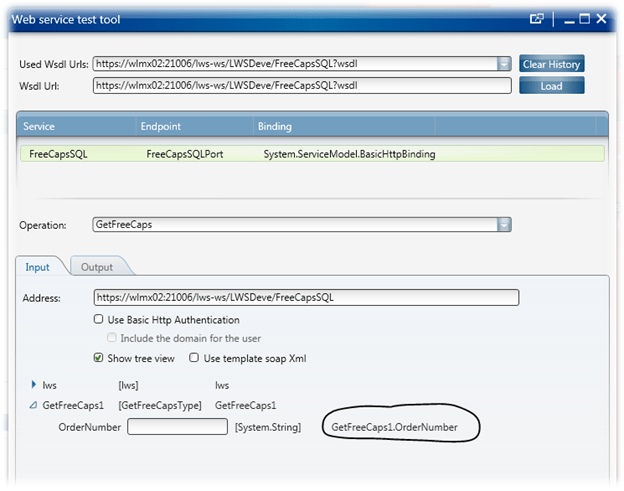
But first, let’s talk about the WebService Test as this will hopefully alleviate a question which will no doubt arise – where did I get the GetFreeCaps1 object from? :-).

In the later versions of Smart Office there is the WebService Test tool, you can run it by typing the following command tool://wstest

The Web Service Test Tool is a handy way for you to test a webservice and see what results are returned. I key in the URL of the webservice, hit load, select the operation and select the Test button. The really nice part is that we can see what M3 will call the name of the webservice object.

Back to it…

Our button will set the GetFreeCaps1 object associated with the DataListPanel:

   <Button Grid.Row="0" Name="btnSearch" Content="Search">
      <Button.CommandParameter>
         <mashup:Events>
            <mashup:Event TargetName="dlpDataPanel" SourceEventName="Click" TargetEventName="Get">
               <!--
               This is specifically where we set the the value in the WebService
               -->
               <mashup:Parameter TargetKey="GetFreeCaps1.OrderNumber" Value="{Binding ElementName=tbOrderNumber, Path=Text}" />
            </mashup:Event>
         </mashup:Events>
      </Button.CommandParameter>
   </Button>

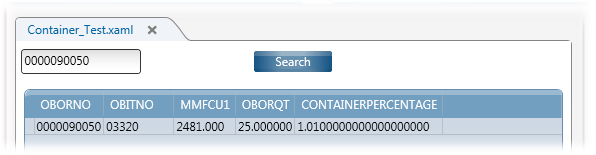
So, the Mashup has an order number that we enter, then we hit the Search button which will populate the DataListPanel – the result is below:


And finally the XAML…

<Grid xmlns="http://schemas.microsoft.com/winfx/2006/xaml/presentation" xmlns:x="http://schemas.microsoft.com/winfx/2006/xaml" xmlns:ui="clr-namespace:Mango.UI.Controls;assembly=Mango.UI" xmlns:mashup="clr-namespace:Mango.UI.Services.Mashup;assembly=Mango.UI">
	<Grid.Resources>
		<mashup:ShowMessage x:Key="ShowMessage" />
	</Grid.Resources>

	<Grid.ColumnDefinitions>
		<ColumnDefinition Width="1*" />
	</Grid.ColumnDefinitions>
	<Grid.RowDefinitions>
		<RowDefinition Height="40" />
		<RowDefinition Height="1*" />
		<RowDefinition Height="50" />
	</Grid.RowDefinitions>
	
	<!--
	We get our customer order number from this TextBox, this order number 
	will be used in the SQL selects where statement
	-->
	<TextBox Grid.Row="0" Name="tbOrderNumber" Text="0000090050" Width="100" Height="25" HorizontalAlignment="Left" />

	<!-- 
	This is the button that initiates the search
	It take the value from the TextBox above and set that value
	in the webservice
	-->
	<Button Grid.Row="0" Name="btnSearch" Content="Search">
		<Button.CommandParameter>
			<mashup:Events>
				<mashup:Event TargetName="dlpDataPanel" SourceEventName="Click" TargetEventName="Get">
					<!--
					This is specifically where we set the the value in the WebService
					-->
					<mashup:Parameter TargetKey="GetFreeCaps1.OrderNumber" Value="{Binding ElementName=tbOrderNumber, Path=Text}" />
				</mashup:Event>
			</mashup:Events>
		</Button.CommandParameter>
	</Button>

	<mashup:DataListPanel Name="dlpDataPanel" Grid.Row="1">
		<mashup:DataListPanel.DataService>
			<mashup:DataService Type="WS">
				<mashup:DataService.Operations>
					<mashup:DataOperation Name="Get">
						<!--
						The WebServoce
						-->
						<mashup:DataParameter Key="WS.Wsdl" Value="https://wlmx02:21006/lws-ws/LWSDeve/FreeCapsSQL?wsdl" />
						<mashup:DataParameter Key="WS.Address" Value="https://wlmx02:21006/lws-ws/LWSDeve/FreeCapsSQL" />
						<mashup:DataParameter Key="WS.Operation" Value="GetFreeCaps" />
						<mashup:DataParameter Key="WS.Contract" Value="FreeCapsSQL" />
						<!-- 
						Set the username and password for the webservice
						-->
						<mashup:DataParameter Key="lws.user" Value="LSO.USER" />
						<mashup:DataParameter Key="lws.password" Value="LSO.PASSWORD" />
						<!--
						Set the Company and Division
						-->
						<mashup:DataParameter Key="lws.company" Value="100" />
						<mashup:DataParameter Key="lws.division" Value="IFL" />						
						<!--
						Set where we get the credentials for logging in to the webservice
						-->
						<mashup:DataParameter Key="WS.CredentialSource" Value="Current" />
					</mashup:DataOperation>
				</mashup:DataService.Operations>
			</mashup:DataService>
		</mashup:DataListPanel.DataService>
		<!--
		The datagrid which will display the results
		-->
		<DataGrid Grid.Row="1" Margin="8" x:Name="datagrid" AutoGenerateColumns="True" ItemsSource="{Binding OrderLineCapCollection}" CanUserAddRows="False" CanUserDeleteRows="False" Style="{DynamicResource styleDataGrid}" />
	</mashup:DataListPanel>

	<ui:StatusBar Name="StatusBar" Grid.Row="2" Grid.Column="0" VerticalAlignment="Bottom" />
</Grid>


Posted in M3 / MoveX, Mashups, Webservices | 5 Comments

JScripts and XML


One of the things that I have been casually thinking about over the last several months is XML and Jscript, especially in the context of WebServices.

JScripts and writing our the likes of XML is just an undertaking that is tedious and time consuming, especially when you compare it to programming languages such as C#.

For those of you that are familiar with the .Net framework and have mucked around with parsing XML you’ve probably come across the System.XML.Serialization assembly. It is a very handy way to allow you to convert the properties of an object to XML and then be able to read that XML in to an object.

This means with larger projects you don’t need to write a heap of custom code to read and write the data, you can just create some objects and then dump them in a single command. It will even handle the nesting of objects and their properties, so you can have a list of values and it will parse out the collect.

This was rather challenging trying to figure out how to use the attributes of the XmlSerializer to control the output. The attributes allow you to control the names of the elements (they default to the property name) and if a property is included or ignored. For examples of the attributes you can use your favourite search engine (https://www.google.co.nz/search?q=xmlserializer+attributes)

We will populate the object with some data, create a TextWriter class, serialise our class writing it out to a file. Then we shall read the file back in to illustrate deserialising the xml file before we output some of the retrieved data.

Things of note in our object it has XMLClass which has a couple of properties.

    public class XMLClass
    {
        public var Data : String;
        public XmlElement(ElementName="Test") var Data2 : String;

        public XmlElement("List") var ListData : System.Collections.ArrayList;
    }

Data property will create an element called “Data” in our output.
Data2 will be renamed to “Test” in our output through using this statement: XmlElement(ElementName=”Test”)
ListData will be renamed “List” and will have the contents

Anyways, enough jibber-jabber, code and xml below – code is commented, if in doubt experiment 🙂 Make small changes. Take careful note that the default output path is to D: drive.

import System;
import System.Windows;
import System.Windows.Controls;
import MForms;

import System.Xml;
import System.Xml.Serialization;
import System.Xml.Serialization.XmlArrayAttribute;
import System.IO;

package MForms.JScript 
{
    class XMLTests
    {
    	// we are going to write our test out to D:\XMLTest.xml
        var gstrPath : String = "d:\\XMLTest.xml";
        
        public function Init(element: Object, args: Object, controller : Object, debug : Object)
        {
        	// 
            var xmcWriteClass : XMLClass = new XMLClass();
            // populate the string with "Hello World"
            xmcWriteClass.Data = "Hello World!";
            // populate the second string
            xmcWriteClass.Data2 = "This is a new beginning";
            // this is a collection of objects - to see how this looks in XML
            xmcWriteClass.ListData = new System.Collections.ArrayList();
            
            var xecExample : XMLExampleClass2 = new XMLExampleClass2();
            // populate the collection objects first object with some data
            xecExample.ClassData2 = "Some Class Data";

			// add the object to the collection
            xmcWriteClass.ListData.Add(xecExample);

			// here we need to define the types of objects
			// so the serialiser doesn't throw an exception
			// XMLClass is defined against the serialiser directly
            var tp : Type[] = new Type[1];
            // typeof doesn't seem to work, so I create an object of the
            // class we want to add and then do a GetType()
            tp[0] = (new XMLExampleClass2).GetType();
            
            // create a streamwriter to write out our data
            var twWriter : TextWriter = new StreamWriter(gstrPath);
            
            // create the XmlSerializer - this will take our object and convert it
            // in to XML.  We get the type of our main class and add the types of any
            // other classes
            var xmsSerial : XmlSerializer = new XmlSerializer(xmcWriteClass.GetType(), tp);

			// Serialise to XML to the text writer
            xmsSerial.Serialize(twWriter, xmcWriteClass);
            
            // close the writer
            twWriter.Close();

			// now lets read the file, create a reader
            var trReader : TextReader = new StreamReader(gstrPath);

			// deserialize the xml from the reader in to an object
            var xmcReadClass : XMLClass = xmsSerial.Deserialize(trReader);

			// close the reader
            trReader.Close();

			// output some of the data that we read
            debug.WriteLine("What we read from the file: " + xmcReadClass.Data + " & " + xmcReadClass.Data2);

        }
    }

    public class XMLClass
    {
        public var Data : String;
        public XmlElement(ElementName="Test") var Data2 : String;

        public XmlElement("List") var ListData : System.Collections.ArrayList;
    }
    
    
    public class XMLExampleClass2
    {
    	public XmlElement(ElementName="TestX") var ClassData2 : String;
    }
}

XML Output

<?xml version="1.0" encoding="utf-8"?>
<XMLClass xmlns:xsi="http://www.w3.org/2001/XMLSchema-instance" xmlns:xsd="http://www.w3.org/2001/XMLSchema">
  <Data>Hello World!</Data>
  <Test>This is a new beginning</Test>
  <List xsi:type="XMLExampleClass2">
    <TestX>Some Class Data</TestX>
  </List>
</XMLClass>


Enjoy!

Posted in Development, M3 / MoveX | 2 Comments