Upcoming Goodies

Well, I finally have work back to well, not normal but working…so that frees up brain cycles and weekends to see what else we can do with Smart Office.

Upcoming topics that I intend to tackle:
* Graphical breakdown of the Smart Office Canvas and the common names that are used and where (so the controls that are named PART_ which I often use to delimit searches for specific controls)
* Financial Budget uploads – don’t you hate that distribution curve, I know my users do 🙂
* Seeing if we can use data bindings, especially to extract external data and add columns
* Using WebServices & jscripts

The later will lay the ambitious foundations to determine the viability of removing a number of modifications we have which record additional order information – so conceptually we will create a little application which will sit on a server and listen for SOAP connections from jscript, the data received will then be verified and written out to a database. Smart Office will have a button which will create a new Window, or possibly overlay a new Grid over an existing window and present a totally customised set of controls to record the information.

Exciting times! 😀

Posted in Uncategorized | Leave a comment

Christchurch Earthquake

Nothing new I’m afraid as my home town has been hit be the second significant earthquake in the last 6 months and I’ve been caught up with the recovery of our business. The first quake in September was a 7.1 and in the early hours of the morning and though there was a lot of damage to property, no one was killed.

Sadly the most recent, last week was a 6.3, shallow, around lunchtime and very close to the city – it resulted in many people killed as buildings collapsed.

If you have found the content on this site useful, then please consider making a donation to the NZ Redcross 2011 Earthquake Appeal – no commitment.

http://www.redcross.org.nz/

Regards,
Scott Campbell

Posted in Uncategorized | Leave a comment

Journal Importing From Excel & jscript Handling of Error Messages Part II

So, much of what I post here is a rough cut, experimental before sitting down and have the users test, but here’s some final code.

For more details and background on the code, please see the previous incarnation.

https://potatoit.wordpress.com/2011/01/23/journal-importing-jscript-handling-of-error-messages/

This improved code will handle errors on panel E, it will also handle FAM Functions 100, 200, 300, 900.

I won’t bore you with long drawn out explanations of the code again, if you want a more detailed explanation, please refer to my previous posting on it and the comments in the code.


// V004 20110207    * completed
// V005 20110207    * maximum row is now set to 10000
//                  * we will look for the word End to end our line processing
// V006 20110212    * don't submit lines that have a 0 value
//                  * truncate the decimals to two decimals

import System;
import System.Text;
import System.Windows;
import System.Windows.Controls;
import System.Windows.Media;
import System.Windows.Media.Media3D;

import MForms;
import Mango.UI.Core;
import Mango.UI.Core.Util;
import Mango.UI.Services;
import Mango.Services;

import Excel;
import System.Reflection;

package MForms.JScript
{
	class GLS100_JournalImport_V06
	{
		var giicInstanceController : IInstanceController = null;    // this is where we will store the IInstanceController to make it available to the rest of the class
		var ggrdContentGrid : Grid = null;                          // this is the Grid that we get passed by the Init()
		var gexaApplication = null;                                 // Excel.Application object
		
		var gbtnImportFromExcel : Button = null;                    // this is the button that we will put on to the panel that will kick off the whole import
		var glvListView : ListView = null;                          // this is the ListView on the panel
		
		var gwbWorkbook = null;                                     // here we will store the Workbook object
		
		var giStartRow : int = 15;                                  // the starting row in the Spreadsheet
		var giMaxRow : int = 10000;                                    // the end row in the Spreadsheet
		var giCurrentRow : int = 15;                                // the current row in the Spreadsheet
		
		var gbLookForResponse = false;                              // should we be looking for a response?

        var gobjStatusJ1 = null;                                      // the statusbar
        var gobjStatusE = null;

        var gbRequest : boolean = false;                            // the request event 


        var gstrVoucherType : String = null;                        // the voucher type

		public function Init(element: Object, args: Object, controller : Object, debug : Object)
		{
            // lets make some of the controls and other
            // bits pieces available to other sections of our code
			ggrdContentGrid = controller.RenderEngine.Content;
			giicInstanceController = controller;
			glvListView = controller.RenderEngine.ListControl.ListView;
			
			try
			{
                // create the button for importing
				gbtnImportFromExcel = new Button();
				gbtnImportFromExcel.Content = "Import";

				Grid.SetColumnSpan(gbtnImportFromExcel, 10);
				Grid.SetColumn(gbtnImportFromExcel, 1);
				Grid.SetRow(gbtnImportFromExcel, 22);
				
                // finally add the control to the grid
				ggrdContentGrid.Children.Add(gbtnImportFromExcel);
				
				// ----- Events -----
				gbtnImportFromExcel.add_Click(OnImportFromExcelClicked);
				gbtnImportFromExcel.add_Unloaded(OnImportFromExcelUnloaded);

			}
			catch(exException)
			{
				MessageBox.Show("Error: " + exException.Message + Environment.NewLine + exException.StackTrace);
			}
		
		}
		
        // find a specific control
        private function findControl()
        {
            var result = null;
            var objTopControl = goUp(ggrdContentGrid);      // go up the visual tree to somewhere useful

            if(null != objTopControl)   // we found 'somewhere useful' 😉
            {
                result = findControlInner(objTopControl, 0, "labelStatus"); // search for a control with a name "labelStatus"
            }
            else MessageBox.Show("Went up without success");

            return(result);
        }

        // check for errors, we need to check
        // for errors on BOTH the E panel
        // and J1 panel
        // We will go out and look for the status control if we 
        // don't have it
        private function checkForError()
        {
            var strResult : String = null;
            var strStatusMessage : String = null;

            try
            {
                if(true == giicInstanceController.RenderEngine.PanelHeader.EndsWith("E"))
                {
                    if(null == gobjStatusE)              // have we found the status control, if not, try to find it
                    {
                        gobjStatusE = findControl();     // do the actual finding of the control
                    }
                    if(null != gobjStatusE)
                    {
                        // now we should extract the status
                        strStatusMessage = gobjStatusE.Content.ToString();
                        if(false == String.IsNullOrEmpty(strStatusMessage))
                        {
                            strResult = strStatusMessage;
                            MessageBox.Show("There was an error, cannot continue! '" + gobjStatusE.Content.toString() + "'");
                        }
                    }
                    else
                    {
                        MessageBox.Show("Couldn't find the StatusBar");
                    }
                }
                else if(true == giicInstanceController.RenderEngine.PanelHeader.EndsWith("J1"))
                {
                    if(null == gobjStatusJ1)              // have we found the status control, if not, try to find it
                    {
                        gobjStatusJ1 = findControl();     // do the actual finding of the control
                    }
                    if(null != gobjStatusJ1)
                    {
                        // now we should extract the status
                        strStatusMessage = gobjStatusJ1.Content.ToString();
                        if(false == String.IsNullOrEmpty(strStatusMessage))
                        {
                            strResult = strStatusMessage;
                            MessageBox.Show("There was an error, cannot continue! '" + gobjStatusJ1.Content.toString() + "'");
                        }
                    }
                    else
                    {
                        MessageBox.Show("Couldn't find the StatusBar");
                    }
                }
            }
            catch(ex)
            {
                MessageBox.Show("checkForError() exception: " + ex.message);
            }

            return(strResult);
        }

        // this function goes down the tree looking for a specific object
        private function findControlInner(parent : Object, depth : int, astrControlName : String)
        {
            var objResult = null;

            try
            {
                if(null != parent)
                {
                    // get the type of our object, we do this
                    // so we can check if the object inherits
                    // from a DependencyObject
                    var parentobjType : Type = parent.GetType();
                    if(parentobjType.IsSubclassOf(DependencyObject) == true)
                    {
                        for(var i=0; i < VisualTreeHelper.GetChildrenCount(parent);i++)
                        {
                            // retrieve the child object
                            var current : Object = VisualTreeHelper.GetChild(parent,i);
                            if(null != current)
                            {
                                // here we shall deterine the type of the new object
                                var objType = current.GetType();

                                if(null != objType)
                                {
                                    // we're looking for the Name property, because
                                    // this is what I am interested in
                                    var objPropertyName = objType.GetProperty("Name");
                                    if(null != objPropertyName)
                                    {
                                        var strName = objPropertyName.GetValue(current);
                                        if(null != strName)
                                        {
                                            if(0 == String.Compare(strName, astrControlName))
                                            {
                                                objResult = current;

                                                break;
                                            }

                                            // does the current object have any children?
                                            if(VisualTreeHelper.GetChildrenCount(current) >= 1)
                                            {
                                                // recurse down
                                                objResult = findControlInner(current, depth+1, astrControlName);
                                                if(null != objResult)
                                                {
                                                    break;
                                                }
                                            }
                                        }
                                    }
                                }
                            }
                        }
                    }
                }
            }
            catch(ex)
            {
                //debug.WriteLine("!-! Exception: " + ex.Message + " " + ex.StackTrace);
            }

            return(objResult);
        }

        // go up the VisualTree until we get to PART_Window
        private function goUp(aContent : Object)
        {
            var parent : Object = aContent;
            var lastParent : Object = aContent;
            var result : Object = null;

            // here we will loop UP the VisualTree seeking the top
            while(null != (parent = VisualTreeHelper.GetParent(parent)))
            {
                lastParent = parent;

                var objType = lastParent.GetType();
                var objPropertyName = objType.GetProperty("Name");
                var strName : String = objPropertyName.GetValue(lastParent)

                if(null != strName)
                {
                    // PART_ContentPanel
                    if(String.Compare(strName,"PART_Window") == 0)
                    {
                        result = parent;

                        break;
                    }
                }
            }
            return(result);
        }

        // display an OpenFileDialog box
        // and extract the result
		private function retrieveImportFile()
		{
			var result : String = null;
			var ofdFile = new System.Windows.Forms.OpenFileDialog();    // we have to use the forms OpenFileDialog unfortunately
			if(null != ofdFile)
			{
				ofdFile.Multiselect = false;
				ofdFile.Filter = "Excel Files (*.xls;*.xlsx)|*.xls;*.xlsx|All Files (*.*)|*.*"; // filter on xls or xlsx files only
				
				if(true == ofdFile.ShowDialog())
				{
					result = ofdFile.FileName;
				}
			}
			return(result);
		}
		
        // this is where we actually do the import
		private function OnImportFromExcelClicked(sender : Object, e : RoutedEventArgs)
		{
            gstrVoucherType = null;
			try
			{
                // here we do some initialisation of Excel
				InitialiseExcel();

				var strFilename : String = retrieveImportFile();            // retrieve the filename of the Excel spreadsheet to open
				if((null != strFilename) && (null != gexaApplication))      // ensure that not only do we have a filename, but we also managed to initialise Excel
				{
					gwbWorkbook = gexaApplication.Workbooks.Open(strFilename);  // open the spreadsheet
					if(null != gwbWorkbook)
					{
				        giicInstanceController.add_RequestCompleted(OnRequestCompleted);
				        giicInstanceController.add_RequestCompleted(OnRequested);
                        gbRequest = true;

						gwbWorkbook.Saved = true;                               // get rid of those annoying save messages
						var strVoucherType : String = retrieveVoucherType();    // we want to get the voucher type from the spreadsheet (the GLS100 voucher)
						
						if(!String.IsNullOrEmpty(strVoucherType))               // we need to ensure that we have a voucher type
						{
                            giicInstanceController.RenderEngine.SetFocusOnList();
							selectFAMFunction(strVoucherType);              // now we need to go out and select the function
							
							// from where on out, we start using the events
						}
					}
					else MessageBox.Show("Failed to Open Workbook");
				}
				else MessageBox.Show("Filename or Excel doesn't exist: " + strFilename);
			}
			catch(exException)
			{
				MessageBox.Show("Error: " + exException.description);
			}
		}

		// set the VoucherText within GLS100/E
		private function setM3VoucherText(astrVoucherText : String)
		{
			var tbVoucherText : TextBox = ScriptUtil.FindChild(ggrdContentGrid, "WWGVTX");
			if(null != tbVoucherText)
			{
				tbVoucherText.Text = astrVoucherText;
			}
			else MessageBox.Show("setM3VoucherText() - Child not found");
		}

		// set the Year within GLS100/E
		private function setM3YEA4(astrYEA4Text : String)
		{
			var tbYEA4Text : TextBox = ScriptUtil.FindChild(ggrdContentGrid, "WWYEA4");
			if(null != tbYEA4Text)
			{
				tbYEA4Text.Text = astrYEA4Text;
			}
			else MessageBox.Show("setM3VoucherText() - Child not found");
		}

        // we need to set the reversal date
        private function setM3ReversalDate(astrReversalText : String)
        {
			var tbReversalText = ScriptUtil.FindChild(ggrdContentGrid, "WWSHDT");
			if(null != tbReversalText)
			{
				try
				{
					var dtValue : DateTime = DateTime.FromOADate(Convert.ToDouble(astrReversalText));
					tbReversalText.Value = dtValue;
				}
				catch(ex)
				{
					MessageBox.Show(ex.description);
				}
			}
			else MessageBox.Show("setM3ReversalDate() - Child not found");
        }

		// set the accounting date within GLS100/E
		private function setM3AccountingDate(astrAccountingDate : String)
		{
			var tbITNO = ScriptUtil.FindChild(ggrdContentGrid, "WWACDT");
			if(null != tbITNO)
			{
				try
				{
					var dtValue : DateTime = DateTime.FromOADate(Convert.ToDouble(astrAccountingDate));
					tbITNO.Value = dtValue;
				}
				catch(ex)
				{
					MessageBox.Show(ex.description);
				}
			}
			else MessageBox.Show("Accounting Date not found");
		}

        // retrieve the voucher text from the spreadsheet
		private function retrieveVoucherText()
		{
			return(gwbWorkbook.ActiveSheet.Range("E7").Value);
		}
		
        // retrieve the accounting date from the spreadsheet
        // we need to use Value2 in this instance to get
        // a value that we can actually use
		private function retrieveAccountingDate()
		{
            try
            {
                return(gwbWorkbook.ActiveSheet.Range("R5").Value2);
            }
            catch(ex)
            {
                MessageBox.Show("Exception: " + ex.message);
            }
			
		}

		// retrieve the voucher type from the Spreadsheet
		private function retrieveVoucherType()
		{
            gstrVoucherType = gwbWorkbook.ActiveSheet.Range("K5").Value;
			return(gstrVoucherType);
		}		

		// retrieve the reversing date
		private function retrieveReversingDate()
		{
            try
            {
                return(gwbWorkbook.ActiveSheet.Range("R7").Value2);
            }
            catch(ex)
            {
            }
		}		


		// GLS100/B set the FAM Function
		private function selectFAMFunction(astrFAMFunction : String)
		{
			var bFound : boolean = false;
			
			if(!String.IsNullOrEmpty(astrFAMFunction))
			{
                // search through the ListView for the FAM function
				for(var iCount : int = 0; iCount < glvListView.Items.Count; iCount++)
				{
					var itmCurrentItem = glvListView.Items[iCount];
					if(null != itmCurrentItem)
					{
						if(!String.IsNullOrEmpty(itmCurrentItem[0]))
						{
							var strCurrentString = itmCurrentItem[0].ToString();
							if(0 == String.Compare(strCurrentString, astrFAMFunction))
							{
								glvListView.SelectedItem = itmCurrentItem;
								bFound = true;
								break;
							}
						}
					}
				}
			}
			if(true == bFound)
			{
                // ok, we've found the FAM Function on the ListView
                // now we need to SELECT it
				giicInstanceController.ListOption("1");	// SELECT
			}
			
		}
		
        // our Import button is being unloaded, now's a good time to clean
        // everything up
		private function OnImportFromExcelUnloaded(sender : Object, e : RoutedEventArgs)
		{
			if(null != gbtnImportFromExcel)
			{
				gbtnImportFromExcel.remove_Click(OnImportFromExcelClicked);
				gbtnImportFromExcel.remove_Unloaded(OnImportFromExcelUnloaded);
			}
		}
		
		public function OnRequested(sender: Object, e: RequestEventArgs)
		{
            // we don't really use this at all at the moment
		}

        // set the error line against the spreadsheet
        private function setLineStatus(astrError : String)
        {
            if(null != gwbWorkbook)
            {
                gwbWorkbook.ActiveSheet.Range("S" + (giCurrentRow-1).ToString()).Value = astrError;
            }
        }
	
		public function OnRequestCompleted(sender: Object, e: RequestEventArgs)
		{
            var strError : String = null;
            try
            {
			    if(e.CommandType == MNEProtocol.CommandTypeKey)     // we're looking for a key event
			    {
				    if(e.CommandValue == MNEProtocol.KeyEnter)      // specifically we're looking the enter key event
				    {
                        strError = checkForError();

                        if(true == String.IsNullOrEmpty(strError))
                        {
					        if(true == giicInstanceController.RenderEngine.PanelHeader.EndsWith("E"))   // are we on panel E?
					        {
						        handleEPanel();     // handle panel E
                                strError = checkForError();
					        }
					        else if(true == giicInstanceController.RenderEngine.PanelHeader.EndsWith("J1")) // are we on panel G1 (this should be GLS120/G1)
					        {
                                strError = checkForError();

                                if(true != String.IsNullOrEmpty(strError))
                                {
                                    giCurrentRow = giMaxRow + 1;
                                }
                                else
                                {
                                    handleJ1Panel();    // handle panel j
                                }
					        }
                        }
                        else
                        {
                            setLineStatus(strError);
                        }
				    }
			    }
			    else if(e.CommandType == MNEProtocol.CommandTypeListOption)
			    {
                    if(e.CommandValue == MNEProtocol.OptionSelect)
                    {
                        if(true == String.IsNullOrEmpty(strError))
                        {
                            handleEPanel();
                        }
                    }
			    }
                if(null != giicInstanceController.Response)
                {
                    if(0 == String.Compare(giicInstanceController.Response.Request.RequestType.ToString(), "Panel"))
                    {
                        if((MNEProtocol.CommandTypeKey == giicInstanceController.Response.Request.CommandType) && (MNEProtocol.KeyF03 == giicInstanceController.Response.Request.CommandValue))
                        {
                            CleanUp();
                        }
                    }
                }
            }
            catch(ex)
            {
                MessageBox.Show(ex.message);
            }
            if(null != strError)
            {
                CleanUp();
            }
		}
		
        // this is where we do the actual handling of the J1 Panel
		private function handleJ1Panel()
		{
			if(giCurrentRow <= giMaxRow)    // the spreadsheet has a limited number of rows...
			{
				// extract the lines from the spreadsheet
                var strWWADIV : String = retrieveFromActiveSheet("H" + giCurrentRow);       // division
				var strWXAIT1 : String = retrieveFromActiveSheet("B" + giCurrentRow);
				var strWXAIT2 : String = retrieveFromActiveSheet("C" + giCurrentRow);
				var strWXAIT3 : String = retrieveFromActiveSheet("D" + giCurrentRow);
				var strWXAIT4 : String = retrieveFromActiveSheet("E" + giCurrentRow);
				var strWXAIT5 : String = retrieveFromActiveSheet("F" + giCurrentRow);
				var strWXAIT6 : String = retrieveFromActiveSheet("G" + giCurrentRow);
                var strWWCUAMDebit : String = retrieveFromActiveSheet("I" + giCurrentRow);
				var strWWCUAMCredit : String = retrieveFromActiveSheet("L" + giCurrentRow);
				var strWWVTXT : String = retrieveFromActiveSheet("O" + giCurrentRow);
                var strWWVTCD : String = retrieveFromActiveSheet("N" + giCurrentRow);

                // this is the current row
				giCurrentRow = giCurrentRow + 1;
				if(!String.IsNullOrEmpty(strWXAIT1))
				{
					if(0 != String.Compare(strWXAIT1,"undefined"))  // verify that we actually have content
					{
                        if(0 != String.Compare(strWXAIT1,"End", true))
                        {
                            var bDoWeHaveAValue : boolean = false;
                            
                            if(!String.IsNullOrEmpty(strWWCUAMDebit))
                            {
                                var dblDebit : double = strWWCUAMDebit;
                                var strDebit : String = dblDebit.ToString("#.##");  // make sure that we are formatted to only 2 decimal places
                                if(!String.IsNullOrEmpty(strDebit))                 // ensure we actually have a value now that we have converted it
                                {
                                    if(0 != String.Compare(strDebit, "0.00"))       // ensure that the value isn't 0!
                                    {
                                        bDoWeHaveAValue = true;
                                        setM3TextField("WWCUAM", strDebit);	// Value
                                    }
                                }
                            }
                            else if(!String.IsNullOrEmpty(strWWCUAMCredit))
                            {
                                var dblCredit : double = strWWCUAMCredit;
                                var strCredit : String = dblCredit.ToString("#.##");    // make sure that we are formatted to only 2 decimal places
                                if(!String.IsNullOrEmpty(strCredit))                    // ensure we actually have a value now that we have converted it
                                {
                                    if(0 != String.Compare(strCredit, "0.00"))          // ensure that the value isn't 0!
                                    {
                                        bDoWeHaveAValue = true;
                                        setM3TextField("WWCUAM", "-" + strCredit);	// Value
                                    }
                                }
                            }
                            if(true == bDoWeHaveAValue)     // if the value is 0, then we shouldn't submit it
                            {
                                // strWWADIV
                                if(!String.IsNullOrEmpty(strWWADIV))
                                {
                                    setM3TextField("WWADIV", strWWADIV);	// division
                                }

						        setM3TextField("WXAIT1", strWXAIT1);	// account
	
						        setM3TextField("WXAIT2", strWXAIT2);	// Dept
						        setM3TextField("WXAIT3", strWXAIT3);	// Dim3
						        setM3TextField("WXAIT4", strWXAIT4);	// Dim4
						        setM3TextField("WXAIT5", strWXAIT5);	// Dim5
						        setM3TextField("WXAIT6", strWXAIT6);	// Dim6
						        //setM3TextField("", retrieveFromActiveSheet("H" + giCurrentRow));	// Division

						
						        setM3TextField("WWVTXT", strWWVTXT);	// Voucher Text
                                setM3TextField("WWVTCD", strWWVTCD);    // VAT type

						        giicInstanceController.PressKey("ENTER");   // press the enter key
                            }
                            else
                            {
                                // we need to go to the next line to process
                                handleJ1Panel();
                            }
                        }
                        else
                        {
                            giCurrentRow = giMaxRow + 1;    // 20110207 - end this loop
                            CleanUp();                      // and do our cleanup
                        }

					}
				}
			}
            else
            {
                //MessageBox.Show("handleJ1Panel(): " + giCurrentRow + " - " + giMaxRow);
                CleanUp();
            }
		}
		
        // a little wee helper function that will search for a TextBox name
        // and set the TextBox value
		private function setM3TextField(astrName : String, astrValue : String)
		{
			var tbTextBox : TextBox = ScriptUtil.FindChild(ggrdContentGrid, astrName);
			if(null != tbTextBox)
			{
				tbTextBox.Text = astrValue;
			}
			else MessageBox.Show("Can't find: " + tbTextBox.Text);
		}

        // retrieve some data from the active spreadsheet
        // at a specific location
		private function retrieveFromActiveSheet(astrPosition : String)
		{
			var strValue : String = gwbWorkbook.ActiveSheet.Range(astrPosition).Value;
			if(true == String.IsNullOrEmpty(strValue))
			{
				strValue = "";
			}
            else if(0 == String.Compare(strValue, "undefined"))
            {
                strValue = "";
            }

			return(strValue);
		}
        
        // retrieveVoucherType
        // gstrVoucherType
        // handle the E Panel
		private function handleEPanel()
		{
			var strAccountingDate : String = retrieveAccountingDate();  // retrieve the accounting date from the Spreadsheet
			var strVoucherText : String = retrieveVoucherText();        // retroeve the voucher text from the Spreadsheet

            var strReversalDate : String = retrieveReversingDate();     // retrieve the reversal date
            var bHaveAllTheFields : Boolean = false;                    // do we have all the fields that we require?


            if( (0 == String.Compare(gstrVoucherType,"100")) || (0 == String.Compare(gstrVoucherType,"200")) || (0 == String.Compare(gstrVoucherType,"900")))
            {
                if((!String.IsNullOrEmpty(strAccountingDate)) && (!String.IsNullOrEmpty(strVoucherText)))
                {
                    if(0 == String.Compare(gstrVoucherType,"900"))
                    {
                        setM3YEA4(strAccountingDate);
                    }
                    else
                    {
                        setM3AccountingDate(strAccountingDate);     // now we actually set the accounting date in the TextBox
                    }
				    
				    setM3VoucherText(strVoucherText);           // and the Voucher TextBox
                    bHaveAllTheFields = true;
                }
            }
            else if(0 == String.Compare(gstrVoucherType,"300"))
            {
                if((!String.IsNullOrEmpty(strReversalDate)) && (!String.IsNullOrEmpty(strAccountingDate)) && (!String.IsNullOrEmpty(strVoucherText)))
                {
				    setM3AccountingDate(strAccountingDate);     // now we actually set the accounting date in the TextBox
				    setM3VoucherText(strVoucherText);           // and the Voucher TextBox
                    setM3ReversalDate(strReversalDate);         // now set the reversal date

                    bHaveAllTheFields = true;
                }
            }
            else
            {
                MessageBox.Show("Sorry, but we can't handle the voucher type: " + gstrVoucherType);
            }
			// if((!String.IsNullOrEmpty(strAccountingDate)) && (!String.IsNullOrEmpty(strVoucherText)))
            if(true == bHaveAllTheFields)
			{
				giicInstanceController.PressKey("ENTER");   // now we press enter - this will fire off a Request event and should take us to GLS120/G1
			}
			else MessageBox.Show("We require an Account Date and Voucher Text");
		}
		
        private function CleanUp()
        {
            if(true == gbRequest)
            {
                giicInstanceController.remove_RequestCompleted(OnRequestCompleted);
        	    giicInstanceController.remove_RequestCompleted(OnRequested);
            }
            gbRequest = false;
            CleanUpExcel();
            //MessageBox.Show("Cleaned up");
        }

        private function CleanUpExcel()
        {
                // check to ensure we have a Workbook object
                // before we attempt to close the workbook
                if(null != gwbWorkbook)
                {
                    gwbWorkbook.Close();
                    gwbWorkbook = null;
                }
                // make sure we have actually created
                // the Excel Application object before
                // we Quit
                if(null != gexaApplication)
                {
                    gexaApplication.Quit();
                    gexaApplication = null;
                }
        }

		private function InitialiseExcel()
		{
			var result = null;
			try
			{
				gexaApplication = new ActiveXObject("Excel.Application");
				gexaApplication.Visible = true;
				
				result = gexaApplication;
			}
			catch(exException)
			{
				MessageBox.Show("Error: " + exException.Message + Environment.NewLine + exException.StackTrace);
			}
			return(result);
		}
		
		//
	}
}

Happy coding! 🙂

Posted in Development, M3 / MoveX | Tagged , , , | Leave a comment

Using Visual Studio for Editing

Though the Script Tool in Smart Office is useful, however it is pretty cumbersome when you have more than a couple of pages of code.

To that end I turned to Visual Studio 2010 – Visual Studio supports jscript however by default it wasn’t as good as one would hope. However, I have found the Javascript Parser http://code.google.com/p/js-addin/ to be very useful and makes life a lot easier!

What tools do other people use?

Posted in Development | Leave a comment

Suggestions or Questions

Please feel free to ask questions, make suggestions on topics to look at.  Can’t make any promises I have an answer, but it is interesting to see the problems and approaches different people take.

One of my next posting will be around some refinements that I have made to the GLS100 Journal Import from Excel which came about through user testing and a couple of DOH! moments.

Posted in Uncategorized | 5 Comments

Some More Improvements to Resizing and Reclaiming Dead Space

In a previous posting I mentioned that we had a modification around MMS121 so we could simplify panel down for staff who use our forklifts. (https://potatoit.wordpress.com/2010/12/23/resizing-and-reclaiming-dead-space-part-2/), it did however turn out that some of the assumptions that I made meant that the end result, though better than what it was previously, could easily be messed up by staff.

I also needed to refine some of the code so I could reduce the window down a little further without everything going south. So what I decided to do was take a look at the problem afresh – it’s been a wee while since I looked at the code and I was definitely in the situation of can’t see the forest for the trees.

So what I present below is the ‘feature’ complete 😉 version that I am rolling out to my forklift users.

Instead of fudging everything and competing against the modification and getting horribly messed up when the ContainerPanel reaches its minimum size, we now check the size of the ContainerPanel Grid, this is the Grid upon which things like the Inquiry Type are attached.

Through some trial and error I found the minimum size that we get to before we get scroll bars (yes, I know, I should have just looked at the minimum size, but our modification seemed to be doing some odd things – or maybe it was the hour :-)). So, when we hit this magic height where the scrollbars appear, we change our resizing logic.

We also look at the information that Lawson provide in their jscript guide and some of our Row settings are now hardcoded.

Whenever the size of the ContainerPanel Grid changes we fire an event. This event will then resize our ListView and move the controls under that ListView based upon the new size offset against the ‘magic height’.

The code will also only apply when we are set to Inquiry Type 9 (this is our modified screen).

The raw code I am about to post won’t really work for anyone but us, but hopefully some of the functions and concepts will be useful.

This particular challenge has been rather good for me, its opened my eyes a little more and I hope illustrates and emphasises that this is a journey of discovery for me 🙂 so what I do may make the poor developers at Lawson cringe but hey… 🙂


// Name: MMS121
// Version: 1.00 2010-12-13
// Description: Resizes the ListView so it uses all of the 
//  windows real-estate
//
// Revision History:
//	1.00	2010-12-13	* Completed
//  1.006   2011-02-08  * adjusted so it better suits our needs
//                          - we now check for a specific height on the ContainerPanel which we use
//                            as an offset for the height of the ListView
//                          - the ListView is now offset correctly and aligned against the proper rows

import System;
import System.Text;
import System.Windows;
import System.Windows.Controls;
import System.Windows.Media;
import System.Windows.Media.Media3D;
import MForms;
import Mango.UI.Core;
import Mango.UI.Core.Util;
import Mango.UI.Services;
import Mango.Services;

package MForms.JScript
{
    class MMS121_006
    {
        var gController;
        var gContent;
        var gDebug;
        var grdLVParent : Grid;
        var glvListView : ListView;
        var gbtnPickButton : Button;
        var gcmbSortOption : ComboBox;

        // this is the Grid that is above the Combobox which selects our view
        var ggrdContainerPanel : Grid;

        // this is the magical height of the ContainerPanel when we end up with a verical scrollbar
        var gdblMagicHeight : double = 666.0;

        public function Init(element: Object, args: Object, controller : Object, debug : Object)
        {
            var ihHost : Mango.Services.IInstanceHost = controller.Host;
            var fweElement : System.Windows.FrameworkElement;
            var objWinData : Mango.Core.Persistance.WindowData;
       	
            // we will only work if we are against inquiry type 9
            if(String.Compare("9",controller.RenderEngine.InquiryType) == 0)
            {
                gController = controller;
                gDebug = debug;
	
                var content : Object = controller.RenderEngine.Content;
                gContent = content;
				
                var lcListControl : ListControl = controller.RenderEngine.ListControl;
	
                glvListView  = lcListControl.ListView;
				 
                grdLVParent = glvListView.Parent;
				
                gbtnPickButton = new Button();
                gbtnPickButton.Content = "PICK";
                Grid.SetColumnSpan(gbtnPickButton, 10);
                Grid.SetColumn(gbtnPickButton, 65);
                Grid.SetRow(gbtnPickButton, 2);
                content.Children.Add(gbtnPickButton);
	
                hideControls();
                moveControls();
                
				
                gbtnPickButton.add_Click(OnClick);
                gbtnPickButton.add_Unloaded(OnUnloaded);
				
                //grdLVParent.add_SizeChanged(OnGridSizeChanged);
                grdLVParent.add_Unloaded(OnGridUnloaded);
                goUp();
				
                if(null != gcmbSortOption)
                {
                    gcmbSortOption.add_SelectionChanged(onComboBoxSelectionChanged)
                }
                if(null != ggrdContainerPanel)
                {
                    ggrdContainerPanel.add_SizeChanged(OnContentGridSizeChanged);
                    LVResizeX(ggrdContainerPanel.ActualHeight);
                    moveModificationControls();
                }
            }
        }
		
        public function onComboBoxSelectionChanged(sender : Object, e : SelectionChangedEventArgs)
        {
            // MessageBox.Show(gcmbSortOption.SelectedIndex + Environment.NewLine + e.AddedItems[0]);
            // MessageBox.Show(gcmbSortOption.SelectedItem.ToString());
            if(7 == gcmbSortOption.SelectedIndex)
            {
                hideControls();
                moveControls();
                LVResizeX(ggrdContainerPanel.ActualHeight);
                moveModificationControls();
                //MessageBox.Show("xxxxxx");
            }
        }

        private function displayChildren(parent : Object, depth : int, debug : Object)
        {
            try
            {
                if(null != parent)
                {
                    // get the type of our object, we do this
                    // so we can check if the object inherits
                    // from a DependencyObject
                    var parentobjType : Type = parent.GetType();
                    if(parentobjType.IsSubclassOf(DependencyObject) == true)
                    {
                        for(var i=0; i = 1)
                                            {
                                                // recurse down
                                                displayChildren(current, depth+1, debug);
                                            }
                                        }
                                    }
                                }
                            }
                        }
                    }
                }
            }
            catch(ex)
            {
                debug.WriteLine("!-! Exception: " + ex.Message + " " + ex.StackTrace);
            }
        }

        private function goUp()
        {
            var parent : Object = gContent;
            var lastParent : Object = gContent;
	
            // here we will loop UP the VisualTree seeking the top
            while(null != (parent = VisualTreeHelper.GetParent(parent)))
            {
                lastParent = parent;
	           
                var objType = lastParent.GetType();
                var objPropertyName = objType.GetProperty("Name");
                var strName : String = objPropertyName.GetValue(lastParent)
	           
                if(null != strName)
                {
                    if(String.Compare(strName,"ContainerPanel") == 0)
                    {
                        ggrdContainerPanel = lastParent;
                        //MessageBox.Show("ContainerPanel Type = " + objType);
                        for(var i : int = 0; i &lt; lastParent.Children.Count; i++)
                        {
                            var con = displayChildren(lastParent);
                            if(null != con)
                            {
                                MessageBox.Show(&quot;xxFound!&quot;);
                            }
                            break;
                        }
                        break;
                    }
                }
            // PART_ContentPanel
            }
        }

        // retrieve the combined height of a specific set of rows
        // we do this so we can determine the height of the ListView
        // which is attached to specific rows
        private function getCombinedRowDefHeight(aiStartRow : int, aiEndRow : int)
		{
            var result : double = 0.0;
			var rdfRowDefinitionCollection : RowDefinitionCollection = grdLVParent.RowDefinitions;
			var iRowCount = rdfRowDefinitionCollection.Count;
			for(var i : int = aiStartRow; i = gdblMagicHeight)
            {
                glvListView.VerticalAlignment = VerticalAlignment.Stretch;
                glvListView.MinHeight = getCombinedRowDefHeight(3,20);
                setTopModificationControls(0.0);
            }
            else
            {
                glvListView.VerticalAlignment = VerticalAlignment.Top;
                glvListView.MinHeight = getCombinedRowDefHeight(3,20) + dblOffset;
                setTopModificationControls(dblOffset);
            }
            
            Grid.SetRow(glvListView, 3);
            Grid.SetRowSpan(glvListView, 18);
        }

        // We will use the interactive launching of the Normal Option
        private function listOptionNormal()
        {
            try
            {
                if(null != gController)
                {
                    gController.PressKey("F21");
                }
                else
                {
                    MessageBox.Show("Controller Class not initiated");
                }
            }
            catch(ex)
            {
                MessageBox.Show("Exception: " + ex.Message);
            }
        }

        public function OnContentGridSizeChanged(sender : Object, e : SizeChangedEventArgs)
        {
            LVResizeX(e.NewSize.Height);
            moveModificationControls();
//             // some debugging information for us
//            var itno = ScriptUtil.FindChild(gContent, "WBITNO");
//            if(null != itno)
//            {
//                itno.Text = e.NewSize.Height.ToString();
//            }
        }

        public function OnGridUnloaded(sender : Object, e : RoutedEventArgs)
        {
            grdLVParent.remove_Unloaded(OnGridUnloaded);
            ggrdContainerPanel.remove_SizeChanged(OnContentGridSizeChanged);
        }

        public function OnClick(sender: Object, e: RoutedEventArgs) 
        {
            listOptionNormal();
        }

        public function OnUnloaded(sender: Object, e: RoutedEventArgs) 
        {
            gbtnPickButton.remove_Click(OnClick);
            gbtnPickButton.remove_Unloaded(OnUnloaded);
        }
    }
}

Posted in Development, M3 / MoveX | Leave a comment

Validating Bank Account Details – Cancelling the Save

For reasons that I am not going to go in to, oh wait, yeah I am 🙂 we needed to do some basic validation against back account details (CRS692/E) added in to M3.

We store our supplier bank account numbers in M3 and when a payment proposal is generated, we will extract the proposal with an in-house written application which will output a text file that can be submitted to our bank.

The problem we have is that a user can make a mistake and not key in the correct number of values for the bank account and we’d end up in the situation where we can’t change the payment proposal and we can’t submit our batch file, the good part is that as long as we have the correct number of characters for a bank account, then even it is wrong we can submit it to the bank and THEN it will reject it. This means that the batch file has to be manually keyed in to our banking software – not fun and somewhat error prone.

So to protect our staff from themselves and unspeakable horrors of rekeying batches a script was born.

The script is very primitive, it will count the number of characters for each of the bank account fields and if they don’t match it will change the background colour of the textbox to orange (and green for those textboxes that have the correct number of characters), then it will cancel the users save attempt.

Anyways, enough with the chitchat…

import System;
import System.Windows;
import System.Windows.Controls;
import MForms;

package MForms.JScript
{
	class ValidateBankDetails_000
	{
		var giicInstanceController : IInstanceController = null;    // this is where we will store the IInstanceController to make it available to the rest of the class
		var ggrdContentGrid : Grid = null;                          // this is the Grid that we get passed by the Init()

		public function Init(element: Object, args: Object, controller : Object, debug : Object)
		{
			giicInstanceController = controller;
			ggrdContentGrid = controller.RenderEngine.Content;
			

			giicInstanceController.add_Requesting(OnRequesting);
		}
		
		
		public function OnRequesting(sender: Object, e: CancelRequestEventArgs)
		{
			try
			{
				if(e.CommandType == MNEProtocol.CommandTypeKey)     // we're looking for a key event
				{
					if(e.CommandValue == MNEProtocol.KeyEnter)      // specifically we're looking the enter key event
					{
						if(true == giicInstanceController.RenderEngine.PanelHeader.EndsWith("CRS692/E"))   // are we on panel E?
						{
							if(false == validBankAccount())         // is the bank account valid?
							{
								e.Cancel = true;                    // it wasn't valid so cancel the request
							}
						}
					}
					else if( (e.CommandValue == MNEProtocol.KeyF3) || (e.CommandValue == MNEProtocol.KeyF03))
					{
						giicInstanceController.remove_Requesting(OnRequesting);
					}
				}
			}
			catch(ex)
			{
			    MessageBox.Show(ex.message);
			}
		}
		
        // this is the heart of the class
        // we will turn the background textbox to green
        // if we have a semi-valid account
        // If we know that we don't have the correct number
        // of characters then we set the background to orange
        // and we cancel the saving of the information
		public function validBankAccount()
		{
			var bResult : boolean = false;
			try
			{
				var bError : boolean = false;       // this is where we keep track of if there is an error
				
				var bBankOK : boolean = false;
				var bBranchOK : boolean = false;
				var bAccountOK : boolean = false;
				var bSuffixOK : boolean = false;
				
                // our bank accounts are set up with 4 compontents
				var tbBank : TextBox = ScriptUtil.FindChild(ggrdContentGrid, "W1BF02");
				var tbBranch : TextBox = ScriptUtil.FindChild(ggrdContentGrid, "W2BF04");
				var tbAccount : TextBox = ScriptUtil.FindChild(ggrdContentGrid, "W3BF07");
				var tbSuffix : TextBox = ScriptUtil.FindChild(ggrdContentGrid, "W4BF03");
				
				var strError : String = null;
				
                // in our world, our bank is two characters
				if(false == String.IsNullOrEmpty(tbBank.Text))
				{
					if(tbBank.Text.Length != 2)
					{
						strError = "Bank is incorrect";
						tbBank.Background = System.Windows.Media.Brushes.Orange;
						bError = true;
					}
					else
					{
						bBankOK = true;
					}
				}
				else bBankOK = true;
				
				if(true == bBankOK)
				{
					tbBank.Background = System.Windows.Media.Brushes.LightGreen;
				}
				
                // 4 characters for the branch
				if(false == String.IsNullOrEmpty(tbBranch.Text))
				{
					if(tbBranch.Text.Length != 4)
					{
						tbBranch.Background = System.Windows.Media.Brushes.Orange;
						bError = true;
					}
					else
					{
						bBranchOK = true;
					}
				}
				else bBranchOK = true;
				
				if(true == bBranchOK)
				{
					tbBranch.Background = System.Windows.Media.Brushes.LightGreen;
				}
				
                // 7 characters for the account
				if(false == String.IsNullOrEmpty(tbAccount.Text))
				{
					if(tbAccount.Text.Length != 7)
					{
						tbAccount.Background = System.Windows.Media.Brushes.Orange;
						bError = true;
					}
					else bAccountOK = true;
				}
				else bAccountOK = true;
				
				if(true == bAccountOK)
				{
					tbAccount.Background = System.Windows.Media.Brushes.LightGreen;
				}
				
                // three characters for the suffix
				if(false == String.IsNullOrEmpty(tbSuffix.Text))
				{
					if(tbSuffix.Text.Length != 3)
					{
						tbSuffix.Background = System.Windows.Media.Brushes.Orange;
						bError = true;
					}
					else bSuffixOK = true;
				}
				else bSuffixOK = true;
				
				if(true == bSuffixOK)
				{
					tbSuffix.Background = System.Windows.Media.Brushes.LightGreen;
				}
				
				if( (false == bSuffixOK) && (false == bAccountOK) && (false == bBranchOK) && (false == bBankOK) )
				{
				}
				else bResult = true;

			}
			catch(ex)
			{
				MessageBox.Show("Error validating the bank account");
			}
			if(true == bError)
			{
                // cancel the save
				bResult = false;
				MessageBox.Show("Sorry, but you haven't entered the account number correctly");
			}
			return(bResult);
		}
	}
}

Posted in Development, M3 / MoveX | 2 Comments

Journal Importing & jscript handling of Error Messages

Hold on to your seats, today I am going to talk about something that actually has a use.

So our Accounting Manager worked in a company that had modified MoveX extensively and they had some nice functionality. One of these nice things that they could do was import journals from a spreadsheet. Something that he wanted to help streamline some of the functions of his job but without modifications. 😉

So jscripts to the rescue.

The basic premise is that we add a button to GLS100, it is this button that will kick off the import itself. We load the Excel spreadsheet, the Excel spreadsheet determines the FAM Function, the data that gets entered in to the E panel before moving on to GLS120/J1, once we are in GLS120/J1 we loop through the spreadsheet extracting lines and entering it in to Smart Office.

There were a few challenges that needed to be addressed – how does one handle errors? How do we actually present the user with a File Dialog, strangely the WPF dialog doesn’t seem to play well (something I need to investigate a little further). And there were some issues around the handling of dates from Excel and empty cells.

How do we know if there was an error entering a line? I had a good look but couldn’t find any events that I could subscribe to nor any properties, so roll on a nasty hack. You’ll notice at the bottom of the window in the status bar we get the notification of errors. This in turn means that we can take a look at the notification message itself – we just have to find the control. So I needed to enlist some of the code that I wrote a while ago to run through the Visual Tree and find the name of the control. Then at runtime we need to find that control, again, I took some existing code.

So the Status notification control was called labelStatus and it is a Label control. Now that we know what it is called we need to go up the Visual Tree far enough that we can start moving down until we get to the label.

To this end, I have a little function called goUp(), I typically only go up as far as the control PART_Window

        // go up the VisualTree until we get to PART_Window
        private function goUp(aContent : Object)
        {
            var parent : Object = aContent;
            var lastParent : Object = aContent;
            var result : Object = null;

            // here we will loop UP the VisualTree seeking the top
            while(null != (parent = VisualTreeHelper.GetParent(parent)))
            {
                lastParent = parent;

                var objType = lastParent.GetType();
                var objPropertyName = objType.GetProperty("Name");
                var strName : String = objPropertyName.GetValue(lastParent)

                if(null != strName)
                {
                    // PART_ContentPanel
                    if(String.Compare(strName,"PART_Window") == 0)
                    {
                        result = parent;

                        break;
                    }
                }
            }
            return(result);
        }

Then we need to go down until we find the control.

        // find a specific control
        private function findControl()
        {
            var result = null;
            var objTopControl = goUp(ggrdContentGrid);      // go up the visual tree to somewhere useful

            if(null != objTopControl)   // we found 'somewhere useful' 😉
            {
                result = findControlInner(objTopControl, 0, "labelStatus"); // search for a control with a name "labelStatus"
            }
            else MessageBox.Show("Went up without success");

            return(result);
        }

        // this function goes down the tree looking for a specific object
        private function findControlInner(parent : Object, depth : int, astrControlName : String)
        {
            var objResult = null;

            try
            {
                if(null != parent)
                {
                    // get the type of our object, we do this
                    // so we can check if the object inherits
                    // from a DependencyObject
                    var parentobjType : Type = parent.GetType();
                    if(parentobjType.IsSubclassOf(DependencyObject) == true)
                    {
                        for(var i=0; i < VisualTreeHelper.GetChildrenCount(parent);i++)
                        {
                            // retrieve the child object
                            var current : Object = VisualTreeHelper.GetChild(parent,i);
                            if(null != current)
                            {
                                // here we shall deterine the type of the new object
                                var objType = current.GetType();

                                if(null != objType)
                                {
                                    // we're looking for the Name property, because
                                    // this is what I am interested in
                                    var objPropertyName = objType.GetProperty("Name");
                                    if(null != objPropertyName)
                                    {
                                        var strName = objPropertyName.GetValue(current);
                                        if(null != strName)
                                        {
                                            if(0 == String.Compare(strName, astrControlName))
                                            {
                                                objResult = current;

                                                break;
                                            }

                                            // does the current object have any children?
                                            if(VisualTreeHelper.GetChildrenCount(current) >= 1)
                                            {
                                                // recurse down
                                                objResult = findControlInner(current, depth+1, astrControlName);
                                                if(null != objResult)
                                                {
                                                    break;
                                                }
                                            }
                                        }
                                    }
                                }
                            }
                        }
                    }
                }
            }
            catch(ex)
            {
                //debug.WriteLine("!-! Exception: " + ex.Message + " " + ex.StackTrace);
            }

            return(objResult);
        }

Then after we submit a journal line we check to see if there was an error against the labelStatus, if there is an error we stop any further submissions of lines.

The file prompting dialog was another issue, for some reason the WPF OpenFileDialog didn’t want to present from the jscript, so I had to resort to the System.Windows.Forms.OpenFileDialog()

The next issue to overcome was the way that Excel stores the dates in an odd format – so I couldn’t use the .Value, instead I needed to use Value2 property and then convert it with the DateTime.FromOADate()

So, the spreadsheet in question is as you see below:

Cell L5 is the FAM Function we select from GLS100/B
Cell R5 is the Accounting Date used in GLS100/E
Cell E7 is the Voucher Text used in GLS100/E
Rows 15 to 42 relate to the lines in GLS120/J1.

The code will issue a SELECT when we find the appropriate FAM Function.
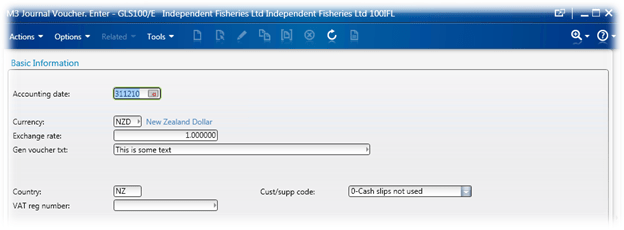
We then set the Accounting Date and Voucher Text
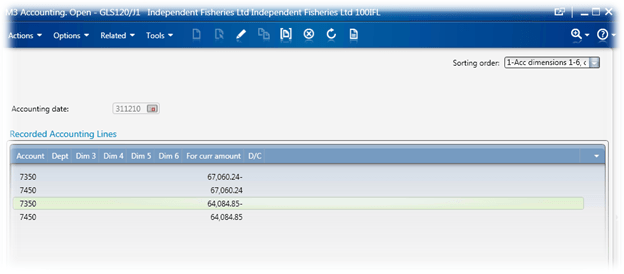
And finally we enter each line.

And all of the code to do it…

import System;
import System.Text;
import System.Windows;
import System.Windows.Controls;
import System.Windows.Media;
import System.Windows.Media.Media3D;

import MForms;
import Mango.UI.Core;
import Mango.UI.Core.Util;
import Mango.UI.Services;
import Mango.Services;

import Excel;
import System.Reflection;

package MForms.JScript
{
	class GLS100_JournalImport_V00
	{
		var giicInstanceController : IInstanceController = null;    // this is where we will store the IInstanceController to make it available to the rest of the class
		var ggrdContentGrid : Grid = null;                          // this is the Grid that we get passed by the Init()
		var gexaApplication = null;                                 // Excel.Application object
		
		var gbtnImportFromExcel : Button = null;                    // this is the button that we will put on to the panel that will kick off the whole import
		var glvListView : ListView = null;                          // this is the ListView on the panel
		
		var gwbWorkbook = null;                                     // here we will store the Workbook object
		
		var giStartRow : int = 15;                                  // the starting row in the Spreadsheet
		var giMaxRow : int = 42;                                    // the end row in the Spreadsheet
		var giCurrentRow : int = 15;                                // the current row in the Spreadsheet
		
		var gbLookForResponse = false;                              // should we be looking for a response?

        var gobjStatus = null;                                      // the statusbar

        var gbRequest : boolean = false;                            // the request event 

		public function Init(element: Object, args: Object, controller : Object, debug : Object)
		{
            // lets make some of the controls and other
            // bits pieces available to other sections of our code
			ggrdContentGrid = controller.RenderEngine.Content;
			giicInstanceController = controller;
			glvListView = controller.RenderEngine.ListControl.ListView;
			
			try
			{
                // create the button for importing
				gbtnImportFromExcel = new Button();
				gbtnImportFromExcel.Content = "Import";

				Grid.SetColumnSpan(gbtnImportFromExcel, 10);
				Grid.SetColumn(gbtnImportFromExcel, 1);
				Grid.SetRow(gbtnImportFromExcel, 22);
				
                // finally add the control to the grid
				ggrdContentGrid.Children.Add(gbtnImportFromExcel);
				
				// ----- Events -----
				gbtnImportFromExcel.add_Click(OnImportFromExcelClicked);
				gbtnImportFromExcel.add_Unloaded(OnImportFromExcelUnloaded);
				
				giicInstanceController.add_RequestCompleted(OnRequestCompleted);
				giicInstanceController.add_RequestCompleted(OnRequested);
                gbRequest = true;
			}
			catch(exException)
			{
				MessageBox.Show("Error: " + exException.Message + Environment.NewLine + exException.StackTrace);
			}
		
		}
		
        // find a specific control
        private function findControl()
        {
            var result = null;
            var objTopControl = goUp(ggrdContentGrid);      // go up the visual tree to somewhere useful

            if(null != objTopControl)   // we found 'somewhere useful' 😉
            {
                result = findControlInner(objTopControl, 0, "labelStatus"); // search for a control with a name "labelStatus"
            }
            else MessageBox.Show("Went up without success");

            return(result);
        }

        // this function goes down the tree looking for a specific object
        private function findControlInner(parent : Object, depth : int, astrControlName : String)
        {
            var objResult = null;

            try
            {
                if(null != parent)
                {
                    // get the type of our object, we do this
                    // so we can check if the object inherits
                    // from a DependencyObject
                    var parentobjType : Type = parent.GetType();
                    if(parentobjType.IsSubclassOf(DependencyObject) == true)
                    {
                        for(var i=0; i < VisualTreeHelper.GetChildrenCount(parent);i++)
                        {
                            // retrieve the child object
                            var current : Object = VisualTreeHelper.GetChild(parent,i);
                            if(null != current)
                            {
                                // here we shall deterine the type of the new object
                                var objType = current.GetType();

                                if(null != objType)
                                {
                                    // we're looking for the Name property, because
                                    // this is what I am interested in
                                    var objPropertyName = objType.GetProperty("Name");
                                    if(null != objPropertyName)
                                    {
                                        var strName = objPropertyName.GetValue(current);
                                        if(null != strName)
                                        {
                                            if(0 == String.Compare(strName, astrControlName))
                                            {
                                                objResult = current;

                                                break;
                                            }

                                            // does the current object have any children?
                                            if(VisualTreeHelper.GetChildrenCount(current) >= 1)
                                            {
                                                // recurse down
                                                objResult = findControlInner(current, depth+1, astrControlName);
                                                if(null != objResult)
                                                {
                                                    break;
                                                }
                                            }
                                        }
                                    }
                                }
                            }
                        }
                    }
                }
            }
            catch(ex)
            {
                //debug.WriteLine("!-! Exception: " + ex.Message + " " + ex.StackTrace);
            }

            return(objResult);
        }

        // go up the VisualTree until we get to PART_Window
        private function goUp(aContent : Object)
        {
            var parent : Object = aContent;
            var lastParent : Object = aContent;
            var result : Object = null;

            // here we will loop UP the VisualTree seeking the top
            while(null != (parent = VisualTreeHelper.GetParent(parent)))
            {
                lastParent = parent;

                var objType = lastParent.GetType();
                var objPropertyName = objType.GetProperty("Name");
                var strName : String = objPropertyName.GetValue(lastParent)

                if(null != strName)
                {
                    // PART_ContentPanel
                    if(String.Compare(strName,"PART_Window") == 0)
                    {
                        result = parent;

                        break;
                    }
                }
            }
            return(result);
        }

        // display an OpenFileDialog box
        // and extract the result
		private function retrieveImportFile()
		{
			var result : String = null;
			var ofdFile = new System.Windows.Forms.OpenFileDialog();    // we have to use the forms OpenFileDialog unfortunately
			if(null != ofdFile)
			{
				ofdFile.Multiselect = false;
				ofdFile.Filter = "Excel Files (*.xls;*.xlsx)|*.xls;*.xlsx|All Files (*.*)|*.*"; // filter on xls or xlsx files only
				
				if(true == ofdFile.ShowDialog())
				{
					result = ofdFile.FileName;
				}
			}
			return(result);
		}
		
        // this is where we actually do the import
		private function OnImportFromExcelClicked(sender : Object, e : RoutedEventArgs)
		{
			try
			{
                // here we do some initialisation of Excel
				InitialiseExcel();

				var strFilename : String = retrieveImportFile();            // retrieve the filename of the Excel spreadsheet to open
				if((null != strFilename) && (null != gexaApplication))      // ensure that not only do we have a filename, but we also managed to initialise Excel
				{
					gwbWorkbook = gexaApplication.Workbooks.Open(strFilename);  // open the spreadsheet
					if(null != gwbWorkbook)
					{
						gwbWorkbook.Saved = true;                               // get rid of those annoying save messages
						var strVoucherType : String = retrieveVoucherType();    // we want to get the voucher type from the spreadsheet (the GLS100 voucher)
						
						if(!String.IsNullOrEmpty(strVoucherType))               // we need to ensure that we have a voucher type
						{
                            giicInstanceController.RenderEngine.SetFocusOnList();
							selectFAMFunction(strVoucherType);              // now we need to go out and select the function
							
							// from where on out, we start using the events
						}
					}
					else MessageBox.Show("Failed to Open Workbook");
				}
				else MessageBox.Show("Filename or Excel doesn't exist: " + strFilename);
			}
			catch(exException)
			{
				MessageBox.Show("Error: " + exException.description);
			}
		}

		// set the VoucherText within GLS100/E
		private function setM3VoucherText(astrVoucherText : String)
		{
			var tbVoucherText : TextBox = ScriptUtil.FindChild(ggrdContentGrid, "WWGVTX");
			if(null != tbVoucherText)
			{
				tbVoucherText.Text = astrVoucherText;
			}
			else MessageBox.Show("setM3VoucherText() - Child not found");
		}

		// set the accounting date within GLS100/E
		private function setM3AccountingDate(astrAccountingDate : String)
		{
			var tbITNO = ScriptUtil.FindChild(ggrdContentGrid, "WWACDT");
			if(null != tbITNO)
			{
				try
				{
					var dtValue : DateTime = DateTime.FromOADate(Convert.ToDouble(astrAccountingDate));
					tbITNO.Value = dtValue;
				}
				catch(ex)
				{
					MessageBox.Show(ex.description);
				}
			}
			else MessageBox.Show("Accounting Date not found");
		}

        // retrieve the voucher text from the spreadsheet
		private function retrieveVoucherText()
		{
			return(gwbWorkbook.ActiveSheet.Range("E7").Value);
		}
		
        // retrieve the accounting date from the spreadsheet
        // we need to use Value2 in this instance to get
        // a value that we can actually use
		private function retrieveAccountingDate()
		{
			return(gwbWorkbook.ActiveSheet.Range("R5").Value2);
		}

		// retrieve the voucher type from the Spreadsheet
		private function retrieveVoucherType()
		{
			return(gwbWorkbook.ActiveSheet.Range("K5").Value);
		}		

		// GLS100/B set the FAM Function
		private function selectFAMFunction(astrFAMFunction : String)
		{
			var bFound : boolean = false;
			
			if(!String.IsNullOrEmpty(astrFAMFunction))
			{
                // search through the ListView for the FAM function
				for(var iCount : int = 0; iCount < glvListView.Items.Count; iCount++)
				{
					var itmCurrentItem = glvListView.Items[iCount];
					if(null != itmCurrentItem)
					{
						if(!String.IsNullOrEmpty(itmCurrentItem[0]))
						{
							var strCurrentString = itmCurrentItem[0].ToString();
							if(0 == String.Compare(strCurrentString, astrFAMFunction))
							{
								glvListView.SelectedItem = itmCurrentItem;
								bFound = true;
								break;
							}
						}
					}
				}
			}
			if(true == bFound)
			{
                // ok, we've found the FAM Function on the ListView
                // now we need to SELECT it
				giicInstanceController.ListOption("1");	// SELECT
			}
			
		}
		
        // our Import button is being unloaded, now's a good time to clean
        // everything up
		private function OnImportFromExcelUnloaded(sender : Object, e : RoutedEventArgs)
		{
			if(null != gbtnImportFromExcel)
			{
				gbtnImportFromExcel.remove_Click(OnImportFromExcelClicked);
				gbtnImportFromExcel.remove_Unloaded(OnImportFromExcelUnloaded);
			}
		}
		
		public function OnRequested(sender: Object, e: RequestEventArgs)
		{
            // we don't really use this at all at the moment
		}
				
		public function OnRequestCompleted(sender: Object, e: RequestEventArgs)
		{
			if(e.CommandType == MNEProtocol.CommandTypeKey)     // we're looking for a key event
			{
				if(e.CommandValue == MNEProtocol.KeyEnter)      // specifically we're looking the enter key event
				{
					if(true == giicInstanceController.RenderEngine.PanelHeader.EndsWith("E"))   // are we on panel E?
					{
						handleEPanel();     // handle panel E
					}
					else if(true == giicInstanceController.RenderEngine.PanelHeader.EndsWith("J1")) // are we on panel G1 (this should be GLS120/G1)
					{
                        if(null == gobjStatus)  // have we found the status control, if not, try to find it
                        {
                            gobjStatus = findControl(); // do the actual finding of the control
                        }
                        if(null != gobjStatus)
                        {
                            // now we should extract the status
                            var strStatusMessage : String = gobjStatus.Content.ToString();
                            if(false == String.IsNullOrEmpty(strStatusMessage))
                            {
                                giCurrentRow = giMaxRow + 1;
                                MessageBox.Show("There was an error, cannot continue! '" + gobjStatus.Content.toString() + "'");
                            }
                        }
                        else
                        {
                            MessageBox.Show("Couldn't find the StatusBar");
                        }
						handleJ1Panel();    // handle panel j
					}

				}
			}
			else if(e.CommandType == MNEProtocol.CommandTypeListOption)
			{
                if(e.CommandValue == MNEProtocol.OptionSelect)
                {
                    handleEPanel();
                }
			}
		}
		
        // this is where we do the actual handling of the J1 Panel
		private function handleJ1Panel()
		{
			if(giCurrentRow <= giMaxRow)    // the spreadsheet has a limited number of rows...
			{
				// extract the lines from the spreadsheet
				var strWXAIT1 : String = retrieveFromActiveSheet("B" + giCurrentRow);
				var strWXAIT2 : String = retrieveFromActiveSheet("C" + giCurrentRow);
				var strWXAIT3 : String = retrieveFromActiveSheet("D" + giCurrentRow);
				var strWXAIT4 : String = retrieveFromActiveSheet("E" + giCurrentRow);
				var strWXAIT5 : String = retrieveFromActiveSheet("F" + giCurrentRow);
				var strWXAIT6 : String = retrieveFromActiveSheet("G" + giCurrentRow);
                var strWWCUAMDebit : String = retrieveFromActiveSheet("I" + giCurrentRow);
				var strWWCUAMCredit : String = retrieveFromActiveSheet("L" + giCurrentRow);
				var strWWVTXT : String = retrieveFromActiveSheet("O" + giCurrentRow);
                var strWWVTCD : String = retrieveFromActiveSheet("N" + giCurrentRow);

                // this is the current row
				giCurrentRow = giCurrentRow + 1;
				if(!String.IsNullOrEmpty(strWXAIT1))
				{
					if(0 != String.Compare(strWXAIT1,"undefined"))  // verify that we actually have content
					{
						setM3TextField("WXAIT1", strWXAIT1);	// account
	
						setM3TextField("WXAIT2", strWXAIT2);	// Dept
						setM3TextField("WXAIT3", strWXAIT3);	// Dim3
						setM3TextField("WXAIT4", strWXAIT4);	// Dim4
						setM3TextField("WXAIT5", strWXAIT5);	// Dim5
						setM3TextField("WXAIT6", strWXAIT6);	// Dim6
						//setM3TextField("", retrieveFromActiveSheet("H" + giCurrentRow));	// Division
                        if(!String.IsNullOrEmpty(strWWCUAMDebit))
                        {
                            setM3TextField("WWCUAM", "-" + strWWCUAMDebit);	// Value
                        }
                        else if(!String.IsNullOrEmpty(strWWCUAMCredit))
                        {
                            setM3TextField("WWCUAM", strWWCUAMCredit);	// Value
                        }
						
						setM3TextField("WWVTXT", strWWVTXT);	// Voucher Text
                        setM3TextField("WWVTCD", strWWVTCD);    // VAT type

						giicInstanceController.PressKey("ENTER");   // press the enter key
					}
				}
			}
            else
            {
                if(true == giicInstanceController.RenderEngine.PanelHeader.EndsWith("J1"))
                {
                    giicInstanceController.remove_RequestCompleted(OnRequestCompleted);
        			giicInstanceController.remove_RequestCompleted(OnRequested);
                    gbRequest = false;
                }

                // check to ensure we have a Workbook object
                // before we attempt to close the workbook
                if(null != gwbWorkbook)
                {
                    gwbWorkbook.Close(false);
                    gwbWorkbook = null;
                }
                // make sure we have actually created
                // the Excel Application object before
                // we Quit
                if(null != gexaApplication)
                {
                    gexaApplication.Quit();
                    gexaApplication = null;
                }
            }
		}
		
        // a little wee helper function that will search for a TextBox name
        // and set the TextBox value
		private function setM3TextField(astrName : String, astrValue : String)
		{
			var tbTextBox : TextBox = ScriptUtil.FindChild(ggrdContentGrid, astrName);
			if(null != tbTextBox)
			{
				tbTextBox.Text = astrValue;
			}
			else MessageBox.Show("Can't find: " + tbTextBox.Text);
		}

        // retrieve some data from the active spreadsheet
        // at a specific location
		private function retrieveFromActiveSheet(astrPosition : String)
		{
			var strValue : String = gwbWorkbook.ActiveSheet.Range(astrPosition).Value;
			if(true == String.IsNullOrEmpty(strValue))
			{
				strValue = "";
			}
            else if(0 == String.Compare(strValue, "undefined"))
            {
                strValue = "";
            }

			return(strValue);
		}

        // handle the E Panel
		private function handleEPanel()
		{
			var strAccountingDate : String = retrieveAccountingDate();  // retrieve the accounting date from the Spreadsheet
			var strVoucherText : String = retrieveVoucherText();        // retroeve the voucher text from the Spreadsheet

			if((!String.IsNullOrEmpty(strAccountingDate)) && (!String.IsNullOrEmpty(strVoucherText)))
			{
				setM3AccountingDate(strAccountingDate);     // now we actually set the accounting date in the TextBox
				setM3VoucherText(strVoucherText);           // and the Voucher TextBox
				giicInstanceController.PressKey("ENTER");   // now we press enter - this will fire off a Request event and should take us to GLS120/G1
			}
			else MessageBox.Show("We require an Account Date and Voucher Text");
		}
		
		private function InitialiseExcel()
		{
			var result = null;
			try
			{
				gexaApplication = new ActiveXObject("Excel.Application");
				gexaApplication.Visible = true;
				
				result = gexaApplication;
			}
			catch(exException)
			{
				MessageBox.Show("Error: " + exException.Message + Environment.NewLine + exException.StackTrace);
			}
			return(result);
		}
		
		//
	}
}

Have fun coding!

Posted in Development, M3 / MoveX | 21 Comments

Excel & Populating Values in to Multi-Panel Sequences

So, I was wondering if it was possible to read values off an Excel spreadsheet and use those values to create an order and add an order line. In short – but of-course! 🙂

Though Smart Office provides functionality natively through mforms::ExcelUtilities, I thought it would be interesting to use a more traditional approach to illustrate how you can use other external programs without Lawson providing direct functionality – for example, you could use Microsoft Word to record all the values for an item in MMS001 for the purposes of documentation.

Though I haven’t played around with it, I’m assuming that this would be a good time to use automation – but I haven’t read that far through the pdf 😉

So the basic premise of what I am going to demonstrate is

  1. From OIS100
  2. Open a Spreadsheet
    1. Read some of the values
  3. Subscribe to the RequestCompleted event
  4. Do a PressKey
  5. The PressKey will fire the RequestCompleted event once we move on the next panel
    1. PressKey until we get to the Order Line (which will generate a new RequestCompleted event)
  6. Write some of the values to the order lines that we extracted from the Spreadsheet

We use the RequestCompleted, as we need to wait until the first event is complete before moving on to the next event. Doing the PressKeys one after the other won’t achieve the results that we want.

The sample spreadsheet which I saved as D:\Test.xlsx, you’ll see that in the A column I have two field names, I have done this purely for the purposes of demonstrating that we can extract the field name and the values from the spreadsheet and it made it easier to muck around using different fields without changing the scripts 🙂

The script below doesn’t add a button, it just runs and creates an order for customer 165, with an order type of D01. We have a panel sequence of EFGHB1, and we have an extra confirm on panel A.

We then set the Item Number and the quantity before entering.

Anyways, lots of comments in the code – hopefully it all makes sense and still works when you deploy it 😀


import System;
import System.Windows;
import System.Windows.Controls;
import MForms;

import Excel;
import System.Reflection;

package MForms.JScript
{
   class ExcelTest
   {
   		// cache some of the variables
   		var gcontroller;
   		var gdebug;
   		var gcontent;
   		
   		var giStep;

		// where we will store the Item Number
   		var gITNO;
   		// Quantity of the order
   		var gQty;
   		
   		// has the RequestCompleted event been removed?
   		var bRemoved;
   		
      public function Init(element: Object, args: Object, controller : Object, debug : Object)
      {
         var content : Object = controller.RenderEngine.Content;

         gdebug = debug;
         gcontroller = controller;
         gcontent = content;
         
         // subscribe to the RequestCompleted event
         controller.add_RequestCompleted(OnRequestCompleted);
			bRemoved = false;
         try
         {
         		// we want to create an Excel App
	         var exExcel = new ActiveXObject("Excel.Application");
	         if(null != exExcel)
	         {
	         		// for the purposes of demonstrating, we'll show
	         		// Excel - we do get better performance if it is
	         		// hidden
	         		exExcel.Visible = true;
	         		
	         		// load the spreadsheet which we will use to submit
	         		// the information
	         		var wbBook = exExcel.Workbooks.Open("D:\Test.xlsx");
	
	         		if(null != wbBook)
	         		{
	         			// Cell B1 - this is the customer
	         			var strCUNO = wbBook.Worksheets(1).Cells(1,2).Value;
	         			// Cell B2 - this is the order type
	         			var strORTP = wbBook.Worksheets(1).Cells(2,2).Value;

						// Just for the purposes of because we can...
						// we are storing the field names in column A1 and A2
						// CUNO, Customer Number field name
	         			var strFNCUNO = wbBook.Worksheets(1).Cells(1,1).Value;
	         			// ORTP, Order Type field name
	         			var strFNORTP = wbBook.Worksheets(1).Cells(2,1).Value;
	         			
	         			// go out and retrieve the Customer Number TextBox control
	         			var tbCUNO = ScriptUtil.FindChild(content, strFNCUNO);
	         			// go out and retrieve the Order Type TextBox control
	         			var tbORTP = ScriptUtil.FindChild(content, strFNORTP);
	         			
	         			if(null != tbCUNO)
	         			{
	         				// set the TextBox Customer Number value
	         				tbCUNO.Text = strCUNO;
	         			}
	         			
	         			if(null != tbORTP)
	         			{
	         				// set the order type text box
	         				tbORTP.Text = strORTP;
	         			}
	         			
	         			// we're also going to demonstrate adding an order line, only one so
	         			// we'll cache it globally
	         			// get the Item Number
	         			gITNO = wbBook.Worksheets(1).Cells(4,1).Value;
	         			// get the Quantity
	         			gQty = wbBook.Worksheets(1).Cells(4,2).Value;
	         			
	         			// now we are going to press enter
	         			controller.PressKey("ENTER");
	         			giStep = 0;

	         			// close the Workbook
	         			wbBook.Close();
	         		}
	         		// Quit Excel
	         		exExcel.Quit();
	         }
	      }
         catch(ex)
         {
         }
      }
      
      public function OnRequestCompleted(sender: Object, e: RequestEventArgs)
      {
      		if((e.CommandType == MNEProtocol.CommandTypeKey) && (e.CommandValue == MNEProtocol.KeyEnter))
      		{
      			// we already know the panel sequence, so we won't bother checking it
      			// if it is likely to change you should look it up on the A panel
      			
				if(true == gcontroller.RenderEngine.PanelHeader.EndsWith("A"))
				{
					// if panel a, then we just want to enter through it, we have nothing useful to add
					gcontroller.PressKey("ENTER");
				}
      			else if(true == gcontroller.RenderEngine.PanelHeader.EndsWith("E"))
      			{
      				// if panel E, then we just want to enter through it, we have nothing useful to add
      				gcontroller.PressKey("ENTER");
      			}
      			else if(true == gcontroller.RenderEngine.PanelHeader.EndsWith("F"))
      			{
      				// if panel F, then we just want to enter through it, we have nothing useful to add
      				gcontroller.PressKey("ENTER");
      			}
      			else if(true == gcontroller.RenderEngine.PanelHeader.EndsWith("G"))
      			{
      				// if panel G, then we just want to enter through it, we have nothing useful to add
      				gcontroller.PressKey("ENTER");
      			}
      			else if(true == gcontroller.RenderEngine.PanelHeader.EndsWith("H"))
      			{
      				// if panel H, then we just want to enter through it, we have nothing useful to add
      				gcontroller.PressKey("ENTER");
      			}
      			else if(true == gcontroller.RenderEngine.PanelHeader.EndsWith("B1"))
      			{
      				// if panel B1, this where we enter the order lines
      				if(giStep == 0)	// we'll just make sure we only execute it once
      				{
      					// from the order line, we will enter the Item Number and Quantity
      					// so we retrieve the TextBoxes from the panel
	         			var tbITNO = ScriptUtil.FindChild(gcontent, "WBITNO");
	         			var tbQty = ScriptUtil.FindChild(gcontent, "WBORQA");
	         			
	         			// Fill in the Item Number TextBox
	         			tbITNO.Text = gITNO;
	         			// Fill in the Quantity TextBox
	         			tbQty.Text = gQty;
	         			
	         			// Press Enter to add the line
	         			gcontroller.PressKey("ENTER");
	         			// we change the giStep so we don't loop through this
	         			giStep = 1;
         			}
         			// now we'll remove the RequestCompleted Event
         			gcontroller.remove_RequestCompleted(OnRequestCompleted);
         			bRemoved = true;
      			}
      		}
      		if(true != bRemoved)
      		{
      			gcontroller.remove_RequestCompleted(OnRequestCompleted);
      		}
      }
   }
}


Have fun!

Posted in Development, M3 / MoveX | 3 Comments

RequestCompleted

The RequestCompleted event is really quite nifty, it provides some quite useful events.

The subscribed events has an argument with an object of RequestEventArgs, this has two very useful members. CommandType and CommandValue.

CommandType is defined in the static object MNEProtocol. Looking at the mforms::MNEProtocol in Visual Studios Object Browser we can see the values.

The items that start with CommandType (oddly enough) correspond to the RequestEventArgs.CommandType.

The RequestEventArgs.CommandValue corresponds to MNEProtocol.CommandValue

Below is some code that shows the messages and the values.


import System;
import System.Windows;
import System.Windows.Controls;
import MForms;

package MForms.Jscript
{
class RequestTest
{
public function Init(element: Object, args: Object, controller : Object, debug : Object)
{
// subscribe to our event
controller.add_RequestCompleted(OnRequestCompleted);
}

public function OnRequestCompleted(sender: Object, e: RequestEventArgs)
{
// display a messagebox with the event name
MessageBox.Show("OnRequestCompleted(): '" + e.CommandType + "' = " + e.CommandValue);
}
}
}

I saw a question about how to monitor for the Next event. Using the code above and selecting Next you’ll see the event CommandType of KEY which relates to CommandTypeKey and then a CommandValue of ENTER which relates to KeyEnter. So we just need to monitor the RequestCompleted event, look for a CommandType == CommandTypeKey and CommandValue == KeyEnter and then add your code.

Eg. Something like this:

if((e.CommandType == MNEProtocol.CommandTypeKey) && (e.CommandValue == MNEProtocol.KeyEnter))

Don’t forget to remove your event handler when you are finished 🙂

Incidentally, you can download a free version of Visual Studio Express for free.

Have fun!

Posted in Development, M3 / MoveX | 6 Comments