Grid Environment Consistency

Today I’m going to talk about something a little different.

Grid Environment Consistency – have you ever been in the situation where you have other people messing^w errr…tweaking with the settings of the various grid applications leading to inconsistencies between environments? Have you ever had someone external come in and build your grid environments but they seem to behave totally different to each other?

Trying to track down specific settings that have been changed can be pretty time consuming.

Well, there is a really easy way to get the settings from the Grid

Continue reading

Posted in M3 / MoveX | Leave a comment

Installing a M3BE 15.1.2 Test Lab

This post is to run through the installation of a basic M3 15.1.2 environment. As with my previous documentation of the 10.1 installation – this is about achieving a few things

  1. Create a completely isolated environment that I can test updates with. Even though I have access to production, test and development environments – if something goes wrong then we potentially have an expensive prospect of getting it fixed.
  2. As it is completely isolated, I can do dumb stuff. The things that make sense in the wee hours of the morning, but once they blow up in your face you reflect and think “That was never going to work”
  3. Provides a better understanding of how the newer versions of M3 hang together.

In this post I wanted to minimise the number of servers I needed to spin up – so the entire M3 environment is running off a single virtualised server. Needless to say, shortcuts have been taken – especially around security and some of the configuration. Likewise no consideration has been given to tuning or performance implications.

In general I’ve followed the instructions, but in some instances needed to take a bit of a leap of faith. Where I followed the manual in a section I’ve included the document I was referencing. For convenience I have also included the files that I used for installation.

Following these instructions should give you a basic running test environment, with the M3BE, M3 UI Adapter, Smart Office, LDAP Session Provider and H5 Enterprise client.

Even though the M3 environment is on a single server, I do have Active Directory and DNS set up on another server which acts as another part of my test network.

Please excuse some of the highlighting – occasionally it shoots across the screen which appears to be a bug in the beta version of Windows I’m using and it got rather tedious trying to correct all of the screen captures.

Continue reading

Posted in M3 / MoveX, Misc | 18 Comments

Launching Business Objects from Smart Office and Running a Script from a Script

As part of a project I am working on, we have got budget to purchase additional licences for our chosen reporting tool – Business Objects Edge.

This means that we can move most of our Crystal Reports on to the Business Objects Edge server, it can run both Crystal and WebI reports. This will remove the need for most of our staff to use a custom application written to run Crystal Reports which is deployed to each staff members computer.

An added benefit is that as Business Objects Edge client interaction is designed around being run within a web-browser, so we can launch reports from Smart Office with context data via a URL.

But with every silver lining, there is a cloud…

Continue reading

Posted in Development, M3 / MoveX, Misc | Leave a comment

Purchase Order Receipting – Process Automation

Most of my posts have been around how to do things. Typically they are small scripts. Today I’ll discuss one of the projects I have been working on to demonstrate that scripting isn’t just for the quick and easy tasks but can also solve complex issues.

IFL need to get imported product and caught product in to M3, they also have a 3rd Party Logistics Coolstore operation which they also want to keep track of within M3.

The process that has been designed is using Purchase Orders to get stock in to M3. 3rd Party stock goes in at zero cost, imported and caught products have prices against them to reflect the costs.

IFL uses lot control extensively which determines what product can be exported to which parts of the world, each import, each landing will have multiple products in a single lot – so we need to create lots for each product and populate some of the attributes.

And finally we have to receipt the product.

In standard M3 we do something like this:

  1. Create the PO Header (PPS200)
  2. Create the PO Lines for each item
    1. PPS201/B1
    2. PPS201/E
  3. Create lot numbers for each item (MMS235/B1)
  4. Populate some of the lot details (MMS235/E)
  5. Receipt the Purchase Order
    1. PPS300/A
    2. PPS300/B1
    3. PPS300/E
  6. Set the lot attribute values (MMS235/B1)
  7. ATS101/B

Continue reading

Posted in Development, M3 / MoveX | 2 Comments

M3 API Calls with the H5 Client

Like any kid with a new toy, I find it a little hard to resist having a play – so this evening I decided that I would expand my mind with research and experimentation… J

I had a quick look through the H5 Development Guide and discovered that it is a little thin on information – infact it’s very similar to the M3 Smart Office development guide – but it provides us with some clues about what we can do.

And in this instance, I was wondering how hard it would be to call the M3 APIs from within the Javascript as this is something I do for many customers scripts and I was wondering if I would need to pass authentication information. As it turns out, once I stopped trying to work with a broken API , it’s pretty simple as we can examine the H5 generated code to get some good clues about how it works.

So what I’ll do is show you the process that I went through and some example code – I haven’t got a nice code pattern, and I haven’t really done much on web development so apologies in advance…

Continue reading

Posted in Development, H5 Client | 4 Comments

H5 Client Scripting – First Look

Infor provide the H5 client as a cross platform client to the M3 BE, recently I came across a document that provides a starting point for creating scripts like you do in Smart Office – this is a bit of a rough brain dump on my initial observations.

Continue reading

Posted in Uncategorized | 6 Comments

H5 Development Guide

I was checking through some documentation today and I stumbled across the H5 Dev Guide in the InforXtreme documentation portal. I had been told that it was going to be released by the end of November in 2014 but never saw it – I was looking in the wrong place it would seem.

https://www.inforxtreme.com/esknowbase/root/DLPublic/41145/H5DevGuide_10.2.2.0.pdf

Or through the InforXtreme Portal

Search -> Browse Documentation -> M3 -> Technology -> System Foundation -> M3 UI Adapter -> 10.2.2.0

Enjoy!

Posted in Development | Leave a comment

Unresolvable XAML references

Quite some time ago I posted an entry about error messages in Visual Studio like ‘The resource “styleListView” could not be resolved’

https://potatoit.wordpress.com/2013/08/26/the-resource-stylelistview-could-not-be-resolved/

In it I had a solution which worked and worked well – in short adding the dictionary below goes a long way to eliminating the errors.

    <UserControl.Resources>
        <ResourceDictionary>
            <ResourceDictionary.MergedDictionaries>
                <ResourceDictionary Source="/Mango.Skin;Component/Resources/FrogPond/FrogPondStyle.xaml" />
            </ResourceDictionary.MergedDictionaries>
        </ResourceDictionary>
    </UserControl.Resources>


One of the follow up posts from around the time that I never got around to posting was when this doesn’t work…

Imagine the scenario – you’ve just got yourself a brand-new-shiny SDK off the InforXtreme download portal, you update your project references to point to the new SDK and well, you get nasty unresolvable errors like above, but adding the resource dictionary doesn’t help.

Typically if you try to add an assembly reference to the DesignSystem it won’t even appear in Visual Studios Intellisense – infact, none of the Smart Office assemblies you’ve added are listed.

As it turns out, the .dlls can be marked as blocked – so if we check the properties of the files we see a nice “Unblock” button at the bottom of the property window.

We can either manually unblock each of the files or we can follow the instructions on this post http://social.technet.microsoft.com/Forums/en-US/itproxpsp/thread/806f0104-1caa-4a66-b504-7a681d1ccb33

It uses the SysInternals tool called streams.

Now, you could end up in the situation like me where even after this *and* after you’ve cleaned and recompiled your solution you still get the errors. One of the easiest ways to resolve this is by closing Visual Studio and locating and clearing the ShadowCache.

This directory is used by the Visual Studio XAML designer to cache the assemblies. For Visual Studio 2013 It is located under <User Profile>\AppData\Local\Microsoft\VisualStudio\12.0\Designer\ShadowCache

Once you’ve deleted the directories, you should be able to open Visual Studio, reload and compile your project.

Posted in Development, M3 / MoveX, Misc | Leave a comment

Adding Items to the Navigator Menu

During the course of removing the modifications from IFL I wanted a way to run some of the C# developments directly so I thought I’d do some investigation.

Using the MenuExtensionService we can add new entries to the Navigator menu, the key being that we need to force a refresh and then we need a way to do this when Smart Office itself launches.

I created a little script which will read an xml file which contains the name to appear in the menu and the URI I want to launch and add these to the M3 Navigator. This script can be run on Smart Offices startup.

For the launching of Smart Office and running a script I referred to Karins post here:
http://smartofficeblog.com/2014/01/21/controlling-the-users-canvas-with-stand-alone-jscripts/

Which for me became:

http://ifsonp.indfish.co.nz:22107/mango/MangoClient.application?server=https://IFSONP.indfish.co.nz:22108&task=mforms%3a%2f%2f_runscript%3fname%3dtestLoadMenu.js

http://ifsonp.indfish.co.nz:22107 and https://IFSONP.indfish.co.nz:22108 is IFLs Smart Office server, these should be substituted with your own. testLoadMenu.js is the name of my Jscript.

Note: when you run a script in the command line the controller object won’t be initialised, so you need to comment out the code line the Jscript editor adds by default:

var content : Object = controller.RenderEngine.Content;

Anyway, the script is pretty simple, and not too hard to follow so…


/*
**	Load Menu
**
**	This script will read an xml file and create menus in the navigator
*/
import System;
import System.Windows;
import System.Windows.Controls;
import MForms;

import System.Xml;
import System.Xml.XPath;
import System.Xml.Serialization;

import System.IO;

import Mango.UI.Core;
import Mango.UI.Services;

package MForms.JScript
{
	class testLoadMenu
	{
		// path to the menus
		var xmlfile = "D:\\Development\\JScript\\Menus.xml";
		
		public function Init(element: Object, args: Object, controller : Object, debug : Object)
		{
			try
			{
				// var content : Object = controller.RenderEngine.Content;
				
				// I am reading a file off the filesystem, in a production environment you wouldn't
				// do this, you'd have the URI in the initialisation of the XPathDocument
				var stream = new StreamReader(xmlfile);
				
				var doc  : XPathDocument = new XPathDocument(stream);
				var nav  : XPathNavigator = doc.CreateNavigator();

				// get a list of MenuItems 
				var menuItems = nav.Select("//MenuItem");
				
				if(null != menuItems)
				{
					// loop through our list of menu items
					for(var currentItem in menuItems)
					{
						// extract the Menu Name
						var menuName = currentItem.Evaluate("string(Name)");
						// extract the URI
						var menuURI = currentItem.Evaluate("string(URI)");

						// add to the navigator
						MenuExtensionService.Current.AddNode(new Task(new Uri(menuURI.ToString()), menuName.ToString()));
					}

				}
				stream.Close();
				
				// this will cause the navigator to refresh
				TasksService.Invalidate();
			}
			catch(ex)
			{
				debug.Error(ex);
			}
		}
	}
}

And an example XML file
 

<?xml version="1.0" encoding="UTF-8"?>
<Menu>
	<MenuItem>
		<Name>JScript</Name>
		<URI>mforms://jscript</URI>
	</MenuItem>
	<MenuItem>
		<Name>Clear Cache</Name>
		<URI>mforms://jscript/clearcache</URI>
	</MenuItem>
</Menu>
Posted in Development, M3 / MoveX | Leave a comment

Adding Columns to a ListView – when there are Editable Cells

This question has cropped up before and I thought that for convenience, I’d add a post as an anchor point.

In the Smart Office blog from our friendly Smart Office developers in Sweden, we have a post which answers the question that many of us had been asking for a long time. How to add a column to a ListView in Smart Office. As most of you know there are a number of traps and oddities around the ListView which make what you would expect to be a fairly simple task horribly complex.

http://smartofficeblog.com/2012/02/13/adding-a-new-column-in-a-m3-list/

(which is based off a great post by Thibaud here https://thibaudatwork.wordpress.com/2011/09/22/how-to-add-a-column-to-a-list/)

The one problem with this script is that it will break when you have an Editable cell in your ListView, and this is due to these two lines of code:

               var newItems = new String[columnCount];

               row.Items.CopyTo(newItems,0);

Specifically the creating the array as an array of strings rather than objects. The ListRow object that is bound to the ItemsSource has an array of objects – currently these can be either String objects OR Mango.UI.Services.Lists.EditableCell objects.

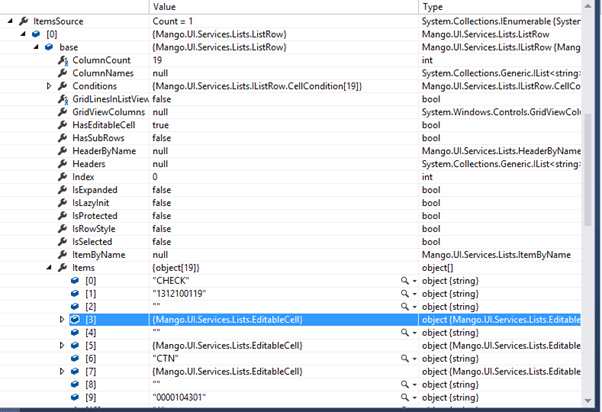
I used the Visual Studio debugger so I could see the objects below (I am preparing a more detailed article on how this works – it is pretty kewl what happens!)

See the Items property above – we have an array of object[19] – one object for each column. The highlighted line above shows that the 4th item in the array is not a String. So instantly an exception will get thrown when we try to copy the EditableCell in to a String.

Correcting this is remarkably simple, we change line 43 in the linked article to read like this:

var newItems = new Object[columnCount];

The CopyTo will no longer throw an exception.

Happy coding!

Cheers,

Scott

Posted in Development, M3 / MoveX | 16 Comments